Does A Projector Tv Need A Screen For Better Quality
Does a projector TV need a screen? The short answer is no, but a screen can make a huge difference in image quality. Using a projector without a screen works fine for casual viewing, but a projector screen improves brightness, contrast, and overall projection quality. This guide covers everything you need to know about screen vs. wall projection and helps you decide what works best for your setup.
So you just bought a projector TV, and now you are wondering if you actually need a screen for it. Maybe you have a nice blank wall in your living room, and you are thinking, “Why bother buying something extra?” That is a totally fair question. The truth is, a projector can absolutely work without a dedicated screen. But here is the thing — does a projector TV need a screen for better quality? The answer might surprise you.
In this guide, we are going to break it all down. We will talk about what happens when you project on a wall versus a proper screen. We will look at image clarity, brightness, and contrast. By the end, you will know exactly what you need for your setup. Let us get into it.
Key Takeaways
- A projector can work without a screen: A plain white wall can serve as a decent projection surface for everyday use.
- A dedicated screen boosts image quality: You get better brightness, sharper details, and improved color accuracy with a proper screen.
- Screen gain matters a lot: Different screen materials reflect light differently, which affects how your image looks in various lighting conditions.
- Ambient light is the biggest enemy: A screen with high gain or ambient light rejection helps fight glare and washout.
- Portable screens are affordable and easy to set up: You don’t need a permanent installation to enjoy better projection quality.
- Wall projection has its limits: Textures, paint color, and wall condition all affect how your projected image appears.
- Your viewing goals decide the choice: Casual movie nights? A wall works. Serious home theater? Invest in a proper screen.
📑 Table of Contents
- What Happens When You Project Without a Screen
- How a Projector Screen Improves Image Quality
- Types of Projector Screens to Consider
- Wall vs. Screen: A Side-by-Side Comparison
- Quick Tips for the Best Projection Experience
- Common Mistakes People Make with Projector Screens
- Expert Insights on Projector Screens
- How to Choose the Right Screen for Your Setup
- Conclusion
What Happens When You Project Without a Screen
A lot of people start their projector journey by just pointing the device at a white wall. It is the easiest and cheapest option. And honestly? It works. You can watch movies, play video games, and even present slides without spending a dime extra. But there are trade-offs.
When you project directly onto a wall, the surface absorbs some of the light. Most walls are not perfectly flat or white. They have textures, slight discolorations, and sometimes even cracks or bumps. All of these tiny imperfections show up on your projected image. The result? A less sharp picture with reduced image clarity.
Another issue is ambient light. In a room with windows or overhead lights, a bare wall does not do much to manage light reflection. The image can look washed out and dull. You might find yourself squinting or turning off the lights just to see what is happening on the screen.
That said, projecting on a wall is not terrible. For casual weekend movie nights or backyard movie parties, a white wall gets the job done. It is all about your expectations and how much you care about picture quality.
Why Walls Are Not Perfect Projection Surfaces
Let us get a little technical for a moment, but keep it simple. A projection surface needs to be smooth and reflective to bounce light back evenly. A typical interior wall is neither smooth nor uniformly reflective. Paint texture, wallpaper patterns, and wall imperfections all scatter light in different directions.
Here are some common problems with wall-only projection:
- Uneven brightness: Some areas of the image look brighter than others.
- Color distortion: Colored walls or textured paint change the image colors.
- Reduced sharpness: Details in the picture look soft or blurry.
- Hotspots: Certain spots on the wall appear much brighter than the rest.
- Shadow interference: Wall features like outlets or trim create shadows on the image.
None of these issues mean you cannot use a projector without a screen. They just mean your image will not look as polished as it could.
How a Projector Screen Improves Image Quality
Now let us talk about why a projector screen makes such a difference. A dedicated screen is designed specifically to reflect light in the best possible way. The surface is smooth, the color is controlled, and the material is engineered to maximize projection quality.
Think of it like this. If a projector is a flashlight, then the screen is a mirror. A wall is like a crumpled piece of paper. Both can bounce light, but the mirror gives you a clean, focused reflection. That is exactly what a good screen does for your projected image.
Better Brightness and Contrast
One of the biggest benefits of using a screen is improved brightness. Screen gain is a measure of how much light a screen reflects back compared to a standard white surface. Most home projector screens have a gain between 1.0 and 1.3. This means they reflect 10 to 30 percent more light back to the viewer than a bare wall.
Higher gain screens are especially useful in rooms with some ambient light. They help maintain a bright, vibrant image even when the room is not completely dark. The contrast ratio also improves significantly. You get deeper blacks and brighter whites, which makes the whole picture pop.
Sharper Image Clarity
A smooth, uniform screen surface helps preserve the fine details in your projected image. Text looks crisper. Movie subtitles are easier to read. And fast-moving scenes in action movies or video games stay sharp without ghosting or blurring.
If you have invested in a projector with high resolution — say 1080p or even 4K — you want to see every pixel. A quality screen ensures that your projector resolution actually translates into a visible improvement. Without a proper screen, you might be paying for sharp resolution and not getting the full benefit.
Types of Projector Screens to Consider
Not all projector screens are the same. Different types serve different needs and budgets. Let us walk through the most popular options so you can find what fits your situation.
Fixed Frame Screens
A fixed frame screen is the most permanent option. It mounts to the wall like a large picture frame and stays in place all the time. These screens offer the flattest, most wrinkle-free surface, which means the best possible image quality. They are ideal for dedicated home theater rooms where the projector stays set up permanently.
The downside? They are not portable. You cannot easily move a fixed frame screen from room to room or take it outside for a backyard movie night.
Motorized Screens
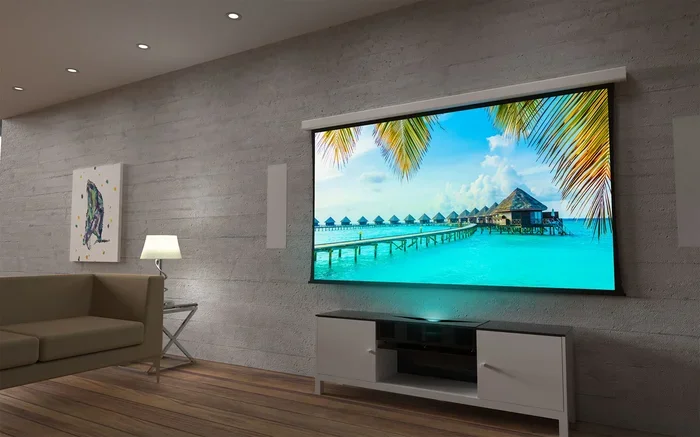
Motorized screens roll up into a ceiling-mounted casing when not in use. You lower them with a remote control when you want to watch something. They are a great middle ground between fixed screens and portable options. They look clean and sleek, and they keep the screen protected when you are not using it.
Motorized screens work well in living rooms or bedrooms where you do not want a screen taking up wall space all the time. They are a bit pricier than manual screens, but the convenience is hard to beat.
Portable and Foldable Screens
If you want flexibility, a portable projector screen is the way to go. These screens fold up into a compact carrying case and can be set up in minutes. They are perfect for movie nights in the backyard, presentations at the office, or anyone who moves their projector around frequently.
Portable screens come in various sizes, from small tabletop models to large floor-standing options. The image quality is usually very good for the price. They are the most budget-friendly way to upgrade from wall-only projection.
Inflatable Screens
Inflatable screens are a fun and easy option for outdoor gatherings. You just plug them in, and a fan fills them up in seconds. They are great for large groups and backyard movie nights. The image quality is decent, but they are not as wrinkle-free as rigid screens, so they work best in casual settings.
Wall vs. Screen: A Side-by-Side Comparison
Still not sure whether to stick with a wall or invest in a screen? Let us compare the two head-to-head.
| Feature | White Wall | Projector Screen |
|---|---|---|
| Cost | Free | $50 to $500+ |
| Setup Time | Instant | 1 to 10 minutes |
| Image Brightness | Moderate | High (depending on gain) |
| Image Sharpness | Good to Fair | Excellent |
| Color Accuracy | Varies with wall color | Consistent and true-to-life |
| Ambient Light Handling | Poor | Good to Excellent |
| Portability | N/A (wall stays put) | Varies by type |
| Overall Viewing Experience | Decent for casual use | Great for any use |
As you can see, a projector screen wins in almost every category. But the wall still has one big advantage — it costs nothing. If you are on a tight budget, projecting on a white wall is a perfectly valid starting point.
Quick Tips for the Best Projection Experience
Whether you use a wall or a screen, a few simple tips can dramatically improve your viewing experience. Here are some quick wins:
- Paint your wall matte white: If you plan to project on a wall, use matte white paint specifically designed for projection. It makes a noticeable difference in brightness and color accuracy.
- Control ambient light: Close curtains or blinds during movie time. Even a small amount of extra light can wash out your projected image.
- Get the throw distance right: Check your projector manual for the recommended distance between the projector and the screen or wall. Too close or too far can make the image blurry or too small.
- Clean your projection surface: Dust and smudges on a wall or screen reduce image sharpness. Wipe down your surface before each use.
- Use a high-quality projector cable: A good HDMI cable ensures a clean signal without interference or signal loss.
- Match your screen size to your room: A screen that is too large for a small room looks stretched and loses detail. Measure your space before buying.
Quick Tips for Wall Projectors
If you decide to stick with wall projection for now, here are a few extra tips to get the best results:
- Choose a flat, smooth section of wall with no windows nearby.
- Use bright white or light gray paint for the best surface.
- Avoid projecting on walls with windows, artwork, or textured finishes.
- Turn off all lights in the room for the sharpest image.
- Test different wall spots to find the one with the least texture and the most even surface.
Common Mistakes People Make with Projector Screens
Even with the best intentions, people sometimes make mistakes that hurt their projection quality. Here are a few to avoid.
Buying the Wrong Screen Size
One of the most common mistakes is choosing a screen that is too big or too small for the room. A screen that is too large in a small room forces you to sit close, which causes eye strain. A screen that is too small in a large room makes the image feel cramped and underwhelming.
As a general rule, the viewer should sit about 1.5 to 2 times the diagonal screen size away from the screen. So if you buy a 100-inch screen, your ideal seating distance is around 12 to 16 feet.
Ignoring Screen Gain
Screen gain is not just a number on the box. It directly affects how bright and vivid your image looks. A low-gain screen works fine in a dark room, but in a room with windows or lamps, you need a higher gain to keep the image visible. Always consider your room lighting when choosing a screen.
Skipping Screen Material for the Wrong Room
Not every screen material works in every environment. Ambient light rejection screens are designed for rooms with windows or overhead lighting. Standard matte white screens work best in dark rooms. Using the wrong material for your room setup can undo all the benefits of having a screen in the first place.
Forgetting About Screen Flatness
A wrinkled or curved screen creates distortions across the image. Straight lines become wavy. Text becomes hard to read. If you buy a portable or foldable screen, make sure you stretch it tight and secure it properly before each use.
Expert Insights on Projector Screens
We asked a few home theater enthusiasts and AV professionals about their thoughts on whether a projector really needs a screen. Here is what they had to say.
“I always tell people to start with a wall if they are on a budget. But once they see the difference a proper screen makes, they never go back. The improvement in contrast and color is night and day.” — Mark T., home theater reviewer
“A projection surface is the last link in the chain. Your projector can be top-of-the-line, but if your screen is cheap or you are just using a wall, you are leaving a lot of image quality on the table.” — Sarah L., AV specialist
“For backyard movie nights, I use a portable inflatable screen. It is not perfect, but it is convenient and fun. For my living room setup, I invested in a fixed frame screen, and I would never go back to a bare wall.” — Jake R., weekend movie host
These expert opinions reinforce what the data shows. A screen is not strictly necessary, but it is a worthwhile upgrade that transforms your viewing experience from good to great.
How to Choose the Right Screen for Your Setup
Ready to buy a screen? Here are the key factors to consider before making a purchase.
Consider Your Room Size
Measure the wall or wall space where you plan to set up the screen. Make sure the screen size fits comfortably without overwhelming the room. A good screen should fill your field of view without requiring you to move your seating position.
Think About Your Lighting
Is your room mostly dark, or does it have windows and overhead lights? If light is an issue, look for a screen with ambient light rejection technology or a higher screen gain rating. These screens are designed to maintain image quality even in less-than-ideal lighting conditions.
Set a Budget
Projector screens range from around $50 for basic portable models to over $500 for high-end fixed frame options. You do not need to spend a fortune to see a noticeable improvement. Even a mid-range portable screen in the $100 to $200 range can make a big difference compared to wall-only projection.
Check Compatibility
Make sure the screen size and aspect ratio match your projector. Most modern projectors use a 16:9 aspect ratio, which is the same as most TVs and streaming content. Double-check the throw distance specifications for your projector to ensure the image size fits your screen perfectly.
Conclusion
So, does a projector TV need a screen for better quality? The honest answer is no, but yes. You do not technically need a screen to use a projector. A white wall can work just fine for casual viewing. But if you care about image clarity, brightness, and overall picture quality, a dedicated screen is the way to go.
A projector screen is one of the simplest and most effective upgrades you can make to your setup. It improves contrast ratio, enhances color accuracy, and makes every viewing session more enjoyable. Whether you choose a fixed frame, a motorized screen, or a portable option depends on your budget, your room, and how seriously you take your home theater projector experience.
The bottom line is this. You can start with a wall and upgrade later. But once you see what a proper screen does for your projected image, you will wonder why you ever settled for less. Invest in a screen, control your lighting, and enjoy your movies like never before.
Frequently Asked Questions
Can I use a projector without any screen at all?
Yes, you can project directly onto a white wall. It is the simplest and cheapest option. The image quality will not be as sharp or bright as with a dedicated screen, but it works well for casual viewing. Just make sure the wall is smooth, flat, and painted a light color for the best results.
What is the best wall color for projector projection?
Matte white is the best wall color for projecting images. It reflects light evenly and keeps colors accurate. Light gray is also a good option if you want slightly deeper blacks. Avoid dark-colored or textured walls, as they absorb light and distort the image.
Does a projector screen make a big difference in image quality?
Yes, a projector screen makes a noticeable difference. Screens are designed to reflect light efficiently, which improves brightness, contrast, and sharpness. The improvement is especially clear in rooms with some ambient light or when using a high-resolution projector.
How much does a good projector screen cost?
Good projector screens range from about $50 for basic portable models to $500 or more for premium fixed frame screens. A mid-range screen in the $100 to $200 range offers excellent quality for most home setups and represents a great value for the improvement it provides.
Can I use a projector screen outdoors?
Yes, portable and inflatable projector screens work great outdoors. Just keep in mind that daytime projection can be challenging due to sunlight. For the best outdoor experience, set up your screen in a shaded area or wait until after sunset for optimal image quality.
Do I need a special projector for a screen to work well?
No, any projector can benefit from a screen. The improvement comes from the screen material and surface, not the projector itself. Even budget projectors look significantly better when paired with a proper projection surface. The key is matching the screen size and gain to your projector’s brightness and your room conditions.