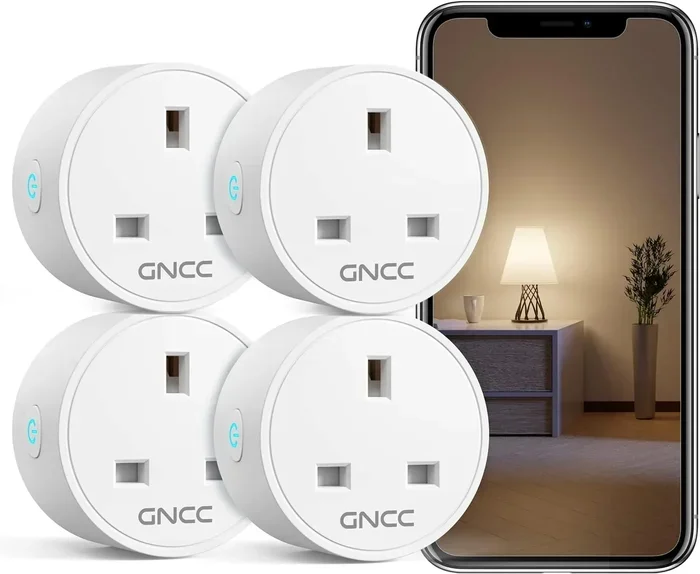
Do Smart Plugs Work Without Alexa and Still Stay Connected
Do Smart Plugs Work Without Alexa is an essential topic that provides valuable insights.
Have you ever bought a smart plug and then wondered if it actually works without Alexa? Maybe you do not own an Echo device. Maybe you prefer not to use a voice assistant. Or perhaps you just want to know what your smart plug can do on its own. Either way, you are in the right place.
The good news is that smart plugs work without Alexa just fine. These small devices are designed to be flexible. They connect to your home network and let you control appliances, lights, and fans from your phone. You do not need a voice command to make them work. In this article, we will walk through everything you need to know. We will cover how they work, how to set them up, which brands to look at, and what to watch out for.
Key Takeaways
- Smart plugs work independently: You do not need Alexa, Google Home, or any voice assistant to use them.
- App control is the primary method: Most smart plugs connect through a manufacturer app over Wi-Fi or Bluetooth.
- Scheduling and timers work without a voice command: You can set up routines directly from your phone.
- Many smart plugs support multiple platforms: Some work with Alexa, Google Home, Apple HomeKit, or IFTTT simultaneously.
- Manual control remains available: Even without Wi-Fi, most smart plugs can be used like a regular outlet.
- Energy monitoring is a built-in perk: Many models track power usage without needing a voice assistant.
- Setup is simple and fast: Most smart plugs take under five minutes to configure without any voice service.
📑 Table of Contents
- How Do Smart Plugs Work Without Alexa?
- Ways to Control Smart Plugs Without Alexa
- Smart Plugs That Work Great Without Alexa
- Setting Up Smart Plugs for Independent Use
- Benefits of Using Smart Plugs Without a Voice Assistant
- Common Problems When Using Smart Plugs Without Alexa
- Expert Insights on Smart Plugs and Voice Assistants
- Final Thoughts
How Do Smart Plugs Work Without Alexa?
Smart plugs are simple plug-in smart devices that sit between your wall outlet and your appliance. They act as a bridge between your device and your wireless network. Once connected, you can turn things on or off from anywhere.
Most smart plugs use Wi-Fi connectivity to communicate with your phone or tablet. Some use Bluetooth as a backup. When you open the manufacturer app, you send a signal through your home network. The smart plug receives that signal and switches power to your device. This entire process happens without any voice assistant involved.
Here is what makes this so convenient. Your phone becomes the remote control. You do not need to shout a command. You do not need a smart speaker sitting on your counter. You just tap your screen and your lamp turns on. That is the core beauty of smart home devices that work without a voice assistant.
The Role of Wi-Fi in Smart Plug Functionality
Wi-Fi is the backbone of most smart plugs. Without a Wi-Fi connection, your plug cannot receive commands from your phone when you are away from home. But within your house, the connection is fast and reliable.
When you set up a Wi-Fi enabled smart plug, it joins your home network just like your laptop or phone does. It gets an IP address and stays connected as long as your router is on. This means your remote control works whether you are on the couch or at the office.
Some smart plugs also support dual-band Wi-Fi, which means they can connect to both 2.4 GHz and 5 GHz networks. This helps avoid interference and keeps the connection stable. If your router supports both bands, your smart plug will likely connect without any issues.
Bluetooth as an Alternative Connection Method
Not all smart plugs rely solely on Wi-Fi. Some models use Bluetooth to connect to your phone. This is useful when you do not want to bother with your Wi-Fi network during setup.
Bluetooth smart plugs have a shorter range. You need to be within about 30 feet of the plug to control it. This works great for a single lamp in your bedroom. But it does not work as well for a plug in the garage when you are at the front door.
Many modern smart plugs use both Wi-Fi and Bluetooth together. The Bluetooth connection helps with initial setup. Then the plug switches to Wi-Fi for full remote control capabilities. This dual approach gives you the best of both worlds.
Ways to Control Smart Plugs Without Alexa
You have more options for controlling smart plugs than you might think. Voice commands are just one method. Let us look at all the ways you can manage your smart outlet without ever talking to Alexa.
Using the Manufacturer App
Every smart plug comes with a companion app. This app is your main control center. You download it from the App Store or Google Play, connect your plug, and start controlling it.
Most apps let you do the following:
- Turn devices on or off with a single tap
- Set schedules for daily or weekly outlet timers
- Create countdown timers for specific durations
- Monitor energy usage in real time
- Rename plugs and group them by room
The app approach works great for people who prefer a visual interface. You can see all your plugged-in devices on one screen. You can tap to turn things on or off. And you can check your energy usage without any voice commands at all.
Scheduling and Timer Functions
Scheduling is one of the most powerful features of any smart plug. You can set your lamp to turn on every evening at sunset. You can schedule your coffee maker to start brewing at 7 AM. You can set a fan to turn off after two hours.
These schedules run on the plug itself. They do not need Alexa or any cloud service to execute. Once you save a schedule in the app, the plug follows it automatically. This is perfect for people who want home automation without relying on a voice assistant.
Some smart plugs also support random scheduling. This feature turns your lights on and off at different times each day. It makes your home look occupied when you are away on vacation. This is a great security feature that works entirely without a voice assistant.
Manual Control and Physical Buttons
Here is something many people overlook. Most smart plugs still have a manual button or switch. If your Wi-Fi goes down, you can still turn your device on or off the old-fashioned way.
This is a huge advantage. Voice assistants rely on internet connectivity. If your router goes down, Alexa cannot help you. But a smart plug still works as a regular outlet with a switch. You just press the button on the plug itself. Your device gets power. Simple as that.
This backup feature is why many people love smart plugs. They add convenience when things work well. But they never take away the basic functionality of a wall outlet.
Using Google Home or Apple HomeKit Instead
Do not want to use Alexa? You can still use other voice assistants. Google Home works with many smart plugs. You just need the Google Home app and a Google Nest speaker or display.
Apple HomeKit is another option. Some smart plugs are certified for Apple HomeKit. They work with Siri on your iPhone, iPad, or HomePod. You can say “Hey Siri, turn off the lamp” and it works just like an Alexa command.
These alternatives give you the same voice control benefits without using Alexa. The plug still connects to your home network. The only difference is which app or assistant you use to send commands.
IFTTT and Third-Party Integrations
IFTTT stands for “If This Then That.” It is a free service that connects different apps and devices together. You can create automation routines that trigger your smart plug based on other events.
For example, you can set up an IFTTT applet that says: “If the weather forecast predicts rain, turn on the porch light.” Or: “If I arrive home, turn on the desk lamp.” These automations run through IFTTT’s servers and do not require Alexa at all.
IFTTT opens up a world of possibilities for home automation. You can connect your smart plug to weather apps, calendar events, fitness trackers, and more. The automation runs in the background without any voice commands. This is a powerful way to make your home smarter without a voice assistant.
Smart Plugs That Work Great Without Alexa
Not all smart plugs are created equal. Some brands focus on compatibility with multiple platforms. Others work best with a single ecosystem. Here are some popular options that shine when used without Alexa.
TP-Link Kasa Smart Plug
The TP-Link Kasa line is one of the most popular smart plug brands on the market. These plugs work entirely through the Kasa app. You do not need any voice assistant to set them up or use them daily.
Kasa plugs support scheduling, countdown timers, and energy monitoring. They also work with Google Home and Alexa if you ever decide to add a voice assistant later. The setup process is straightforward. You plug in the device, open the app, and follow the prompts. Most people have it running in under three minutes.
Amazon Smart Plug (Yes, Without Alexa)
This might sound surprising. The Amazon Smart Plug works without Alexa too. It is designed to integrate with Alexa, but you can also use it through the Alexa app or the Amazon Alexa skill for smart home devices.
Even if you never use Alexa, the plug still functions as a smart outlet. You can control it through the Alexa app on your phone. You can set schedules and timers. And if you ever get an Echo device later, it will already be paired and ready to go.
Wyze Plug
Wyze makes affordable smart plugs that work well without any voice assistant. The Wyze app gives you full control over scheduling, on-off commands, and energy monitoring. The plugs are Wi-Fi enabled and connect directly to your home network.
Wyze plugs also support Alexa and Google Home if you want them later. But out of the box, they work perfectly fine on their own. The app is clean and easy to navigate. It is a great choice for people who want simple remote control without any extra setup.
Gosund Smart Plug
Gosund plugs are another solid option for independent use. They work through the Gosund app and support scheduling and outlet timers right out of the box. The plugs are compact and fit easily into tight spaces.
Gosund also offers energy monitoring on some models. This lets you track how much electricity your devices use. You can view usage data in the app and adjust your habits accordingly. This feature works entirely without any voice assistant.
Setting Up Smart Plugs for Independent Use
Setting up a smart plug without Alexa is simple. You do not need any special equipment beyond the plug itself and your phone. Here is a step-by-step guide to get you started.
Step-by-Step Setup Process
- Plug the smart plug into your wall outlet
- Download the manufacturer app on your phone
- Create an account or sign in
- Make sure your phone is connected to your 2.4 GHz Wi-Fi network
- Follow the in-app instructions to add a new device
- Wait for the plug to connect to your network
- Name your plug and assign it to a room
- Start controlling your device from the app
The entire process usually takes less than five minutes. Most apps walk you through each step with clear instructions. If you run into trouble, check that your phone is on the 2.4 GHz band. Many smart plugs do not support 5 GHz networks during initial setup.
Tips for a Smooth Setup
- Keep your phone close to the plug during setup
- Make sure your Wi-Fi password is correct
- Restart your router if the plug fails to connect
- Update the app to the latest version before setup
- Place the plug in a location with strong Wi-Fi signal
Creating Schedules Without Any Voice Assistant
Once your plug is set up, creating schedules is easy. Open the app and look for the schedule or timer option. You can set a device to turn on at a specific time every day. You can create a one-time timer for a specific duration.
For example, you might set your bedside lamp to turn on at 7 PM every evening. You could set your space heater to turn off after four hours. These automations run on the plug itself. They do not need any voice assistant or cloud service to execute.
Some apps also let you create automation routines based on sunrise or sunset times. This is a great feature for outdoor lights or security lamps. The plug follows the sun and adjusts your devices accordingly. All of this works without Alexa or any other voice service.
Benefits of Using Smart Plugs Without a Voice Assistant
You might wonder why someone would use a smart plug without a voice assistant. There are actually many good reasons. Let us explore the benefits.
Privacy and Data Concerns
Voice assistants are always listening. They record your commands and send data to cloud servers. Some people are uncomfortable with this level of monitoring. Using a smart plug without a voice assistant gives you full control over your data.
When you control your plug through the app, your commands stay between your phone and your home network. There is no always-on microphone in your room. This is a major privacy advantage for many users.
Simplicity and Reliability
Voice assistants can sometimes misunderstand commands. They might turn on the wrong device. They might fail to respond at all. Using the app gives you direct, reliable control. You tap a button and the device responds. There is no guessing involved.
Smart plugs also work during internet outages if they support manual control. Your voice assistant goes offline too. But your plug still works as a regular outlet. This reliability factor makes smart plugs a smart choice for any home.
Cost Savings
You do not need to buy an Echo speaker or any other smart home hub to use a smart plug. The plug itself is the only device you need. This keeps your setup cost low. Many quality smart plugs cost under $25.
Beyond the purchase price, smart plugs can help you save on energy bills. Energy monitoring features show you which devices draw the most power. You can unplug vampire devices or adjust your usage habits. Over time, these small changes add up to real savings.
Flexibility and Future-Proofing
Smart plugs that work without Alexa are not locked into one ecosystem. You can use them today with just the app. Tomorrow, you might add Google Home. Next year, you might try Apple HomeKit. Your plug works with all of them.
This flexibility means your investment lasts longer. You are not stuck with one platform. You can switch between assistants or use none at all. The plug adapts to your needs as they change.
Common Problems When Using Smart Plugs Without Alexa
Smart plugs are reliable, but they are not perfect. Here are some common issues and how to fix them.
Wi-Fi Connection Drops
If your smart plug keeps losing connection, the problem is usually your Wi-Fi signal. Move the plug closer to your router. Or consider adding a Wi-Fi extender to boost the signal in that part of your home.
Another fix is to make sure your router firmware is up to date. Old firmware can cause connectivity issues with smart home devices. A quick update often solves the problem.
App Crashes or Freezes
The manufacturer app can sometimes crash or freeze. This is usually a software issue. Make sure you have the latest version of the app installed. Restarting your phone can also help clear temporary glitches.
If the problem persists, try uninstalling and reinstalling the app. This resets the connection and often fixes stubborn bugs. Just make sure you remember your plug name and password before reinstalling.
Schedules Not Executing Properly
If your schedules stop working, check that your plug is still connected to the Wi-Fi. A disconnected plug cannot execute scheduled commands. Also make sure your phone’s date and time settings are correct. Incorrect time settings can confuse the scheduling system.
Some routers have a feature called “AP isolation” that blocks devices from communicating with each other. Make sure this feature is turned off. It can prevent your smart plug from receiving commands from the app.
Plug Not Responding to App Commands
If your plug does not respond to commands in the app, try power cycling it. Unplug it from the wall, wait 10 seconds, and plug it back in. This forces the plug to reconnect to your network and often fixes the issue.
You should also check that your phone is connected to the same Wi-Fi network as the plug. If your phone is on cellular data, it cannot communicate with the plug through your home network. Switch to Wi-Fi and try again.
Expert Insights on Smart Plugs and Voice Assistants
Smart home experts agree that smart plugs are versatile devices. They work well with or without a voice assistant. The key is choosing the right plug for your needs.
“Most consumers do not realize that smart plugs are fully functional as standalone devices,” says a smart home technology reviewer. “The app gives you everything you need. A voice assistant is just an optional extra.”
Experts also recommend looking for plugs with energy monitoring capabilities. This feature gives you valuable insights into your electricity usage. It works independently of any voice service and helps you make smarter energy decisions.
Another expert tip is to buy plugs from brands with a strong app ecosystem. A well-designed app makes all the difference. It gives you easy access to scheduling, timers, and device management. You do not need any voice assistant to enjoy these features.
Final Thoughts
Do Smart Plugs Work Without Alexa? Absolutely. Smart plugs are independent plug-in smart devices that give you remote control and home automation capabilities without any voice assistant. You control them through a simple app on your phone. You set schedules, create timers, and monitor energy usage all on your own.
Whether you choose a TP-Link Kasa plug, a Wyze plug, or any other brand, you will find that these devices work great on their own. They connect to your Wi-Fi enabled network and respond to your commands instantly. They still work during internet outages thanks to manual control options. And they fit into any smart ecosystem you choose to build later.
The beauty of a smart plug is its simplicity. It adds convenience and control to your daily life. It does not require a voice assistant, a smart speaker, or any complicated setup. Just plug it in, download the app, and start controlling your devices. You will wonder how you ever lived without one.
So go ahead and try a smart plug today. You do not need Alexa. You do not need Google Home. You just need your phone and a wall outlet. That is all it takes to bring a little smart home magic into your life.
Frequently Asked Questions
Can I use a smart plug without any voice assistant at all?
Yes, you absolutely can. Smart plugs work independently through their manufacturer app. You control them using your phone over Wi-Fi. Voice assistants like Alexa are completely optional. The plug handles scheduling, on-off commands, and timers all on its own.
Do smart plugs need Wi-Fi to work without Alexa?
Yes, most smart plugs need Wi-Fi for full functionality. Wi-Fi lets you control the plug remotely when you are away from home. It also enables scheduling and energy monitoring. However, many smart plugs still work as regular outlets when Wi-Fi is down. You can turn them on or off manually at the plug itself.
Which smart plugs work without Alexa and Google Home?
Most smart plugs work without any voice assistant at all. Brands like TP-Link Kasa, Wyze, and Gosund all function fully through their own apps. These Wi-Fi enabled plugs do not require Alexa or Google Home to operate. They give you complete control through your phone.
Can I schedule my smart plug without using a voice command?
Yes, scheduling is one of the best features of any smart plug. You set schedules directly in the manufacturer app. The plug follows your schedule automatically without any voice commands. You can set daily routines, one-time timers, and even random schedules for security purposes. Everything runs on the plug itself.
Will my smart plug still work if I never set up Alexa?
Yes, your smart plug will work perfectly fine without Alexa. Alexa is just one optional way to control your plug. The primary control method is always the manufacturer app. You can use the plug for years without ever connecting it to a voice assistant. It works as a smart outlet right out of the box.
Are smart plugs without Alexa less expensive than Alexa-compatible ones?
Not necessarily. Most smart plugs cost the same whether they work with Alexa or not. The difference is in the software features. A plug that works with Alexa simply has the capability added. It does not cost more to use it without Alexa. You get the same basic functionality either way.
=== CONCLUSION ===
Do Smart Plugs Work Without Alexa and still stay connected? Yes, and they do it remarkably well. Smart plugs are independent smart devices that give you control over your appliances and lights without any voice assistant. You use the app, you set schedules, and you enjoy the convenience of home automation on your terms.
These plug-in smart devices connect to your Wi-Fi network and respond to your commands instantly. They work with or without Alexa, Google Home, or Apple HomeKit. They offer manual control when the internet goes down. And they help you save energy through monitoring and smart scheduling.
Whether you are new to smart home technology or looking to simplify your setup, smart plugs are a fantastic starting point. They are affordable, easy to set up, and incredibly useful. Pick a brand you trust, plug it in, and start enjoying the benefits of a smarter home today. You do not need Alexa. You just need your phone.