Do Old Ipods Still Work And What You Can Do With Them
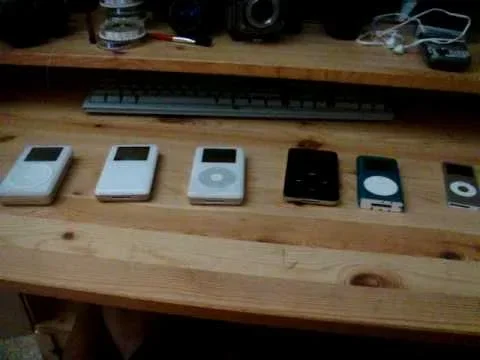
Do old Ipods still work? Yes, most older iPod models can still function, but they may need a few updates or repairs to stay usable. Whether you have an iPod classic, iPod touch, iPod nano, or iPod shuffle, there are plenty of ways to bring these devices back to life. This guide covers everything from restoring your iPod to finding new uses for it, so you can get the most out of your vintage iPod collection.
Have you found an old iPod sitting in a drawer somewhere? Maybe it was your first music player back in the day, and it still holds a special place in your heart. The big question is: do old Ipods still work? The short answer is yes. Most iPod models can still power on, play your favorite songs, and hold music just like they did years ago. But there is more to it than that.
In this article, we will walk through everything you need to know about using an old iPod today. We will cover which models are still usable, how to restore them, what cool things you can do with them, and whether it is worth keeping one around. If you have been wondering about your vintage iPod, this guide has you covered.
The world has moved on to smartphones and streaming, but there is something special about pulling out a dedicated music player. An old iPod gives you distraction-free listening, extra iPod storage for your library, and a sense of nostalgia that no phone can match. Let us dive in.
Key Takeaways
- Old Ipods Still Work: Most iPod models from the last 15 years can still power on and play media, even if they need minor repairs.
- Multiple Models Still Useful: The iPod touch, iPod classic, iPod nano, and iPod shuffle each offer unique features that remain relevant today.
- Restoring Is Simple: You can restore an old iPod using iTunes or Finder, update the software, and replace the battery if needed.
- Creative Uses Exist: Old Ipods can serve as dedicated music players, workout devices, car stereos, or even digital photo frames.
- Battery Replacement Helps: Swapping out an old battery can dramatically improve your iPod’s performance and iPod battery life.
- No Internet Needed: Many iPod functions work offline, making them great for situations where you don’t want to use your phone.
- Worth Keeping: With the right care, an old iPod can still deliver a solid audio experience and serve niche purposes in 2024.
📑 Table of Contents
Do Old Ipods Still Work In 2024?
The quick answer is yes. Do old Ipods still work in 2024? Most of them do. Apple stopped making the iPod line in 2017, but that does not mean the devices stopped working overnight. The hardware inside these players is built to last. Many people still use their iPod classic or iPod touch daily without any major issues.
However, there are a few things to keep in mind. Older devices may have slower processors, smaller screens, and outdated software. Some features may not work as smoothly as they once did. But for basic tasks like playing music or podcasts, an old iPod still does the job very well.
What Makes An Old iPod Stop Working?
Several factors can cause an old iPod to fail or act up. Understanding these issues helps you troubleshoot and fix them.
- Dead battery: The most common problem. After years of use, the battery loses its ability to hold a charge.
- Outdated software: Older iPod models may not support the latest versions of iTunes or macOS.
- Broken screen: Physical damage from drops or wear and tear over the years.
- Port damage: The charging port or headphone jack can wear out with regular use.
Most of these problems have simple fixes. A battery replacement, a software restore, or a new pair of headphones can bring an old iPod back to life. The key is knowing what to look for and how to approach the fix.
Which iPod Models Are Still Usable Today?
Not all iPod models are created equal when it comes to long-term usability. Some iPod models hold up better than others. Here is a breakdown of the most popular ones and how they perform today.
The iPod Classic
The iPod classic is the beloved hard-drive-based player that held up to 160GB of music. Many people still swear by it. The iPod classic 2024 experience is surprisingly good. The device still plays MP3s, AAC files, and other audio formats without any issues. The click wheel is responsive, and the battery, while old, often still holds a decent charge.
The main limitation is that the iPod classic cannot connect to modern streaming services like Spotify or Apple Music directly. You need to sync your music manually through a computer. But if you are okay with that, the iPod classic remains one of the best dedicated music players ever made.
The iPod Touch
The iPod touch is essentially an iPhone without the cellular capability. It can still run apps, browse the web (on older versions), and play music. The latest iPod touch model, the 7th generation from 2019, still supports many apps and can connect to Wi-Fi.
One of the biggest advantages of the iPod touch is that you can still download and use apps. This makes it a great option for kids, as a dedicated music device, or even a lightweight gaming device. The iPod touch apps ecosystem is smaller now, but many apps still work on it.
The iPod Nano and iPod Shuffle
The iPod nano and iPod shuffle are small, clip-on players designed for workouts and everyday use. Both devices are still functional for playing music offline. The nano has a small color screen and supports podcasts and audiobooks. The shuffle is a button-based player with no screen at all.
These devices are perfect for people who want a simple, distraction-free music experience. They are small, lightweight, and the batteries often last for hours. The trade-off is that they have very limited storage and no app support.
Quick Comparison Table
| Model | Storage | Screen | Internet | Apps | Best For |
|---|---|---|---|---|---|
| iPod Classic | Up to 160GB | Click wheel | No | No | Massive music libraries |
| iPod Touch (7th Gen) | 32GB or 128GB | 4-inch touchscreen | Wi-Fi only | Yes | Apps, games, music |
| iPod Nano (7th Gen) | 16GB | 1.54-inch color | No | No | Workouts, podcasts |
| iPod Shuffle (4th Gen) | 2GB | None | No | No | Simple listening |
What Can You Do With An Old iPod?
Just because smartphones took over does not mean your old iPod is useless. There are many creative and practical ways to use an old iPod in your daily life. Here are some of the best ideas.
Use It As A Dedicated Music Player
The most obvious use is also the best one. An iPod as MP3 player gives you hours of distraction-free listening. No notifications, no calls, no social media distractions. Just pure music. Load up your favorite albums, create playlists, and enjoy.
This is especially great for people who want to reduce screen time. An old iPod lets you listen to music without the temptation of checking your phone every five minutes.
Use It For Workouts
The iPod nano and iPod shuffle are perfect workout companions. They are small, sweat-resistant, and clip right onto your shirt or shorts. You do not need to carry your phone to the gym when you have a dedicated music player.
Many runners and gym-goers still prefer the iPod shuffle for its simplicity. You press a button, and music plays. No screen to look at, no distractions. Just your workout playlist.
Use It As A Car Stereo
Older cars without Bluetooth or auxiliary inputs can still play music from an iPod. The 30-pin or USB connection works with most factory car stereos. You can plug in your old iPod and enjoy your music library on long road trips.
This is a great use for an iPod that you no longer carry around daily. It becomes your dedicated car music player, leaving your phone free for navigation and calls.
Use It As a Digital Photo Frame
With a little creative setup, an iPod touch can function as a digital photo frame. Load up your favorite photos, set it to slideshow mode, and place it on a shelf. It is a unique way to display memories without buying a dedicated photo frame device.
Use It For Podcasts and Audiobooks
Even older iPod models support podcasts and audiobooks. The iPod classic and iPod nano both handle these formats well. This makes them great for long commutes, flights, or relaxing at home.
Use It As a Backup Device
Keeping an old iPod charged and ready as a backup music player is smart. If your phone dies, your iPod can still keep you entertained. It is a simple but effective use that many people overlook.
How To Restore And Sync Your Old iPod
If your old iPod has been sitting unused for a while, you may need to restore it before it works properly again. The good news is that the process is straightforward.
Step 1: Check Compatibility
First, make sure your computer can communicate with the iPod. Older iPods use the 30-pin dock connector, while newer ones use USB. You may need an adapter if your computer does not have the right port. Check iPod compatibility with your operating system before you start.
Step 2: Update iTunes or Finder
On Windows and older Macs, use iTunes. On macOS Catalina and later, use Finder. Make sure your software is up to date. Open the app, connect your iPod with a cable, and wait for the device to appear.
Step 3: Restore The iPod
If the iPod is not responding, you may need to restore it. Here is how:
- Connect the iPod to your computer.
- Select the device in iTunes or Finder.
- Click “Restore iPod.”
- Wait for the process to complete.
- Set up the iPod as new or restore from a backup.
Restoring wipes all data from the device, so make sure you have a backup if you want to keep your music and settings.
Step 4: Sync Your Music
After restoring, you can sync your music library to the iPod. Sync iPod playlists, albums, and podcasts just like you did years ago. You can also transfer files manually if you prefer a more hands-on approach.
For the iPod touch, you can also download apps directly from the App Store over Wi-Fi, as long as the device supports the current or near-current iOS versions.
How To Replace The iPod Battery
If your iPod dies quickly or will not hold a charge, a battery replacement can help. iPod battery replacement kits are available online for most models. You will need a small screwdriver and a little patience. Alternatively, you can take the iPod to a repair shop and have them do it for a modest fee.
Replacing the battery can dramatically improve your iPod battery life and make the device feel like new again. It is one of the best investments you can make for an old iPod.
Common Problems And How To Fix Them
Even when do old Ipods still work in general, individual devices can develop specific issues. Here are the most common problems and how to solve them.
The iPod Will Not Turn On
This is usually a battery issue. Plug the iPod into a charger and wait at least 30 minutes. If it still does not turn on, try a hard reset. For most iPod models, you hold down the Menu and Center (or Play) buttons for about 10 seconds. This forces the device to restart.
The Screen Is Frozen
A frozen screen often happens after a bad sync or software glitch. Perform a hard reset as described above. If that does not work, connect the iPod to your computer and try restoring it through iTunes or Finder.
Music Skips or Sounds Scratchy
Check your headphones first. If the headphones are fine, the issue might be with the iPod’s headphone jack. Clean it gently with a toothpick or compressed air. Sometimes dust and lint build up inside the jack and cause audio issues.
The iPod Does Not Sync Properly
Make sure you are using the latest version of iTunes or Finder. Try a different USB cable or port. If the problem persists, restore the iPod and try syncing again. Sometimes resetting the device clears up sync issues.
The Battery Drains Too Fast
Old batteries naturally lose capacity over time. If your iPod is several years old, the battery may need replacing. You can also extend battery life by turning off equalizer settings, reducing screen brightness, and limiting the number of songs stored on the device.
The iPod Touch Wi-Fi Will Not Connect
Older iPod touch models may not support newer Wi-Fi standards. If your router uses only 5GHz bands, the iPod may not detect it. Try switching your router to a 2.4GHz network, which is more compatible with older devices.
Is It Worth Keeping An Old iPod?
This is a question many people ask, and the answer depends on your situation. If you have a large music library that you enjoy listening to without distractions, an old iPod is absolutely worth keeping.
An iPod also makes a great gift. Handing down a vintage iPod to a child or teenager gives them a dedicated device for music and entertainment without the risks of smartphone ownership. It teaches them to appreciate music in a focused way.
From a financial standpoint, an old iPod has almost no value on the resale market unless it is in pristine condition. But as a functional device, it still delivers real value. The emotional connection and nostalgia factor should not be underestimated either.
Think about what you want from the device. If you just want to listen to music during a commute or workout, an old iPod does the job perfectly. If you need apps, internet, and a modern experience, a smartphone or a current iPod touch is the better choice.
Expert Tips For Keeping Your Old iPod Running
Want to get the most out of your old iPod? Here are some expert tips that help extend the life of these devices.
- Store it properly: Keep your iPod in a cool, dry place. Heat and moisture are the biggest enemies of old electronics.
- Charge it regularly: Even if you are not using it, charge the iPod every few months to prevent the battery from completely dying.
- Use quality cables: Cheap USB cables can cause sync issues and even damage the charging port. Invest in a good cable.
- Keep software updated: For iPod touch models, update to the latest supported iOS version to maintain security and app compatibility.
- Clean the ports: Use a soft brush or compressed air to keep the charging port and headphone jack free of dust.
- Back up your data: Regularly sync and back up your iPod to your computer so you never lose your music and playlists.
Quick Tips For iPod Data Transfer
If you need to move music from your old iPod to a new computer or device, iPod data transfer can be tricky. Apple does not make it easy to copy music off an iPod. However, third-party tools like TouchCopy or Senuti can help you pull files off your device quickly and easily.
Another option is to sync the iPod to a new computer and then transfer the files from the iTunes or Music library folder. It takes a few extra steps, but it works reliably.
Quick Tips For iPod Accessories
Even though the iPod line is discontinued, accessories are still available. You can find iPod accessories like replacement batteries, charging cables, and cases online. Amazon, eBay, and specialty Apple repair shops are good sources. The 30-pin connector is widely supported, so finding compatible cables and docks is still easy.
Conclusion
Do old Ipods still work in 2024? Without a doubt. Whether you have an iPod classic, iPod touch, iPod nano, or iPod shuffle, these devices still have plenty of life left in them. With a little care, a battery replacement, or a simple restore, you can bring your vintage iPod back to full functionality.
There are many creative ways to use an old iPod today. From dedicated music listening to workout playlists, car audio, and even photo slideshows, these devices still serve real purposes. They offer a focused, distraction-free experience that smartphones simply cannot match.
If you have an old iPod lying around, do not throw it away. Restore iPod settings, replace the battery if needed, and find a new use for it. Your old iPod still has a lot to offer, and with the tips in this guide, you can keep it working for years to come.
Take some time today to dig out that old iPod from your drawer. Charge it up, sync your favorite music, and enjoy the simple pleasure of a dedicated music player. You might be surprised at how much you still love it.
Frequently Asked Questions
Can I still use an iPod with a modern computer?
Yes, most older iPods can still connect to modern computers. You may need an adapter for the 30-pin connector or a USB cable that matches the iPod model. On Macs running macOS Catalina or later, use Finder instead of iTunes to manage your iPod. On Windows, iTunes still works for syncing and restoring.
What should I do if my old iPod battery is completely dead?
First, try charging the iPod for at least 30 minutes using the original cable and adapter. If it still does not respond, the battery may need replacing. Replacement batteries are affordable and widely available online. You can also take the iPod to an Apple Store or a certified repair shop for professional battery replacement.
Can I still download apps on an iPod touch?
Yes, but it depends on the model. The 7th generation iPod touch supports many current apps, but some newer apps may no longer be compatible. Older iPod touch models may only run apps up to a certain iOS version. Check the App Store on your iPod to see which apps are still available for your specific model.
Is it worth repairing an old iPod instead of buying a new one?
It depends on the model and the repair cost. If you have an iPod classic or a recent iPod touch, a battery replacement or screen repair can make it feel like new for a fraction of the cost of a new device. For older models, the repair cost may not be worth it. Evaluate the iPod’s condition and your emotional attachment before deciding.
Can I use Apple Music on an old iPod?
Apple Music requires an internet connection and a supported device. The iPod touch can stream Apple Music over Wi-Fi if it runs a compatible iOS version. The iPod classic, nano, and shuffle do not support streaming. However, you can download Apple Music tracks on your computer and sync them to your iPod for offline listening.
What are the best uses for an iPod nano or shuffle today?
The iPod nano and shuffle excel as simple, distraction-free music players. They are perfect for workouts, commutes, and situations where you do not want to carry your phone. The nano’s small screen also makes it a decent option for viewing playlists and podcast descriptions. The shuffle’s clip design makes it incredibly portable and easy to use during physical activities.
=== CONCLUSION ===
Do old Ipods still work and remain useful in 2024? Yes, they absolutely do. From the iPod classic to the iPod touch, these devices continue to deliver a quality audio experience and serve niche purposes that smartphones cannot easily replace. Whether you want a dedicated music player, a workout companion, or a nostalgic trip down memory lane, your old iPod still has plenty to offer.
Restore it, charge it up, and find a new purpose for it. With the right care and a little creativity, your vintage iPod can keep working beautifully for years to come.