But Do I Need an N64 Controller for Nintendo Switch
You do not strictly need an N64 controller to play N64 games on the Nintendo Switch, but using one massively improves the experience. The Switch supports N64 controllers through the Switch Online app and USB adapters. Whether you choose an official or third-party option depends on your budget and how much you value authentic retro feel. This guide breaks down every option so you can decide with confidence.
You have probably seen those classic Nintendo 64 controllers on store shelves or online and wondered if they are worth the hype. Maybe you grew up playing GoldenEye 007 or Super Mario 64 and want to relive those memories on your Switch. Or maybe you are just curious about whether the N64 controller for Switch is even necessary. The short answer is no, you do not need one. But the longer answer is a lot more interesting.
The Nintendo Switch has opened the door to a massive library of retro games through Nintendo Switch Online. Among them, the N64 collection stands out as one of the most exciting additions. But how you play those games can change everything. Using the right N64 controller on Switch can turn a frustrating experience into something magical. Let us dive deep into what you need to know.
In this article, we will cover compatibility, controller options, setup tips, and which games benefit most from an authentic N64 feel. By the end, you will know exactly whether investing in one makes sense for you.
Key Takeaways
- The Nintendo Switch can play N64 games through the Nintendo Switch Online service without any extra hardware.
- An N64 controller for Switch gives you a more authentic retro gaming experience than the default Joy-Cons or Pro Controller.
- USB adapters make N64 controller wireless on the Switch, solving the wired limitation of original hardware.
- Third-party N64 controllers are more affordable but vary widely in quality and compatibility.
- Not all N64 games play well on the Switch, and the right controller can make a big difference.
- Budget and personal preference should guide your choice between official and third-party options.
📑 Table of Contents
- What Is the N64 Controller and Why Does It Matter?
- How N64 Controllers Work on Nintendo Switch
- The Best N64 Controller Options for Switch
- Pros and Cons of Using an N64 Controller on Switch
- Which N64 Games Play Best on Switch?
- Common Mistakes and Tips for Setup
- Expert Insights on Retro Controller Choices
- Final Thoughts
What Is the N64 Controller and Why Does It Matter?
The Nintendo 64 controller is one of the most iconic gaming peripherals ever made. Its distinctive design with the analog stick in the center, the D-pad on the left, and the C-buttons on the right was revolutionary for its time. When you play N64 games on Switch, the controller you use shapes the entire experience.
Modern controllers like the Nintendo Switch Pro Controller or Joy-Cons are excellent for most games. But retro titles were designed with specific input methods in mind. The N64 analog stick had a unique feel and response curve that is hard to replicate. The face buttons on the original controller had a satisfying click that many players remember fondly.
Using a modern controller for retro games can feel disconnected. It is like listening to a vinyl record through a Bluetooth speaker. You get the music, but something is missing. The N64 controller for Switch bridges that gap and brings back the authentic feel that made these games special in the first place.
The Legacy of the N64 Controller Design
Nintendo designed the N64 controller with innovation in mind. The center analog stick was the first of its kind in a home console. It allowed for 3D movement in ways that earlier controllers could not match. Games like Super Mario 64 and Banjo-Kazooie relied heavily on precise stick movement.
The controller also introduced the R and Z buttons on the back, adding more triggers for complex inputs. The D-pad was perfect for fighting games and menu navigation. Every part of the controller served a purpose. That thoughtful design is a big reason why players still crave the original N64 controller for Switch compatibility today.
How N64 Controllers Work on Nintendo Switch
Understanding how N64 controller compatibility works on the Switch helps you make the right choice. Nintendo has made it possible to play N64 games through its subscription service, but the method of input depends on what hardware you use.
There are three main ways to connect an N64 controller to the Switch. Each method has its own advantages and limitations. Let us break them down.
Method 1: Nintendo Switch Online App
The simplest way to play N64 games on the Switch is through the Nintendo Switch Online app. You download the app on your phone, pair it with your Switch, and use your phone as a controller. This method does not require any extra hardware at all.
However, using a phone as a controller has drawbacks. The touchscreen controls are not ideal for N64 games. You miss the tactile feel of physical buttons and the analog stick. Latency can also be an issue. If you want a better experience, this method is a starting point but not the end goal.
Method 2: USB Adapter with Original N64 Controller
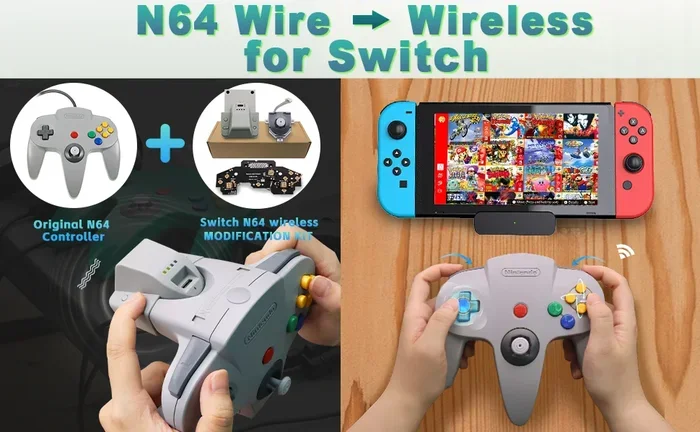
The most authentic way to use an N64 controller on Switch is through a USB adapter. You plug your original N64 controller into a USB adapter, and the adapter connects to the Switch. This gives you the real thing with all its original buttons, stick, and rumble.
Several adapters support this setup. The 8BitDo SN30 Pro and retro adapters from brands like Retro-Bit are popular choices. You get wireless freedom and genuine N64 feel. The downside is cost. Original N64 controllers can be expensive, especially well-preserved ones.
Method 3: Third-Party N64 Style Controllers
If you do not want to hunt down original N64 hardware, third-party controllers are a great alternative. Companies like 8BitDo and PowerA make controllers that mimic the N64 layout but work natively with the Switch.
These controllers often include modern features like wireless connectivity, rechargeable batteries, and programmable buttons. They do not have the exact feel of an original N64 controller, but they come much closer than a standard gamepad. For many players, this is the sweet spot between authenticity and convenience.
The Best N64 Controller Options for Switch
Not all N64 controllers for Switch are created equal. Some deliver a premium retro experience while others cut corners. Here is a look at the best options available right now.
Official N64 Controllers with USB Adapter
Nintendo has released official N64 controllers designed for use with the Switch Online service. These are reproductions of the original controller with modern wireless connectivity built in. They connect directly to the Switch without needing a separate adapter.
The official controller features the classic design, the center analog stick, and the distinctive purple and gray color scheme. It also includes rumble support, which adds a nice tactile dimension to games. The build quality is solid, and it feels like the real thing.
The main drawback is price. Official Nintendo accessories tend to cost more than third-party alternatives. But if authenticity matters to you, there is no better option.
Third-Party N64 Style Controllers
Budget-conscious gamers have several excellent third-party options. The 8BitDo SN30 Pro Plus mimics the N64 layout in a compact wireless package. It connects via Bluetooth and works seamlessly with the Switch.
Another popular choice is the PowerA Classic Controller Pro for N64. It offers a full-size controller with wireless connectivity and rechargeable battery. These controllers are more affordable and often come with extra features like programmable buttons.
The trade-off is that they do not feel exactly like the original. The analog sticks and button feedback are slightly different. But for casual retro gaming, they get the job done very well.
Comparison Table
| Feature | Official N64 Controller | Third-Party N64 Style | Joy-Cons / Pro Controller |
|---|---|---|---|
| Authentic N64 Feel | Excellent | Good | Poor |
| Price Range | $80+ | $40-$60 | $70-$80 |
| Wireless Connectivity | Yes | Yes | Yes |
| USB Adapter Required | No | No | No |
| Rumble Support | Yes | Varies | Yes |
| N64 Button Layout | Yes | Yes | No |
| Availability | Limited | Widely Available | Widely Available |
Pros and Cons of Using an N64 Controller on Switch
Every option has trade-offs. Before you buy, it helps to weigh the advantages and disadvantages of using an N64 controller for Switch setup.
Pros
- Authentic retro experience. Playing N64 games with the original-style controller brings back the nostalgia. Every button press feels like it did when you were younger.
- Better control in certain games. Fighting games and platformers designed for the N64 controller play much better with the right input method. The analog stick positioning and button layout make a real difference.
- Wireless freedom. Modern N64 controllers and adapters eliminate the tangled wires of the original setup. You can play from the couch without worrying about cable length.
- Build quality and durability. Official and premium third-party controllers are built to last. They handle years of retro gaming sessions without falling apart.
- Collectible appeal. The official N64 controller for Switch is a nice piece of hardware to display. It looks great on a shelf next to your Switch console.
Cons
- Cost. Original N64 controllers and adapters can add up quickly. The official controller alone costs as much as a new game.
- Availability. Genuine N64 controllers are getting harder to find. Counterfeit controllers also flood the market, making it tough to know what you are getting.
- Learning curve. If you are used to modern controllers, the N64 layout takes some getting used to. The center stick and button placement feel unfamiliar at first.
- Limited rumble. The original N64 rumble pak was basic compared to modern haptic feedback. Some players find the rumble in N64 games underwhelming.
- Adapter compatibility issues. Not all USB adapters work perfectly with every Switch game. Some may have input lag or button mapping problems.
Which N64 Games Play Best on Switch?
The N64 library on Nintendo Switch Online includes some of the greatest games ever made. But not every title benefits equally from using an N64 controller on Switch. Some games shine with the original layout, while others work fine with a modern controller.
Games That Benefit Most from N64 Controllers
Super Mario 64 is the obvious example. The center analog stick controls Mario’s movement with precision that a standard gamepad cannot match. The C-buttons handle camera angles, and the Z-trigger lets you run. Using an N64 controller makes this classic feel exactly as it did in 1996.
GoldenEye 007 is another must-play with the right controller. The shooting mechanics and movement rely on the N64 stick and button layout. Playing GoldenEye with Joy-Cons feels like driving a car with bicycle pedals. It works, but it is not ideal.
Mario Kart 64 also benefits from the N64 layout. The analog stick gives you precise control over your kart’s steering. The trigger buttons on the back make acceleration and braking feel natural.
Games That Work Fine with Modern Controllers
Not every N64 game needs the original controller. Puzzle games like Dr. Mario 64 work perfectly fine with any controller. Strategy games like Star Wars: Rogue Squadron can be played comfortably with the Switch Pro Controller.
Fighting games like Super Smash Bros. (the first one) are a mixed bag. The N64 controller gives a more authentic feel, but the Joy-Cons work well for casual play. It really comes down to personal preference.
Common Mistakes and Tips for Setup
Setting up an N64 controller for Switch is straightforward, but a few mistakes can cause frustration. Here are the most common pitfalls and how to avoid them.
Mistake 1: Buying Counterfeit Controllers
The market is full of cheap knockoff N64 controllers that look authentic but perform poorly. They use inferior materials, have sticky buttons, and the analog stick often drifts after a few weeks. Always buy from reputable sellers and check reviews before purchasing.
Mistake 2: Ignoring Adapter Compatibility
Not every USB adapter works with the Switch. Some adapters are designed for PC or other consoles and may not be recognized by the Switch. Check compatibility before buying an adapter. Look for adapters specifically marketed for retro gaming on the Switch.
Mistake 3: Skipping Firmware Updates
Many third-party controllers need firmware updates to work properly with the Switch. Check the manufacturer’s website for the latest firmware before your first setup. Skipping this step can lead to connection issues or unresponsive buttons.
Helpful Tips
- Test your controller in the Switch’s controller settings before launching a game. Make sure all buttons and the analog stick respond correctly.
- Keep your controller charged. Nothing ruins a retro gaming session faster than a dead battery in the middle of a boss fight.
- Clean your original N64 controller if you are using one. The analog stick can collect dust and debris over the years, causing stick drift.
- Buy a controller grip if you are using a phone as a controller through the Switch Online app. Holding a phone for long periods is uncomfortable.
Expert Insights on Retro Controller Choices
According to retro gaming experts, the controller you choose shapes your entire experience with classic titles. The N64 controller for Switch is not just a novelty, it is a functional tool that can improve your performance and enjoyment.
Many long-time N64 players report that switching back to the original controller after years of using modern gamepads feels like coming home. The muscle memory kicks in instantly. Your fingers remember where every button is without you having to think about it.
On the other hand, casual players who only dabble in retro games may not notice a huge difference. For them, a modern controller works just fine. The key is understanding your own gaming habits and preferences before making a purchase.
Final Thoughts
So, do you need an N64 controller for Nintendo Switch? The honest answer is no, you do not need one. The Switch works perfectly well with its default controllers for playing N64 games. But if you care about authenticity, nostalgia, and getting the most out of the N64 library, an N64 controller is absolutely worth it.
The best option depends on your budget and how much you value the original feel. The official Nintendo N64 controller is the gold standard but comes at a premium price. Third-party N64 style controllers offer a great balance of cost and quality. And if you are on a tight budget, the Switch Online app with your phone works in a pinch.
Whatever you choose, the important thing is to enjoy these classic games the way they were meant to be played. The N64 controller for Switch is more than just a piece of hardware, it is a bridge to some of the most memorable gaming moments in history. Pick the option that fits your needs, grab a controller, and dive back into the world of N64 gaming.
Frequently Asked Questions
Can I play N64 games on Nintendo Switch without an N64 controller?
Yes, you can. The Nintendo Switch Online service gives you access to the N64 library, and you can play those games using Joy-Cons or the Nintendo Switch Pro Controller. The experience works fine, but it lacks the authentic feel of an original N64 controller.
Is the official N64 controller for Switch worth the price?
If you are a fan of retro gaming and want the most authentic experience possible, the official N64 controller is worth it. It features the original layout, wireless connectivity, and solid build quality. For casual players, a third-party option may be a better value.
Do I need a USB adapter to use an original N64 controller on the Switch?
Yes, if you want to use an original N64 controller, you need a USB adapter that connects the controller to the Switch wirelessly. The official N64 controller sold by Nintendo comes with built-in wireless, so no separate adapter is needed for that version.
Which N64 games play best with the N64 controller on Switch?
Games that rely heavily on precise analog stick movement and the unique button layout benefit the most. Super Mario 64, GoldenEye 007, and Mario Kart 64 are top examples. These games were designed specifically for the N64 controller and feel much better with it than with modern alternatives.
Are third-party N64 controllers compatible with all Switch games?
Most third-party N64 style controllers work well with the Switch and the N64 library on Switch Online. However, compatibility can vary. Always check reviews and manufacturer specs before buying to ensure the controller works with your specific setup.
Can I use an N64 controller for other retro consoles on the Switch?
No, the N64 controller is designed specifically for N64 games on the Switch. It does not work as a general controller for other retro libraries like SNES or Genesis games on the platform. Each retro console has its own controller requirements.
=== CONCLUSION ===
The N64 controller for Switch is not a requirement, but it is a fantastic upgrade for anyone serious about retro gaming. It brings back the authentic feel, the nostalgic buttons, and the precise analog stick that made N64 games so special. Whether you choose the official controller, a third-party alternative, or stick with your Joy-Cons, the most important thing is that you enjoy those classic games.
Take what you learned from this guide, consider your budget and gaming style, and make the choice that feels right for you. The world of N64 gaming on the Switch is waiting, and the perfect controller is out there to make it unforgettable.