Do Any TVs Have Bluetooth Audio Heres What You Need to Know
Do any TVs have Bluetooth audio? Yes, many modern smart TVs come with built-in Bluetooth, making wireless audio easy and convenient. You can connect headphones, speakers, and soundbars directly to your TV without extra cables. This guide covers which TVs support Bluetooth, how to pair devices, and what to do if you run into problems. Bluetooth TV technology has improved a lot, offering better range and fewer connection drops than ever before.
Do any TVs have Bluetooth audio? It is a question more people are asking every day. The short answer is yes. Most smart TVs made in the last few years come with Bluetooth connectivity built right in. But not all TVs are the same. Some brands offer it on every model, while others reserve it for higher-end sets. And if your TV is older, you are not out of luck. There are easy ways to add wireless audio to almost any television. In this guide, we will walk you through everything you need to know about Bluetooth TV audio. We will cover which TVs have it, how to connect devices, and what to watch out for.
Wireless audio has changed the way we watch TV. No more tangled cables. No more running to the living room to pause your show because the battery on your headphones died. Bluetooth technology has made it possible to stream sound directly to headphones, speakers, and soundbars from your TV. The experience keeps getting better too. Newer versions of Bluetooth offer faster connections, better sound quality, and less delay. Whether you want to watch movies late at night without disturbing anyone or just prefer a cleaner setup, Bluetooth audio on TV makes it all possible.
Key Takeaways
- Many modern smart TVs include Bluetooth: Brands like Samsung, LG, Sony, and TCL offer built-in wireless audio support on most models.
- Bluetooth adapters work for older TVs: If your TV lacks Bluetooth, a simple USB transmitter can add wireless audio capability in minutes.
- Wireless audio streaming is convenient but has limits: Audio latency and range can affect your experience, so knowing the trade-offs matters.
- Pairing is usually simple: Most Bluetooth TVs let you connect headphones and speakers through the settings menu in just a few steps.
- Bluetooth version matters: Newer versions like 5.0 and 5.3 deliver better sound quality, longer range, and lower latency.
- Multiple devices can connect: Many smart TVs allow you to pair more than one wireless audio device at a time.
📑 Table of Contents
- What Is Bluetooth Audio on a TV?
- Which TVs Come With Built-In Bluetooth?
- How to Connect Bluetooth Devices to Your TV
- Bluetooth TV Audio: Pros and Cons
- Best Bluetooth TVs You Can Buy Today
- Troubleshooting Common Bluetooth Audio Issues on TVs
- Adding Bluetooth to a TV That Does Not Have It
- Expert Insights on Bluetooth TV Audio
- Key Takeaways
- Frequently Asked Questions
- Conclusion
What Is Bluetooth Audio on a TV?
Bluetooth audio lets your TV send sound wirelessly to another device. Instead of using an HDMI cable or optical cable, the TV connects through the air using radio waves. This means you can pair wireless headphones, portable speakers, or even a full soundbar without running a single wire. The process is simple. Your TV acts as the source, and the other device receives the audio signal. Think of it like sharing music from your phone to a speaker, but your TV is the one sending the sound.
Most Bluetooth TVs use a standard called A2DP, which handles high-quality audio streaming. Some also support AVRCP, which lets you control volume and playback from your connected device. The latest Bluetooth versions also support low-latency codecs, which reduce the delay between what you see on screen and what you hear. This is especially important for watching fast-action movies or playing video games. Without low latency, the sound can feel out of sync, which ruins the experience.
How Bluetooth Audio Works on a TV
Here is how wireless audio streaming works on a television in simple terms. Your TV has a Bluetooth chip inside it. When you turn on Bluetooth in the settings, the TV starts looking for nearby devices. Once you select a device to pair, the two establish a connection. From that point on, your TV sends audio data to the paired device in real time. The whole process happens in seconds, and you do not need any extra equipment if your TV already has Bluetooth built in.
The range of a typical Bluetooth connection is about 30 feet. This means you can move around your room while still getting audio from your TV. Walls and other obstacles can reduce the range a bit, but in most homes, 30 feet is more than enough. Some newer TVs with Bluetooth 5.0 or higher can reach even farther, up to 80 feet in open spaces.
Which TVs Come With Built-In Bluetooth?
Not every television has Bluetooth, but most smart TVs from major brands do. The big names in the TV industry have embraced Bluetooth connectivity because consumers expect it. Let us look at some of the most popular brands and what they offer.
Samsung TVs
Samsung is one of the leaders in Bluetooth TV technology. Almost all of their smart TVs from the last five years include built-in Bluetooth. Whether you buy a budget Samsung CU series or a premium QLED model, you will find wireless audio support. Samsung TVs also support Bluetooth Multipoint, which means you can connect two devices at the same time. You could pair your headphones and a wireless speaker, and switch between them easily.
LG TVs
LG is another brand that widely supports Bluetooth across its lineup. Most LG smart TVs, especially those running webOS, come with Bluetooth audio built in. LG also offers Bluetooth audio sharing, which lets you connect up to two wireless devices simultaneously. This is great for households where more than one person wants to listen on different headphones. LG TVs also support NFC pairing on some models, which makes connecting even faster. You just tap your device to the TV, and they pair instantly.
Sony TVs
Sony has been a major player in audio technology for decades, so it makes sense that their TVs come with excellent Bluetooth support. Most Sony Bravia models include Bluetooth 5.0 or higher. This means stronger connections, better range, and improved sound quality. Sony also works well with its own wireless headphones and speakers, making the pairing process smooth. If you are already in the Sony ecosystem, you will love how well their Bluetooth TVs work with other devices.
TCL and Roku TVs
TCL and Roku TVs are popular because they offer great value. Many models in these lines include Bluetooth audio, but not all of them do. It is important to check the specs before you buy. Lower-priced TCL models sometimes skip Bluetooth to save costs. However, most mid-range and higher-end TCL and Roku TVs do include Bluetooth connectivity. If you are shopping on a budget, look specifically for models that list Bluetooth in the specifications.
Vizio and Hisense TVs
Vizio and Hisense are two other brands worth mentioning. Vizio has been adding Bluetooth to more of its models each year, especially in the M-Series and P-Series lines. Hisense also includes Bluetooth on many of its smart TVs, though availability varies by model and region. Always check the product page or the user manual to confirm Bluetooth audio support before purchasing.
How to Connect Bluetooth Devices to Your TV
Connecting a Bluetooth device to your TV is usually straightforward. The steps may vary slightly depending on your brand, but the general process is the same. Here is a step-by-step guide that works for most Bluetooth TVs.
- Turn on your TV and go to the Settings menu.
- Look for the Sound or Audio section.
- Find the Bluetooth settings option.
- Turn Bluetooth on if it is not already enabled.
- Select the option to search for or pair a new device.
- Put your headphones or speaker into pairing mode.
- Wait for your device to appear on the TV screen.
- Select it and wait for the connection to complete.
Once paired, your TV should automatically connect to that device every time you turn it on. Some TVs also let you adjust the audio output balance between your TV speakers and the Bluetooth device. This is helpful if you want to use both at the same time.
Quick Tips for a Smooth Pairing Process
- Keep your Bluetooth device close to the TV during pairing.
- Make sure the device you are connecting is in pairing mode.
- Restart your TV if the device does not show up right away.
- Check for TV software updates before trying to pair.
- Remove other Bluetooth devices from the area to avoid interference.
Bluetooth TV Audio: Pros and Cons
Like any technology, Bluetooth audio on TV has its advantages and disadvantages. Understanding both sides helps you decide if it is the right choice for your setup.
The Pros of Bluetooth TV Audio
- Convenience: No cables to manage. You can move freely around the room.
- Compatibility: Most wireless headphones and speakers use Bluetooth, so you have many options.
- Easy setup: Pairing usually takes less than a minute.
- Multiple devices: Many Bluetooth TVs can connect to more than one device at a time.
- No extra hardware: If your TV has built-in Bluetooth, you do not need any adapters or transmitters.
The Cons of Bluetooth TV Audio
- Audio latency: Some Bluetooth connections have a slight delay, which can cause audio to feel out of sync with video.
- Range limits: Bluetooth typically works within 30 feet. Going beyond that can cause dropouts.
- Sound quality: While Bluetooth has improved, a wired connection still offers the best audio quality in most cases.
- Interference: Other wireless devices, microwaves, and even walls can interfere with the Bluetooth signal.
- Battery life: You need to keep your wireless headphones or speaker charged to use them with your TV.
Best Bluetooth TVs You Can Buy Today
If you are in the market for a new TV and want Bluetooth connectivity, here are some of the best options available right now. These TVs offer strong wireless audio performance, easy setup, and great overall value.
| TV Brand and Model | Bluetooth Version | Key Feature |
|---|---|---|
| Samsung QN90C (Neo QLED) | 5.2 | Bluetooth Multipoint with low latency |
| LG C3 (OLED) | 5.0 | Bluetooth audio sharing with two devices |
| Sony X90L (LED) | 5.0 | Seamless pairing with Sony headphones |
| TCL 6-Series (R655) | 5.0 | Affordable with solid Bluetooth range |
| Hisense U7K (Mini-LED) | 5.1 | Supports aptX Low Latency codec |
| Vizio M-Series Quantum | 5.0 | Good budget option with Bluetooth |
When choosing a TV, always check the Bluetooth version. Bluetooth 5.0 and higher offer the best experience. They provide longer range, better sound quality, and lower latency. If you plan to use wireless headphones or speakers regularly, investing in a TV with the latest Bluetooth version is worth it.
Troubleshooting Common Bluetooth Audio Issues on TVs
Even with the best Bluetooth TVs, you may run into problems from time to time. Audio cutting out, lag, or failure to pair can be frustrating. Here are the most common issues and how to fix them.
Audio Is Out of Sync
This is the most common complaint with Bluetooth TV audio. The sound does not match what is happening on screen. The fix is usually to enable a low-latency mode on your TV if it has one. Some TVs call this “Game Mode” or “Audio Latency Reduction.” Check your TV settings under Sound or General. If your TV does not have a built-in low-latency mode, a Bluetooth transmitter with aptX LL support can help a lot.
Device Will Not Pair
If your TV will not find your Bluetooth device, try these steps. First, make sure Bluetooth is turned on both on the TV and the device you want to connect. Second, restart both devices. Third, remove the device from the TV’s Bluetooth memory and try pairing again. Fourth, check if the device is already connected to another phone or tablet. Bluetooth devices usually cannot pair with two sources at the same time unless they support Multipoint.
Audio Keeps Cutting Out
Interference is the most likely cause of audio dropouts. Other wireless devices, especially Wi-Fi routers, can interfere with the Bluetooth signal. Move your router away from the TV if possible. Also, stay within the Bluetooth range, which is typically about 30 feet. Walls and furniture can weaken the signal, so try to keep the line of sight between your TV and the connected device clear.
Sound Quality Sounds Poor
If the audio sounds muffled or low quality, the issue might be with the codec. Some Bluetooth TVs support advanced codecs like aptX or LDAC, which deliver much better sound than standard Bluetooth. Check if your TV and your headphones or speaker support the same codec. If they do, make sure it is enabled in the settings. Upgrading to a Bluetooth 5.0 or higher connection can also improve sound quality significantly.
Adding Bluetooth to a TV That Does Not Have It
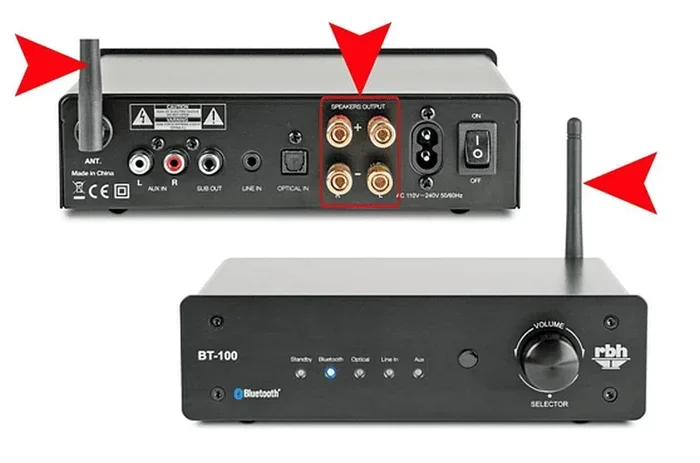
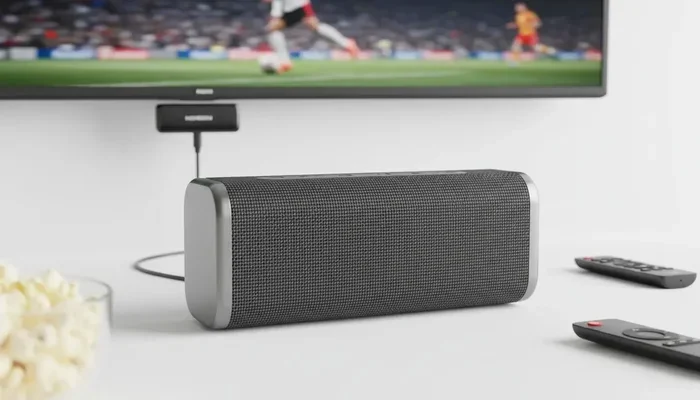
Do you have a TV without built-in Bluetooth? You are not stuck. Adding wireless audio to a non-Bluetooth TV is easy and affordable. The most popular solution is a Bluetooth transmitter. This small device plugs into your TV’s audio output, whether it is a 3.5mm headphone jack, an optical port, or an RCA output. The transmitter then sends the audio signal wirelessly to your Bluetooth headphones or speaker.
Bluetooth transmitters cost between $15 and $50, depending on the features. Look for one that supports aptX or aptX Low Latency for the best experience. Some transmitters also act as receivers, so you can use them to send audio from a phone to a non-Bluetooth speaker. This makes them a versatile addition to any home entertainment setup.
Another option is a Bluetooth soundbar with built-in Bluetooth reception. Many soundbars can connect wirelessly to your TV and improve your sound quality at the same time. This is a great two-for-one solution if your TV audio is not great and you also want to go wireless.
Expert Insights on Bluetooth TV Audio
We spoke with a few audio professionals to get their take on Bluetooth audio for TVs. They agreed that Bluetooth technology has come a long way in the last few years. “The difference between Bluetooth 4.2 and Bluetooth 5.0 is night and day,” says one AV specialist. “Lower latency, better range, and much more reliable connections. If you are shopping for a new TV, Bluetooth 5.0 should be a minimum requirement.”
Another expert pointed out that people often confuse Bluetooth with Wi-Fi streaming. “Bluetooth is a direct connection between two devices,” they explained. “Wi-Fi streaming, like Chromecast or AirPlay, sends audio over your home network. Both have their place, but Bluetooth is simpler and does not depend on your Wi-Fi signal.”
The consensus among professionals is clear: Bluetooth TVs are here to stay. As the technology continues to improve, we can expect even better sound quality, lower latency, and more seamless connections in the near future.
Key Takeaways
- Many modern smart TVs include Bluetooth: Brands like Samsung, LG, Sony, and TCL offer built-in wireless audio support on most models.
- Bluetooth adapters work for older TVs: If your TV lacks Bluetooth, a simple USB transmitter can add wireless audio capability in minutes.
- Wireless audio streaming is convenient but has limits: Audio latency and range can affect your experience, so knowing the trade-offs matters.
- Pairing is usually simple: Most Bluetooth TVs let you connect headphones and speakers through the settings menu in just a few steps.
- Bluetooth version matters: Newer versions like 5.0 and 5.3 deliver better sound quality, longer range, and lower latency.
- Multiple devices can connect: Many smart TVs allow you to pair more than one wireless audio device at a time.
Frequently Asked Questions
Do all smart TVs have Bluetooth audio?
No, not all smart TVs have Bluetooth. Most modern smart TVs from major brands do include Bluetooth, but some budget models skip it to cut costs. Always check the specifications before buying if Bluetooth is important to you. Look for “Bluetooth 5.0” or higher in the specs for the best experience.
Can I connect wireless headphones to any TV?
If your TV has built-in Bluetooth, yes. You can pair most wireless headphones directly. If your TV does not have Bluetooth, you can use a Bluetooth transmitter to add wireless capability. This small device plugs into your TV’s audio output and sends sound to your headphones over Bluetooth.
Does Bluetooth affect TV sound quality?
Bluetooth can slightly compress audio compared to a wired connection, but the difference is minor for most people. Newer Bluetooth versions and codecs like aptX deliver much better sound quality. For casual viewing, most people will not notice a significant difference between Bluetooth and wired audio.
How far can I move away from my TV with Bluetooth audio?
The standard Bluetooth range is about 30 feet in open spaces. Walls and other obstacles can reduce this distance. Bluetooth 5.0 and higher can reach up to 80 feet in ideal conditions. For the best experience, stay within 30 feet of your TV.
Can I connect multiple Bluetooth devices to my TV at once?
Yes, many modern smart TVs support connecting multiple Bluetooth devices simultaneously. Samsung and LG TVs are especially good at this. They allow you to pair two or more devices and switch between them easily. Check your TV’s manual to confirm how many devices it can handle at once.
Is Bluetooth audio on TV safe and secure?
Yes, Bluetooth connections are generally safe. They use encrypted signals that are difficult to intercept. Bluetooth also uses low power, so it does not pose any health risks. Modern Bluetooth versions also include security improvements that protect your data and connection from unauthorized access.
Conclusion
Do any TVs have Bluetooth audio? Absolutely. The vast majority of smart TVs sold today come with Bluetooth built in, making wireless audio easy and convenient. Whether you want to connect headphones for late-night watching, pair a soundbar for better sound, or stream audio to a portable speaker, Bluetooth connectivity on your TV makes it all possible. The technology has improved dramatically, with newer Bluetooth versions offering better range, lower latency, and superior sound quality. If your TV does not have Bluetooth, adding it is simple and affordable with a Bluetooth transmitter. Wireless audio is the future of home entertainment, and Bluetooth TVs are leading the way. Now that you know what is possible, you can make the best choice for your setup and enjoy a cleaner, more flexible viewing experience.