Can I Play Ps2 On A Modern Tv And Everything Needed
Yes, you can absolutely play PS2 on a modern TV, but you will need the right cables or an HDMI converter to make it work. The PlayStation 2 uses older analog outputs, and modern TVs are built for digital signals, so a little extra gear goes a long way. This guide covers every option, from composite cables to HDMI adapters, so you can enjoy your favorite classic games with the best possible picture quality.
Maybe you just dug out an old PlayStation 2 from the closet. Or perhaps you picked one up at a garage sale for next to nothing. Either way, the first question that hits you is pretty simple. Can I play PS2 on a modern TV? The short answer is yes. But the full answer is a bit more interesting, and it depends on a few things. Let us walk through it all together.
Playing PS2 games on a modern TV is totally doable. You just need to understand the connection types and pick the right setup for your screen. Modern TVs are digital, and the PS2 outputs an analog signal. That mismatch is the main thing standing between you and your favorite childhood games. Once you bridge that gap, everything falls into place.
In this article, we will cover every way to connect a PlayStation 2 to a modern television. We will look at the cables you probably already have, the adapters you might need to buy, and which method gives you the best picture quality. By the end, you will know exactly what to do. No guesswork. No frustration. Just a clear path to getting back to gaming.
Key Takeaways
- You can connect a PS2 to a modern TV: Using composite, component, or HDMI adapter cables depending on your TV’s inputs.
- HDMI converters offer the best picture: They upscale the PS2’s analog signal to digital output for sharper images on modern displays.
- Composite cables are the simplest option: They plug in easily but give the lowest picture quality of all the connection types.
- Component cables provide a big upgrade: They deliver better color and resolution compared to standard AV cables.
- Not all TVs have the same ports: Check your TV’s input options before buying any cables or adapters.
- Picture quality varies by method: HDMI converters produce the cleanest image, while composite cables may look blurry on large screens.
- Retro gaming is easier than ever: With the right setup, you can enjoy PS2 classics on any modern television without hassle.
📑 Table of Contents
- Why Does the PS2 Need Special Setup on Modern TVs?
- Can I Play PS2 On A Modern Tv Using Composite Cables?
- Using Component Cables for a Better Picture
- What About HDMI? The Best Way to Play PS2 on Modern TVs
- Comparison Table: Connection Methods for PS2 on Modern TVs
- Common Problems and How to Fix Them
- Expert Tips for the Best PS2 Gaming Experience on Modern TVs
- Final Thoughts on Playing PS2 on a Modern TV
Why Does the PS2 Need Special Setup on Modern TVs?
The PlayStation 2 came out in the year 2000. At that time, most people watched TV on CRT screens. Those old tubes handled analog signals just fine. The PS2 was designed to send its video output through analog cables. Fast forward to today, and modern flat-screen TVs are built entirely around digital signals. They do not always play nice with older analog outputs.
This is why you sometimes get a blank screen, fuzzy image, or no sound at all when you plug a PS2 straight into a new TV. The signal types do not match naturally. But the good news is that there are simple solutions. You just need the right cables or a small converter box to translate that old analog signal into something your modern TV can read.
The Signal Difference Explained Simply
Think of it like this. The PS2 speaks an old language. Your modern TV only understands a new one. A converter or the right cable type acts like a translator between the two. Without that translator, the TV simply cannot make sense of what the PS2 is sending. Once you add the right bridge, everything works smoothly again.
The PS2 originally supported three main cable types. Composite AV cables came in the box with most consoles. Component cables offered better quality and were sold separately. And some regions had SCART or RGB options that gave the best picture of all. Each of these outputs carries the analog signal in a slightly different way, and modern TVs handle them differently too.
Can I Play PS2 On A Modern Tv Using Composite Cables?
This is the most common and easiest method. Almost everyone still has the original composite AV cables lying around somewhere. They come with the yellow, red, and white RCA plugs. The yellow plug carries the video signal, while the red and white plugs handle the audio. You plug them into the back of your PS2 and into the corresponding inputs on your TV.
Most modern TVs still have composite inputs, even if they are not front and center. You will usually find them labeled as AV, Video, or RCA inputs. Some TVs hide them behind a panel or inside a menu. Once connected, your PS2 will display on the screen, but the picture quality will not be amazing.
Composite cables max out at 480i resolution. On a big modern TV, this can look pretty blurry. The image might also show some color bleeding or slight flickering. For casual gaming or nostalgia trips, this is totally fine. But if you want a sharper picture, there are better options available.
Pros and Cons of Composite Cables
- Pros: Everyone has them, they are cheap, and they plug in with zero setup.
- Cons: The picture quality is the lowest of all options, and large modern TVs can make the image look soft or blurry.
Using Component Cables for a Better Picture
If you want a noticeable step up in quality, component cables are the way to go. These cables split the video signal into three separate channels. That means more color detail and a cleaner image. The PS2 supports component output at up to 480p resolution, which is a real improvement over composite.
Component cables use green, blue, and red video plugs, plus red and white audio plugs. They look similar to composite cables but have three video inputs instead of one. Many modern TVs still include component inputs, though they are becoming less common on newer models. Check the back of your TV or look through the input settings to see if you have them.
The picture quality with component cables is much better for retro gaming. Text looks sharper, colors are more vivid, and the overall image feels cleaner on a large screen. If you have component cables for your PS2, this is the best budget-friendly option before moving on to HDMI converters.
Quick Tip: Check Your PS2 Model
Not every PS2 model supports component output out of the box. The original fat PS2 models definitely do. The slim PS2 models also support component, but you may need to adjust a setting in the menu. Go to Settings, then Configuration, and look for the video output option. Make sure it is set to component rather than automatic or composite.
What About HDMI? The Best Way to Play PS2 on Modern TVs
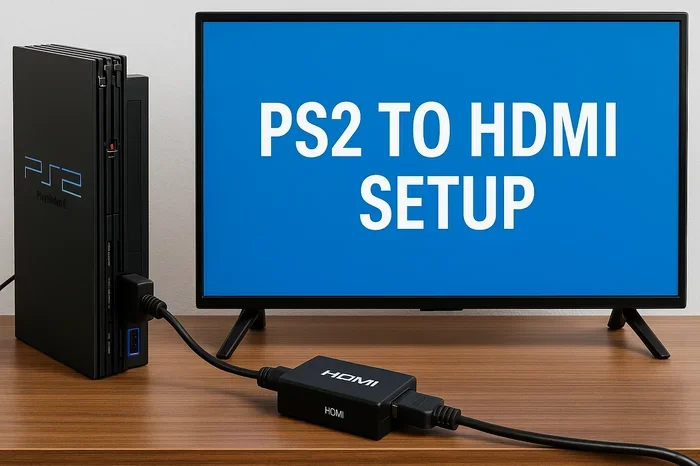
Here is where things get really good. The PS2 does not have an HDMI port. It was made long before HDMI became standard. But you can still get HDMI output from your PS2 with an HDMI converter. This small device plugs into the PS2’s AV or component outputs and converts the signal to HDMI. You then run a standard HDMI cable from the converter to your TV.
The result is the best picture quality you can get from a PS2 on a modern television. The converter upscales the signal, sharpens the image, and removes a lot of the old analog artifacts. Games look noticeably cleaner, text is easier to read, and colors pop better on a flat-screen display. For serious retro gamers, an HDMI converter is the gold standard.
Popular HDMI Converter Options
There are several HDMI converters available on the market. Some are basic and affordable, while others offer more features like scanline filtering and resolution scaling. Here are the main types you will come across:
- Basic HDMI converters: These are affordable and do the job. They convert the signal and output it via HDMI. They usually cost between 15 and 30 dollars.
- Upscaling HDMI converters: These offer better image processing. They can upscale the PS2 output to higher resolutions, making the picture look much sharper on large TVs.
- Advanced retro gaming converters: These are designed specifically for classic consoles. They add features like deinterlacing, color correction, and custom resolution options. They cost more but deliver the best results.
Setting Up an HDMI Converter Step by Step
- Plug the composite or component cables into the back of your PS2.
- Connect the other ends of those cables into the HDMI converter’s input ports.
- Attach an HDMI cable from the converter to your TV’s HDMI input.
- Plug the converter into a power source, usually via a USB cable or wall adapter.
- Switch your TV to the correct HDMI input.
- Turn on your PS2 and enjoy the upgraded picture.
The setup is simple and takes less than five minutes. Once it is connected, you will notice the difference immediately. Games that looked fuzzy on composite cables suddenly look crisp and clear. It is a huge upgrade for anyone who wants to revisit PS2 classics on a big modern screen.
Comparison Table: Connection Methods for PS2 on Modern TVs
| Connection Type | Picture Quality | Resolution | Cost | Ease of Setup |
|---|---|---|---|---|
| Composite Cables | Low | 480i | Free (included) | Very Easy |
| Component Cables | Medium | 480p | Low | Easy |
| HDMI Converter | High | Up to 480p (upscaled) | Medium | Easy |
| SCART / RGB Adapter | Medium-High | 480i or 480p | Low to Medium | Moderate |
The table above shows a clear winner for picture quality. The HDMI converter gives you the best results on a modern TV. But if you are on a tight budget and just want to play a few games quickly, composite cables will get the job done. Component cables strike a nice middle ground between cost and quality.
Common Problems and How to Fix Them
Even with the right setup, you might run into a few issues when connecting a PS2 to a modern TV. These are common and easy to fix. Let us go through the most frequent problems and their solutions.
No picture on the screen. This usually means the TV is on the wrong input. Check that your TV is set to the correct HDMI or AV input. Also make sure all cables are firmly plugged in. A loose connection is the number one cause of this issue.
Black and white image. This happens when you use composite cables and the TV misreads the signal. Try switching to component cables or an HDMI converter. If you are using composite, make sure the yellow plug is fully seated in the correct port.
No sound. Check the red and white audio cables. Make sure they are plugged into the matching audio input ports on your TV. Some modern TVs auto-detect audio inputs, so you may need to select the correct audio track in the TV settings.
Flickering or rolling picture. This is a classic issue with older consoles on modern displays. It usually means the signal is not being processed correctly. An HDMI converter with built-in deinterlacing will fix this almost always.
Quick Tips to Avoid Problems
- Always check cable connections before turning anything on.
- Use the highest quality cables your setup supports.
- Keep your PS2 firmware and TV input settings updated.
- If using a converter, make sure it is powered on before you turn the PS2.
- Try different HDMI ports on your TV if one does not work.
Expert Tips for the Best PS2 Gaming Experience on Modern TVs
Getting the PS2 connected is only half the battle. To really enjoy your games on a modern television, a few extra steps can make a big difference. These tips come from experienced retro gamers who have tested every setup imaginable.
Use a CRT TV for the authentic experience. If you still have an old CRT TV, the PS2 looks and feels its best on it. The image is smooth, the colors are warm, and the lag is zero. Many retro purists prefer CRT displays for PlayStation 2 gaming. But if you want to use a modern flat screen, the tips below will help.
Enable game mode on your TV. Most modern TVs have a game mode setting that reduces input lag. This makes the controls feel more responsive, which matters a lot for fast-paced PS2 games. Look for Game Mode in your TV’s picture settings and turn it on.
Adjust the TV’s sharpness and brightness. Modern TVs are often set to vivid or dynamic picture modes by default. These settings can make retro games look harsh and oversaturated. Switch to a standard or movie picture mode and reduce the sharpness slightly. The image will look much more natural and closer to how the games originally looked.
Consider a capture card for streaming. If you want to record or stream your PS2 gameplay on a modern setup, an HDMI converter with passthrough can feed both your TV and a capture card at the same time. This is a great option for content creators who want to share their retro gaming sessions.
Is Retro Gaming Worth the Effort?
Absolutely. Playing PS2 games on a modern TV brings back so many memories. The PlayStation 2 library is full of incredible titles that still hold up today. From legendary RPGs to groundbreaking action games, the PS2 has something for everyone. Getting it set up on a modern TV opens up a whole world of classic gaming that is well worth the effort.
Final Thoughts on Playing PS2 on a Modern TV
So, can I play PS2 on a modern TV? Yes, and it is easier than you might think. Whether you use the composite cables that came in the original box or invest in an HDMI converter for the best picture quality, the setup is straightforward and rewarding. You can revisit your favorite PS2 classics on a big, crisp modern display and experience them in a whole new way.
The right connection method depends on your TV, your budget, and how much you care about picture quality. Composite cables are the easiest and cheapest. Component cables offer a solid upgrade. And an HDMI converter gives you the best results by far. Pick the option that fits your situation, follow the setup steps, and you will be gaming in no time.
Retro gaming has never been more accessible. The PlayStation 2 is one of the greatest consoles ever made, and its library is full of timeless titles. Do not let an old console and a new TV stop you from enjoying those games again. With the right setup, your PS2 and your modern TV are the perfect pair.
Frequently Asked Questions
Do I need any special equipment to play PS2 on a modern TV?
You need at least the original composite cables that came with the PS2. For better picture quality, consider buying component cables or an HDMI converter. Most modern TVs still have the inputs needed to connect a PS2, so you do not need any special equipment beyond the right cables or adapter.
Will my PS2 games look good on a 4K TV?
The PS2 outputs a maximum of 480p, so the image will not be as sharp as native 4K content. However, using an HDMI converter with upscaling can significantly improve the picture quality on a 4K TV. The games will look much better than with composite cables, though they will not match the clarity of true high-definition content.
Can I use a PS2 HDMI adapter with any PS2 model?
Most HDMI adapters work with all PS2 models, including the original fat console and the slim version. Check the adapter specifications to confirm compatibility. The setup process is the same regardless of which PS2 model you own.
Is there any lag when playing PS2 on a modern TV?
Modern TVs can introduce slight input lag compared to old CRT displays. Enabling game mode on your TV reduces this lag significantly. Using an HDMI converter with a passthrough HDMI port can also help minimize any delay between pressing a button and seeing the action on screen.
What is the best cable type for PS2 on a modern TV?
An HDMI converter provides the best picture quality. It converts the PS2’s analog signal to digital HDMI output, resulting in a sharper and cleaner image. If you want a budget option, component cables are the next best choice and offer a noticeable upgrade over standard composite cables.
Can I connect multiple PS2 games easily with a modern TV setup?
Yes, once you have the right cables or converter connected, switching between PS2 games is just as easy as with any modern console. The setup remains the same regardless of which game you are playing. Just make sure your TV input is set correctly and your PS2 is powered on, and you are ready to play.
=== CONCLUSION ===
Playing PS2 on a modern TV is completely possible and surprisingly simple. You have several options to choose from, ranging from the basic composite cables to the premium HDMI converter setup. Each method has its own benefits, and the right choice depends on your TV, your budget, and how much you care about picture quality.
The PlayStation 2 remains one of the most beloved gaming consoles ever made. Its massive library of games offers hundreds of hours of entertainment, and getting it running on a modern television lets you enjoy those classics with a level of clarity that was never possible back in the day. Whether you are a nostalgic gamer revisiting old favorites or someone who just discovered the PS2 library, now is the perfect time to plug in and play.
Grab the right cables or grab an HDMI converter, follow the steps in this guide, and you will be gaming in minutes. The effort is minimal, and the reward is a whole world of retro gaming fun on your modern TV. Do not let the age of your console hold you back. Your PS2 and your modern television are a great match, and the games are waiting for you.