Can You Pair Jbl Bluetooth Speakers Together for Stereo
Yes, you can pair JBL Bluetooth speakers together for stereo mode and create a richer, more immersive sound experience. JBL offers built-in features like PartyBoost and JBL Connect+ that make wireless speaker pairing simple and fast. Whether you own a JBL Flip, JBL Charge, or JBL Boombox, this guide covers everything you need to know about connecting two speakers seamlessly.
Have you ever wondered if you can pair two JBL Bluetooth speakers together to create an amazing stereo setup? The good news is that yes, you absolutely can. Can You Pair JBL Bluetooth Speakers Together for a richer, more immersive listening experience? The answer is a resounding yes, and it is easier than most people think.
Whether you own a JBL Flip, a JBL Charge, or even a JBL Boombox, JBL has built-in features that make wireless speaker pairing simple and seamless. In this guide, we will walk you through everything you need to know about JBL speaker pairing, from compatibility to step-by-step instructions. You will learn how to set up stereo sound with your JBL portable speakers, avoid common mistakes, and get the most out of your audio setup.
By the end of this article, you will feel confident about connecting your speakers and creating a JBL sound system that fills any room with rich, balanced audio. Let us dive right in.
Key Takeaways
- Stereo pairing is possible: Most modern JBL speakers support wireless pairing for left and right channel separation.
- JBL PartyBoost is the key feature: This technology lets you connect multiple JBL speakers from the same generation.
- Compatibility matters: Not all JBL models can pair together. Always check speaker compatibility before attempting a connection.
- The process is simple: You can pair speakers in just a few steps using the JBL app or built-in Bluetooth pairing mode.
- Placement affects sound quality: Positioning your speakers correctly makes a huge difference in stereo performance.
- Troubleshooting is straightforward: Most pairing issues can be resolved with a simple reset or firmware update.
📑 Table of Contents
Can You Pair JBL Bluetooth Speakers Together for Stereo?
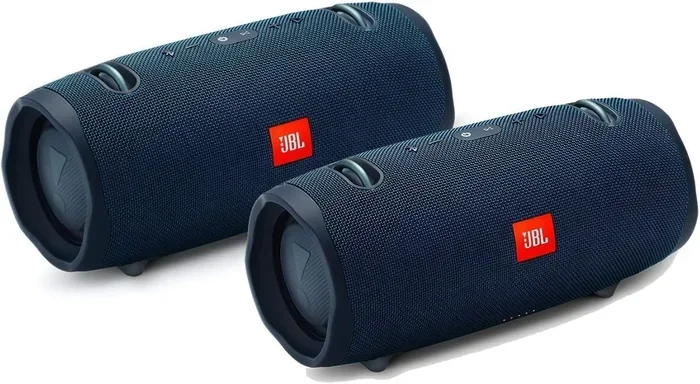
The short answer is yes. Can You Pair JBL Bluetooth Speakers Together for stereo sound? Absolutely. JBL designed many of its newer speakers with Bluetooth stereo mode and multi-speaker pairing features built right in. This means you can use two JBL portable speakers as a left and right channel pair, giving you a much wider and more dynamic soundstage.
Stereo pairing splits the audio signal into two channels. One speaker handles the left channel, and the other handles the right channel. This creates a sense of space and depth that a single speaker simply cannot match. When you pair JBL speakers together, you unlock a whole new level of audio clarity and richness.
What Does Stereo Pairing Actually Mean?
Stereo pairing means connecting two speakers so that each one plays a different channel of audio. The left speaker plays the left channel, and the right speaker plays the right channel. This mimics how professional audio systems work in studios and live venues.
When you set up JBL wireless connectivity in stereo mode, you get a more natural and spacious sound. Instruments and vocals feel like they are coming from specific directions instead of all muddled together in one spot. It makes a noticeable difference, especially when listening to music with complex arrangements.
Why Stereo Mode Matters for Your Listening Experience
Single speakers are convenient, but they have limitations. The sound tends to be flat and centered, which can feel narrow. Stereo mode opens up the sound field and makes music feel alive. Whether you are hosting a backyard party or enjoying a quiet evening at home, JBL speaker pairing in stereo mode delivers a noticeably better experience.
Here are some key benefits of using stereo mode with your JBL Bluetooth speakers:
- Wider soundstage: Music feels like it is wrapping around you instead of coming from one point.
- Better separation: You can hear individual instruments and vocal layers more clearly.
- Increased volume: Two speakers working together produce louder output than one alone.
- Enhanced bass response: Dual speakers can reproduce low frequencies more effectively.
- More immersive listening: Movies, podcasts, and music all benefit from stereo separation.
How JBL Speaker Pairing Technology Works
JBL wireless connectivity relies on Bluetooth technology to link speakers without any wires. The process uses a proprietary protocol that allows one speaker to act as the primary unit, or “master,” while the second speaker acts as the “slave.” The master speaker receives the audio signal from your phone or other device and then sends a copy of that signal to the second speaker.
JBL has developed two main technologies for multi-speaker pairing. The first is JBL Connect+, which was introduced in earlier speaker models. The second is JBL PartyBoost, which is the newer and more advanced system found in current-generation speakers. Both technologies serve the same core purpose: linking multiple speakers wirelessly for a bigger, more powerful sound.
Understanding Bluetooth Connectivity Between Speakers
Bluetooth is the wireless technology that allows your phone, tablet, or laptop to communicate with your speakers without using cables. When you pair JBL speakers together, they use Bluetooth to exchange audio data in real time. The range of Bluetooth is typically around 30 feet, though walls and obstacles can reduce this distance.
Modern JBL speakers use Bluetooth 5.0 or higher, which provides a more stable connection and better range than older versions. This means fewer dropouts and a more reliable stereo sound setup. The latest Bluetooth versions also support faster data transfer, which helps maintain audio quality during wireless transmission.
The Role of JBL Connect+ and PartyBoost
JBL Connect+ was the original multi-speaker pairing technology. It allowed you to connect multiple JBL Connect+ enabled speakers together. However, Connect+ speakers could not pair with newer PartyBoost speakers.
JBL PartyBoost replaced Connect+ and is the current standard. Speakers with PartyBoost can connect to other PartyBoost speakers, and many also support Connect+ for backward compatibility. PartyBoost also lets you control all connected speakers from a single app, adjust volume independently, and even set up multi-room audio across different areas of your home.
Quick Tips
- Check the label: Look for the PartyBoost or Connect+ logo on your speaker to confirm compatibility.
- Update firmware: Always keep your speakers updated through the JBL app for the best pairing performance.
- Same generation matters: Speakers from the same product line tend to pair more reliably with each other.
Which JBL Speakers Are Compatible for Pairing?
Not all JBL speakers can pair with each other. JBL speaker compatibility depends on the technology your speaker uses. Speakers with PartyBoost can connect to other PartyBoost speakers, and speakers with Connect+ can connect to other Connect+ speakers. Mixing the two technologies usually does not work.
JBL Flip Series Compatibility
The JBL Flip series is one of the most popular lines of portable speakers. The Flip 6 and Flip 5 both support PartyBoost, which means you can pair them together for stereo sound. Older Flip models like the Flip 4 and Flip 3 use Connect+, so they pair with each other but not with PartyBoost models.
JBL Charge and Boombox Models
JBL Charge speakers like the Charge 5 and Charge 4 also use PartyBoost and Connect+ respectively. The JBL Boombox series, including the Boombox 3 and Boombox 2, supports PartyBoost and delivers powerful stereo pairing for large outdoor spaces. The JBL Xtreme series and JBL Pulse series also participate in the PartyBoost ecosystem.
JBL Speaker Pairing Compatibility at a Glance
| Speaker Model | Pairing Technology | Can Pair With | Max Speakers |
|---|---|---|---|
| JBL Flip 6 | PartyBoost | PartyBoost speakers | 100+ |
| JBL Flip 5 | PartyBoost | PartyBoost speakers | 100+ |
| JBL Flip 4 | Connect+ | Connect+ speakers | 100+ |
| JBL Charge 5 | PartyBoost | PartyBoost speakers | 100+ |
| JBL Charge 4 | Connect+ | Connect+ speakers | 100+ |
| JBL Boombox 3 | PartyBoost | PartyBoost speakers | 100+ |
| JBL Boombox 2 | PartyBoost | PartyBoost speakers | 100+ |
| JBL Pulse 4 | PartyBoost | PartyBoost speakers | 100+ |
| JBL Xtreme 3 | PartyBoost | PartyBoost speakers | 100+ |
As you can see from the table, JBL portable speakers within the same technology group can pair together. If you are buying a second speaker specifically for stereo pairing, make sure it uses the same PartyBoost or Connect+ technology as your existing speaker.
Common Mistakes to Avoid
- Mixing technologies: Trying to pair a PartyBoost speaker with a Connect+ speaker will not work.
- Ignoring firmware updates: Outdated firmware can cause pairing failures and compatibility issues.
- Pairing too many speakers: While PartyBoost supports up to 100 speakers, pairing too many can degrade audio quality and drain batteries faster.
Step-by-Step Guide to Pairing Your JBL Speakers
Now that you know which speakers can pair together, let us walk through the actual process. Can You Pair JBL Bluetooth Speakers Together in just a few minutes? Yes, and here is exactly how to do it.
Pairing Two JBL Flip Speakers
Pairing two JBL Flip speakers is one of the most common setups. Here is how to do it:
- Turn on both speakers and make sure they are fully charged.
- Press the PartyBoost button on the first speaker. The LED light will start flashing, indicating it is ready to pair.
- Press the PartyBoost button on the second speaker. It will search for available speakers and connect automatically.
- Wait for the confirmation tone. Both speakers will play a sound to confirm the connection is established.
- Play music from your phone and enjoy stereo sound. The first speaker you activated will be the left channel, and the second will be the right channel.
This process works the same way for Charge 5, Boombox 3, and other PartyBoost-enabled speakers. The whole thing takes less than a minute once you have done it a couple of times.
Pairing JBL Charge with JBL Boombox
You can pair a JBL Charge 5 with a JBL Boombox 3 because both use PartyBoost. The process is identical to the steps above. The Boombox will likely produce more bass and volume, so it works well as the primary speaker while the Charge adds clarity and mid-range presence.
Using the JBL Portable App for Easy Setup
The JBL app (formerly called JBL Portable) makes speaker pairing even easier. You can download it for free on iOS and Android. The app lets you see all available PartyBoost and Connect+ speakers nearby, connect them with a single tap, and adjust settings like EQ and volume balance.
Using the app is especially helpful when you want to connect more than two speakers. It gives you a visual interface to manage your JBL sound system and ensures all speakers are synced properly.
Expert Insights
Audio engineers recommend always pairing speakers of the same model for the most balanced stereo image. When you pair two identical speakers, the frequency response and driver characteristics match perfectly, resulting in a seamless left-to-right soundstage. If you must pair different models, try to choose speakers from the same product line and generation for the best results.
Troubleshooting Common JBL Pairing Problems
Even with the best JBL wireless connectivity, you may run into issues sometimes. Speaker pairing problems are usually easy to fix. Here are the most common issues and how to solve them.
Speakers Won’t Connect to Each Other
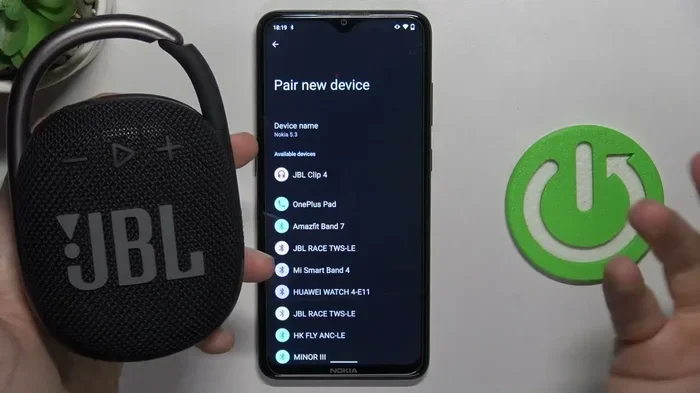
If your speakers refuse to pair, the first thing to check is the Bluetooth connection. Make sure both speakers are within a few feet of each other during the initial pairing process. Also, confirm that neither speaker is currently connected to a different device. You can do this by checking the Bluetooth settings on your phone and disconnecting from any other speakers.
Try resetting both speakers by holding down the power button and the volume down button simultaneously for about 10 seconds. This clears any previous pairing memory and puts the speakers in a fresh state ready for a new connection.
Audio Cuts Out or Drops Frequently
Intermittent audio drops are often caused by distance or interference. Keep both speakers within 30 feet of each other and away from walls, microwaves, and other Bluetooth devices. If you are using your speakers outdoors, make sure your phone is also within range of both speakers.
Another common cause is a low battery. When a speaker’s battery drops below 20 percent, the Bluetooth signal can become unstable. Keep your speakers charged, especially during long listening sessions.
One Speaker Is Louder Than the Other
This issue usually happens when the speakers are not balanced correctly. In the JBL app, you can adjust the volume balance between the left and right speakers manually. If you are not using the app, try swapping the positions of the two speakers to see if the louder one follows the speaker or stays with the position.
If swapping does not help, one speaker may have a firmware issue. Update the firmware on both speakers through the JBL app and try pairing again.
Quick Troubleshooting Tips
- Reset both speakers before attempting to pair again.
- Turn off Bluetooth on your phone and turn it back on to refresh the connection.
- Move closer together and retry the pairing process.
- Check for firmware updates in the JBL app.
- Forget the speaker in your phone’s Bluetooth settings and re-pair from scratch.
Expert Tips for the Best Stereo Experience
Pairing your JBL Bluetooth speakers is only half the battle. To get the best possible stereo sound setup, you need to think about placement, settings, and maintenance. Here are some expert tips that will elevate your listening experience.
Optimal Speaker Placement for Stereo Sound
Where you place your speakers has a huge impact on sound quality. For the best stereo image, position the two speakers about 3 to 5 feet apart and angle them slightly inward toward your listening position. This creates a sweet spot where the sound from both speakers blends perfectly.
Avoid placing speakers too close to walls or corners, as this can cause bass to become muddy and overwhelming. Elevating the speakers on a table or shelf also helps reduce floor reflections and improves clarity. If you are using your speakers outdoors, place them at roughly ear level when you are sitting or standing in your main listening area.
Maximizing Bluetooth Range and Signal Strength
Bluetooth has a practical range of about 30 feet in open space. Walls, furniture, and other obstacles can reduce this significantly. To get the best JBL wireless connectivity, keep your phone within range of both speakers and minimize physical barriers between them.
If you need more range, consider using a Bluetooth transmitter with an extended range. These devices plug into your audio source and broadcast a stronger, more stable signal to your speakers. They are especially useful for outdoor parties or large rooms where your phone might be far from the speakers.
Keeping Your Firmware Updated
JBL regularly releases firmware updates that improve Bluetooth stability, fix bugs, and add new features. The JBL app will notify you when an update is available for your speaker. Keeping your firmware up to date ensures the best pairing performance and audio quality.
Firmware updates can also add new JBL speaker compatibility with speakers from other product lines. This means an older speaker might gain the ability to pair with newer models after a firmware update.
Using Stereo Mode for Different Scenarios
Dual speaker mode works great in many situations. For indoor listening, place the speakers on opposite sides of the room for a wide soundstage. For outdoor gatherings, position them at the front of the crowd, angled toward the audience. For a bedroom setup, place them on nightstands about 4 feet apart for an intimate but spacious sound.
You can also use multi-room audio with PartyBoost to connect speakers in different rooms of your house. This lets you play the same music throughout your home or play different music in each room for a customized listening experience.
Common Mistakes When Pairing JBL Speakers
- Skipping the reset: A simple reset solves most pairing issues, but many people skip this step.
- Pairing in a crowded Bluetooth environment: Busy areas with many Bluetooth devices can interfere with the pairing process. Try pairing in a quieter location.
- Ignoring the JBL app: The app provides tools and features that make pairing easier and more reliable.
- Not checking battery levels: Low battery can cause connection drops and pairing failures.
Conclusion
Can You Pair JBL Bluetooth Speakers Together for stereo? The answer is a definitive yes. JBL has made it incredibly easy to connect two or more speakers wirelessly and create a powerful, immersive audio setup. Whether you use PartyBoost or Connect+, the process is straightforward and takes only a minute or two.
By following the steps in this guide, you now know how to check compatibility, pair your speakers, troubleshoot common issues, and optimize your stereo setup for the best possible sound. The key is to match speakers with the same pairing technology, keep firmware updated, and place your speakers thoughtfully for the best audio performance.
So go ahead and grab that second JBL speaker. Pair your JBL Bluetooth speakers together, sit back, and enjoy music the way it was meant to be heard. Your ears will thank you.