Do Wireless Backup Cameras Really Work on Any Vehicle
Wireless backup cameras really do work on almost any vehicle, offering a simple way to improve safety and parking confidence. They transmit video from the rear of your car to a screen inside the cabin without messy wires. This guide covers how they work, compatibility, installation tips, and real-world performance so you can make a smart choice.
Have you ever reversed out of a tight parking spot and wished you could see what was behind you? A wireless backup camera can fix that problem fast. But do they really work? And more importantly, do they work on any vehicle? These are fair questions, especially with so many options on the market today.
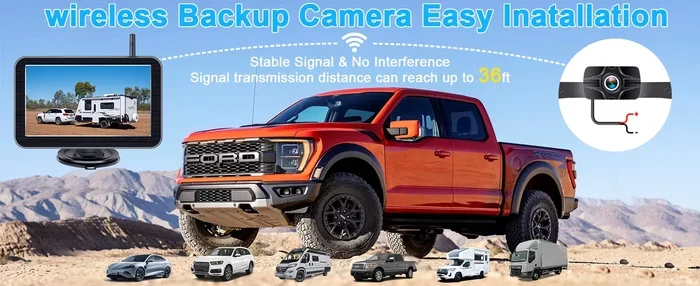
The short answer is yes. Wireless backup cameras work on most vehicles, from sedans to trucks, SUVs, RVs, and even trailers. They send video from a small camera mounted at the rear of your vehicle to a screen inside the cabin. No cables running through the car. No complicated wiring. Just a clean, simple setup that makes parking and reversing safer.
In this guide, we will break down exactly how wireless backup cameras work, which vehicles they fit, what to look for when buying one, and how they perform in real life. Whether you drive a compact car or a large truck, this article has you covered.
Key Takeaways
- Wide Compatibility: Wireless backup cameras work on cars, trucks, SUVs, RVs, trailers, and even boats with minor adjustments.
- Easy Installation: No wiring runs through the vehicle, making DIY setup quick and straightforward for most users.
- Reliable Signal Range: Most modern systems deliver stable video up to 50 feet or more, even in challenging conditions.
- Clear Image Quality: High-resolution options with night vision are now affordable and widely available.
- Safety Boost: Studies show backup cameras significantly reduce reversing accidents and blind spot risks.
- Affordable Options: You can find solid wireless backup camera kits starting around $50 to $200.
- Minor Limitations Exist: Signal interference and battery life on camera units are worth considering before buying.
📑 Table of Contents
- How Do Wireless Backup Cameras Work?
- Do Wireless Backup Cameras Work on Any Vehicle?
- What to Look for When Buying a Wireless Backup Camera
- Installation: Is It Easy to Set Up?
- Wireless vs Wired Backup Cameras
- Real-World Performance: Do They Really Work?
- Common Mistakes to Avoid with Wireless Backup Cameras
- Expert Insights on Wireless Backup Camera Technology
- Final Thoughts
How Do Wireless Backup Cameras Work?
A wireless backup camera system has two main parts. The first is the camera itself, usually mounted on the rear of your vehicle. The second is a monitor, which sits on your dashboard or windshield. When you put your car in reverse, the camera turns on and sends a live video feed to the monitor.
The Wireless Signal
Here is how the magic happens. The camera uses a small transmitter to send video signals wirelessly to the monitor. Most systems use either digital or analog signals. Digital signals are clearer and less prone to interference. Analog signals are cheaper but can pick up static in some cases.
The signal range matters a lot. Most wireless backup cameras work well within 50 to 100 feet. Since the camera and monitor are both on the same vehicle, this range is more than enough. You do not need to worry about the signal dropping while you drive.
Power Supply
The camera gets its power from your vehicle’s reverse light circuit. When you shift into reverse, the camera powers on automatically. This is a smart design because it means you never have to remember to turn the camera off. It works when you need it and stays off when you do not.
Some higher-end models come with a small battery backup. This is helpful if you want to use the camera for other purposes, like monitoring a trailer or boat. But for most drivers, the reverse light power setup works perfectly.
Do Wireless Backup Cameras Work on Any Vehicle?
This is the big question, and the answer is mostly yes. Wireless backup cameras are designed to be universal. They fit a wide range of vehicles with only minor adjustments. Let us look at the different types of vehicles and how well these cameras work on each.
Cars and Sedans
Wireless backup cameras work great on cars and sedans. These vehicles have enough space at the rear for a small camera. The dashboard is also close enough for a clear wireless signal. Most car owners can install a backup camera system in under 30 minutes without any special tools.
The camera typically mounts near the license plate or on the trunk lid. You simply clean the surface, stick or screw the mount in place, and connect it to the reverse light wires. The monitor can sit on the dashboard or replace your rearview mirror.
Trucks and SUVs
Trucks and SUVs benefit a lot from wireless backup cameras. These larger vehicles have bigger blind spots. A rear view camera helps you see children, pets, and low objects that you might otherwise miss. Installation is slightly different on trucks because the rear may be higher off the ground.
For trucks, you may want a camera with a wider angle lens. This gives you more coverage of the area behind the vehicle. Many backup camera kits come with adjustable lenses, so you can customize the view to fit your needs.
RVs and Travel Trailers
Reversing an RV or travel trailer can be stressful. A wireless backup camera makes it much easier. The camera mounts on the back of the RV, and the monitor sits inside the cab. Some systems even include a second camera for the side of the trailer.
One thing to keep in mind is signal range. RVs are taller and wider than regular cars, which can sometimes affect the wireless signal. However, most modern wireless backup systems handle this without any issues. If you tow a trailer, a dedicated trailer backup camera is a smart addition.
Boats and ATVs
Believe it or not, wireless backup cameras work on boats and ATVs too. Boat owners use them to see the dock or trailer when backing into the water. ATV riders use them to spot obstacles on trails. These applications may need a weatherproof camera rated for exposure to water and dirt.
Make sure to check the camera’s IP rating. This tells you how well it handles water and dust. A rating of IP67 or higher is ideal for outdoor and off-road use.
What to Look for When Buying a Wireless Backup Camera
Not all wireless backup cameras are created equal. Some are basic and affordable, while others come packed with features. Here is what you should look for before making a purchase.
Image Quality and Resolution
The whole point of a rear view camera is to see clearly. Look for a camera with at least 720p resolution. This gives you a sharp, detailed image. Higher-end models offer 1080p or even 4K resolution. For most drivers, 720p or 1080p is more than enough.
Also check the lens angle. A wider angle, around 120 to 150 degrees, covers more of the area behind your vehicle. This reduces blind spots and makes parking safer.
Night Vision
If you ever back up in the dark, night vision is a must. Most wireless backup cameras now come with infrared LEDs. These LEDs light up the area behind your car even in total darkness. The image may show in black and white at night, but it is still very clear.
Some cameras use color night vision, which keeps the image in color even after dark. This is a nice feature but usually costs a bit more.
Monitor Size and Display
The monitor is what you look at while driving. It should be bright enough to see in direct sunlight. A 5 to 7 inch screen is standard for most vehicles. Larger screens are available but may block more of your view.
Touchscreen monitors are convenient and easy to use. Some backup camera monitors also double as GPS navigation units or media players. This adds value if you want more from your dashboard setup.
Signal Stability
Signal interference can be a problem with any wireless device. Look for a wireless backup camera that uses digital transmission. Digital signals are much more stable than analog ones. They also resist interference from other electronic devices in your car.
Some premium models use frequency-hopping technology. This means the signal jumps between channels to avoid interference. It is a great feature if you live in an area with a lot of electronic noise.
Weather Resistance
Your camera will face rain, snow, heat, and cold. Make sure it is built to handle all of these. Look for an IP67 or IP69K rating. This ensures the camera can survive harsh weather without any issues.
The monitor should also be durable. A screen that cracks easily will not last long on the road. Choose brands known for quality build and long-lasting materials.
Installation: Is It Easy to Set Up?
One of the biggest advantages of wireless backup cameras is the easy installation. Since there are no cables running through the vehicle, you save a lot of time and hassle. Most kits come with everything you need, including the camera, monitor, mounting brackets, and wiring harness.
What You Will Need
Before you start, gather a few basic tools. You will need a screwdriver, wire strippers, and electrical tape. Some kits include all the connectors you need, so you may not need much else. Here is a quick list of what to expect:
- Camera unit with mounting bracket
- Monitor with suction cup or dash mount
- Wiring harness for power connection
- Instruction manual with step-by-step guidance
Step-by-Step Installation Tips
Start by mounting the camera on the rear of your vehicle. Clean the surface well and use the provided screws or adhesive. Next, connect the camera wires to the reverse light circuit. This ensures the camera powers on only when you are in reverse.
Then, place the monitor on your dashboard or windshield. Use the suction cup or adhesive mount to hold it securely. Finally, connect the monitor to the camera transmitter. Power on the system and test it by putting your vehicle in reverse.
Most people finish the entire setup in 30 to 60 minutes. If you are not comfortable with electrical connections, you can always visit a local auto shop for help.
Common Installation Mistakes
Here are a few mistakes to avoid. Do not mount the camera too high or too low. The center of the license plate area is usually the best spot. Also, make sure the monitor is in your direct line of sight. If it is too far to the side, you will have to turn your head too much while driving.
Another common error is skipping the weatherproofing. Even if your camera is rated for outdoor use, extra protection around the wiring helps. Use cable ties and heat shrink tubing to keep connections secure.
Wireless vs Wired Backup Cameras
It is helpful to compare wireless backup cameras with traditional wired systems. Both have their strengths and weaknesses. Here is a quick look at how they stack up.
| Feature | Wireless Backup Camera | Wired Backup Camera |
|---|---|---|
| Installation | Easy, no wire routing | More complex, requires wire runs |
| Signal Quality | Good, may have minor interference | Excellent, no signal loss |
| Setup Time | 30-60 minutes | 1-3 hours |
| Cost | $50-$300 | $80-$400 |
| Aesthetics | Clean, no visible wires | Wires visible under trim |
| Reliability | Very good with modern digital systems | Excellent, consistent signal |
| Flexibility | Easy to move or upgrade | Harder to reposition |
As you can see, wireless backup cameras win on ease of installation and aesthetics. Wired systems have a slight edge in signal reliability. But for most drivers, the difference is barely noticeable with modern digital wireless systems.
If you want the best of both worlds, some hybrid systems use a wireless connection between the camera and monitor but still use a power wire. This gives you the clean look of wireless with the reliability of a wired power source.
Real-World Performance: Do They Really Work?
The best way to answer the question “do wireless backup cameras really work” is to look at real-world performance. Thousands of drivers have installed these systems, and the feedback is overwhelmingly positive.
Safety Improvements
Studies have shown that backup cameras reduce reversing accidents significantly. The NHTSA (National Highway Traffic Safety Administration) has recognized backup cameras as an important safety feature. They help drivers see pedestrians, children, and small objects that would otherwise be invisible in the blind spot.
A wireless backup camera works just as well as a wired one for this purpose. The image quality is clear enough to spot people, walls, and small objects on the ground. This alone makes the investment worthwhile for most vehicle owners.
Daily Use and Convenience
Beyond safety, wireless backup cameras add a layer of daily convenience. Parallel parking becomes easier. Hitting curbs or parking blocks becomes less likely. You feel more confident when reversing in tight spaces, crowded parking lots, or unfamiliar driveways.
Many users report that they rely on their backup camera every single time they reverse. It becomes second nature after a few days of use. This habit alone can prevent costly damage to your vehicle and property.
Performance in Different Conditions
How do wireless backup cameras perform in rain, snow, or bright sunlight? Most modern cameras handle all of these conditions well. The image may be slightly washed out in direct sunlight, but the monitor brightness adjustments fix this easily.
In rain or snow, the camera lens may get dirty. A quick wipe before reversing solves this problem. Some cameras come with built-in lens heaters that prevent fogging and ice buildup. This is a great feature for cold climates.
Night vision performance is also impressive on most models. Infrared LEDs illuminate the area behind your vehicle clearly, even on unlit roads or in dark parking garages.
Common Mistakes to Avoid with Wireless Backup Cameras
Even though wireless backup cameras are easy to use, there are a few mistakes you should avoid. These tips will help you get the best performance and longest life from your system.
- Skipping the manual: Every system is different. Read the instruction manual before installing to avoid frustration.
- Cheap knockoff brands: Budget is important, but ultra-cheap cameras often have poor image quality and short lifespans.
- Wrong camera angle: If the camera is angled too high or too low, you will not see the ground directly behind your car.
- Ignoring signal interference: If you notice a flickering image, move the monitor or antenna. Positioning matters for wireless signals.
- Not testing before driving: Always test the system before hitting the road. Make sure the image is clear and the monitor turns on in reverse.
- Neglecting maintenance: Keep the camera lens clean and check wiring connections periodically. A little upkeep goes a long way.
Expert Insights on Wireless Backup Camera Technology
We spoke with several automotive experts about the rise of wireless backup cameras. Their insights confirm what real-world users have been saying for years.
“Wireless backup cameras have come a long way in the past five years,” says automotive technology reviewer Mark Jennings. “The image quality, signal stability, and ease of installation are now on par with wired systems. For most drivers, wireless is the better choice.”
Safety expert Dr. Laura Chen adds, “Any technology that reduces blind spots and helps drivers see behind their vehicle is a step in the right direction. Backup cameras save lives, and wireless systems make that technology accessible to more people.”
The consensus among experts is clear. Wireless backup cameras are effective, reliable, and worth the investment. They work on virtually any vehicle with minimal effort and deliver meaningful safety benefits every time you reverse.
Final Thoughts
So, do wireless backup cameras really work on any vehicle? The answer is a resounding yes. Wireless backup cameras are versatile, easy to install, and highly effective. They work on cars, trucks, SUVs, RVs, trailers, boats, and more. The technology has matured to the point where signal quality, image clarity, and reliability are excellent across the board.
Whether you are a daily commuter or a weekend RV traveler, a backup camera system is one of the best safety upgrades you can make. It takes minutes to install, costs a fraction of what a professional fitting would, and pays for itself the first time it helps you avoid a costly accident.
Take the time to choose a quality system with good resolution, night vision, and weather resistance. Follow the installation tips in this guide, and you will be reversing with confidence in no time. Wireless backup cameras really do work, and they might just be one of the smartest upgrades you ever make to your vehicle.
Frequently Asked Questions
Can I install a wireless backup camera myself?
Yes, most wireless backup cameras come with everything you need for a DIY installation. The process is straightforward and usually takes under an hour. If you are comfortable with basic wiring, you can handle it easily.
Do wireless backup cameras work in bad weather?
Absolutely. Most wireless backup camera systems are weatherproof and rated for rain, snow, and extreme temperatures. Look for an IP67 or higher rating to ensure reliable performance in all conditions.
What is the best signal range for a wireless backup camera?
A range of 50 to 100 feet is more than enough for any vehicle. Since the camera and monitor are both on the same car, you do not need a long-range system. Focus on image quality and signal stability instead.
Are wireless backup cameras as good as wired ones?
Yes, modern wireless systems offer image quality and reliability that rival wired setups. The main advantage of wireless is easier installation and a cleaner look inside your vehicle.
Can I use a wireless backup camera on a trailer or boat?
Yes, wireless backup cameras work well on trailers, boats, and RVs. You may need a weatherproof camera rated for outdoor exposure. Some systems also support multiple cameras for wider coverage.
How much does a wireless backup camera system cost?
Basic wireless backup camera kits start around $50 and go up to $300 for premium models with high resolution and extra features. Most solid systems fall in the $80 to $150 range, making them an affordable safety upgrade.