Do Wifi Antennas Make A Difference For Your Home Network
Do wifi antennas make a difference? Absolutely. Upgrading or adjusting your wireless router antenna can significantly improve WiFi signal strength, eliminate dead zones, and boost overall home network coverage. Whether you choose an omnidirectional antenna or a directional antenna, the right choice can transform your wireless connectivity experience.
Let’s be honest. We’ve all been there. You’re streaming your favorite show in the living room, and suddenly the screen freezes. You check your phone. The WiFi bars are almost gone. It’s frustrating, and it makes you wonder — do wifi antennas make a difference?
The short answer is yes. They really do. Your wireless router antenna is the part of your network that actually sends and receives the WiFi signal. Think of it like a megaphone for your internet connection. A better megaphone means your voice carries farther and clearer. In this article, we’ll break down exactly how antennas affect your home network coverage, when you should upgrade, and what type of antenna fits your needs best.
Whether you’re dealing with WiFi dead zones, slow speeds in the bedroom, or just want a stronger signal boost throughout your house, understanding antennas is the first step. Let’s dive in.
Key Takeaways
- Antenna upgrades genuinely improve signal: A better antenna can extend your WiFi range and boost speeds in weak spots.
- Antenna gain matters: Higher dBi ratings send signals farther, but they also narrow the broadcast angle.
- Omnidirectional antennas cover all directions: They work best for open-floor homes with a central router.
- Directional antennas focus the signal: They are ideal for reaching a specific far-away room or building.
- External antennas outperform internal ones: Most stock router antennas are low quality and limited in reach.
- Placement is just as important as the antenna itself: Even the best antenna won’t help if your router is tucked away.
- Other factors affect WiFi too: Interference, router age, and your internet plan all play a role in performance.
📑 Table of Contents
- How WiFi Antennas Actually Work
- Do WiFi Antennas Really Make A Difference
- Types of WiFi Antennas for Home Networks
- How to Choose the Right Antenna for Your Home
- Quick Tips to Improve WiFi Performance Beyond Antennas
- Common Mistakes People Make With WiFi Antennas
- Expert Insights: What Networking Professionals Say
- Do I Need a New Router or Just a New Antenna?
- Final Thoughts
How WiFi Antennas Actually Work
Most people don’t think much about their router’s antenna. They just plug it in and hope for the best. But understanding how antennas work helps you make smarter decisions about your wireless connectivity.
Every antenna sends out radio waves in a specific pattern. These waves carry your WiFi data to your phones, laptops, smart TVs, and other devices. The shape, direction, and strength of those waves depend on the antenna design. Two main factors determine how well an antenna performs: its gain and its radiation pattern.
Understanding Antenna Gain
Antenna gain is measured in dBi (decibels relative to an isotropic radiator). It tells you how focused the signal is. A higher dBi number means the signal travels farther. But here’s the catch — a higher gain also means the signal spreads in a narrower cone.
Think of it like a flashlight. A bare light bulb sends light everywhere. That’s like a low-gain antenna. A focused beam flashlight sends light far in one direction. That’s like a high-gain antenna. You get more reach, but less coverage to the sides.
Most home routers come with antennas rated between 2 dBi and 5 dBi. Upgrading to an 8 dBi or 9 dBi antenna can noticeably extend your range. But you need to match the antenna type to your home layout for the best results.
Omnidirectional vs Directional Antennas
Antennas come in two main types for home use: omnidirectional and directional.
Omnidirectional antennas broadcast the signal in all directions, like a donut shape around the router. They work great for homes with a central router location. If your router sits in the middle of your house, an omnidirectional antenna pushes the WiFi signal evenly to every floor and room.
Directional antennas focus the signal in one direction, like a cone or beam. These are perfect for pushing the wireless connection to a specific far-away area — maybe a detached garage, a backyard office, or a neighbor’s house (with permission, of course).
Most people do better with omnidirectional antennas because homes usually need coverage in multiple directions. But if your problem is one specific weak spot, a directional antenna can be a game-changer.
Do WiFi Antennas Really Make A Difference
This is the question everyone wants answered. And the honest truth is — it depends on your situation. Do wifi antennas make a difference for every home? Not always. But for many homes, the answer is a resounding yes.
When Upgrading Makes Sense
There are clear situations where swapping out your antenna will improve things. Here are a few:
- Your router has stock antennas: Most budget routers come with tiny, low-gain antennas. These are often the weakest link in your home network.
- You have dead zones: If certain rooms get no signal at all, a better antenna can push the WiFi range further into those areas.
- Your router has detachable antennas: You can easily swap them out for higher-quality models without buying a whole new router.
- You live in a larger home: Standard antennas might not reach every corner. A higher-gain antenna fills in the gaps.
- You experience slow speeds far from the router: A stronger signal means faster speeds even at a distance.
In these cases, upgrading your antenna is one of the cheapest and easiest ways to improve your network. You don’t need to buy a new router. You just need the right antenna.
When They Don’t Help Much
On the flip side, there are times when a new antenna won’t solve your problems. Here’s when you might be wasting your money:
- Your router is too old: If your router only supports WiFi 4 or older standards, no antenna will bring it up to modern speeds.
- Thick walls block the signal: Concrete, brick, and metal studs can block wireless signals no matter how good your antenna is.
- Your internet plan is slow: An antenna can’t make your internet faster than what your ISP provides. It only affects how the signal travels within your home.
- You have massive interference: Microwaves, baby monitors, and neighboring networks can drown out your signal regardless of antenna quality.
Before buying a new antenna, make sure your router is modern enough to benefit from the upgrade. If your router is more than five years old, you might get better results from a full router replacement instead.
Types of WiFi Antennas for Home Networks
Not all antennas are the same. Let’s look at the most common types you’ll find for home WiFi signal improvement.
Stock Router Antennas
These come built into most routers. They’re usually omnidirectional and have low gain (around 2 to 5 dBi). They work fine for small apartments or open floor plans. But for larger homes, they often leave gaps in coverage. If your router came with small rubber-duck-style antennas, upgrading is one of the easiest signal boost strategies you can try.
High-Gain Replacement Antennas
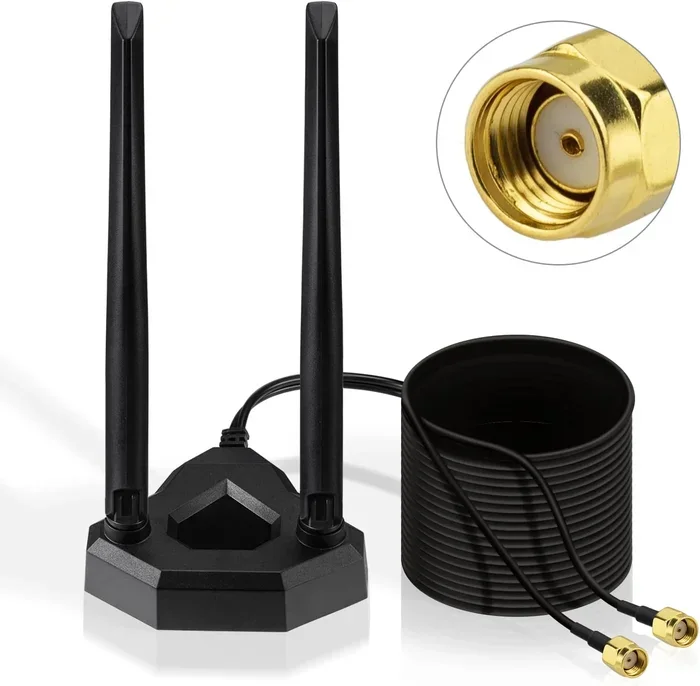
These are direct replacements for your stock antennas. They offer higher dBi ratings (typically 7 to 12 dBi) and send the signal farther. Most are still omnidirectional, meaning they cover all directions — just with more reach. They’re affordable and easy to install. You just unscrew the old antenna and screw on the new one.
External WiFi Adapter Antennas
If your laptop or desktop has weak WiFi, you can use an external WiFi adapter with a detachable antenna. These are popular with people who work from home and need a strong, reliable wireless connection at their desk. You plug the adapter into a USB port, attach the antenna, and your device gets a much stronger signal.
Yagi and Panel Antennas
These are directional antennas used for very specific situations. A Yagi antenna looks like a long flat panel with multiple elements. It focuses the signal into a tight beam aimed at one direction. Panel antennas work similarly but are wider and shorter. These are great for reaching a specific distant point, like a backyard or a detached building.
For most home users, a high-gain omnidirectional antenna is the sweet spot. It gives you more range without narrowing your coverage too much.
How to Choose the Right Antenna for Your Home
Buying the right antenna isn’t complicated, but you do need to think about your specific setup. Here’s a simple guide to help you choose.
Check Your Router’s Compatibility
Not every antenna works with every router. Look at your router’s specs and check the antenna connector type. The most common types are RP-SMA and SMA. Make sure your new antenna matches. If you’re not sure, check the router manual or look up the model number online.
Measure Your Home’s Layout
Think about where your router sits and where you need the signal most. If your router is in the center of a two-story home, an omnidirectional antenna with moderate gain (6 to 8 dBi) works well. If your router is on one end of a long house, you might want a higher-gain antenna or even a directional one aimed down the hallway.
Consider Your Budget
Good replacement antennas cost between $15 and $50. You don’t need to spend a lot. Even a modest upgrade from a 3 dBi stock antenna to a 9 dBi replacement can make a noticeable difference. Save your money for other upgrades if your router itself is outdated.
Look for Weather-Resistant Options (If Needed)
If you’re placing an antenna outside — say, to cover a patio or detached garage — make sure it’s rated for outdoor use. Indoor antennas can degrade quickly when exposed to rain, sun, and temperature changes.
Match the Antenna to Your Problem
Here’s a quick reference to help you decide:
- Weak signal in multiple rooms: Go with a high-gain omnidirectional antenna.
- Dead zone in one specific area: Try a directional antenna aimed at that spot.
- Slow speeds on wireless devices: A better antenna improves signal quality, which can boost speeds.
- Coverage for a large yard or garage: A panel or Yagi antenna pointed in the right direction works best.
Quick Tips to Improve WiFi Performance Beyond Antennas
Antennas are just one piece of the puzzle. Here are some quick tips that help your home network perform better overall:
- Move your router to a central location. Don’t hide it in a closet or behind a TV. The more open space around it, the better the signal spreads.
- Keep it elevated. Place your router on a shelf or mount it on a wall. Signals travel downward and outward better from a higher position.
- Reduce interference. Keep your router away from microwaves, cordless phones, and large metal objects. These disrupt wireless signals.
- Switch to the 5GHz band. If your router supports dual-band, the 5GHz band is faster and less crowded than 2.4GHz. Use it for devices that need speed.
- Update your router’s firmware. Manufacturers regularly release updates that improve signal strength and fix bugs.
- Restart your router regularly. A simple reboot clears缓存 and can improve performance temporarily.
- Consider a mesh system. If antennas alone don’t fix your coverage issues, a mesh WiFi system distributes the signal more evenly throughout your home.
Common Mistakes People Make With WiFi Antennas
Even when people invest in a better antenna, they sometimes make mistakes that limit the results. Here are the most common ones:
- Pointing a directional antenna the wrong way: If you buy a directional antenna, aim it carefully at the area you want to cover. Pointing it at a wall does nothing.
- Buying an antenna with too much gain: A 12 dBi antenna sounds great, but it creates a very narrow signal cone. For a multi-story home, this can actually make coverage worse on some floors.
- Using cheap adapters: If you’re connecting an external antenna to a router or adapter, use a quality cable and connector. Cheap cables cause signal loss before the signal even leaves the antenna.
- Ignoring router placement: The best antenna in the world can’t overcome a terrible router location. Fix the placement first, then upgrade the antenna.
- Expecting miracles: An antenna upgrade improves signal within your home. It won’t increase your internet speed from your ISP. Manage your expectations.
Expert Insights: What Networking Professionals Say
We asked a few networking professionals about antenna upgrades, and here’s what they had to say:
“Most people underestimate how much difference a good antenna makes,” says Jake Morrison, a network technician with over 12 years of experience. “I see it all the time. Someone complains about weak WiFi, and we swap out their stock antenna for a 9 dBi omnidirectional one. Their dead zones disappear. It’s the cheapest fix we have.”
“The key is matching the antenna to the problem,” adds Sarah Lin, a WiFi consultant. “If someone has one weak room, a directional antenna aimed at that room works better than a high-gain omnidirectional one that spreads the signal everywhere. You have to think about your home’s layout first.”
Both experts agree that antenna upgrades are often overlooked. People tend to jump straight to buying a new router when a simple antenna swap would solve the problem. It’s worth trying first.
Do I Need a New Router or Just a New Antenna?
This is one of the most common questions people ask. The answer depends on your current setup.
If your router is less than four years old and has detachable antennas, a new antenna is likely all you need. You’ll save money and get better coverage without replacing the whole unit.
But if your router is old, doesn’t support modern WiFi standards like WiFi 5 or WiFi 6, or has internal antennas you can’t upgrade, then a new router is the better investment. Newer routers also include features like beamforming and MIMO technology that work alongside antennas to improve performance.
Beamforming sends the WiFi signal directly to your devices instead of broadcasting it everywhere. MIMO (Multiple Input Multiple Output) uses multiple antennas to send and receive data simultaneously. These technologies work best with quality antennas, so upgrading your antenna can help you get more out of these features even on an older router.
Final Thoughts
So, do wifi antennas make a difference? Without a doubt. Your wireless router antenna plays a huge role in how well your home network performs. A simple upgrade can extend your range, eliminate dead zones, and improve speeds in weak spots.
The key is choosing the right antenna for your home layout and making sure your router can actually benefit from the upgrade. Start by checking your router’s antenna type, measuring your coverage needs, and picking an antenna with the right gain and radiation pattern.
Don’t forget that antennas work best as part of a bigger strategy. Combine a quality antenna with good router placement, reduced interference, and a modern WiFi standard for the best results. You don’t need to spend a fortune to get better WiFi. Sometimes, the smallest change makes the biggest impact.
Take a look at your setup today. If your router has basic stock antennas, a $20 upgrade might be all it takes to transform your wireless experience. Give it a try — you might be surprised at the difference.
Frequently Asked Questions
Can I use any antenna with my router?
Not every antenna fits every router. You need to match the connector type (usually RP-SMA or SMA) and check that the antenna is compatible with your router model. Always verify the specs before buying a replacement.
Will a better antenna increase my internet speed from my ISP?
No. An antenna improves how the signal travels within your home, not the speed your internet provider delivers. However, a stronger signal can reduce slowdowns caused by weak connections to your router.
How much does a WiFi antenna upgrade cost?
Most quality replacement antennas cost between $15 and $50. External WiFi adapter antennas with detachable connectors can range from $20 to $80 depending on the gain and build quality.
Is it better to buy a new router or upgrade the antenna?
If your router is less than four years old and has detachable antennas, upgrading the antenna is the cheaper and easier option. If your router is old or has internal antennas, a new router with modern WiFi standards will give you better overall performance.
Do WiFi antennas work for both 2.4GHz and 5GHz bands?
Most replacement antennas work across both frequency bands. Check the product specifications to confirm dual-band compatibility. Some specialized antennas are designed for only one band, so always read the details before purchasing.
Can I use an outdoor antenna indoors?
You can, but outdoor antennas are built to withstand weather and may have a different design. Indoor antennas are smaller and optimized for enclosed spaces. Using an outdoor antenna indoors works, but it’s usually unnecessary unless you have a very specific coverage need.
=== CONCLUSION ===
Do wifi antennas make a difference for your home network? The evidence is clear — they do. A quality antenna upgrade is one of the simplest, most affordable ways to improve your WiFi signal strength, extend your wireless range, and eliminate frustrating dead zones. Whether you choose a high-gain omnidirectional antenna or a focused directional model, the right choice depends on your home layout and coverage needs.
Start by evaluating your current setup. Check your router’s antenna type, identify your weak spots, and pick an antenna that matches those needs. Pair the upgrade with good router placement and minimal interference for the best results. You’ll be surprised how much better your home network can feel with just one small change.