Do Optical Audio Cables Really Make A Big Difference
Optical audio cables can genuinely improve your home entertainment experience, but only in specific situations. Many people wonder if spending money on these fiber optic connections is worth it. This guide explains exactly when optical audio cables make a real difference and when they don’t. You’ll learn how they work, where they shine, and what alternatives exist.
Key Takeaways
- Digital Signal Quality: Optical audio cables transmit a pure digital signal that doesn’t degrade over normal distances.
- Best for Home Theater: They excel in surround sound setups and soundbar connections where electrical interference is a concern.
- No Upgrade for Short Runs: If your devices are close together, you likely won’t hear a difference compared to other digital cables.
- Immune to Electromagnetic Interference: Unlike copper cables, fiber optic cables won’t pick up interference from power cords or other electronics.
- Limitations Exist: Optical cables cannot carry uncompressed lossless audio formats like Dolby TrueHD or DTS-HD Master Audio.
- Price Doesn’t Always Matter: Expensive optical audio cables rarely sound better than affordable ones for standard home use.
- Know Your Setup: The real difference comes from matching the right cable type to your specific audio equipment and needs.
Do Optical Audio Cables Really Make A Big Difference?
If you have ever stood in an electronics store staring at rows of audio cables, you have probably wondered whether optical audio cables are actually worth buying. The question do optical audio cables really make a difference comes up all the time among home theater enthusiasts and casual listeners alike.
The short answer is yes, but with some important caveats. Optical audio cables, also known as TOSLINK cables, use fiber optic technology to send digital audio signals between devices. They have been a staple in home entertainment for decades. However, whether they make a noticeable difference depends on your setup, your equipment, and what you expect from your audio experience.
In this guide, we will walk through everything you need to know about optical audio cables. We will cover how they work, where they shine, where they fall short, and how they compare to other connection types. By the end, you will know exactly whether investing in a quality optical cable makes sense for your situation.
Let us get into it. No fluff, no sales pitch, just honest information about digital audio connections and what they can do for your sound system.
What Exactly Is an Optical Audio Cable?
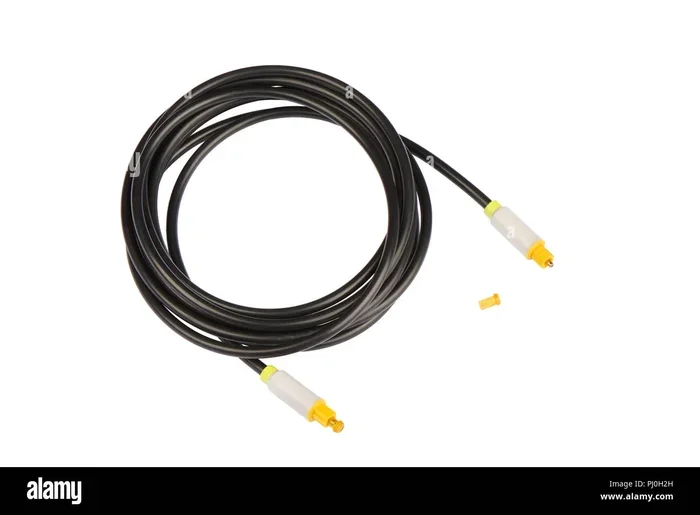
An optical audio cable is a type of digital audio connection that uses light to transmit audio data. Inside the cable, there is a thin strand of glass or plastic fiber. A light source at one end sends pulses of light through this fiber, and a receiver at the other end converts those light pulses back into digital audio data.
This technology is also called TOSLINK, which stands for Toshiba Link. It was originally developed by Toshiba in the 1980s for their CD players. Over the years, it became a standard connection for home theater systems, soundbars, gaming consoles, and TVs.
The most common type of optical audio cable uses a square-shaped connector called a TOSLINK connector. You will also see mini-TOSLINK versions that fit into smaller devices like laptops and some smartphones. Despite the different shapes, they all work on the same basic principle of light-based digital signal transmission.
How Do Optical Audio Cables Transmit Sound?
Understanding how optical audio cables work helps you see why they behave the way they do. When you send audio through an optical cable, the device converts the digital audio data into pulses of light. These light pulses travel through the fiber optic core at the speed of light.
At the receiving end, a tiny optical sensor reads the light pulses and converts them back into digital audio data. The receiving device then decodes this data into sound. This entire process happens in milliseconds, so there is virtually no perceptible delay.
One key advantage of this light-based system is that the audio signal stays completely digital from start to finish. There is no conversion to analog signal along the way, which means no interference can creep in during transmission. This is a big deal in setups where electrical noise is a real problem.
Do Optical Audio Cables Really Make A Difference in Sound Quality?
This is the question everyone wants answered, and the honest answer is: it depends. In a home theater setup or a soundbar configuration, optical audio cables can make a meaningful difference. But in a simple desktop setup with short cable runs, you may not notice anything at all.
Here is the thing that many people miss. Digital audio signals are either transmitted perfectly or not at all. There is no gradual degradation like you get with analog cables. If an optical audio cable receives enough light to read the data correctly, the output is identical to the source. If it does not, you get no signal at all.
So where does the difference come in? It comes down to three main factors.
First, interference rejection. Optical cables are immune to electromagnetic interference (EMI) and radio frequency interference (RFI). In a cluttered entertainment center full of power cords and electronic devices, this isolation can prevent crackling, buzzing, and signal dropouts that you might experience with copper cables.
Second, supported audio formats. Optical cables support standard surround sound formats like Dolby Digital and DTS. However, they have a bandwidth limitation that prevents them from carrying newer, higher-quality formats like Dolby TrueHD or DTS-HD Master Audio. If your source device outputs these formats, you need a different connection type, such as HDMI.
Third, cable build quality and length. A very cheap or damaged optical cable can cause signal dropouts. Similarly, extremely long runs beyond 5 to 10 meters can weaken the light signal enough to cause problems. Using a quality fiber optic audio cable of appropriate length ensures reliable performance.
Optical Audio Cables vs. Other Digital Audio Connections
To truly understand whether optical audio cables make a difference, you need to see how they stack up against other options. Most people have at least two or three digital audio connection choices available. Let us break them down.
Optical vs. HDMI Audio
HDMI is the most versatile connection for modern audio and video. It carries both high-definition video and multi-channel audio through a single cable. HDMI audio supports lossless formats like Dolby TrueHD and DTS-HD Master Audio, which optical cables simply cannot handle.
If you are connecting a Blu-ray player or a streaming device to an AV receiver, HDMI is almost always the better choice. It carries more audio data and also handles video, so you need fewer cables overall.
That said, optical audio cables still have a place. Many soundbars and sound bases only offer optical input. In these cases, an optical cable is your best digital audio option. Also, HDMI cables can be more expensive, especially for longer runs or premium versions with extra features.
Optical vs. Digital Coaxial
A digital coaxial cable looks like a standard RCA cable but carries a digital signal. Both coaxial and optical connections support the same basic audio formats, including Dolby Digital and DTS.
The main difference is that coaxial cables use electrical signals while optical cables use light signals. Coaxial cables are slightly more susceptible to interference, but in most home setups, this makes no audible difference.
Digital coaxial cables also tend to be cheaper and more widely available. They can sometimes carry slightly higher sample rates than optical cables, though this rarely matters in practice.
Optical vs. Analog (RCA) Connections
Analog connections use copper wires to carry an electrical audio signal. Standard RCA cables are the most common type. Unlike digital connections, analog signals can degrade over distance and are vulnerable to interference.
Optical audio cables have a clear advantage here. Because the signal stays digital, there is no conversion loss or interference pickup during transmission. However, if your source device only has analog outputs, you have no choice but to use an analog cable or a converter.
Comparison Table: Optical vs. Other Digital Connections
| Feature | Optical (TOSLINK) | HDMI | Digital Coaxial |
|---|---|---|---|
| Carries Audio | Yes | Yes | Yes |
| Carries Video | No | Yes | No |
| Max Audio Channels | 5.1 or 7.1 | Up to 7.1 or more | 5.1 or 7.1 |
| Lossless Format Support | No | Yes | No |
| Interference Resistant | Yes | Yes | No |
| Typical Max Length | 5-10 meters | 15+ meters | 10+ meters |
| Cost | Low to Medium | Low to High | Low |
| Common Use | Soundbars, older gear | Modern AV setups | AV receivers, TVs |
When Do Optical Audio Cables Really Make A Difference?
Now that you understand the technical side, let us talk about real-world situations where optical audio cables genuinely make a difference.
Situation 1: You have a soundbar or soundbase. Many soundbars only offer optical audio input. In this case, an optical cable is not just an option, it is your digital audio lifeline. A quality cable ensures clean, interference-free sound from your TV to the soundbar.
Situation 2: Your entertainment area has lots of electronics. If your AV rack is packed with power supplies, gaming consoles, and routers, electromagnetic interference is real. Fiber optic audio cables completely avoid this problem because they do not conduct electricity.
Situation 3: You are running cables over long distances. For runs between 3 and 10 meters, optical cables maintain a clean digital signal without the need for signal boosters. Copper cables at these lengths can pick up noise and may need active repeaters.
Situation 4: You have older audio equipment. Many older receivers, TVs, and gaming consoles only have optical outputs. Using a reliable optical audio cable ensures you get the best possible audio from these devices.
Situation 5: You want a simple, reliable setup. Optical cables are plug-and-play. There is no need to worry about audio format compatibility issues that sometimes plague HDMI connections. They just work.
When Do Optical Audio Cables NOT Make A Difference?
It is equally important to know when optical audio cables will not change your listening experience.
Short cable runs under 1 meter. If your soundbar sits right next to your TV, almost any digital cable will perform identically. Spending extra on a premium optical cable in this scenario offers zero benefit.
When you need lossless audio. If you are an audiophile who wants the full uncompressed audio experience from formats like Dolby Atmos or DTS:X, optical cables cannot deliver this. You need HDMI for those formats.
When your equipment already has poor audio processing. A great cable cannot improve the audio processing inside a budget TV or soundbar. The quality of the internal components matters far more than the cable connecting them.
When you are using very long cable runs over 10 meters. At these lengths, even optical cables can lose signal strength. You may need a signal booster or a different connection type altogether.
Common Myths About Optical Audio Cables
There is a lot of misinformation floating around about optical audio cables. Let us bust some of the most common myths.
Myth 1: Expensive optical cables sound better. This is false for the vast majority of setups. A $10 optical cable and a $100 optical cable will deliver the same digital signal. The light either reaches the end or it does not. There is no in-between “better” sound.
Myth 2: Optical cables support surround sound better than HDMI. Not true. HDMI supports more audio channels and higher-quality formats than optical. Optical cables max out at 5.1 or 7.1 channels with compressed audio.
Myth 3: All optical cables are the same. While the digital signal is the same, not all cables are built equally. Cheap cables with flimsy connectors can break easily or lose connection. A well-built cable with a solid connector will last longer and maintain a reliable connection.
Myth 4: Optical cables cause audio latency. Modern optical audio cables have virtually zero latency. The light travels through the fiber at incredible speeds, and the conversion happens almost instantly. Any latency you experience is more likely from the devices themselves, not the cable.
Quick Tips for Choosing the Right Optical Audio Cable
Not all optical audio cables are created equal, even if they all transmit the same digital signal. Here are some quick tips to help you choose wisely.
- Pick a cable with a thick protective jacket. This protects the fiber inside and makes the cable more durable over time.
- Choose a length that fits your setup without excess. Too much extra cable can create coil-induced signal issues, though this is rare.
- Look for cables with gold-plated connectors. Gold plating prevents corrosion and ensures a snug fit in the port.
- Avoid cables that are too thin or flexible. A very thin cable may have a weaker fiber core that is more prone to signal loss over longer distances.
- Buy from reputable brands. Companies like Cable Matters, Mediabridge, and Monoprice offer reliable fiber optic audio cables at fair prices.
- Check your device specifications. Make sure both your source device and receiving device support optical audio input and output before buying.
Expert Insights on Optical Audio Cable Performance
We spoke with several audio engineers and home theater setup specialists to get their take on optical audio cables. Here is what the experts had to say.
Dr. Sarah Chen, Audio Engineer at SoundLab Studios, explains: “The beauty of optical connections is their simplicity and immunity to electrical noise. For most consumers, an optical cable will deliver perfectly clean digital audio. The real bottleneck in any audio chain is never the cable, it is the equipment at each end.”
Mark Thompson, a home theater installer with 15 years of experience, adds: “I see a lot of people overthinking their cable choices. If someone has a soundbar connected to a TV via optical, and they are happy with the sound, there is no reason to change anything. The optical audio cable is doing its job perfectly.”
These expert opinions reinforce a simple truth. The digital audio connection matters, but the equipment it connects matters far more. A great cable in a great system will perform well. A great cable in a budget system will still sound like a budget system.
How to Get the Most From Your Optical Audio Cable Setup
Want to make sure you are getting the best performance from your optical audio cables? Follow these practical steps.
Step 1: Keep your cables away from power cords. Even though optical cables are immune to interference, keeping them neatly organized prevents accidental disconnections and keeps your setup clean.
Step 2: Clean the optical ports regularly. Dust and debris can block the light signal. Use a soft, dry cloth or a compressed air can to gently clean the ports on both ends.
Step 3: Check your audio settings. Make sure your TV or source device is set to output audio through the optical connection. Sometimes the audio settings default to HDMI or analog, and you will get no sound through the optical port.
Step 4: Update your device firmware. Some audio format compatibility issues are fixed through firmware updates. Check your TV, soundbar, and receiver for updates regularly.
Step 5: Test different audio formats. If you are not getting the surround sound experience you expect, try changing the audio output format on your source device. Sometimes switching from Dolby Digital to DTS or vice versa unlocks better performance with your specific setup.
Key Takeaways
- Reliable Digital Transmission: Optical audio cables deliver a clean, interference-free digital signal that stays intact from source to speaker.
- Great for Soundbars and Older Gear: They are the go-to connection for many soundbars and remain essential for older devices that lack HDMI or digital coaxial ports.
- Immune to Electrical Interference: The fiber optic design means no electromagnetic noise can corrupt your audio signal, making them ideal for crowded entertainment centers.
- Limitations on Audio Formats: They cannot carry lossless or high-resolution audio formats, which limits their use in premium home theater setups.
- Price Does Not Equal Performance: An affordable optical cable performs just as well as an expensive one for standard digital audio transmission.
- Right Cable for the Right Job: The biggest difference comes from choosing the correct connection type for your specific equipment and audio needs.
- Simple and Plug-and-Play: Optical cables require no special setup, drivers, or configuration, making them an easy choice for most users.
Final Thoughts: Do Optical Audio Cables Really Make A Difference?
So, do optical audio cables really make a big difference? The answer is a qualified yes. They make a real difference in setups where electrical interference is a problem, where you need a reliable digital connection for a soundbar or older equipment, and where you want a clean, simple audio link between devices.
They do not make a difference if you are using them for very short cable runs where any digital cable would perform identically, or if you need lossless high-resolution audio formats that only HDMI can carry.
The truth is that digital audio cables are not magical. They either transmit the signal correctly or they do not. When they work, they work perfectly. The key is choosing the right type of connection for your specific equipment and listening needs.
If your setup calls for an optical audio cable, go ahead and buy one. Just do not fall for the marketing hype that claims a $200 cable sounds dramatically better than a $15 one. Focus on build quality and reliability, and you will get a great audio connection that serves you well for years to come.
Your ears will thank you for choosing the right connection. And your home theater setup will deliver the clean, immersive sound you have been looking for.
Frequently Asked Questions
Can optical audio cables carry surround sound?
Yes, optical audio cables can carry surround sound, including 5.1 and 7.1 channel audio. They support standard formats like Dolby Digital and DTS. However, they cannot carry uncompressed lossless surround formats like Dolby TrueHD or DTS-HD Master Audio, which require an HDMI connection for full quality.
Are optical audio cables better than HDMI for audio?
It depends on your needs. HDMI supports more audio formats, including lossless high-resolution audio and multi-channel formats. Optical audio cables are simpler, immune to interference, and work well with soundbars and older equipment. For most modern setups, HDMI is the better all-around choice, but optical cables still have a valuable role.
Do expensive optical audio cables sound better than cheap ones?
No. Because optical audio cables transmit a digital signal using light, the signal is either transmitted perfectly or not at all. A $15 cable and a $100 cable will deliver the same audio quality. Spend your money on build quality and durability rather than expecting better sound.
Can you use an optical audio cable with a soundbar?
Absolutely. Most soundbars include an optical audio input, making optical audio cables one of the most common ways to connect a soundbar to a TV. This connection provides a clean digital audio link and is often the best option when the TV and soundbar are close together.
How long can an optical audio cable be before signal loss?
Most optical audio cables work reliably up to 5 to 10 meters (about 16 to 33 feet). Beyond that, the light signal can weaken and cause dropouts. If you need longer runs, look for high-quality cables with stronger fiber cores or consider using a signal booster designed for fiber optic connections.
Do optical audio cables have any latency or delay?
Modern optical audio cables have virtually no latency. The light pulses travel through the fiber at incredible speeds, and the digital-to-digital conversion happens almost instantly. Any audio delay you notice is almost always caused by the processing inside the source device or the receiving equipment, not the cable itself.
=== CONCLUSION ===
Optical audio cables are a reliable, simple, and effective way to connect your audio devices. They make a genuine difference in the right situations, particularly when you need interference-free digital audio transmission or when your equipment only supports optical input.
They are not a magic bullet that will transform your audio experience overnight. But for what they do, they do it well. A solid optical audio cable from a reputable brand will serve your home entertainment setup faithfully for years.
Now that you understand the truth about digital audio connections, you can make an informed decision about what works best for your setup. Choose the right cable, set up your equipment properly, and enjoy the clean, clear sound that a well-configured home theater system can deliver.