Do I Need A Projector Screen For My Projector Or Not
So, do you actually need a projector screen? The short answer is no, but the full answer is more interesting. You can project onto a blank wall, a white sheet, or even a bedsheet in a pinch. However, a dedicated projector screen dramatically improves image quality, color accuracy, and overall viewing experience. Whether you are building a home theater or setting up for outdoor movie night, choosing the right projection surface makes a huge difference.
Key Takeaways
- You do not always need a screen: A clean white wall can work in a pinch for casual viewing.
- Screen material matters: Different materials affect brightness, contrast, and color accuracy.
- Ambient light is a killer: A proper screen handles light much better than a bare wall.
- Portability is a game changer: Portable screens are affordable and easy to set up anywhere.
- Screen size affects immersion: A bigger screen creates a more cinematic experience.
- Gain and viewing angle are key specs: Understanding these helps you pick the right screen.
- A screen boosts projector performance: Even the best 4K projector looks better on a proper screen.
📑 Table of Contents
- So, Do You Really Need a Projector Screen?
- Types of Projector Screens You Can Choose From
- Projecting Onto a White Wall: Pros and Cons
- When a Projector Screen Is Absolutely Worth It
- How to Choose the Right Screen for Your Setup
- Common Mistakes People Make With Projector Screens
- Expert Tips to Get the Best Image From Your Projector
- Quick Tips for First-Time Projector Users
- Final Thoughts: Do You Need a Projector Screen?
So, Do You Really Need a Projector Screen?
Here is a question people ask all the time. You just bought a projector. You are excited to watch movies on a huge screen. But then reality hits. You look around your room and see a blank wall. You do not have a projector screen. So what do you do?
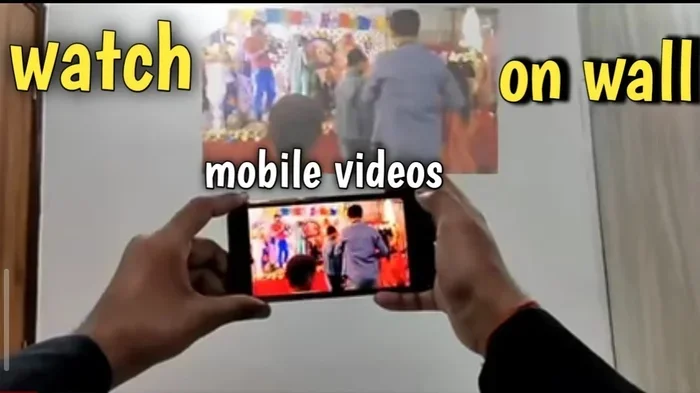
The honest truth is that you do not need a screen to use a projector. A projector works by sending light onto any flat surface. That surface could be a wall, a ceiling, or even a hanging bedsheet. The image will still show up. But here is the catch. The quality of that image depends a lot on what surface you are projecting onto.
Think of it like this. You would not serve a fancy dinner on a paper plate. The food might taste the same, but the experience is completely different. A projection surface works the same way. It changes how the light reflects back to your eyes. And that directly impacts what you see on the “screen.”
So while a screen is not mandatory, it is often a smart investment. Let us break down why, and help you decide what is best for your setup.
What Happens When You Project Without a Screen
Before we talk about screens, let us look at what happens when you skip one. Many people project directly onto their wall. It works. But there are tradeoffs. Walls are not perfectly flat. They have texture, paint color, and tiny imperfections. All of these things affect the final image.
A painted wall can absorb some of the light from your projector. This means the image looks dimmer than it should. Colors might appear washed out. And if your wall is not pure white, the image can take on a weird tint. A blue wall, for example, will make everything look blue.
Another issue is contrast. Without a proper screen, dark areas of the image can look gray or muddy. Bright areas might seem too bright. This lack of balance makes the picture harder to enjoy, especially in rooms with any ambient light. If you have ever noticed that your projected image looks “flat” or “lifeless,” the wall is probably to blame.
Types of Projector Screens You Can Choose From
If you decide a screen is worth it, you have options. Not all screens are the same. Different types work better for different situations. Let us walk through the most popular choices.
Fixed Frame Screens
A fixed frame screen is exactly what it sounds like. It is a flat screen mounted to a frame. It stays in one place permanently. These screens offer the best image quality because the surface is completely flat and taut. There are no wrinkles or waves to distort the picture.
Fixed frame screens are ideal for a dedicated home theater room. If you plan to watch movies or play games regularly, this is a great choice. They come in various sizes and materials to match your projector and room setup.
Retractable Screens
A retractable screen rolls up when you are not using it. You pull it down when movie time arrives. This is a fantastic option if your projector setup doubles as a workspace or living area. When the screen is rolled up, the wall is visible again.
These screens come in ceiling-mounted or wall-mounted versions. Ceiling-mounted retractable screens are especially popular in home theaters. They stay hidden until you need them. This keeps the room looking clean and uncluttered.
Portable Screens
Love the idea of a screen but do not want to deal with permanent installation? A portable projector screen is your best friend. These screens fold up into a compact case. You can carry them to the backyard, the garage, or even a friend’s house.
Portable screens are great for outdoor movie night sessions. They set up in minutes and work with almost any projector. The image quality is good, though not quite as sharp as a fixed frame screen. For casual viewing and fun gatherings, they are more than enough.
Motorized Screens
If you want convenience and a sleek look, consider a motorized screen. These screens lower and raise with the push of a button. They often come with remote controls or even smart home integration.
Motorized screens are a premium option. They cost more than manual retractable screens, but the ease of use is hard to beat. They are perfect for rooms where aesthetics matter. A motorized screen gives your setup a polished, professional look.
Projecting Onto a White Wall: Pros and Cons
Many people assume a white wall is a fine replacement for a screen. And in some cases, they are right. But there are important things to consider before you skip buying a screen altogether.
The Pros of Using a Wall
- It costs nothing extra. You already have a wall, so there is no additional purchase.
- No setup required. You do not need to assemble anything or find wall space.
- It works in a pinch. If you just want to watch one movie, a wall is perfectly fine.
- No extra storage. You do not need to find a place to keep a screen when it is not in use.
The Cons of Using a Wall
- Paint color affects the image. Even “white” paint is rarely true white. Most wall paint has a slight tint that distorts colors.
- Texture creates problems. Textured walls scatter light unevenly. This leads to a blurry or uneven image.
- Lower contrast. Walls absorb more light than proper screen materials. The result is a less vibrant picture.
- No gain. Screens have a “gain” rating that boosts brightness. A wall has zero gain.
For a quick movie night with friends, a wall works fine. But for regular viewing or a serious home theater setup, a wall will hold you back. The difference becomes even more noticeable with a 4K projector, where every detail counts.
When a Projector Screen Is Absolutely Worth It
Not everyone needs a screen. But some situations make a screen almost essential. Let us look at when investing in a projector screen really pays off.
You Are Building a Home Theater
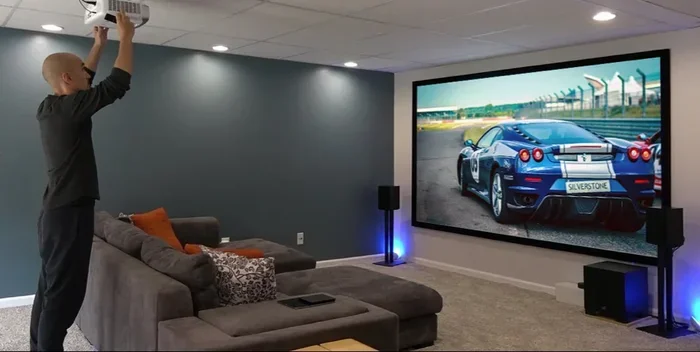
If you are setting up a dedicated viewing room, a screen is a must. A proper screen creates the immersive experience that makes a home theater feel special. The right screen material enhances contrast, deepens blacks, and makes colors pop.
Think about it this way. You would not buy a high-end sound system and then listen to it through a tinny Bluetooth speaker. The same logic applies here. A quality projector deserves a quality screen to perform at its best.
You Watch Movies or Play Games Regularly
Casual use and regular use are very different. If you only project once a month, a wall might be fine. But if you watch movies every weekend or play games on a big screen nightly, a proper screen makes every session better.
Over time, the difference in image quality becomes obvious. Colors look richer. Details are sharper. The overall picture feels more professional and polished. Once you experience a screen, going back to a wall feels like a step backward.
Your Room Has Ambient Light
This is a big one. If your viewing room has windows, lamps, or other light sources, a wall will struggle. Ambient light washes out projected images. A good projector screen is designed to handle ambient light better than a bare wall.
Some screens have special coatings that reflect light more efficiently back toward the viewer. This means the image stays bright and clear even when the room is not completely dark. For rooms where total darkness is not possible, a screen is your best friend.
You Want the Best Possible Image Quality
Even if your room is pitch black, a screen still improves the picture. The surface of a projector screen is engineered to reflect light evenly. This creates a uniform image with smooth gradients and accurate colors.
A wall, no matter how smooth, cannot match this level of precision. The difference might be subtle at first. But once you notice it, you will never want to go back to projecting on a wall again.
How to Choose the Right Screen for Your Setup
Ready to buy a screen? Great. But with so many options available, it helps to know what to look for. Here are the key factors that will guide your decision.
Screen Size and Viewing Distance
The size of your screen should match your room and your throw distance. Throw distance is the space between your projector and the screen. A longer throw distance allows for a larger screen.
As a general rule, sit about 1.5 to 2 times the diagonal screen size away from the screen. So if you buy a 100-inch screen, your seating should be around 12 to 16 feet away. This gives you a comfortable viewing experience without eye strain.
Screen Material and Gain
Screen gain measures how much light the screen reflects back to the viewer. A higher gain means a brighter image. But higher gain also narrows the viewing angle. This means people sitting off to the side may see a dimmer picture.
For most home setups, a gain between 1.0 and 1.3 is ideal. This provides a bright image with a wide viewing angle. If you are setting up an outdoor screening, a higher gain screen can help fight daylight.
Aspect Ratio
Screen aspect ratio refers to the shape of the screen. The most common ratios are 16:9 and 16:10. Most modern projectors use a 16:9 ratio, which matches standard HD and 4K content. Make sure your screen matches your projector’s native aspect ratio for the best fit.
Matte White vs. Gray Screens
Matte white screens are the most versatile option. They work well in dark rooms and provide accurate colors. Gray screens are designed for rooms with some ambient light. They boost contrast by absorbing some of the surrounding light.
Choose a matte white screen if your room can be darkened easily. Choose a gray screen if you cannot fully control the lighting. Some people even use a dual-purpose screen that works well in both conditions.
Common Mistakes People Make With Projector Screens
Buying a screen is only half the battle. Many people make avoidable mistakes that hurt their viewing experience. Here are the most common ones to watch out for.
Choosing a Screen That Is Too Small
It is tempting to buy a smaller screen to save money. But a small screen wastes the potential of your projector. A bigger screen creates a more immersive experience. It makes you feel like you are inside the movie. Do not cheap out on size unless your room truly cannot accommodate a larger screen.
Ignoring Room Lighting
People often buy a screen without thinking about the room’s lighting conditions. If your room has lots of light, a matte white screen will look washed out. Always consider how much light enters the room and choose a screen material that handles it well.
Not Leveling the Screen
A crooked screen ruins the entire experience. The image will look distorted, and text will appear slanted. Take the time to level your screen properly before your first viewing session. It makes a surprisingly big difference.
Skipping the Warranty
Good screens last for years. But accidents happen. A screen with a warranty gives you peace of mind. Look for screens that offer at least a one-year warranty. Higher-end models sometimes come with longer coverage.
Expert Tips to Get the Best Image From Your Projector
Want to squeeze every bit of quality from your setup? Here are some quick tips that make a big difference.
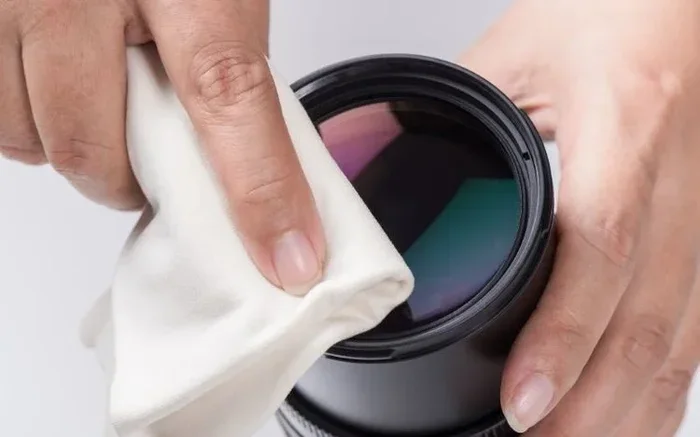
- Clean your lens regularly. Dust on the lens creates a blurry image. Use a soft microfiber cloth to wipe it gently.
- Match your screen to your projector type. Short-throw projectors need screens designed for close-range projection. Long-throw projectors need screens that handle wider angles.
- Use a screen cleaner. Regular dusting keeps the surface smooth and free of debris that can distort the image.
- Calibrate your projector settings. Adjust brightness, contrast, and color settings to match your screen material. This simple step can dramatically improve the picture.
- Consider a screen with a black border. A black border around the screen improves perceived contrast and makes the image look more cinematic.
Quick Tips for First-Time Projector Users
Setting up a projector for the first time can feel overwhelming. Here are some simple tips to get you started on the right foot.
- Start with a white wall. Before you spend money on a screen, try projecting onto a clean white wall. This helps you understand how your projector performs in your space.
- Test at different times of day. Check your image quality with the lights on and off. This tells you how well your setup handles ambient light.
- Measure your throw distance. Know how far your projector needs to be from the wall or screen to produce the size you want.
- Invest in a screen gradually. You do not need to buy the most expensive screen right away. Start with a basic portable screen and upgrade later if needed.
- Read reviews before buying. Not all screens are created equal. Look for reviews that test real-world image quality, not just specs on paper.
The bottom line is that you have options. You do not have to spend a fortune to enjoy a great projected image. Start simple, learn what works for your room, and upgrade as your needs grow.
Final Thoughts: Do You Need a Projector Screen?
So, do I need a projector screen for my projector? The answer depends on your situation. If you are watching casually on a budget, a white wall works. But if you want the best possible experience, a proper screen is worth every penny.
A projector screen transforms the way light reflects back to your eyes. It improves brightness, contrast, color accuracy, and overall immersion. Whether you choose a fixed frame screen, a retractable screen, or a portable option, the upgrade is noticeable.
Think about how often you will use your projector. If it is a regular thing, invest in a screen. Your eyes will thank you. And every movie night will feel more like a trip to the cinema.
The right setup brings your content to life. Do not let a plain wall hold you back from the full potential of your projector setup. Take the time to choose the right screen, get the placement right, and enjoy the show.
Frequently Asked Questions
Can I project onto a painted wall instead of a screen?
Yes, you can project onto a painted wall, and it will work for casual viewing. However, the paint color and texture affect the image quality. A smooth, matte white wall gives the best results. Textured or colored walls can distort colors and reduce contrast significantly.
What size projector screen do I need for my room?
The right screen size depends on your room size and seating distance. A good rule of thumb is to sit 1.5 to 2 times the diagonal screen size away from the screen. For a 100-inch screen, aim for about 12 to 16 feet of viewing distance for the most comfortable experience.
Is a portable projector screen good enough for regular use?
Portable projector screens are surprisingly good for regular use. They offer solid image quality and are easy to set up and store. While they may not match the perfection of a fixed frame screen, they are a great balance of convenience and performance for most users.
Does screen gain really matter?
Yes, screen gain matters quite a bit. Gain measures how much light the screen reflects back to the viewer. A higher gain makes the image brighter but narrows the viewing angle. For most home setups, a gain between 1.0 and 1.3 provides the best balance of brightness and wide viewing angles.
Can I use a projector without any screen at all?
You can absolutely use a projector without a screen. Any flat surface, including a wall, a bedsheet, or even a white ceiling, can serve as a projection surface. The image will appear, but a proper screen enhances brightness, contrast, and color accuracy for a much better viewing experience.
How do I clean my projector screen properly?
Use a soft microfiber cloth to gently wipe the screen surface. Avoid harsh chemicals or abrasive materials that could damage the screen coating. For stubborn spots, lightly dampen the cloth with distilled water. Always check the manufacturer’s cleaning guidelines before cleaning your specific screen model.
=== CONCLUSION ===
Deciding whether you need a projector screen for your projector comes down to how much you value image quality and how often you use your setup. A wall works in a pinch. But a proper screen elevates every viewing session. From home theater setups to backyard movie nights, the right screen makes a visible difference.
Take your time, consider your room and usage needs, and pick the screen that fits your budget and lifestyle. Once you see the difference a good screen makes, you will wonder how you ever watched without one. Happy projecting.