Internet Explorer vs Windows Explorer Key Differences
Internet Explorer is a web browser that lets you visit websites, while Windows Explorer is a file manager that helps you navigate your computer’s folders and files. Many people confuse the two because of the similar name, but they serve completely different purposes in the Microsoft Windows ecosystem.
Have you ever stared at your computer screen and wondered why Microsoft has two tools with such similar names? You open one, and it shows you websites. You open the other, and it shows you folders and files. This is the Internet Explorer vs Windows Explorer puzzle that confuses a lot of people.
The truth is simple. These two tools are not the same thing at all. They do completely different jobs on your Microsoft Windows computer. One helps you browse the internet. The other helps you browse your own files. In this article, we will break down every difference you need to know. By the end, you will never mix them up again.
Whether you are a casual computer user or someone managing a network, understanding the difference between Internet Explorer and Windows Explorer matters. It helps you use your operating system more efficiently. It also saves you time when you are troubleshooting or setting up a new machine. Let us dive right in.
Key Takeaways
- Different Purposes: Internet Explorer is a web browser, and Windows Explorer is a file management tool.
- Not Interchangeable: You cannot use either tool to do the job of the other.
- User Interface: Both have a navigation pane and address bar, but they display entirely different content.
- Legacy Status: Internet Explorer has been retired by Microsoft in favor of Microsoft Edge.
- Still Relevant: Windows Explorer (now called File Explorer) remains a core part of every Windows PC.
- Common Confusion: The similar naming leads many users to mix up the two tools.
📑 Table of Contents
What Is Internet Explorer?
Internet Explorer is a web browser made by Microsoft. A web browser is a program that lets you visit websites on the internet. You type in a web address, and the browser loads the page for you. Think of it as your window to the online world.
A Brief History of Internet Explorer
Internet Explorer first came out in 1995. It was bundled with Microsoft Windows and became the most popular browser in the world. For many years, people used it as their default browser. It was everywhere. You could not buy a new Windows PC without it already installed.
Over time, other browsers like Google Chrome and Mozilla Firefox gained popularity. They offered faster speeds and better browsing experience. Microsoft tried to keep up. They released newer versions of Internet Explorer, but the damage was done. By 2022, Microsoft officially retired Internet Explorer. It is no longer supported or updated.
What Could Internet Explorer Do?
Internet Explorer was designed for one main job: accessing the internet. Here is what it could do:
- Load and display websites
- Play videos and audio from the web
- Run browser plugins and ActiveX controls
- Save bookmarks and browsing history
- Handle multiple tabs or windows at once
It needed an active internet connection to work. Without the internet, Internet Explorer was basically useless. You could not open it to look at your local files or manage your computer. That is where Windows Explorer comes in.
What Is Windows Explorer?
Windows Explorer is a file management tool built into every Windows operating system. It lets you see, open, move, copy, and delete files and folders on your computer. You might also hear people call it File Explorer in newer versions of Windows.
How Windows Explorer Works
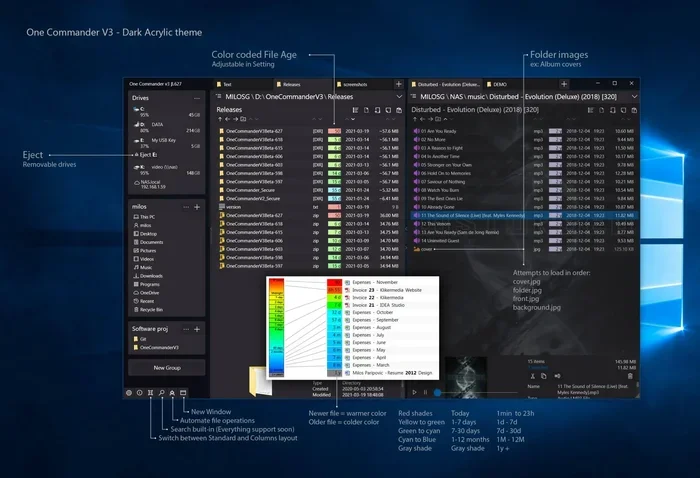
When you open Windows Explorer, you see a graphical user interface that displays the file system on your computer. You can see your hard drive, USB drives, network folders, and more. The left side usually shows a navigation pane with quick links to common locations like Desktop, Documents, and Downloads.
The right side shows the contents of the folder you have selected. You can sort files by name, date, size, or type. You can also search for specific files using the search bar at the top. Windows Explorer does not need the internet to work. It works entirely on your local machine.
Key Features of Windows Explorer
Windows Explorer has many useful features for everyday computing:
- Folder management: Create, rename, move, and delete folders
- File previews: See thumbnails of images and documents without opening them
- Address bar: Type in a file path to jump to a specific location
- Search functionality: Find files quickly using keywords or filters
- Library system: Group files from different locations into one view
- Network access: Browse shared folders on other computers
Windows Explorer has been a part of Windows since Windows 95. It has evolved over the years. In Windows 10 and Windows 11, it is called File Explorer, but it is essentially the same tool. It remains one of the most used programs on any Windows PC.
Internet Explorer vs Windows Explorer: Side-by-Side Comparison
Now that you know what each tool does, let us put them side by side. This comparison will make the differences crystal clear.
| Feature | Internet Explorer | Windows Explorer |
|---|---|---|
| Primary Function | Web browsing | File management |
| Requires Internet | Yes | No |
| Developed By | Microsoft | Microsoft |
| Current Status | Retired (no longer supported) | Still active in Windows 10 and 11 |
| Displays | Websites and web pages | Folders, files, and drives |
| Navigation Pane Shows | Favorites, history, feeds | Quick access, libraries, network |
| Address Bar Input | Web URLs | File paths |
| Replaced By | Microsoft Edge | File Explorer (same tool, new name) |
| Used For | Browsing the web | Managing local and network files |
| System Resources Used | High (especially older versions) | Low to moderate |
As you can see from the table above, these two tools could not be more different. They share a similar name and a similar user interface layout, but their purposes are completely separate. One opens the door to the internet. The other opens the door to your computer’s files.
Common Features They Share
Even though they serve different purposes, Internet Explorer and Windows Explorer do share a few things in common. Understanding these similarities can help you see why people confuse them.
Similar User Interface Elements
Both tools use a graphical user interface with a navigation pane on the left and a main content area on the right. Both have an address bar at the top where you can type in a location. Both also have a toolbar with buttons for common actions like back, forward, refresh, and view options.
This design similarity is not a coincidence. Microsoft used a consistent design language across its tools. The idea was to make the computer feel familiar and easy to use. But it also led to a lot of confusion among users who did not read the labels carefully.
Both Are Part of the Windows Ecosystem
Both tools were built by Microsoft and included in the Windows operating system. They are both desktop applications that run locally on your machine. They both support drag-and-drop functionality and right-click context menus. These shared traits make sense because they are both part of the same desktop environment.
Why the Confusion Happens
The confusion between Internet Explorer vs Windows Explorer is very common. Here is why it happens so often.
The Word “Explorer” in Both Names
The word “Explorer” appears in both names. When you hear someone say “Explorer,” you might not know which one they mean. This is especially true for people who are new to computers or who have not used Windows for many years.
Similar Look and Feel
Both tools have a similar layout. A navigation pane on the left. A main window on the right. An address bar at the top. If you are in a hurry, you might open the wrong one without even noticing. This happens more often than you might think.
Legacy of Older Windows Versions
In older versions of Windows, like Windows XP and Windows 7, both tools were heavily used. Many people spent hours in Windows Explorer managing files and just as much time in Internet Explorer browsing the web. The two tools became deeply embedded in daily computing. Even though Internet Explorer is now retired, the memory of both tools living side by side still causes confusion today.
Quick Tips to Avoid Mixing Them Up
Here are some simple tips to keep these two tools straight:
- Check the icon. Internet Explorer has a blue “e” logo. Windows Explorer has a yellow folder icon.
- Look at what opens. If you see websites, it is Internet Explorer. If you see folders and files, it is Windows Explorer.
- Remember the shortcut. Windows Explorer opens with the Windows key + E. Internet Explorer does not have a widely used shortcut.
- Think about the task. Need to browse the web? Use a browser. Need to manage files? Use Windows Explorer.
Common Mistakes People Make
Mixing up these two tools is the number one mistake. But there are a few other common errors people make when using them.
- Trying to browse the web in Windows Explorer: Windows Explorer cannot load websites. It is not a browser. If you want to visit a site, open a web browser like Microsoft Edge or Google Chrome.
- Trying to manage files in Internet Explorer: Internet Explorer cannot help you move, copy, or delete local files. Use Windows Explorer for that.
- Still using Internet Explorer: Since Microsoft retired Internet Explorer, using it is a security risk. Switch to a modern browser like Microsoft Edge for better safety and performance.
- Ignoring Windows Explorer shortcuts: Many people do not know that Windows Explorer has powerful search and sorting features. Learning these shortcuts can save you a lot of time.
Expert Insights and Recommendations
From a networking and IT perspective, understanding the distinction between these two tools is important. Here is what the experts say.
What IT Professionals Recommend
IT professionals recommend that users always use the right tool for the right job. If you need to access a website, use a modern web browser. If you need to manage files on your computer, use Windows Explorer. Mixing the two up can lead to frustration and wasted time.
For network administrators, the distinction matters even more. Windows Explorer can be used to access shared network folders and manage permissions. Internet Explorer, in its old days, was sometimes used to access internal company web portals. But today, those portals are better accessed through modern browsers.
The Future of File Management and Web Browsing
Microsoft has moved on from both Internet Explorer and the old Windows Explorer design. The company now pushes Microsoft Edge as its default browser. File Explorer continues to evolve with new features in Windows 11, including improved search, tabs, and a refreshed design. Understanding this Windows operating system landscape helps you stay current and productive.
Key Takeaways
- Internet Explorer was a web browser for accessing websites on the internet. It has been retired by Microsoft.
- Windows Explorer is a file management tool for organizing, finding, and managing files and folders on your computer.
- They share a similar user interface layout but serve completely different purposes.
- The difference between Internet Explorer and Windows Explorer comes down to web browsing versus file management.
- Always use the right tool for the task to avoid confusion and improve efficiency.
- Modern alternatives like Microsoft Edge and updated File Explorer offer better performance and security.
Conclusion
The Internet Explorer vs Windows Explorer debate is easier to understand than most people think. They are two completely different tools with two completely different jobs. Internet Explorer was your gateway to the web. Windows Explorer is your gateway to your files. Even though Internet Explorer is no longer with us, the lesson remains the same: know which tool you need before you open it.
Understanding this distinction makes you a smarter computer user. It helps you navigate your desktop environment with confidence. It also saves you from the frustration of opening the wrong program when you need something done quickly. So the next time someone asks you about the difference between Internet Explorer and Windows Explorer, you will know exactly what to tell them.
Keep these tips in mind. Use the right tool for the right job. And never let a similar name fool you again. Your computer will thank you for it.
Frequently Asked Questions
Can I still use Internet Explorer on Windows 10 or 11?
Microsoft officially retired Internet Explorer in June 2022. It is no longer supported or updated. While some older versions of Windows 10 may still have it installed, using it is not recommended due to security risks. Microsoft Edge is the recommended replacement for web browsing.
Is Windows Explorer the same as File Explorer?
Yes, Windows Explorer was renamed to File Explorer starting with Windows 8. They are the same tool with a different name. File Explorer is the current name used in Windows 10 and Windows 11.
Do I need an internet connection to use Windows Explorer?
No, Windows Explorer works entirely offline. It manages files and folders stored on your local hard drive, external drives, and network connections. It does not need the internet to function.
Why did Microsoft name both tools so similarly?
Microsoft used the word “Explorer” in both names to convey the idea of exploration. Internet Explorer was meant to help you explore the web. Windows Explorer was meant to help you explore your computer’s file system. The similar naming was intentional but led to widespread confusion among users.
What replaced Internet Explorer as Microsoft’s default browser?
Microsoft Edge replaced Internet Explorer as the default browser. Edge is built on a modern browsing engine and offers better performance, security, and features. It is included with Windows 10 and Windows 11.
Can Windows Explorer access websites?
No, Windows Explorer cannot load or display websites. It is a file management tool, not a web browser. If you want to browse the internet, you need to use a web browser like Microsoft Edge, Google Chrome, or Mozilla Firefox.
=== CONCLUSION ===
The difference between Internet Explorer and Windows Explorer is clear once you understand what each tool does. One is for the web. The other is for your files. They share a name and a similar look, but their functions are entirely separate. By keeping these distinctions in mind, you can work more efficiently and avoid common mistakes. Use the right tool, and your computing experience will be much smoother.