Choosing Projector Screen Material For Ambient Light Rooms
Choosing the right projector screen material for ambient light rooms can transform your viewing experience from mediocre to magnificent. In this guide, you will learn about ambient light rejecting screens, gain factors, and the best materials that combat glare and washout. We break down every option so you can pick the perfect screen for your bright room setup with confidence.
Setting up a home theater or office presentation space is exciting. But if your room gets a lot of natural light or has bright overhead fixtures, you know the struggle. A standard white screen turns into a washed-out mess the moment the sun comes in. That is why picking the right projector screen material for ambient light rooms is so important.
The material you choose determines how your image looks, how vibrant the colors stay, and whether people can enjoy the content from different seats. This guide walks you through everything you need to know. We will cover screen types, gain ratings, textures, and real-world tips. By the end, you will feel confident making the best choice for your space.
Let us start with the basics so you understand what makes certain materials work better in bright environments.
Key Takeaways
- Ambient Light Rejecting (ALR) screens are the top choice for rooms with windows or overhead lighting because they focus light from your projector and reject ambient light.
- Screen gain matters a lot — higher gain screens reflect more light back to viewers but often have narrower viewing angles.
- Gray screens improve contrast in bright rooms, while white screens work best in controlled lighting environments.
- Your room layout and seating distance should directly influence the screen size and material you choose.
- Budget-friendly options exist that still deliver solid performance in ambient light conditions.
- Texture and surface type affect image sharpness, hotspots, and overall picture quality more than most people realize.
- Testing your setup before buying can save you from costly mistakes and disappointment.
📑 Table of Contents
- Understanding Ambient Light and Why It Matters
- Screen Gain: What It Is and Why You Should Care
- Ambient Light Rejecting (ALR) Screens Explained
- White vs. Gray vs. Black Screen Materials
- Screen Texture and Surface Type
- How to Choose the Right Material for Your Room
- Common Mistakes to Avoid
- Expert Tips for Getting the Best Results
- Conclusion
Understanding Ambient Light and Why It Matters
Ambient light is any light in your room that does not come from the projector. Think sunlight through windows, ceiling lamps, or even light bouncing off a light-colored wall. This stray light hits your screen and dilutes the image. Colors look faded. Blacks turn gray. Details disappear.
Not all rooms are created equal. A basement home theater with blackout curtains is a completely different beast from a living room with large windows. Your projector screen material for ambient light rooms needs to handle the specific light challenges your space presents.
Types of Ambient Light in Your Room
Before picking a screen, identify the light sources in your room:
- Natural daylight — the biggest enemy of image quality. South-facing windows are the worst culprits.
- Overhead lighting — recessed lights, chandeliers, or track lighting can wash out the screen.
- Side lighting — lamps or light sources positioned to the side create uneven brightness.
- Reflected light — light bouncing off walls, ceilings, or floors adds to the overall ambient glow.
Once you know your light sources, you can choose a material designed to fight them. This is the first step in choosing projector screen material for ambient light rooms the right way.
Screen Gain: What It Is and Why You Should Care
Screen gain is one of the most important specs to understand. It measures how much light the screen reflects back to the viewers compared to a standard white reference surface. A gain of 1.0 means the screen reflects light exactly like a standard white wall.
Higher gain screens reflect more light back toward the audience. This sounds great, but there is a trade-off. Higher gain usually means a narrower viewing angle. If someone sits far off to the side, the image gets dimmer or shifts in color.
Gain Ratings for Bright Rooms
Here is a quick breakdown of gain ratings and what they mean for ambient light performance:
- Gain 1.0 to 1.3: Standard white screens. They look great in dark rooms but struggle with ambient light. Colors are natural but contrast drops in bright settings.
- Gain 1.3 to 1.5: A solid middle ground. These screens add a bit of brightness while keeping decent viewing angles. Good for rooms with moderate light.
- Gain 1.5 to 2.0: High-gain screens. They push brightness significantly but narrow the viewing cone. Best for smaller rooms where everyone sits centered.
- Gain 2.0+: Very high gain. These are specialty screens for extreme ambient light. They have tight viewing angles and can create hotspots if not positioned correctly.
For most projector screen material for ambient light rooms setups, a gain between 1.3 and 1.8 hits the sweet spot. You get enough brightness boost without sacrificing too much viewing flexibility.
Ambient Light Rejecting (ALR) Screens Explained
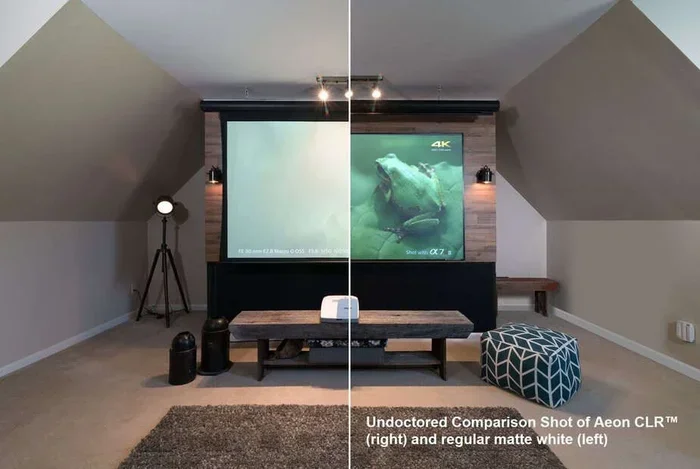
If you are serious about watching content in a bright room, ALR screens are the way to go. ALR stands for Ambient Light Rejecting. These screens use special optical coatings and surface textures to direct projector light toward the audience while deflecting ambient light away from the viewing area.
Think of it like a mirror that only reflects light from one specific direction. Your projector sends light straight at the screen, and the screen bounces it back to your seats. Meanwhile, light from windows or lamps hits the screen at different angles and gets scattered away from the viewers.
How ALR Technology Works
ALR screens have a structured surface, often with tiny ridges or particles embedded in the material. This micro-texture does two things simultaneously:
- It focuses the projector light back toward the seating area with precision.
- It scatters ambient light in directions away from the audience.
The result is a dramatic improvement in contrast and color vibrancy even when the room is lit up. Many people say the difference between a standard screen and an ALR screen in a bright room is night and day.
When you are choosing projector screen material for ambient light rooms, ALR should be at the top of your list. They are more expensive than standard screens, but the performance gain in bright environments is undeniable.
Types of ALR Screen Materials
Not all ALR screens are the same. Here are the main types:
- Black velvet ALR screens: These have a dark base that absorbs stray light. They excel at deep blacks and high contrast. Perfect for rooms with a lot of ambient light.
- Glass bead ALR screens: Tiny glass beads embedded in the surface reflect light more directly back. They offer high gain but narrower viewing angles.
- Hybrid ALR screens: These combine different optical layers to balance gain, viewing angle, and ambient light rejection. They are versatile and popular for home theaters.
- Gray ALR screens: A gray base reduces light reflection overall, which boosts perceived contrast. Great for rooms where you cannot fully control lighting.
White vs. Gray vs. Black Screen Materials
The color of your screen material plays a huge role in how your image looks in an ambient light room. Each color has strengths and weaknesses.
White Screens
White screens are the most common. They deliver bright, vibrant images and accurate colors. In a dark room, they are fantastic. But in a bright room, they wash out quickly. Whites reflect all light equally, including the unwanted ambient light that degrades your picture.
White screens work best for projector screen material for ambient light rooms only if you combine them with an ALR surface or if the room has controllable lighting.
Gray Screens
Gray screens are a popular upgrade for bright rooms. The gray tint absorbs some of the ambient light, which helps preserve contrast and deep blacks. Colors may look slightly cooler or less saturated on a gray screen compared to white, but the overall image quality in a lit room is noticeably better.
Gray screens come in different shades. A light gray preserves more brightness while still improving contrast. A dark gray maximizes contrast but reduces overall image brightness. Choose based on how bright your room gets.
Black Screens
Black screens are the premium choice for ambient light rooms. They absorb nearly all stray light and reflect only the projector light back to viewers. The result is incredible contrast, deep blacks, and vivid colors even in well-lit spaces.
Black screens are typically more expensive. They also require a projector with strong brightness output. If your projector is weak, a black screen can make the image too dark. But paired with a bright projector, they are unbeatable.
Quick Comparison Table
| Screen Color | Best For | Contrast | Brightness | Ambient Light Handling |
|---|---|---|---|---|
| White | Dark rooms | Moderate | High | Poor without ALR |
| Gray | Moderately bright rooms | Good | Moderate | Decent |
| Black | Very bright rooms | Excellent | Lower | Excellent with ALR |
Your choice between white, gray, and black depends on your room conditions and projector strength. For most people dealing with ambient light, gray or black ALR screens deliver the best results.
Screen Texture and Surface Type
Beyond color and gain, the texture of the screen material matters more than most people think. The surface affects how evenly light spreads, whether hotspots appear, and how sharp the image looks.
Smooth vs. Textured Surfaces
Smooth screens provide a uniform surface that spreads light evenly. They are great for sharp, detailed images. However, they can show imperfections in the projection surface and may create hotspots where the center of the screen appears brighter than the edges.
Textured screens, on the other hand, use tiny surface patterns to scatter light more evenly. This reduces hotspots and provides a more consistent image across the entire screen. Some textures also enhance the 3D effect of the image, making it feel more immersive.
Matte White vs. Semi-Gloss
- Matte white surfaces diffuse light widely. They reduce glare but also lose some brightness. Good for dark rooms, less ideal for bright ones.
- Semi-gloss surfaces reflect more light directionally. They boost brightness and work well with ALR technology. Best for ambient light rooms.
When you are choosing projector screen material for ambient light rooms, always consider the texture alongside the gain and color. A high-gain black ALR screen with a semi-gloss texture is a powerhouse combination for bright spaces.
Rear Projection vs. Front Projection Screens
Most people think of front projection, where the projector sits in front of the screen. But rear projection screens place the projector behind the screen, shining light through it. Rear projection screens handle ambient light very well because the screen material is designed to let light pass through while blocking side light.
Rear projection requires more space behind the screen and a specific screen material. It is a great option for rooms where you want to hide the projector and keep the setup clean. If you have a bright room and limited wall space, rear projection screens are worth considering.
How to Choose the Right Material for Your Room
Now that you understand the key factors, let us walk through how to actually make the decision. Follow these steps to find the perfect projector screen material for ambient light rooms.
Step 1: Measure Your Room Light Levels
Spend a day observing your room at different times. Note when the sun is brightest, which walls get the most light, and whether you can control the lighting with curtains or blinds. This gives you a baseline for what kind of screen you need.
Step 2: Check Your Projector Brightness
Your projector’s brightness, measured in lumens, matters a lot. A dim projector needs a high-gain screen to compensate. A bright projector can handle a lower-gain screen that delivers better color accuracy. Match your screen to your projector’s output for the best results.
Step 3: Consider Your Seating Arrangement
How many people will watch the screen, and where will they sit? If everyone sits in a tight row centered on the screen, a high-gain screen works well. If viewers are spread across a wide area, you need a material with a wider viewing angle, even if it means slightly lower gain.
Step 4: Set Your Budget
ALR screens range from affordable to very premium. Set a realistic budget and look for the best material within that range. You do not need to spend a fortune to get a solid ambient light rejecting screen. Many mid-range options deliver excellent performance.
Step 5: Read Reviews and Test if Possible
Before you buy, read reviews from other users with similar room setups. If you can, visit a store or attend a home theater expo to see different materials in person. Nothing beats seeing the difference with your own eyes.
Common Mistakes to Avoid
Even experienced projector users make mistakes when selecting screen materials. Here are the most common ones to avoid:
- Buying a standard white screen for a bright room. This is the number one mistake. A regular white screen will look terrible in any room with ambient light. Always opt for ALR or at least a gray material.
- Ignoring the viewing angle. A high-gain screen looks amazing from the center but terrible from the sides. Make sure the material suits your seating layout.
- Overestimating projector brightness. A bright screen material cannot fix a weak projector. Check your projector specs first.
- Skipping the test phase. Many manufacturers offer samples or small swatches. Testing a material before committing saves money and disappointment.
- Forgetting about screen size. A larger screen needs a brighter projector and a higher-gain material to maintain image quality in bright rooms.
Avoiding these mistakes puts you ahead of most buyers. Take your time, do your research, and pick the material that fits your specific room conditions.
Expert Tips for Getting the Best Results
Here are some insider tips from home theater enthusiasts and AV professionals:
- Paint your walls dark. Dark walls absorb stray light and reduce ambient reflection. This simple change boosts contrast on any screen material.
- Use blackout curtains. Even the best screen material performs better when you can control natural light. Heavy curtains make a noticeable difference.
- Position your projector correctly. The angle and distance affect how light hits the screen. Follow the manufacturer’s recommendations for optimal placement.
- Clean your screen regularly. Dust and fingerprints scatter light and reduce image clarity. A microfiber cloth keeps your screen performing at its best.
- Consider a ceiling-mounted screen. Mounting the screen on the ceiling can reduce ambient light interference from overhead fixtures.
These small adjustments complement your screen material choice and take your viewing experience to the next level.
Conclusion
Choosing the right projector screen material for ambient light rooms is one of the most impactful decisions you can make for your viewing setup. The material affects everything from color accuracy to contrast to how enjoyable the experience is during daytime viewing.
Start by understanding your room’s light challenges. Then match your screen material — whether ALR, gray, black, or a hybrid — to those challenges and your projector’s capabilities. Pay attention to gain ratings, texture, and viewing angles. Avoid the common mistakes that trip up most buyers.
With the right screen material in place, you will enjoy vibrant, sharp, and contrast-rich images no matter how bright your room gets. Take your time, do the research, and invest in a screen that delivers the experience you deserve.
Your perfect setup is closer than you think. Start with the right material, and everything else falls into place.
Frequently Asked Questions
What is the best projector screen material for a room with windows?
Ambient Light Rejecting (ALR) screens are the best choice for rooms with windows. They use specialized optical coatings to reject stray sunlight while reflecting projector light back to viewers. A black ALR screen with a gain between 1.3 and 1.8 works especially well in bright, window-heavy rooms.
Can I use a white screen in an ambient light room?
You can, but it will not perform well without help. White screens reflect all light, including unwanted ambient light, which washes out the image. If you must use white, choose a high-gain ALR white screen and control your room lighting with curtains or blinds for better results.
Does screen gain affect image quality in bright rooms?
Yes, screen gain has a significant impact. Higher gain screens reflect more projector light back to the audience, which helps combat ambient light. However, higher gain often narrows the viewing angle. Find a balance between gain and viewing width that suits your room layout.
How do I know if my projector is bright enough for an ambient light room?
Projectors with 3,000 lumens or more handle ambient light much better. If your projector is below 2,000 lumens, you will need a high-gain ALR screen and should also control room lighting as much as possible. Check your projector’s lumen rating before choosing a screen.
Are ALR screens worth the extra cost?
For rooms with ambient light, ALR screens are absolutely worth the investment. The improvement in contrast, color vibrancy, and overall image quality in bright environments is dramatic. Standard screens simply cannot compete with ALR technology when stray light is a problem.
What screen size should I choose for a bright room?
Smaller to medium-sized screens (between 80 and 120 inches) work best in bright rooms. Larger screens require more projector brightness to maintain image quality, and ambient light has a greater impact on bigger surfaces. Match your screen size to your projector’s lumen output for the clearest picture.