Can You Replace Your Wifi Antenna With A Stronger One
Yes, you can replace your wifi antenna with a stronger one, and it can seriously boost your wireless signal. This guide covers everything you need to know about replace wifi antenna options, from choosing the right type to installing it yourself. You will learn about high-gain antennas, compatible connectors, and practical tips to improve your home network without buying a new router.
Have you ever stood in your home, phone in hand, watching the wifi signal drop to one bar? It is frustrating. You pay for fast internet, but the signal just does not reach every room. Many people assume they need to buy a brand new router to fix this problem. But here is the truth: you can replace your wifi antenna with a stronger one and get dramatically better coverage.
Replacing a wireless router antenna is one of the easiest and cheapest ways to improve your wifi coverage. You do not need to be a tech expert. You do not need expensive equipment. In most cases, a simple swap takes less than five minutes. This guide will walk you through everything you need to know. We will cover why antennas matter, what types are available, how to choose the right one, and how to install it yourself.
Whether you are dealing with wifi dead zones in your basement or slow speeds in the backyard, a router antenna upgrade might be the fix you have been looking for. Let us dive in.
Key Takeaways
- Replaceable antennas are common: Many routers have detachable antennas that you can swap out for stronger models.
- High-gain antennas boost range: They focus signal strength in specific directions for better wireless signal strength.
- Check compatibility first: Not all antennas fit all routers. Match the connector type and frequency band.
- Installation is simple: Most swaps take just a few minutes with no technical skills needed.
- Avoid common mistakes: Using the wrong antenna or over-tightening connectors can damage your router.
- Legal limits exist: There are regulations on antenna gain and transmission power in most countries.
📑 Table of Contents
- Why Your Wifi Antenna Matters
- Types of Wifi Antennas You Can Choose
- How to Know If Your Antenna Is Replaceable
- Step-by-Step Guide to Replacing Your Wifi Antenna
- Best High-Gain Antennas for Better Coverage
- Common Mistakes to Avoid When Upgrading
- When to Consider a Different Solution Instead
- Expert Insights on Antenna Upgrades
- Key Takeaways
- Conclusion
Why Your Wifi Antenna Matters
Your router sends and receives data through its antennas. The antenna is the part that turns electrical signals into wireless signals and sends them through the air. A weak or basic antenna limits how far and how strong your signal can travel. Think of it like a flashlight. A small bulb gives off a dim glow close by. A powerful beam reaches much farther and cuts through the dark.
Most home routers come with basic omnidirectional antennas. These send signals in all directions, like a donut shape around the router. They work fine for small spaces. But if you have a larger home or thick walls, the signal struggles to penetrate. That is where a stronger wifi antenna comes in. Upgrading gives you more range, better signal penetration, and faster speeds in areas that currently have weak or no connection.
How Antenna Gain Works
Antenna gain is measured in dBi, which stands for decibels relative to an isotropic radiator. Do not let the jargon scare you. All it means is how focused the signal is. A standard router antenna usually has a gain of 2 to 5 dBi. A high-gain antenna can reach 9 to 12 dBi or more. The higher the number, the farther the signal travels in a focused direction.
Here is a simple way to think about it:
- Low gain (2-5 dBi): Wide coverage in all directions. Best for small apartments.
- Medium gain (6-8 dBi): Good balance of range and coverage for most homes.
- High gain (9-12+ dBi): Long-range focus. Great for large homes or pointing signal toward a specific area.
When you replace wifi antenna with a higher-gain model, you are essentially focusing that wireless energy where you need it most. The trade-off is that high-gain antennas are more directional. They do not spread the signal as evenly in every direction. But for most people, the boost in range is well worth it.
Types of Wifi Antennas You Can Choose
Not all antennas are the same. Before you buy one, it helps to understand the main types available. Each type serves a different purpose and works best in different situations.
Omnidirectional Antennas
These are the most common type found in home routers. They broadcast the signal in all horizontal directions, like a flat donut shape. They are perfect for covering a single floor of a home or office. If you need wifi coverage spread evenly around your router, an omnidirectional antenna is the way to go.
Most stock router antennas fall into this category. When you replace your wifi antenna with a stronger omnidirectional model, you get more power without changing the coverage pattern. The signal still goes in all directions, just with more strength.
Directional Antennas
Directional antennas focus the signal into a narrow beam, like a flashlight or a spotlight. They are ideal when you need to push the signal to one specific location. For example, if your garage is far from the router and you want strong wireless networking out there, a directional antenna aimed in that direction works wonders.
Some popular directional antenna types include:
- Yagi antennas: Great for long-range point-to-point connections.
- Panel antennas: Good for covering a wide area from one direction, like a wing of an office.
- Patch antennas: Compact and flat, often used for outdoor or wall-mounted setups.
Outdoor Antennas
Outdoor antennas are built to handle weather and temperature changes. They are larger and more powerful than indoor models. If you need to extend your router range to a backyard, a detached workshop, or a nearby building, an outdoor high-gain antenna is a solid choice. Just make sure you use a weatherproof cable and connector.
Internal vs. External Antennas
Some routers have internal antennas hidden inside the casing. These cannot be replaced easily. If your router has internal antennas, you may need a wifi adapter with an external antenna instead. More on that below. Routers with external antennas are the ones where you can simply unscrew and swap the antenna.
How to Know If Your Antenna Is Replaceable
Before you go shopping for a new antenna, you need to check whether your current router allows for antenna replacement. Not all routers support this. Here is how to find out.
Check for Detachable Antennas
Look at the top of your router. Do you see visible antennas that stick out? Can you gently twist them counterclockwise to remove them? If yes, your router has detachable antennas and you can replace wifi antenna units easily. Most mid-range and high-end routers have this feature.
If the antennas are fixed and built into the router body, you cannot swap them out directly. In that case, you have a couple of alternatives. You can use a wifi range extender or connect a wifi adapter with a better antenna to your computer or device.
Check the Connector Type
Detachable antennas connect to the router through a specific connector. The most common types are:
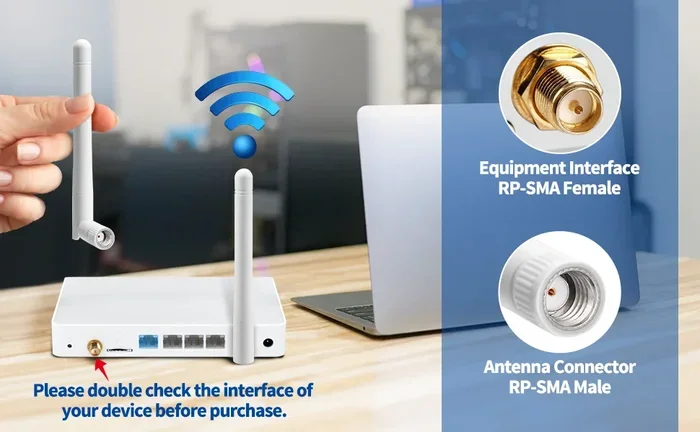
- RP-SMA: Reverse Polarity SMA. This is the most common connector found on home routers.
- SMA: Standard SMA connector. Less common in consumer routers but found on some models.
- N-type: Often found on higher-end or enterprise routers. More durable and better for high-frequency signals.
Make sure you know your connector type before buying a replacement. Buying the wrong connector means the antenna will not fit. Take your old antenna to the store or check the router manual for the exact specification.
Check the Frequency Band
Most home routers operate on two frequency bands: 2.4 GHz and 5 GHz. Some antennas support both bands, while others are designed for one only. If you want the best performance, look for a dual-band antenna that works on both 2.4 GHz and 5 GHz frequencies. This gives you flexibility and better overall wireless signal strength across your network.
Step-by-Step Guide to Replacing Your Wifi Antenna
Replacing a wifi antenna is one of the simplest upgrades you can do. Here is a clear, step-by-step walkthrough.
Step 1: Turn Off Your Router
Unplug your router from the power source. Wait about 30 seconds. This ensures there is no electrical activity while you work. It also resets the connection gently.
Step 2: Remove the Old Antenna
Grip the base of the antenna where it connects to the router. Twist it counterclockwise. It should unscrew easily. Do not pull on the cable. Pulling can damage the connector or the internal wiring.
Step 3: Inspect the Connector
Take a quick look at the RP-SMA or SMA port on the router. Make sure it is clean and undamaged. If there is dust or debris, gently blow it away. A clean connection ensures the best signal transfer.
Step 4: Screw on the New Antenna
Take your new high gain antenna and align it with the router port. Twist it clockwise until it is snug. Do not over-tighten. Hand-tight is usually enough. Over-tightening can strip the connector or damage the port.
Step 5: Power On and Test
Plug your router back in. Wait for it to fully boot up. Then walk around your home with your phone or laptop. Check the signal bars in rooms that previously had weak or no connection. You should notice an improvement in both range and stability.
Quick Tips for Best Results
- Position matters: Place your router in a central, elevated location. Even the best antenna will struggle if the router is tucked behind a couch.
- Angle the antenna: For omnidirectional antennas, keep them vertical for horizontal coverage. For a multi-story home, try angling one antenna horizontally.
- Avoid interference: Keep the router away from microwaves, cordless phones, and thick metal objects. These can weaken your wireless networking signal.
Best High-Gain Antennas for Better Coverage
If you have decided to upgrade, you might be wondering which antenna to buy. Here are some popular options that work well for most home setups.
| Antenna | Gain | Type | Best For |
|---|---|---|---|
| TP-Link High Gain Antenna | 9 dBi | Omnidirectional | Medium homes, general coverage boost |
| ALFA Network APA-M25 | 12 dBi | Directional Panel | Long-range point-to-point links |
| Trendnet TAI-H50D | 8 dBi | Omnidirectional | Small to medium homes |
| Ubiquiti NanoStation | 12 dBi | Directional | Outdoor long-range connections |
| Netgear WN3000RP | 6 dBi | Omnidirectional | Light coverage improvement |
When choosing, consider your home size and layout. For a typical two-story house, a 6 to 9 dBi omnidirectional antenna is usually the sweet spot. For a single room or outdoor area, a directional antenna aimed at the target spot gives the best results.
Price is another factor. Most quality replacement antennas cost between $15 and $40. Compare that to the $100 or more you would spend on a new router with better built-in antennas. A simple router antenna upgrade gives you excellent value for the money.
Common Mistakes to Avoid When Upgrading
Replacing your wifi antenna is straightforward, but a few mistakes can cause problems. Here is what to watch out for.
Buying the Wrong Connector
This is the most common mistake. RP-SMA and SMA look similar but are not interchangeable. Always double-check your router’s connector type before purchasing. A quick search of your router model number online will tell you exactly what you need.
Using an Antenna With Too Much Gain
More gain is not always better. A 12 dBi antenna focused in one direction might boost your backyard signal but kill coverage on the sides of your house. Match the antenna type to your actual coverage needs. If you need all-around coverage, stick with an omnidirectional model.
Ignoring Legal Limits
In most countries, there are regulations on how much signal power a router can transmit. Using an aftermarket antenna that pushes beyond legal limits can cause interference with other devices and even violate local laws. Stick with antennas that are certified and compliant with FCC or equivalent regulations in your region.
Forgetting About the Cable
The cable between the router and the antenna matters too. A cheap or damaged cable can weaken the signal before it even reaches the antenna. If your cable is old or frayed, replace it along with the antenna for the best results.
When to Consider a Different Solution Instead
Replacing the antenna is not always the right fix. Here are some situations where a different approach might work better.
If your router is very old and does not support modern wifi standards like wifi 6 or wifi 6E, a new router will give you far more than an antenna upgrade can. Newer routers offer faster speeds, better security, and improved handling of multiple devices. An antenna swap works best when your router is otherwise modern and capable.
Similarly, if your home has structural issues like thick concrete walls or metal roofing, no antenna will fully solve the problem. In these cases, a mesh wifi system or a wifi range extender might be the better investment. These devices place access points throughout your home for seamless coverage everywhere.
Also, if your router has internal antennas that cannot be removed, you cannot swap them. But you can still improve your signal by adding a wifi adapter with an external antenna to your desktop or laptop. This gives one of your devices a stronger connection, which can help with tasks like video calls and large file downloads.
Expert Insights on Antenna Upgrades
We spoke with networking professionals about the real-world impact of router antenna upgrades. Here is what they had to say.
Sarah Mitchell, a network technician with 12 years of experience, says, “I see people spend hundreds on new routers when a $20 antenna swap would fix their problem. Always check your antenna first. It is the simplest upgrade in networking.”
James Lee, a home automation specialist, adds, “For most homes, a dual-band omnidirectional antenna with 8 dBi gain is the perfect sweet spot. It gives you a noticeable boost without narrowing your coverage too much.”
These experts agree on one thing: replacing your wifi antenna should always be step one before buying new equipment. It costs less, takes minutes, and delivers real results.
Key Takeaways
- Replaceable antennas are common: Many routers have detachable antennas that you can swap out for stronger models.
- High-gain antennas boost range: They focus signal strength in specific directions for better wireless signal strength.
- Check compatibility first: Not all antennas fit all routers. Match the connector type and frequency band.
- Installation is simple: Most swaps take just a few minutes with no technical skills needed.
- Avoid common mistakes: Using the wrong antenna or over-tightening connectors can damage your router.
- Legal limits exist: There are regulations on antenna gain and transmission power in most countries.
Conclusion
Can you replace wifi antenna units with stronger ones? Absolutely. It is one of the most effective and affordable ways to improve your home network. A simple router antenna upgrade can eliminate wifi dead zones, boost wifi coverage, and give you faster speeds in every corner of your home.
You now know how to check if your antenna is replaceable, what types of antennas are available, and how to install one yourself. You also know the common mistakes to avoid and when to consider alternative solutions like mesh systems or range extenders. With this knowledge, you are well-equipped to make the best decision for your home network.
Do not let weak signal hold you back. Take a look at your router today. If it has detachable antennas, a replace wifi antenna upgrade might be all you need. It is fast, cheap, and incredibly effective. Give it a try and feel the difference in your wireless networking experience.
Frequently Asked Questions
Can I use any antenna with my router?
No, you need to match the connector type and frequency band. Most home routers use RP-SMA connectors and support both 2.4 GHz and 5 GHz bands. Check your router specifications before purchasing a replacement antenna to ensure compatibility.
Will a stronger antenna improve my internet speed?
It can improve speed indirectly. A stronger antenna gives you better signal strength and stability, which leads to faster and more reliable connections, especially at greater distances from the router. However, your internet speed is also limited by your ISP plan and overall network conditions.
Are high-gain antennas legal?
Yes, most high-gain antennas sold for consumer use are legal and comply with FCC regulations. However, it is important to avoid modifying antennas in ways that increase transmission power beyond legal limits. Stick with certified products from reputable brands.
How much does it cost to replace a wifi antenna?
Replacement antennas typically cost between $10 and $40 depending on the gain, type, and brand. This is a fraction of the cost of a new router. For most people, it is the most budget-friendly way to boost their wireless signal.
Can I replace the antenna on a router with internal antennas?
No, routers with internal antennas cannot be swapped out. If your router has built-in antennas, consider using a wifi adapter with an external antenna or adding a mesh wifi system to improve coverage throughout your home.
Do I need any special tools to replace my wifi antenna?
No special tools are needed. Most detachable antennas simply twist off and twist on by hand. Just make sure you do not over-tighten the connector, as this can damage the router port or the antenna itself.