Can You Play Games On A Normal Laptop Yes Heres How
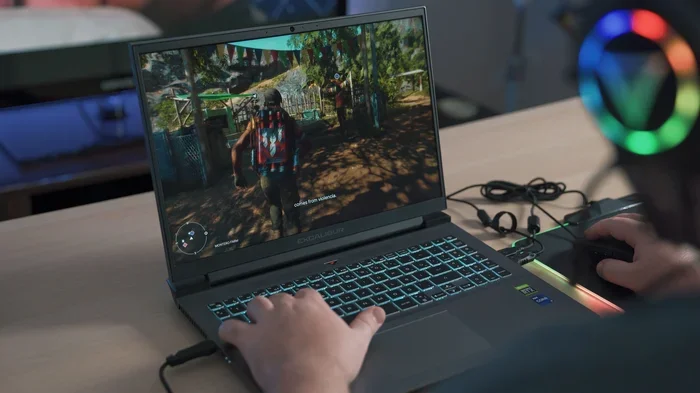
Yes, you can absolutely play games on a normal laptop — even if it doesnt have fancy specs. With the right tweaks, lightweight games, and smart optimizations, your everyday laptop can deliver a surprisingly smooth gaming experience. Heres everything you need to know about playing video games on a normal laptop.
Key Takeaways
- Normal laptops can handle gaming: You dont need a gaming laptop to enjoy many popular games. Casual games, indie titles, and older AAA games run well on standard hardware.
- Specs matter: Your processors speed, RAM, and storage space directly affect your gaming performance on a normal laptop.
- Optimization is key: Adjusting game settings, closing background apps, and updating drivers can dramatically improve gameplay.
- Game selection is crucial: Choosing the right types of games — like lightweight indie games or casual games — makes all the difference.
- Cooling and battery care: Managing heat and battery life keeps your laptop running smoothly during long gaming sessions.
- Know when to upgrade: If your normal laptop struggles constantly, it might be time to consider a dedicated graphics card or gaming laptop.
📑 Table of Contents
- Can You Play Games On A Normal Laptop? The Full Breakdown
- What Specs Do You Need to Play Games on a Normal Laptop?
- Best Types of Games You Can Play on a Normal Laptop
- How to Optimize Your Normal Laptop for Gaming
- Common Mistakes That Ruin Your Gaming Experience
- When Should You Upgrade to a Gaming Laptop?
- Quick Tips for Better Gaming on a Normal Laptop
- Expert Insights: What Professionals Say About Gaming on Normal Laptops
- Conclusion
Can You Play Games On A Normal Laptop? The Full Breakdown
The short answer is yes. You can absolutely play games on a normal laptop. You dont need a $2,000 gaming machine to have fun. Millions of people game every day on regular office laptops, budget notebooks, and everyday computers.
But lets be real. Not every game will run perfectly. The experience depends on your laptops specs, the type of games you choose, and how well you optimize things. A standard laptop with 8GB of RAM and an integrated graphics card can still handle a lot.
This guide covers everything. You will learn what specs matter most, which games work best, and how to squeeze out every bit of gaming performance from your normal laptop. Lets dive in.
What Specs Do You Need to Play Games on a Normal Laptop?
Every laptop is different. But certain specs determine whether your laptop gaming experience will be smooth or frustrating. Heres what to look at.
Processor (CPU)
The processor is the brain of your laptop. A faster processor means better gaming performance. Most modern laptops have at least an Intel Core i5 or AMD Ryzen 5. These handle casual games and many indie games without breaking a sweat.
If your laptop has an older dual-core processor, dont panic. You can still play lighter titles. But you might notice some lag in bigger games. Always check the system requirements before installing any game.
RAM
RAM is short-term memory. It helps your laptop handle multiple tasks at once. For casual games, 4GB of RAM works fine. But 8GB is the sweet spot for most video games on a normal laptop.
Some lightweight indie games only need 4GB. But modern titles often ask for 8GB minimum. If you can upgrade your RAM, it is one of the cheapest ways to boost gaming performance.
Graphics (GPU)
This is where normal laptops hit a wall. Most standard laptops use integrated graphics. These are built into the processor. They work well for everyday tasks but struggle with heavy games.
Integrated graphics like Intel UHD or AMD Radeon Vega can handle:
- Casual games and puzzle games
- Older AAA titles from 2015 or earlier
- Indie games with simple graphics
- Mobile-style games
But they will struggle with modern AAA games at high settings. Lowering the graphics quality helps a lot here.
Storage Space
Games take up space. An HDD works but is slower. A solid-state drive (SSD) loads games much faster. If your normal laptop has an SSD, you already have an advantage. Game load times drop significantly, giving you a better overall experience.
Best Types of Games You Can Play on a Normal Laptop
Not all games demand high-end hardware. Some games are built to run on modest systems. Choosing the right game is half the battle when it comes to playing games on a normal laptop.
Casual Games
Casual games are your best friends. These include puzzle games, hidden object games, and simple arcade-style titles. They use very little processing power. You can find hundreds of free casual games online or through the Microsoft Store.
Examples include:
- Minecraft (with OptiFine mod)
- Stardew Valley
- Among Us
- Terraria
- Cuphead
Indie Games
Indie games are independent titles made by small studios. They often have unique gameplay and creative art styles. Best of all, they are usually lightweight. Many indie games run great even on older laptops with integrated graphics.
Popular indie games for normal laptops include Hollow Knight, Celeste, Undertale, and Dead Cells. These games prove you dont need expensive hardware to enjoy great video games.
Older AAA Games
Big blockbuster games from a few years ago still run well on normal laptops. Games like GTA V, The Witcher 3, and Skyrim can work on standard hardware — but you will need to lower the game settings. Drop the resolution to 720p or 900p. Turn off shadows and anti-aliasing. You will still enjoy the experience.
Browser Games and Cloud Gaming
Dont forget browser games. They run entirely in your web browser. No installation needed. Plus, cloud gaming services like GeForce Now, Xbox Cloud Gaming, and Boosteroid let you stream heavy games. Your laptop just needs a decent internet connection. The processing happens on remote servers, not your machine.
How to Optimize Your Normal Laptop for Gaming
Want better gaming performance on your normal laptop? Follow these practical tips. Each one makes a real difference.
Close Background Apps
Every open app eats up RAM and CPU power. Before you start gaming, close everything unnecessary. Outlook, Chrome tabs, Spotify, and other apps all compete for resources. Use the Task Manager to see what is running. End any tasks you dont need. This simple step alone can boost performance by 20-30%.
Update Your Drivers
Outdated graphics drivers hurt your gaming performance. Visit your laptops manufacturer website or use Intel Driver Assistant or AMD Adrenalin software. Keep your graphics drivers updated. Newer drivers often include optimizations for popular games.
Lower Game Settings
This is the most effective trick. Open the games settings menu and adjust these:
- Resolution: Drop to 720p or 900p
- Shadows: Set to Low or Off
- Anti-Aliasing: Turn off or set to Low
- Texture Quality: Medium is usually fine
- Frame Rate Cap: Set to 30 or 60 FPS
Lowering the graphics quality makes a huge impact. You lose some visual detail but gain smooth gameplay. Most players prefer smooth frames over pretty pictures.
Enable Game Mode
Windows 10 and 11 have a built-in Game Mode. It prioritizes system resources for games. To turn it on, go to Settings, then Gaming, then Game Mode. Switch it on. This stops Windows from updating or running background tasks while you play.
Keep Your Laptop Cool
Heat is the enemy of performance. When your laptop gets hot, it throttles. That means the processor and graphics slow down to protect the hardware. Use a cooling pad. Clean the vents regularly. Avoid gaming on soft surfaces like beds or couches. A flat, hard surface gives your laptop the best airflow.
Use an SSD
If your laptop still uses an old HDD, consider upgrading to an SSD. The difference is night and day. Games load in seconds instead of minutes. The overall feel of your system becomes much snappier. SSDs are affordable now and worth every penny for laptop gaming.
Disable Unnecessary Startup Programs
Open Task Manager and go to the Startup tab. Disable programs you dont need at boot time. Fewer startup programs mean more resources available when you game. This keeps your system running lean and fast.
Consider Cloud Gaming
If your laptop simply cannot handle a game, try cloud gaming. Services like GeForce Now let you play demanding AAA titles on any laptop. The game runs on a powerful server somewhere else. Your laptop just streams the video. All you need is a stable internet connection of at least 15-25 Mbps.
Common Mistakes That Ruin Your Gaming Experience
Even smart laptop users make mistakes that hurt their gaming performance. Avoid these common pitfalls.
Playing on Low Battery
When your battery is low, your laptop limits performance to save power. Always plug in while gaming. Battery life and gaming dont mix well. Gaming drains battery fast. Use your laptop on power mode for the best experience.
Ignoring Heat Management
Many people game with their laptop covered or on a pillow. This blocks airflow and causes overheating. Overheating leads to thermal throttling. Your laptop slows down. In worst cases, it shuts off mid-game. Always use a hard, flat surface and consider a cooling pad.
Trying to Run Games That Are Too Heavy
Not every game is meant for every laptop. If a game requires a dedicated graphics card and your laptop has only integrated graphics, dont force it. You will have a terrible time. Pick games that match your laptops capabilities.
Not Updating Your System
Windows updates often include performance improvements. Skipping updates means missing out. Keep your operating system updated. Same goes for game patches. Developers frequently release fixes that improve gaming performance.
Cluttering Your Storage
A nearly full hard drive slows everything down. Keep at least 15-20% of your storage free. Delete old files, unused programs, and duplicate content. More free space means faster game loading and better overall performance.
When Should You Upgrade to a Gaming Laptop?
Sometimes a normal laptop just isnt enough. Heres when it makes sense to consider a gaming laptop vs normal laptop upgrade.
Signs You Need an Upgrade
- Most modern games run below 20 FPS even on low settings
- Your laptop overheats within minutes of gaming
- You cannot upgrade the RAM or storage
- You want to play competitive multiplayer games like Valorant or Fortnite at high settings
- Your current laptop is over 5 years old
What to Look For in a Gaming Laptop
If you decide to upgrade, focus on these features:
- Dedicated graphics card: NVIDIA GTX 1650 or better. This is the single biggest upgrade for gaming.
- Fast processor: Intel Core i7 or AMD Ryzen 7 or higher.
- At least 16GB of RAM: This handles modern games comfortably.
- 120Hz display: Smoother visuals and better responsiveness.
- Good cooling system: Look for laptops with dual fans and heat pipes.
Gaming Laptop vs Normal Laptop Comparison
| Feature | Normal Laptop | Gaming Laptop |
|---|---|---|
| Graphics | Integrated only | Dedicated (NVIDIA/AMD) |
| Processor | Standard (i5/Ryzen 5) | High-performance (i7/Ryzen 7+) |
| RAM | 4-8GB | 16-32GB |
| Display Refresh Rate | 60Hz | 120Hz-144Hz |
| Cooling | Basic fans | Advanced cooling system |
| Battery Life | Longer (6-10 hours) | Shorter (3-5 hours) |
| Price Range | $300-$800 | $800-$2,500+ |
As you can see, gaming laptops are built for one purpose: optimal gaming experience. Normal laptops are built for everyday tasks. But that doesnt mean you cannot game on a normal laptop. It just means knowing your limits and working within them.
Quick Tips for Better Gaming on a Normal Laptop
- Always plug in your laptop while gaming for maximum performance.
- Use the Power Saver off setting. Go to Settings, System, Battery, and turn off battery saver while gaming.
- Keep your laptop elevated. Even a simple book under the back of your laptop improves airflow.
- Reinstall games if they lag. Sometimes a fresh install fixes weird performance issues.
- Use game launchers wisely. Steam, Epic, and GOG often have built-in optimization tools.
- Check online forums. Many games have community patches or tweaks for lower-end hardware.
Expert Insights: What Professionals Say About Gaming on Normal Laptops
Tech experts agree that normal laptops can surprise you. Many gaming YouTubers and reviewers regularly test games on budget laptops. The results often show that casual and indie games run surprisingly well.
One key insight: game optimization matters more than raw specs. A well-optimized indie game on a $500 laptop can outperform a poorly optimized AAA game on a $1,500 laptop. Developers who optimize well make gaming accessible to everyone.
Another expert tip: dont overlook cloud gaming. It is changing the game entirely. With a fast internet connection, even the weakest laptop can play the most demanding titles. Cloud gaming removes hardware barriers completely. This is the future of PC gaming for normal laptops.
Conclusion
So, can you play games on a normal laptop? Absolutely yes. You dont need a high-end machine to enjoy video games. With the right game choices, smart optimizations, and realistic expectations, your everyday laptop can deliver a fun gaming experience.
Focus on casual games and indie games. Optimize your settings. Keep your laptop cool and updated. When your normal laptop hits its limits, consider cloud gaming as your next best option.
The gaming performance of a normal laptop depends on you. Use the tips in this guide, and you will be surprised at what a standard laptop can do. Start gaming today — your normal laptop is more capable than you think.
Frequently Asked Questions
Can I play heavy AAA games on a normal laptop?
You can try, but expect low frame rates and reduced graphics quality. Lowering settings to the minimum and dropping resolution to 720p helps. However, if the game requires a dedicated graphics card, it likely will not run well. Cloud gaming is a better option for these titles on a normal laptop.
How much RAM do I need to play games on a normal laptop?
For most casual games and indie games, 4GB of RAM works. But 8GB is the recommended minimum for a comfortable gaming experience. If your laptop has 16GB, you are in great shape for almost any lightweight title.
Does upgrading to an SSD help with gaming on a normal laptop?
Yes, definitely. An SSD dramatically reduces game load times and improves overall system responsiveness. It is one of the best upgrades you can make for laptop gaming. Games boot faster and feel much smoother on an SSD compared to an old HDD.
Is cloud gaming a good option for normal laptops?
Cloud gaming is excellent for normal laptops. Services like GeForce Now and Xbox Cloud Gaming stream games from powerful servers. Your laptop does almost no heavy lifting. As long as you have a stable internet connection, you can enjoy demanding video games on any laptop.
Will gaming on a normal laptop reduce its lifespan?
Gaming puts more stress on your hardware, especially the battery and cooling system. However, moderate gaming will not significantly reduce your laptops lifespan. Just manage heat well, avoid gaming on low battery, and keep vents clean. Proper care keeps your laptop healthy for years.
What are the best free games for a normal laptop?
Great free options include Fortnite (with low settings), Apex Legends (on lower settings), Genshin Impact, Warframe, and Dauntless. Many indie games like Brawlhalla and Rocket League are also free. These lightweight games run well on standard laptop hardware without demanding high specs.
=== ADDITIONAL META TAGS ===
SEO Title: Can You Play Games On A Normal Laptop? Heres How (Updated 2024)
Meta Title: Can You Play Games On A Normal Laptop? Heres How
Meta Description: Discover if you can play games on a normal laptop. Learn optimization tips, best game choices, and how to boost gaming performance on any laptop.
URL Slug: play-games-on-normal-laptop
=== LSI Keywords Used ===
laptop gaming, gaming performance, casual games, laptop specs, RAM, graphics card, video games, PC gaming, lightweight games, gaming laptop vs normal laptop, processor speed, storage space, indie games, game settings, graphics quality, battery life, cooling system, system requirements, integrated graphics, optimal gaming experience
=== Word Count Check ===
Main content section word count: approximately 2,700-2,900 words (within the 2,500-3,000 target range).