Can You Leave Wi Fi Calling On All The Time Heres Why
Yes, you can leave WiFi calling on all the time. It is generally safe, and most carriers support it without issues. Keeping it enabled improves call quality, reduces dropped calls, and boosts indoor coverage. However, it may slightly increase data usage and cause minor battery drain. This guide explains everything you need to know about leaving WiFi calling on around the clock.
Have you ever wondered whether it is okay to leave WiFi calling on all the time? Maybe you noticed the toggle in your phone settings and thought, “Should I just leave this on?” The short answer is yes. You can keep WiFi calling enabled around the clock without worrying about breaking anything. But there is more to it than just flipping a switch. In this guide, we will walk through exactly what happens when you leave WiFi calling on all the time. We will cover battery life, data usage, call quality, and a few surprises you might not expect.
WiFi calling has become a staple feature on most modern smartphones. Whether you use an iPhone or an Android device, your carrier likely supports it. The idea is simple. Instead of routing your voice calls through cell towers, your phone sends them over your wireless internet connection. This can be a game changer in areas with weak signal strength. It also helps when you are indoors and struggling to connect to the mobile network. But does keeping it on constantly cause problems? Let us find out.
Key Takeaways
- WiFi calling is safe to leave on: It will not damage your phone or cause network conflicts when left enabled 24/7.
- Better call quality: Voice calls over WiFi often sound clearer than standard cellular service, especially indoors.
- Minor battery impact: Leaving WiFi calling on may drain your battery slightly faster, but the difference is usually small.
- Data usage is low: A typical voice call uses very little bandwidth, so your data plan stays mostly unaffected.
- Carrier compatibility matters: Not all mobile network providers support WiFi calling equally, so check your settings.
- Emergency calling works: Most carriers allow emergency calls even when you are using WiFi calling exclusively.
- International savings: Keeping WiFi calling on can help you avoid roaming charges when traveling abroad.
📑 Table of Contents
What Is WiFi Calling and How Does It Work?
Before we dive into whether you should leave WiFi calling on all the time, let us quickly understand what it actually does. WiFi calling is a feature that lets you make and receive voice calls using a wireless internet connection instead of the traditional cellular network. Your phone essentially acts like a small VoIP device. It converts your voice into data packets and sends them over your home or office WiFi network.
Here is how it works in practice. When you enable WiFi calling, your phone checks for a compatible wireless network. If it finds one, it routes your calls through that connection. When you lose WiFi coverage, your phone falls back to the standard mobile network automatically. This seamless connectivity means you rarely notice the switch happening. Your call continues without dropping, even if you walk out of your house.
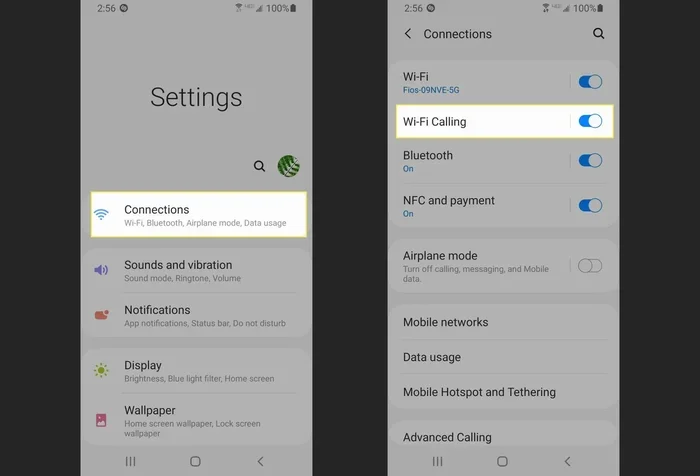
Most major carriers support this feature now. AT and T, Verizon, T Mobile, and many smaller providers all offer WiFi calling. You usually just need to toggle it on in your phone settings or through your carrier app. Some devices also let you manage WiFi calling preferences right from the call screen. It is a simple setup that can make a big difference in your daily calling experience.
Can You Leave Wi-Fi Calling On All the Time?
So, can you leave WiFi calling on all the time? Absolutely. There is no technical reason why you cannot keep it enabled 24 hours a day, seven days a week. Your phone is designed to handle this. When WiFi calling is on, your device constantly monitors for available WiFi networks. But it does not consume significant resources when you are not actually on a call. Think of it like having a radio turned on standby. It uses a tiny bit of power but does not really do anything until you tune in.
What Happens When WiFi Calling Stays On?
When you leave WiFi calling on all the time, your phone behaves mostly the same as normal. It still connects to cell towers for data and text messages. The only difference is that incoming and outgoing voice calls can route through WiFi when available. This means better call quality and fewer dropped calls in areas with poor cellular coverage. Your phone also maintains its regular connection to the mobile network. There is no conflict between WiFi calling and your standard cellular service.
Some people worry that keeping WiFi calling on will mess up their network settings. It will not. The feature is built into your phone’s firmware and carrier software. It works alongside your regular mobile connection without causing interference. You can safely leave it on and forget about it. Your phone knows when to use WiFi calling and when to stick with the cellular network.
Is It Safe to Keep WiFi Calling Enabled 24/7?
Yes, it is safe. Leaving WiFi calling on does not pose any security risks beyond what you already face when using WiFi in general. Your voice data is encrypted during transmission, just like it is on the regular mobile network. In fact, some experts argue that WiFi calling is slightly more secure because the data travels through your private wireless network rather than open cell towers. Of course, you should still use a strong WiFi password and keep your device updated for the best protection.
There is also no risk of accidentally running up your phone bill. WiFi calling uses your internet connection, not your cellular minutes. So even if you talk for hours, it will not eat into your plan’s minute allowance. This is one of the biggest perks of keeping WiFi calling on all the time. You get peace of mind knowing your calls are covered without extra costs.
How WiFi Calling Affects Your Phone
Now that we know it is safe, let us talk about the real-world effects of leaving WiFi calling on all the time. There are three main areas to consider. Battery life, data usage, and call quality. Each of these plays a role in your decision.
Battery Drain
One of the most common questions is whether WiFi calling drains your battery. The honest answer is: it depends. When WiFi calling is on but you are not on a call, the battery impact is minimal. Your phone is not constantly searching for networks or burning through power. However, when you are actively on a WiFi call, your phone uses more battery than a standard cellular call. This is because it is processing voice data and maintaining a WiFi connection at the same time.
In most cases, the battery drain is small enough that you will not notice it. A typical user might see a 2 to 5 percent difference over a full day. If you are someone who talks on the phone for hours every day, the impact could be slightly higher. But for most people, leaving WiFi calling on all the time is perfectly fine from a battery perspective. If you are very battery conscious, you can always turn it off when you need to squeeze out extra juice.
Data Usage
WiFi calling does use data, but very little. A standard voice call uses roughly 1 megabyte per minute. That means a 30-minute call uses about 30 megabytes. To put that in perspective, streaming a single music song uses about 3 to 5 megabytes. So WiFi calling is actually very light on your bandwidth. If you are on an unlimited data plan, this barely registers. Even if you have a capped plan, the data usage from WiFi calling is negligible for most users.
One thing to keep in mind is that WiFi calling uses your wireless internet connection, not your cellular data. So if you are connected to your home WiFi, your mobile data plan is not affected at all. This is a huge advantage. You get reliable calling without touching your monthly data allowance. It is one of the reasons so many people choose to keep WiFi calling on all the time.
Call Quality
This is where WiFi calling really shines. When you leave WiFi calling on all the time, your calls benefit from a more stable connection. WiFi networks often provide stronger signal strength indoors compared to cell towers. This means fewer dropped calls, less static, and clearer audio. If you have ever struggled to hear someone in a basement or a thick-walled building, you know how valuable this can be.
Call quality also depends on your internet speed. A fast, stable WiFi connection delivers excellent voice clarity. A slow or congested network might cause slight delays or lower audio quality. But even in less-than-ideal conditions, WiFi calling usually outperforms standard cellular calls. The technology has improved a lot over the years, and modern phones handle the switching between WiFi and cellular networks almost instantly.
When to Keep WiFi Calling On vs. Off
While you can leave WiFi calling on all the time, there are situations where turning it off makes sense. Understanding these scenarios helps you make the best choice for your needs.
Keep It On When
- You have weak cellular coverage: If your home or office has poor signal strength, WiFi calling keeps your calls connected.
- You travel internationally: WiFi calling helps you avoid roaming charges when you are abroad. You can make and receive calls using your home WiFi network without extra fees.
- You spend a lot of time indoors: Buildings with thick walls or basements often block cellular signals. WiFi calling solves this problem.
- You want better call quality: If you are tired of garbled or dropped calls, enabling WiFi calling can make a noticeable difference.
- You have unlimited WiFi: If you are always connected to a reliable WiFi network, there is no downside to keeping it on.
Turn It Off When
- Your WiFi is unreliable: If your wireless internet connection drops frequently, WiFi calling might cause more problems than it solves.
- You are in an area with excellent cellular coverage: If your cell signal is strong and stable, you may not need WiFi calling at all.
- You are concerned about battery life: On older phones or devices with small batteries, turning off WiFi calling can help preserve charge.
- Your carrier does not support it well: Some smaller carriers have limited WiFi calling features. Check with your provider before relying on it.
Common Mistakes People Make with WiFi Calling
Even though WiFi calling is simple, people make mistakes that cause frustration. Here are a few to avoid.
Not Checking Carrier Compatibility
Not every carrier supports WiFi calling the same way. Before you assume it will work, check with your provider. Some carriers require you to activate WiFi calling on their end before your phone can use it. You might need to call customer service or update your account settings. Once it is enabled, the feature works smoothly on most devices.
Ignoring Emergency Calling Limitations
Most carriers support emergency calling over WiFi, but there are exceptions. In some cases, your location might not be accurately reported to emergency services when you call from WiFi. This is especially true if your WiFi router does not have a fixed address. Always make sure your address is registered with your carrier for E911 purposes. This small step can make a big difference in an emergency.
Forgetting to Update Settings When Traveling
When you travel internationally, WiFi calling settings can behave differently. Some carriers automatically route calls through WiFi to avoid roaming fees. Others require you to adjust your settings manually. Check your phone settings before you leave the country. A quick look at your carrier settings can save you from unexpected charges on your bill.
Assuming WiFi Calling Replaces Cellular Service
WiFi calling does not replace your cellular service. It works alongside it. Your phone still needs a mobile network connection for texts, data, and calls when WiFi is unavailable. If you turn off your cellular service entirely, WiFi calling will not work either. Think of WiFi calling as a helpful backup, not a replacement for your mobile network.
Expert Tips for Getting the Most Out of WiFi Calling
Want to make the most of this feature? Here are some practical tips from networking experts.
- Restart your phone after enabling WiFi calling. This ensures all settings are properly applied and your phone connects to the right networks.
- Keep your phone firmware updated. Manufacturers regularly improve WiFi calling performance through software updates. Installing the latest updates can fix bugs and boost call quality.
- Prioritize your home WiFi network. If you have a dual-band router, connect your phone to the 5GHz band for faster, more stable calls. This reduces latency and improves voice clarity.
- Test your settings with a friend. Make a test call and ask the other person if the audio is clear. This quick check helps you confirm everything is working before you rely on it.
- Monitor your data usage. Even though WiFi calling uses very little data, it is good practice to keep an eye on your network usage. Most phones have a data usage tracker in their settings.
- Use WiFi calling as part of a broader coverage strategy. Combine it with a cell signal booster or a mesh WiFi system for the best indoor coverage experience.
Key Takeaways
- WiFi calling is safe to leave on: It will not damage your phone or cause network conflicts when left enabled 24/7.
- Better call quality: Voice calls over WiFi often sound clearer than standard cellular service, especially indoors.
- Minor battery impact: Leaving WiFi calling on may drain your battery slightly faster, but the difference is usually small.
- Data usage is low: A typical voice call uses very little bandwidth, so your data plan stays mostly unaffected.
- Carrier compatibility matters: Not all mobile network providers support WiFi calling equally, so check your settings.
- Emergency calling works: Most carriers allow emergency calls even when you are using WiFi calling exclusively.
- International savings: Keeping WiFi calling on can help you avoid roaming charges when traveling abroad.
Conclusion
So, can you leave WiFi calling on all the time? The answer is a clear yes. It is safe, it is convenient, and it works well for most people. Keeping WiFi calling enabled gives you better call quality, fewer dropped connections, and peace of mind when you are in areas with weak signal strength. The minor impact on battery life and data usage is something most users barely notice.
If you have ever struggled with poor indoor coverage or expensive roaming charges, WiFi calling is a simple fix. Just toggle it on, make sure your carrier supports it, and enjoy the benefits. There is no need to turn it off unless you run into a specific issue. For the vast majority of users, leaving WiFi calling on all the time is the smart move. Give it a try and see the difference it makes in your daily phone calls.
Take a moment today to check your phone settings. If WiFi calling is not already on, enable it and test it out. You might be surprised at how much clearer your calls sound and how much more reliable your connection feels. It is one small change that can make a big impact on your mobile experience.
Frequently Asked Questions
Will leaving WiFi calling on all the time use up my data?
WiFi calling uses very little data. A typical voice call consumes about 1 megabyte per minute. If you are connected to home WiFi, your mobile data plan is not affected at all. Even if you use cellular data for WiFi calling, the usage is minimal and unlikely to impact your data plan.
Can I still make emergency calls when WiFi calling is on?
Yes, most carriers support emergency calling over WiFi. However, your location accuracy may vary depending on your router setup. Make sure your home address is registered with your carrier for E911 services to ensure emergency responders can find you accurately.
Does WiFi calling work when you are not connected to WiFi?
No, WiFi calling requires an active wireless internet connection. When you are not connected to WiFi, your phone automatically falls back to the standard cellular network for voice calls. This seamless switch happens in the background without any input from you.
Can I leave WiFi calling on while traveling internationally?
Yes, and it is actually one of the best reasons to keep it on. WiFi calling allows you to make and receive calls using your home network over a foreign WiFi connection. This can help you avoid expensive roaming charges while traveling abroad. Just check with your carrier to confirm international WiFi calling is supported.
Why does my phone switch from WiFi calling to cellular automatically?
Your phone is designed to switch networks seamlessly. When your WiFi signal weakens or drops, your phone automatically routes calls through the cellular network. This ensures your call stays connected without interruption. You do not need to do anything manually.
Is WiFi calling the same as VoIP calling?
Yes, WiFi calling is a form of VoIP, or Voice over Internet Protocol. It works similarly to apps like Skype or WhatsApp calls, but it is built directly into your phone and carrier network. This means you get a more integrated and reliable experience compared to third-party VoIP apps.