Can You Change RCA to HDMI With These Simple Tips Today
Changing RCA to HDMI is easier than most people think. With the right RCA to HDMI converter, you can connect vintage devices to modern TVs in just a few minutes. This guide covers everything you need, from choosing the best adapter to fixing common signal issues on your own.
Have you ever looked at your old VCR, retro gaming console, or vintage stereo and wondered how to connect it to your modern TV? If so, you are not alone. Many people have older equipment that uses RCA cables but only have HDMI ports on their newer screens. The good news is that changing RCA to HDMI is totally doable. You do not need to be a tech expert to make it work. In this guide, we will walk you through every step. You will learn what tools you need, how to set things up, and how to avoid common mistakes. By the end, you will feel confident connecting your old devices to any modern display.
The world of audio video conversion can feel confusing at first. There are so many adapters, cables, and converter boxes on the market. It is easy to feel overwhelmed. But here is the truth: the process is much simpler than it looks. Whether you want to set up a home theater system with vintage gear or just get your old DVD player working on a new TV, this guide has you covered. We will break everything down into plain language. No jargon. No confusing tech terms. Just clear, practical advice that actually works.
So, can you change RCA to HDMI? The short answer is yes. The longer answer is that it depends on the type of converter you choose and the equipment you have. But do not worry. We will cover all of that in detail below. Let us dive in and get your older devices connected to your modern TV. You will be surprised how quick and painless this process can be.
Key Takeaways
- You can absolutely change RCA to HDMI using a simple converter box or adapter. No advanced tech skills are needed.
- Active converters are the best choice for most setups because they upscale the signal and improve display quality.
- Check your cables and ports first before buying any equipment. This saves time and money.
- Common issues like no signal or poor picture are usually easy to fix with basic troubleshooting steps.
- Budget-friendly options work great for casual use, but premium converters offer better upscaling and reliability.
- Always test your setup after connecting everything to make sure the audio and video both work properly.
📑 Table of Contents
What Is RCA and Why Do You Need to Convert to HDMI?
If you have ever seen those red, white, and yellow cables plugged into the back of an old TV or stereo, those are RCA cables. They have been around for decades. They were the standard way to carry audio and video signals from one device to another. But technology has moved on. Today, most TVs, projectors, and monitors use HDMI. So what does that mean for your older gear?
What Are RCA Cables?
RCA cables are the classic analog connectors you find on almost every piece of older audio and video equipment. The yellow cable carries the video signal. The red and white cables carry the right and left audio channels. Together, they form a composite connection. This was the go-to standard for home entertainment for many years. You will still find RCA outputs on VCRs, older gaming consoles, camcorders, and some AV receivers.
The problem is that modern TVs and monitors have mostly dropped RCA inputs. They rely almost entirely on HDMI. That is where the need for signal conversion comes in. You need a bridge between the old analog world and the new digital one. And that bridge is a converter.
Why HDMI Became the Standard
HDMI stands for High-Definition Multimedia Interface. It carries both audio and video through a single cable. This made it a huge upgrade over RCA. With HDMI, you get better display quality, higher resolution, and a cleaner setup with fewer cables. Most modern TVs and monitors come with multiple HDMI ports built in.
But here is the catch. Just because HDMI is the standard does not mean your old devices are useless. They still work great. You just need the right adapter to translate the analog signal into a digital one that your TV can read. That is exactly what an RCA to HDMI converter does.
Quick Tip: Before buying any converter, check the back of your old device. Make sure it has RCA output ports. The yellow, red, and white jacks should be clearly labeled. If you see component video ports instead (red, green, and blue), you may need a different type of adapter.
Can You Change RCA to HDMI? Yes — Here Is How
The answer to can you change RCA to HDMI is a resounding yes. There are several ways to do it, and the method you choose depends on your budget, your equipment, and how much quality you want. Let us look at the main options available to you right now.
Types of RCA to HDMI Converters
When you start shopping, you will find a few different types of composite to HDMI adapters. Here are the most common ones you will come across:
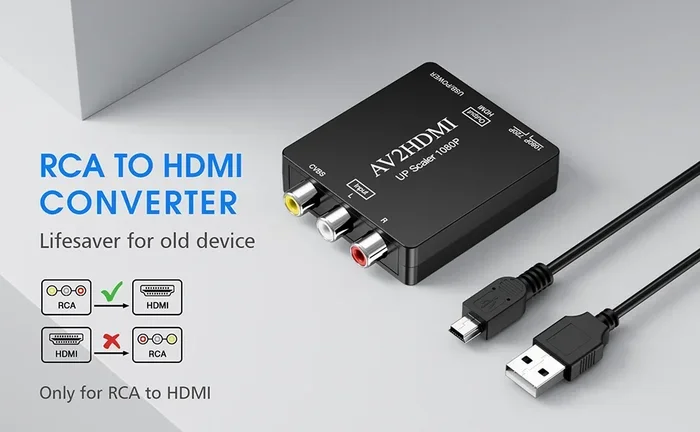
- Standalone converter boxes. These are small devices that plug into your RCA source on one end and connect to your TV via HDMI on the other. They are the most popular option and work with almost any setup.
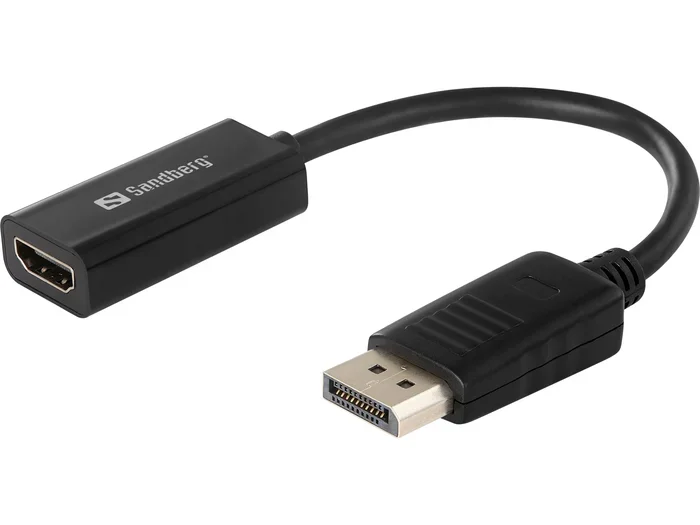
- Converter cables. These are all-in-one cables with RCA plugs on one end and an HDMI plug on the other. They are compact and great for simple setups, but they may not offer the best upscaling.
- AV receivers with conversion features. Some modern AV receivers can accept RCA inputs and output HDMI. These are great if you already have a receiver or plan to upgrade your audio setup.
- USB capture cards. These are more niche but useful if you want to connect an old device to a computer or stream the signal. They are not ideal for direct TV connections but have their uses.
Active vs Passive Converters
This is an important distinction that many people overlook. Active converters have built-in electronics that actually convert the analog signal to digital. They often include upscaling features that improve the picture quality. Passive adapters, on the other hand, simply reroute the signal without any processing. They are cheaper but usually produce a lower-quality output.
For most people, an active converter is the better choice. It will give you a clearer picture and better color accuracy. A passive adapter might work in a pinch, but do not expect great results for important viewing. If you care about display quality, spend a little extra on an active unit.
Common Mistake: Many people buy a passive adapter thinking it will give them the same quality as an active converter. It will not. The signal still needs to be converted from analog to digital, and only an active converter can do that properly.
Step-by-Step Guide to Changing RCA to HDMI
Now that you understand the basics, let us walk through the actual setup process. This is simpler than you might think. Follow these steps and you will have your old device connected to your TV in no time.
What You Will Need
Before you start, gather these items. Having everything ready makes the process smooth and fast:
- An RCA to HDMI converter (active type recommended)
- RCA cables (red, white, and yellow) — these usually come with the converter
- An HDMI cable to connect the converter to your TV
- Your older device with RCA outputs (VCR, retro console, DVD player, etc.)
- A modern TV or monitor with an available HDMI port
- A power source for the converter (usually USB or a wall adapter)
The Connection Process
Here is how to set everything up step by step:
- Plug the RCA cables into your old device. Match the colors. Yellow goes into the video port. Red and white go into the audio ports. Push them in firmly until they click.
- Connect the other end of the RCA cables to the converter box. Again, match the colors carefully. This is the most important step. Getting the colors wrong will result in no picture or no sound.
- Plug the HDMI cable into the converter. Then plug the other end into an available HDMI port on your TV.
- Power on the converter. Use the USB cable or wall adapter that came with your unit. Some converters draw power from the HDMI connection itself, but most work better with their own power source.
- Turn on your TV and select the correct HDMI input. Use your remote to switch to the port where you plugged in the converter.
- Turn on your old device. You should now see the picture on your TV. Adjust the converter settings if needed for the best display quality.
That is it. You have successfully changed RCA to HDMI. It really is that simple. If you run into any issues, do not panic. We will cover troubleshooting in the next section.
Expert Insight: Take a photo of your cable connections before you unplug anything. This makes it much easier to set things back up if you need to move your equipment or troubleshoot later. It is a small habit that saves a lot of frustration.
Common Problems and How to Fix Them
Even with a simple setup, you might run into a few hiccups along the way. This is completely normal. Here are the most common issues people face when converting RCA to HDMI and how to solve them quickly.
No Signal Issues
If your TV shows a blank screen or says “No Signal,” do not worry. This is the most common problem and usually has a simple fix. Start by checking your cable connections. Make sure every RCA plug is firmly seated in the correct color-coded port. A loose connection is the number one cause of no signal.
Next, make sure your TV is on the right HDMI input. Sometimes the input changes accidentally. Try unplugging the converter, waiting a few seconds, and plugging it back in. This resets the connection. If you are still seeing no signal, try a different HDMI cable or a different HDMI port on your TV.
Another thing to check is whether your converter is properly powered. If it has a power adapter, make sure it is plugged in and working. Some converters will not function without their own power source, even if they are connected via HDMI.
Poor Picture Quality
If you have a picture but it looks fuzzy, blurry, or has strange colors, the issue is usually related to signal quality. Start by checking your RCA cables. Old or damaged cables can degrade the signal significantly. Try replacing them with fresh ones if possible.
Make sure your converter supports the resolution your TV expects. Many budget converters only output 720p or 1080p. If your TV is 4K, the converter will still work, but the picture will be scaled up. For the best results, look for a converter that supports at least 1080p output.
Also, check that your converter is an active type. Passive adapters will not convert the signal properly and will often produce a poor or flickering image. Investing in a good active converter makes a huge difference in display quality and overall performance.
Quick Tip: If your picture looks washed out or too dark, check the brightness and contrast settings on both your converter (if it has them) and your TV. Sometimes the default TV settings are not optimized for older analog signals.
Best RCA to HDMI Converters on the Market
Not all converters are created equal. Some offer great value, while others deliver premium performance. Here is a look at what to look for and some top options across different price ranges.
Top Picks by Budget
Budget option (under $15): Basic composite to HDMI adapters from well-known brands like Genissey or Convertgear work fine for casual use. They offer standard definition output and get the job done. They are perfect for connecting an old VCR or retro console that you do not use every day.
Mid-range option ($15 to $40): Converters in this range often include upscaling features. They can take a standard definition signal and boost it to 720p or 1080p. Brands like RetroTINK and AOOK are popular choices. These are great for retro gaming setups where picture quality matters.
Premium option (over $40): High-end converters offer the best upscaling, support for higher resolutions, and better build quality. They often include features like scanline simulation for retro gamers who want that authentic CRT look. These are ideal for serious collectors or anyone who wants the best possible output from their vintage equipment.
Comparison Table
| Converter Type | Price Range | Upscaling | Best For |
|---|---|---|---|
| Budget Active Converter | $10 – $15 | No | Basic RCA to HDMI needs |
| Mid-Range Converter | $15 – $40 | Yes (720p/1080p) | Retro gaming and home theater |
| Premium Converter | $40 – $100+ | Yes (4K capable) | Collectors and quality-focused users |
| Passive Adapter | $5 – $10 | No | Temporary or emergency use only |
Expert Insight: When shopping for a converter, always check customer reviews. Look for feedback specifically about picture quality and reliability. A converter that looks good on paper may not perform well in real-world use. Real user experiences are the best guide.
Expert Tips for Better Performance
Once you have your RCA to HDMI converter set up, there are a few things you can do to get the best possible results. These tips will help you squeeze more quality out of your setup and avoid frustration down the road.
Upgrading Your Setup
If you are serious about getting the best picture from your older devices, consider a few upgrades. First, replace any old RCA cables with fresh, high-quality ones. Damaged or worn-out cables are a leading cause of poor signal. Gold-plated connectors are a nice bonus but not essential.
Second, use a short, high-quality HDMI cable between your converter and TV. Longer cables can sometimes introduce signal loss, especially with older equipment. Keep your HDMI cable as short as practical while still reaching your TV comfortably.
Third, if you have an AV receiver, you can integrate the converter into your audio setup. This lets you use better speakers and get improved sound quality along with your video. Many AV receivers have RCA inputs and HDMI outputs, which can simplify your whole setup.
Maintaining Signal Quality
Keep your converter in a well-ventilated area. These devices can get warm during use, and overheating can cause signal problems or even damage. Do not stack other electronics on top of your converter box. Give it room to breathe.
Also, unplug your converter when you are not using it for extended periods. This protects the electronics and extends the lifespan of the device. A small habit like this can save you from unexpected failures down the road.
Finally, keep your firmware and software up to date if your converter has a companion app or digital controls. Some smart converters receive updates that improve compatibility and display quality over time. Check the manufacturer’s website periodically for the latest firmware.
Common Mistake: Do not buy the cheapest converter you can find without reading reviews. A very cheap passive adapter might seem like a good deal, but it often produces poor results. You will end up frustrated and needing to buy a better one anyway. Spend a little more upfront and save yourself the hassle.
Conclusion
Can you change RCA to HDMI? Absolutely. With the right RCA to HDMI converter and a few simple steps, you can connect virtually any older device to a modern TV or monitor. The process is straightforward, affordable, and does not require any special technical skills. Whether you are setting up a retro gaming station, bringing an old VCR back to life, or integrating vintage audio equipment into your home theater setup, the right converter makes it all possible.
Remember to choose an active converter for the best results. Check your cables and ports before you buy. Follow the step-by-step connection process carefully. And if you run into any issues, the troubleshooting tips in this guide should help you get back on track quickly. Your older equipment still has plenty of life left in it. With the right signal conversion setup, you can enjoy it on a modern high-definition display with excellent picture and sound quality.
So go ahead. Give it a try. You might be surprised at how easy it is to bridge the gap between old and new technology. Your vintage devices deserve to be seen and heard on a big, modern screen. With the tips and guidance in this article, you are now fully equipped to make changing RCA to HDMI happen. Happy connecting.
Frequently Asked Questions
Do I need a special converter to change RCA to HDMI?
Yes, you need an active RCA to HDMI converter to properly translate the analog signal from your RCA cables into a digital HDMI signal. Passive adapters alone will not convert the signal. Make sure the converter you buy supports composite video input and has its own power source for the best results.
Will changing RCA to HDMI improve the picture quality on my TV?
It can, but the improvement depends on the converter you use. An active converter with upscaling features will produce a much clearer picture than a passive adapter. However, the original source quality still matters. A VHS tape will never look like 4K Blu-ray, but a good converter will make it look as sharp as possible for the source material.
Can I use an RCA to HDMI converter with retro gaming consoles?
Absolutely. Retro gaming consoles like the NES, SNES, Sega Genesis, and PlayStation 1 all use RCA outputs. A quality converter will let you play these classic games on a modern TV with much better display quality than an old CRT monitor. Many retro gamers specifically use converters to enhance their setup.
Why does my converter have no sound after connecting RCA to HDMI?
No sound usually means the red and white RCA audio cables are not properly connected or are plugged into the wrong ports. Double-check that the red cable goes to the red audio port and the white cable goes to the white port. Also make sure your TV is not muted and the volume is turned up on both the converter and the TV itself.
Can I convert HDMI back to RCA if I need to?
Yes, you can use an HDMI to RCA converter for the reverse process. These work similarly but in the opposite direction. They take the digital HDMI signal and convert it back to analog for older equipment. However, the quality may not match the original output, and not all HDMI sources support this type of conversion. Always check compatibility before purchasing.
How much does it cost to change RCA to HDMI?
Budget converters start at around $5 to $15 for basic models. Mid-range active converters with upscaling typically cost between $15 and $40. Premium options with advanced features can run $40 to $100 or more. For most casual users, a $15 to $30 converter offers the best balance of price and performance. It is a small investment that breathes new life into your older equipment.