Can RCA Cables Be Converted To HDMI Without Any Adapter
Can RCA cables be converted to HDMI without any adapter? The short answer is no. RCA cables carry analog signals while HDMI transmits digital data, so a direct connection is not possible. However, you can bridge this gap with the right RCA to HDMI converter or a composite to HDMI device. This guide walks you through every method, myth, and practical tip to help you connect your older devices to modern displays safely and effectively.
This is a comprehensive guide about Can Rca Cables Be Converted To Hdmi.
Key Takeaways
- Direct conversion is not possible: RCA and HDMI use completely different signal types, so you always need some form of conversion device.
- A converter box is your best friend: An RCA to HDMI converter is the most reliable and widely available option for analog to digital conversion.
- Signal quality matters: Cheap adapters can degrade your audio video quality, so investing in a good converter pays off.
- Multiple conversion methods exist: From standalone converter boxes to AV receivers, there are several paths to get RCA content on an HDMI screen.
- Legacy devices still have value: Retro gaming consoles, older DVD players, and vintage gear can all work with modern TVs using the right setup.
- Avoid common mistakes: Using the wrong cable type or skipping audio connections are the top errors people make during conversion.
[FEATURED_IMAGE_PLACEHOLDER]
Can RCA Cables Be Converted to HDMI Without Any Adapter
The question can RCA cables be converted to HDMI comes up more often than you might think. People own old DVD players, retro gaming consoles, and vintage stereo systems and want to hook them up to modern flat-screen TVs. The honest answer is that you cannot do it without some kind of conversion device. RCA cables carry analog signals, and HDMI carries digital signals. These are fundamentally different technologies, so a bare wire connection will never work.
That does not mean you are stuck, though. With the right RCA to HDMI converter, you can absolutely enjoy your older devices on a new display. This article covers every angle of this topic. You will learn how the conversion process works, what tools you need, and how to avoid common pitfalls. Whether you are setting up a home theater system or just want to play old games on a big screen, this guide has you covered.
Let us start with the basics so you fully understand why this conversion is necessary in the first place.
Why RCA and HDMI Are Not the Same
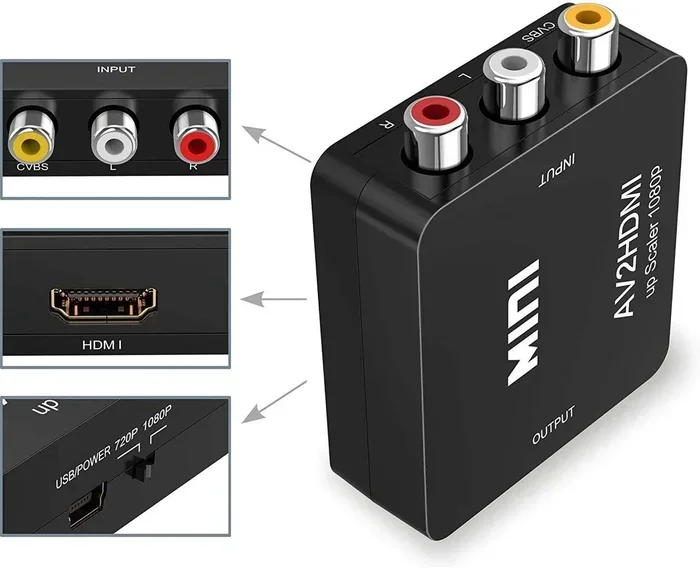
RCA cables have been around since the 1940s. They carry analog audio and video signals through separate red, white, and yellow connectors. The yellow cable handles video, while the red and white cables handle right and left audio channels. These signals are continuous waves that degrade over distance and are susceptible to interference.
HDMI cables, on the other hand, transmit digital signals through a single cable. They carry both high-definition video and multi-channel audio in one neat package. Digital signals are much cleaner and do not suffer from the same quality loss as analog signals. Because of this fundamental difference, you need a device that can translate one format into the other.
How RCA to HDMI Conversion Actually Works
Understanding the conversion process helps you make smarter buying decisions. When you use a composite to HDMI converter, the device takes the analog signals from your RCA cables and converts them into digital HDMI output. This process is called analog to digital conversion. It involves sampling the analog signal, digitizing it, and then outputting it through the HDMI port.
Most converters also perform upscaling, which means they take the lower resolution RCA signal and boost it to fit modern HD or even 4K displays. This is important because RCA cables typically output at 480i or 576p resolution, which looks blurry on a large modern TV without upscaling.
What Happens Inside a Converter Box
A typical RCA to HDMI converter box contains a small processor chip. This chip reads the analog input from the RCA cables and translates it into a digital HDMI signal. The converter then outputs this signal through an HDMI cable to your TV or monitor. Some models also include built-in audio extraction, which lets you separate the audio signal if needed.
Here is what happens step by step during conversion:
- The RCA cables send analog audio and video signals to the converter box.
- The internal processor chip reads and digitizes these signals.
- The converter upscales the video to a higher resolution.
- The processed digital signal is sent out through the HDMI cable.
- Your TV receives the digital signal and displays it in full quality.
This entire process happens in real time, so there is virtually no lag. That makes RCA to HDMI converters great for gaming and watching movies without any noticeable delay.
Different Ways to Convert RCA to HDMI
There are several methods you can use to connect RCA devices to HDMI displays. Each method has its pros and cons, and the right choice depends on your specific setup and budget.
Method 1: Standalone RCA to HDMI Converter Box
This is the most popular and straightforward option. A standalone converter box plugs into your RCA cables on one end and connects to your TV via HDMI on the other end. You simply plug in the RCA cables from your source device, connect the HDMI cable from the box to your TV, and you are good to go.
Pros of standalone converters:
- Easy to set up with no technical knowledge needed.
- Affordable, with many options under $30.
- Portable and compact, so you can move them between devices easily.
- No drivers or software required.
Cons of standalone converters:
- Budget models may produce lower quality output.
- Some converters only support standard definition, not HD.
- You need an extra power source, usually a USB cable.
Method 2: AV Receiver with RCA and HDMI Inputs
If you already own an AV receiver, you might not need a separate converter. Many AV receivers have both RCA inputs and HDMI outputs. You connect your RCA cables to the receiver’s input ports and then run an HDMI cable from the receiver to your TV. The receiver handles the analog to digital conversion internally.
This method is excellent for home theater setups because the AV receiver also processes and improves audio quality. You get better sound than you would with a basic converter box. However, AV receivers can be expensive, so this method makes the most sense if you already own one.
Method 3: USB Capture Cards
Some people use USB capture cards to convert RCA signals. These cards plug into a computer, and you connect the RCA cables to the card. The computer software then processes the analog signal and outputs it through an HDMI connection if you have a capture card with HDMI passthrough. This method is more complex and is usually used for streaming or recording rather than simple viewing.
Method 4: Retro Gaming Adapters
If your goal is to play retro games, there are specialized adapters designed for this purpose. Devices like the RetroTINK or Analogue Pocket accessories are built specifically for converting legacy console signals to modern display formats. These adapters often provide the best image quality for gaming because they are designed with pixel-perfect scaling in mind.
| Method | Cost Range | Setup Difficulty | Best For |
|---|---|---|---|
| Standalone Converter Box | $15 – $50 | Easy | Simple RCA to HDMI connection |
| AV Receiver | $100 – $500+ | Moderate | Home theater and audio setups |
| USB Capture Card | $30 – $150 | Advanced | Streaming and recording |
| Retro Gaming Adapter | $50 – $200 | Moderate | Retro console gaming |
Tips for Better Signal Quality When Converting RCA to HDMI
Not all conversions look the same. The quality of your final image and sound depends on several factors. Here are practical tips to get the best results from your RCA to HDMI conversion setup.
Use High-Quality RCA Cables
Even though you are converting to digital, the input signal still matters. Cheap, damaged, or overly long RCA cables can introduce noise and interference into the analog signal before it even reaches the converter. Invest in well-shielded audio video cables with gold-plated connectors for the cleanest input signal.
Choose a Converter That Supports Your Resolution
Not all converters output the same resolution. Some only support 480p, while others can upscale to 720p, 1080p, or even 4K. If you want the sharpest picture on your modern TV, choose a converter that supports at least 1080p output. Check the product specifications before you buy.
Keep Cables Short and Organized
Longer cables mean more opportunity for signal loss. Keep your RCA cables and HDMI cable as short as practical while still allowing for a tidy setup. If you must use longer cables, consider using high-quality, shielded options to minimize interference.
Separate Audio When Needed
Some converter boxes combine audio and video into the HDMI output, while others allow you to extract audio separately. If you are using a soundbar or external speakers, look for a converter that provides optical or analog audio output in addition to the HDMI connection.
Power Your Converter Properly
Many converter boxes need external power, usually through a USB cable connected to your TV or a wall adapter. Make sure the power supply is stable. A weak or fluctuating power source can cause flickering, signal drops, or no output at all.
Common Mistakes People Make When Converting RCA to HDMI
Even with the right equipment, mistakes can ruin your experience. Here are the most common errors and how to avoid them.
Assuming a Direct Connection Will Work
The biggest mistake is thinking you can plug RCA cables directly into an HDMI port. This will not work. The connector shapes are completely different, and the signal types are incompatible. Always use a proper converter device. Any product that claims to let you do a direct RCA-to-HDMI connection without any conversion hardware is misleading.
Ignoring Audio Connections
Some people focus only on the video signal and forget about audio. RCA cables carry audio on two separate connectors (red and white). If your converter does not pass audio through HDMI automatically, you may need to connect the audio cables separately to your sound system. Check your converter’s manual to understand how it handles audio.
Buying the Cheapest Converter Available
It is tempting to grab the least expensive RCA to HDMI converter online, but very cheap models often produce poor image quality. They may introduce lag, static, or color distortion. Spending a little more on a reputable brand saves you from frustration later. Look for converters with good reviews and clear resolution support.
Using Damaged or Old RCA Cables
Old cables with bent pins, frayed wires, or corroded connectors degrade the signal before it even reaches the converter. Inspect your cables before setup. If a cable looks worn out, replace it. A new set of composite cables costs very little and makes a noticeable difference in output quality.
Not Checking TV Input Settings
After connecting everything, some users wonder why they see no picture. Often, the TV is set to the wrong input source or the wrong resolution. Use your TV remote to switch to the correct HDMI input and adjust the display settings if needed.
Can You Convert RCA to HDMI for Retro Gaming?
Retro gaming is one of the most popular reasons people ask about RCA to HDMI conversion. Old consoles like the NES, SNES, Sega Genesis, and PlayStation 1 all use RCA or composite outputs. Connecting these to a modern TV can be tricky because modern displays often struggle with low-resolution, interlaced signals.
The good news is that dedicated retro gaming converters exist. These devices do more than basic conversion. They offer features like scanline filtering, frame buffering, and low-latency output. This means you get the authentic retro look with modern display clarity. For serious retro gamers, investing in a quality converter is well worth it.
Some converters also support component video inputs, which provide better quality than standard composite RCA. If your console supports component output, always use that connection for the best results before converting to HDMI.
Expert Insights on RCA to HDMI Conversion
Signal quality experts often emphasize that the weakest link in any conversion chain determines your final output quality. This means even the best converter box cannot fix poor-quality source cables or a low-resolution source signal. Start with the best possible input, and the conversion process will produce much better results.
Another expert tip is to avoid chaining multiple conversion devices. For example, do not use an RCA to component adapter followed by a component to HDMI converter unless absolutely necessary. Each conversion step introduces potential quality loss and adds complexity. If your device has a direct RCA output, use a single RCA to HDMI converter for the cleanest signal path.
When shopping for a converter, look for models that support EDID (Extended Display Identification Data) passing. EDID helps the converter communicate properly with your TV, ensuring it outputs the correct resolution and refresh rate automatically. Converters without EDID support often require manual resolution tweaking, which can be frustrating.
Key Takeaways
- Direct RCA to HDMI connection is impossible: You always need a conversion device because analog and digital signals are incompatible.
- A standalone RCA to HDMI converter box is the easiest solution: It is affordable, simple to set up, and works with most RCA source devices.
- AV receivers offer a premium alternative: If you already own one, it can handle conversion while also improving your audio experience.
- Signal quality starts with your cables: Use well-made, shielded RCA cables and keep cable runs short for the best results.
- Avoid the cheapest converters: They often produce lag, static, or poor image quality that ruins the experience.
- Retro gaming benefits from specialized adapters: These provide better scaling and lower latency than generic converters.
- Check your TV settings after setup: Switching to the correct input and resolution solves most display issues.
Conclusion
The answer to can RCA cables be converted to HDMI without any adapter is a clear no. You need a conversion device to bridge the gap between analog and digital signals. But the good news is that this process is simple, affordable, and widely supported by many products on the market today.
Whether you choose a standalone RCA to HDMI converter box, an AV receiver, or a retro gaming adapter, the key is to pick quality equipment that matches your needs. Start with good source cables, choose a converter that supports your desired resolution, and follow the setup tips in this guide. With the right setup, your older devices will look and sound great on modern displays.
Do not let outdated cables stop you from enjoying your favorite content. The world of analog to digital conversion is accessible to everyone, and the results are well worth the small effort it takes to get everything connected properly. Grab the right converter, follow the steps above, and enjoy your RCA devices on a big, crisp HDMI screen today.
Frequently Asked Questions
Can I plug RCA cables directly into an HDMI port?
No, you cannot plug RCA cables directly into an HDMI port. RCA cables carry analog signals, while HDMI ports expect digital signals. The connectors are physically different, and the signal types are incompatible. You need a converter device to bridge this gap.
What is the best RCA to HDMI converter to buy?
The best converter depends on your budget and needs. Popular reliable brands include RetroTINK, ViewHD, and Cable Matters. Look for a converter that supports at least 1080p output, has good user reviews, and includes proper power supply. Avoid the cheapest no-name brands as they often produce poor quality output.
Does RCA to HDMI conversion cause any lag?
Most modern RCA to HDMI converters have virtually no lag. The conversion process happens in real time. However, very cheap or poorly designed converters may introduce noticeable delay. If you plan to use the setup for gaming, look for converters specifically marketed as low-latency or gaming-friendly.
Can I convert component video to HDMI the same way?
Yes, component video can be converted to HDMI using a similar process. Component cables use three RCA-style connectors (green, blue, and red) for higher quality video than standard composite RCA. You can use a component to HDMI converter for this purpose, and the image quality will generally be better than composite conversion.
Why does my converted RCA signal look blurry on my TV?
Blurry output usually happens for a few reasons. Your RCA source might be low resolution, your converter might not upscale properly, or your TV might be set to the wrong display mode. Make sure your converter supports HD output, your cables are in good condition, and your TV is set to match the converter’s output resolution.
Do I need any special software for RCA to HDMI conversion?
No, most standalone RCA to HDMI converter boxes do not require any software or drivers. They work as plug-and-play devices. Simply connect the RCA cables, plug in the power, connect the HDMI cable to your TV, and switch to the correct input. Some USB capture cards used for recording may require software, but viewing setups do not.