Can Public Wifi Track VPN and Compromise Your Privacy
Using a VPN on public WiFi adds a powerful layer of protection, but it does not make you completely invisible. While a VPN encrypts your data and hides your browsing activity from most snoops, public WiFi networks can still detect that you are using a VPN and may track certain metadata. Understanding what a VPN can and cannot hide is essential for anyone who values online privacy and secure browsing on the go.
You are sitting at a coffee shop. The WiFi password is on the receipt. You open your laptop, connect to the network, and fire up your VPN. You feel safe. But wait — can public WiFi still track your VPN? That is the question many people ask, and the answer is not as simple as yes or no.
The truth is that a VPN on public WiFi does a lot of heavy lifting to protect you. But it is not a magic shield. There are gaps, vulnerabilities, and metadata that can still be exposed. In this guide, we will break down exactly how public WiFi tracking works, what a VPN can and cannot hide, and how you can stay truly safe when you connect to unsecured networks.
Whether you are a remote worker, a traveler, or just someone who loves free WiFi, this article will give you the knowledge you need to browse with confidence. Let us dive in.
Key Takeaways
- A VPN encrypts your traffic: This means most people on the same WiFi network cannot see what you are browsing or downloading.
- Public WiFi can still detect VPN usage: Network admins can see that you are connected to a VPN server, even if they cannot see your data.
- DNS leaks and IP leaks are real risks: A poorly configured VPN may expose your real IP address or browsing queries.
- Not all VPNs are equal: Free VPNs often log your data, which defeats the purpose of using one in the first place.
- HTTPS websites add extra protection: Even without a VPN, most modern sites encrypt your data, but a VPN covers everything.
- Combining a VPN with other tools works best: Use a kill switch, DNS leak protection, and avoid sensitive tasks on public networks when possible.
📑 Table of Contents
- How Does a VPN Work on Public WiFi?
- Can Public WiFi Still See That You Are Using a VPN?
- What Are the Risks of Using a VPN on Public WiFi?
- How to Choose a VPN That Protects You on Public WiFi
- Quick Tips to Stay Safe on Public WiFi
- Common Mistakes People Make With VPNs on Public WiFi
- Expert Insights on VPN Privacy and Public WiFi
- Conclusion
How Does a VPN Work on Public WiFi?
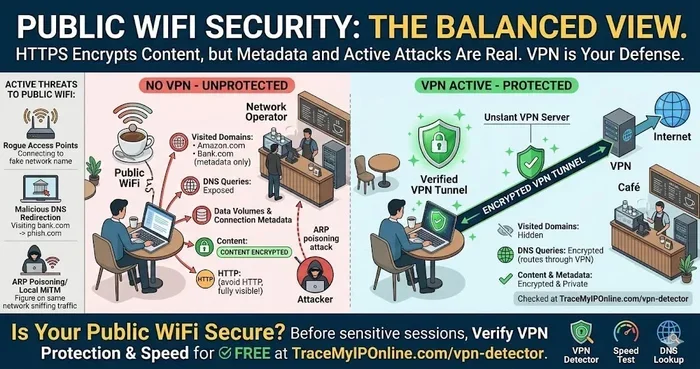
To understand whether public WiFi can track a VPN, you need to know how a VPN actually works. A Virtual Private Network creates an encrypted tunnel between your device and a remote server. All your internet traffic passes through this tunnel.
Here is what happens step by step:
- You connect to a public WiFi network, like the one at an airport or hotel.
- You launch your VPN app and connect to a server.
- The VPN encrypts all your data before it leaves your device.
- Your encrypted data travels through the public WiFi network.
- It reaches the VPN server, which decrypts it and sends it to the internet.
- The response follows the same path back to you.
During this process, anyone monitoring the public WiFi network — like a hacker in the corner or the coffee shop owner — sees only scrambled data. They cannot read your browsing history, see what you download, or intercept your passwords. This is the core benefit of VPN encryption.
What Does the Encryption Actually Hide?
A good VPN protocol hides a lot of sensitive information. Here is a list of what typically stays hidden:
- Your browsing history — websites you visit are encrypted
- Your passwords — entered on HTTPS or VPN-protected sites
- Your messages — if they are not end-to-end encrypted already
- Your downloads — files cannot be intercepted in transit
- Your IP address — the VPN server masks your real address
This is why millions of people use a VPN for public WiFi. It is one of the best defenses against data interception on open networks.
Can Public WiFi Still See That You Are Using a VPN?
Yes. Here is the part that surprises many people. Even though a VPN encrypts your traffic, the public WiFi network can still detect that you are using a VPN. How? Because the connection between your device and the VPN server has a unique digital fingerprint.
Network administrators and sophisticated monitoring tools can identify VPN traffic patterns. They know you are using a VPN. They just cannot see what you are doing inside that encrypted tunnel. This is an important distinction.
What Metadata Can Be Tracked?
While your actual browsing data stays hidden, certain metadata can still be collected. Metadata is information about your connection, not the content itself. Here is what public WiFi might track:
- Connection times — when you connected and disconnected
- VPN server address — the IP of the VPN server you used
- Data volume — how much data you transferred
- Duration of connection — how long you were online
- Device type — the kind of device you are using
So while your browsing activity stays private, your digital footprint still leaves some traces. For most everyday users, this level of metadata is not a serious concern. But for people in high-risk situations, even this can matter.
What Are the Risks of Using a VPN on Public WiFi?
A VPN is not perfect. There are real risks that can expose your data even when you think you are protected. Understanding these risks helps you stay safer.
DNS Leaks
A DNS leak happens when your DNS queries — the requests your browser makes to load websites — escape the VPN tunnel. Instead of going through the encrypted connection, they travel through the public WiFi network in plain text.
This means the network can see which websites you are visiting, even though your traffic is otherwise encrypted. DNS leaks are one of the most common VPN vulnerabilities on public networks.
IP Address Leaks
Sometimes a VPN fails to mask your real IP address. This can happen due to poor configuration, IPv6 leaks, or WebRTC leaks in your browser. If your real IP is exposed, anyone on the network can see your approximate location and internet provider.
VPN Connection Drops
VPN connections are not always stable. If your VPN drops unexpectedly, your device reconnects to the internet without encryption. This is called a VPN kill switch failure, and it can expose your real IP and browsing activity for a brief window.
Malicious WiFi Networks
Not all public WiFi is what it seems. Hackers sometimes set up fake WiFi hotspots that look legitimate. These are called evil twin attacks. If you connect to one of these, the attacker can intercept your data before it even reaches the VPN server.
Free VPNs Are Risky
Free VPN services often make money by logging and selling your data. If you use a free VPN on public WiFi, you might be trading one privacy problem for another. Always choose a reputable paid VPN provider with a strict no-logs policy.
How to Choose a VPN That Protects You on Public WiFi
Not all VPNs offer the same level of protection. Some are built for streaming, others for torrenting. If your main concern is security on public networks, you need specific features.
Features to Look For
- Strong encryption — Look for AES-256 encryption or better
- Kill switch — Automatically cuts internet if the VPN drops
- DNS leak protection — Prevents DNS queries from leaking
- No-logs policy — The provider does not store your activity
- WireGuard or OpenVPN protocols — Trusted, audited protocols
- Multi-hop connections — Routes your traffic through multiple servers
Top VPN Protocols for Public WiFi
The protocol your VPN uses matters a lot. Here is a quick comparison of the most common ones:
- WireGuard — Fast, modern, and highly secure. Great for public WiFi.
- OpenVPN — Open-source and widely audited. Very reliable.
- IKEv2/IPSec — Good for mobile devices. Quick reconnection after drops.
- L2TP/IPSec — Older but still decent. Slower than newer options.
For the best online privacy on public networks, WireGuard and OpenVPN are your top choices.
Quick Tips to Stay Safe on Public WiFi
Using a VPN is the most important step, but it is not the only one. Here are some quick tips that boost your security:
- Always turn on your VPN before connecting to any public network
- Enable the kill switch in your VPN settings
- Check for HTTPS — look for the padlock icon in your browser
- Disable auto-connect to open WiFi networks on your device
- Use a DNS leak test to verify your VPN is working properly
- Avoid logging into sensitive accounts on public WiFi when possible
- Keep your device updated — software patches fix security holes
- Use two-factor authentication on important accounts
These small habits add up. They make it much harder for anyone on the same network to compromise your network security.
Common Mistakes People Make With VPNs on Public WiFi
Even people who use VPNs regularly make mistakes that undermine their protection. Here are the most common ones:
Assuming the VPN Protects Everything
A VPN protects your internet traffic, but it does not protect you from phishing emails, malicious apps, or physical theft of your device. Think of it as one layer in a multi-layered security approach.
Using a Free VPN Without Research
Free VPNs often have weak encryption, data caps, and hidden logging policies. Some even inject ads or track your browsing habits. Always research a VPN before trusting it with your data.
Ignoring VPN Alerts
When your VPN app warns you about a connection drop or a DNS leak, pay attention. Ignoring these alerts can leave you exposed on a public network.
Connecting to WiFi Before Enabling the VPN
There is a brief window of time between connecting to WiFi and launching your VPN where your traffic is unencrypted. Make it a habit to enable the VPN first, then connect to any public network.
Not Testing Your VPN Regularly
VPN configurations can change. Your provider might update their servers. Regularly running a leak test ensures your VPN is actually working as promised.
Expert Insights on VPN Privacy and Public WiFi
Cybersecurity experts agree that a VPN is essential for public WiFi use, but they also emphasize that it is not a silver bullet. According to privacy researchers, the combination of a reputable VPN and HTTPS websites provides the strongest protection for everyday users.
Experts also recommend checking your VPN provider’s jurisdiction. Providers based in countries with strong privacy laws, like Switzerland or Panama, are generally more trustworthy. Those in Five Eyes or Fourteen Eyes countries may face legal pressure to share user data.
Another expert tip is to use a VPN with obfuscation. This feature disguises VPN traffic so it looks like regular internet traffic. It is especially useful in countries or networks that block VPN usage.
Remember, secure browsing is not just about tools. It is also about behavior. Avoid clicking suspicious links, do not enter sensitive information on non-HTTPS sites, and keep your software up to date.
Conclusion
So, can public WiFi track a VPN? The short answer is yes and no. Public WiFi can detect that you are using a VPN and may collect some metadata. But it cannot see your browsing activity, intercept your passwords, or read your encrypted data — as long as your VPN is working correctly.
Using a VPN on public WiFi is one of the best things you can do for your online privacy. It creates a secure tunnel that protects you from most threats on unsecured networks. But it is not enough on its own. You also need to choose a trustworthy VPN, enable leak protection, and practice good digital hygiene.
The internet is a wonderful tool, but public WiFi can be a risky place. With the right knowledge and the right tools, you can browse safely anywhere. Stay informed, stay protected, and never underestimate the power of a good VPN connection.
Frequently Asked Questions
Can a public WiFi network owner see my browsing history if I use a VPN?
No. A VPN encrypts all your internet traffic, so the network owner cannot see which websites you visit or what you do online. They can only see that you are connected to a VPN server and how much data you are using.
Is it safe to use online banking on public WiFi with a VPN?
It is much safer with a VPN than without one. However, for maximum security, it is still best to avoid sensitive transactions on public networks when possible. Use a reputable VPN with a kill switch and make sure the banking site uses HTTPS.
What is a DNS leak and how does it affect VPN privacy?
A DNS leak occurs when your DNS queries bypass the VPN tunnel and go through the public WiFi network. This can reveal the websites you are visiting to the network owner or anyone monitoring the connection. Good VPNs include built-in DNS leak protection to prevent this.
Do free VPNs protect me on public WiFi?
Most free VPNs do not provide reliable protection. Many log your data, have weak encryption, or sell your browsing habits. If you care about online privacy, invest in a trusted paid VPN service with a verified no-logs policy.
Can a VPN be hacked on public WiFi?
A properly configured VPN with strong encryption is extremely difficult to hack. However, vulnerabilities can exist in the VPN software itself, or if you connect to a malicious WiFi network before enabling your VPN. Always use trusted VPN providers and enable all security features.
What is the best VPN protocol for public WiFi security?
WireGuard and OpenVPN are the best protocols for public WiFi. They are fast, secure, and widely audited. Avoid older protocols like PPTP, which have known security weaknesses and are no longer considered safe.
=== CONCLUSION ===
Using a VPN on public WiFi is one of the smartest things you can do for your digital security. It encrypts your data, hides your IP address, and keeps your browsing activity private from most prying eyes. But it is not a perfect solution. Understanding its limitations helps you use it more effectively.
Choose a reliable VPN, enable all security features, and stay aware of your surroundings when connecting to public networks. Your online privacy is worth the effort. Stay safe out there.