Can I Use Rca Cables For Component Video Connections
Can I Use RCA Cables For Component Video? The short answer is yes, but with important caveats. Using standard RCA cables for component video connections can work in certain setups, but the results depend on your equipment and signal quality needs. This guide covers everything you need to know about component video cables, compatibility, and how to get the best picture from your legacy devices.
Have you ever wondered can I use RCA cables for component video connections? It is a question that comes up a lot among people setting up older TVs, projectors, and home theater systems. The answer is not as simple as yes or no. You need to understand a few things about how these cables work, what makes them different, and when it makes sense to use one over the other.
Component video has been a standard way to connect video devices for decades. Many people still have equipment that relies on these connections. At the same time, RCA cables are some of the most common cables found in any home. So it is natural to wonder if you can use what you already have.
In this article, we will walk through everything you need to know. We will cover what component video actually is, how it differs from other cable types, and whether your existing RCA cables can handle the job. By the end, you will know exactly what to do for your specific setup.
Key Takeaways
- Yes, you can use RCA cables for component video: Standard RCA cables can carry component video signals, but they are not the ideal choice for best results.
- Color coding matters a lot: Component video uses red, green, and blue cables for video, while composite video uses yellow. Mixing them up will cause problems.
- Signal quality may suffer: RCA cables are designed for composite or stereo audio, not the separated RGB signal used in component video. You may notice lower quality.
- Legacy devices still rely on these connections: Many older TVs, DVD players, and projectors use component video. Knowing how to connect them properly is still very useful.
- Use the right cables when possible: Dedicated component video cables offer better shielding, color separation, and signal integrity compared to standard RCA cables.
- Quick tips save you headaches: Matching cable colors correctly, checking your equipment manual, and avoiding long cable runs will improve your setup significantly.
📑 Table of Contents
- What Is Component Video and Why Does It Matter?
- Can You Use RCA Cables for Component Video?
- RCA Cables vs Component Video Cables: Key Differences
- When Should You Use RCA Cables for Component Video?
- How to Properly Connect RCA Cables for Component Video
- Common Mistakes and What to Avoid
- Expert Insights and Practical Advice
- Conclusion
What Is Component Video and Why Does It Matter?
Component video is an analog video signal that splits the image into three separate channels. Each channel carries a different color component of the picture. This separation allows for much better image quality compared to older connection methods. Let us break down how this works and why it still matters today.
Understanding the Component Video Signal
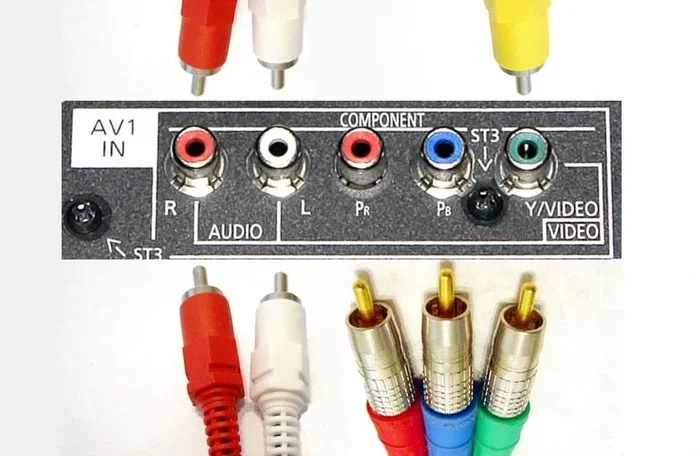
The component video signal uses three cables to carry video information. These are typically color-coded as green, blue, and red. The green cable carries the luminance signal, which is the brightness and detail of the image. The blue cable carries the blue color difference signal. The red cable carries the red color difference signal.
This method of color separation is what gives component video its quality advantage. Instead of sending all video information through one cable, it spreads the data across three dedicated paths. The result is a sharper, more detailed picture with better color accuracy.
Component video was widely used in the early days of high definition. Many HDTVs from the 2000s relied on component video connections as their best analog option. Even after HDMI became popular, component video remained a trusted choice for standard definition and high definition content on older devices.
Component Video vs Composite Video
It is easy to confuse component video with composite video. They both use RCA connectors, but they work very differently. Composite video uses a single yellow RCA cable to carry all video information in one signal. This means the brightness, color, and sync data are all mixed together.
Component video separates these signals into three cables. This separation reduces interference and allows for a cleaner picture. Composite video maxes out at standard definition quality, while component video can handle high definition resolutions up to 1080p.
Here is a quick comparison of the two:
- Composite video: One yellow RCA cable. Standard definition only. Lower image quality.
- Component video: Three RCA cables (green, blue, red). Supports standard and high definition. Much better image quality.
- Signal separation: Composite mixes all data. Component keeps brightness and color information apart.
- Max resolution: Composite is limited to 480i or 576i. Component can reach 1080p.
If you are trying to get the best picture from an older device, component video is always the better choice over composite. The three-cable setup makes a real difference in picture clarity and color accuracy.
Can You Use RCA Cables for Component Video?
The short answer to can I use RCA cables for component video is yes. Standard RCA cables can physically connect to component video ports because they use the same type of connector. However, there are important limitations you need to understand before you plug anything in.
The Color-Coding Confusion Explained
The biggest issue people face is color coding. Component video uses green, blue, and red cables for the video signal. Standard RCA cables are also color-coded, but they are typically used for composite video (yellow) and stereo audio (red and white).
If you grab a pack of RCA cables and try to use them for component video, you might be tempted to just match the colors. Red to red, blue to blue, green to green. But here is the problem. The red and blue RCA cables are often wired for audio, not video. Even though the connector looks the same, the internal wiring may be different.
Also, standard RCA cables usually come with only two or three cables in a set. You need three cables for the video signal alone in component video. You will also need separate audio cables, which adds to the confusion.
What Happens When You Plug Them In
When you connect RCA cables to a component video port, the physical connection will work. The connectors are the same size and shape. But the signal quality might not be ideal. Standard RCA cables are not designed with the same shielding and wire gauge as dedicated component video cables.
You might notice several issues:
- Reduced image sharpness: The picture may look slightly softer or less defined.
- Color bleeding: Colors might not be as crisp or separated as they should be.
- Interference or noise: You may see static, ghosting, or flickering in the image.
- Shorter effective range: Signal quality drops faster over distance with standard RCA cables.
For a short cable run in a casual setup, these issues might not be noticeable. But for a dedicated home theater or a longer cable run, the difference can be significant.
RCA Cables vs Component Video Cables: Key Differences
Not all cables with the same connector are created equal. Understanding the differences between standard RCA cables and dedicated component video cables helps you make the right choice for your setup.
Signal Quality and Bandwidth Comparison
Component video cables are built to handle a wider bandwidth than standard RCA cables. They carry the full RGB signal with better fidelity. The internal construction uses thicker conductors and better shielding to protect the analog signal from interference.
Standard RCA cables are typically designed for lower-bandwidth signals like composite video or stereo audio. When you push them to handle the demands of component video, they may not perform as well. The signal can degrade, especially over longer distances.
Here is a side-by-side look at the differences:
- Conductor thickness: Component video cables use thicker wires for better signal transmission. Standard RCA cables use thinner conductors.
- Shielding: Dedicated component video cables have superior shielding to block electromagnetic interference. Regular RCA cables have minimal shielding.
- Bandwidth capacity: Component video cables handle higher bandwidth for HD resolutions. Standard RCA cables are limited in bandwidth.
- Build quality: Component video cables are built for sustained high-quality video transmission. Regular RCA cables are built for general-purpose use.
Connector Types and Cable Build
Both cable types use the same RCA connector, which is the standard phono plug. But the cable construction differs. Component video cables often have better insulation, stronger connectors, and more durable outer casing. They are designed to be plugged and unplugged frequently without signal loss.
The connectors on component video cables are also sometimes color-coded specifically for the video signal: green for luminance, blue for blue color difference, and red for red color difference. This is different from the red and white audio RCA cables that most people are familiar with.
If you are buying cables new, it is always better to get dedicated component video cables. They are inexpensive and will give you a much better experience than repurposing standard RCA cables.
When Should You Use RCA Cables for Component Video?
There are situations where using standard RCA cables for component video makes sense. Knowing when to use them and when to invest in proper cables helps you get the best results without wasting money.
Common Scenarios and Legacy Setups
If you have an older device that only outputs component video, and you only have RCA cables on hand, go ahead and use them. The connection will work. You will get a picture. It may not be perfect, but it will be functional.
Common scenarios where this comes up include:
- Setting up an older DVD player or VCR that has component video outputs.
- Connecting a legacy game console like a Nintendo Wii or older PlayStation model.
- Hooking up a vintage projector or monitor that only accepts component video input.
- Temporary setups where you do not want to buy new cables right away.
- Rental or secondary TV setups where top quality is not the priority.
In these cases, using RCA cables for component video is a perfectly reasonable solution. Just be aware of the potential quality trade-offs.
Equipment That Still Relies on These Connections
Many pieces of video equipment still use component video connections today. Some modern devices even include them as a backup option. Here are some common devices that use component video:
- Older HDTVs and CRT TVs: Many TVs from the 2000s relied on component video as their primary high-definition input.
- Blu-ray players and DVD recorders: Some models still offer component video outputs alongside HDMI.
- Retro gaming consoles: The Wii, Wii U, and older PlayStation models support component video for better picture quality.
- Home theater projectors: Many projectors use component video as their main video input.
- Cable boxes and satellite receivers: Some older set-top boxes still include component video outputs.
If you own any of these devices, knowing how to connect them properly is essential. Component video may not be the newest technology, but it is still widely used and reliable.
How to Properly Connect RCA Cables for Component Video
If you have decided to use RCA cables for your component video setup, there is a right way to do it. Following these steps ensures you get the best possible picture and avoid common connection mistakes.
Step-by-Step Connection Guide
Follow these steps to connect your RCA cables for component video:
- Identify the component video outputs on your source device. Look for three ports labeled green, blue, and red. These are the video outputs.
- Identify the corresponding inputs on your TV or display. They will also be color-coded green, blue, and red.
- Connect the green cable to the green port on both devices. This carries the luminance signal.
- Connect the blue cable to the blue port on both devices. This carries the blue color difference.
- Connect the red cable to the red port on both devices. This carries the red color difference.
- Connect audio cables separately. Use red and white RCA cables for stereo audio. Plug the red cable into the red audio port and the white cable into the white audio port.
- Power on your devices and select the correct input source on your TV or display.
- Check the picture quality. Adjust settings on your display if needed to get the best image.
Quick Tips for Best Results
Here are some practical tips to improve your component video setup when using RCA cables:
- Keep cable runs short: Shorter cables mean less signal loss. Try to keep RCA cables under 6 feet for the best quality.
- Match cable colors exactly: Never swap the color assignments. Green always goes to green, blue to blue, and red to red. Mixing them up will give you a distorted or monochrome picture.
- Check your cable quality: Thicker, better-shielded RCA cables will perform better than thin, cheap ones. Look for cables with braided shielding.
- Avoid sharp bends: Bending cables sharply can damage the internal conductors and degrade the signal.
- Clean the connectors: Dust or dirt on the RCA connectors can cause a poor connection. Wipe them with a dry cloth before plugging them in.
Common Mistakes and What to Avoid
Even when you know can I use RCA cables for component video, mistakes can still happen. Avoiding these common errors saves you time, frustration, and poor picture quality.
Wrong Cable Assignments
The most common mistake is mixing up the cable colors. Some people see red and white RCA cables and assume they are the audio cables that come with the component video setup. But in a component video configuration, the red cable is for video, not audio.
Another mistake is using a composite video cable (yellow) and trying to force it into a component video port. The connectors are different sizes, so this will not work. But sometimes people try to use an adapter, which can introduce signal problems.
Always double-check which cables go where. The color coding on component video is consistent across devices. Green is luminance, blue is blue color difference, and red is red color difference. Audio cables are separate and use red and white connectors.
Signal Degradation and Quality Loss
Signal degradation is a real concern when using RCA cables for component video. Here are the main factors that cause quality loss:
- Long cable runs: Signal strength drops over distance. Keep RCA cables as short as possible.
- Poor shielding: Cables without proper shielding pick up electromagnetic interference from nearby electronics.
- Cheap connectors: Loose or poorly made connectors create intermittent connections that cause picture flickering.
- Bent or damaged cables: Physical damage to the cable internal wiring degrades the signal over time.
- Wrong cable type: Using audio RCA cables for video signals can result in poor conductivity and signal loss.
If you notice any of these issues, try replacing your RCA cables with dedicated component video cables. The improvement in picture quality can be dramatic.
Expert Insights and Practical Advice
Many people ask can I use RCA cables for component video because they want to save money or avoid buying new cables. While this is understandable, there are a few expert insights worth considering.
First, if you already have high-quality RCA cables with good shielding, they will work fine for component video. The key factor is cable quality, not just the connector type. A well-built RCA cable with thick conductors and good shielding can perform nearly as well as a dedicated component video cable.
Second, consider your resolution needs. If you are watching standard definition content or playing retro games, standard RCA cables will work perfectly. The quality difference is minimal at lower resolutions. But if you are trying to get the best out of a high definition source, dedicated component video cables are worth the investment.
Third, think about your overall home theater setup. If you are building a quality setup, every cable matters. But if you are just setting up a secondary TV in a bedroom or garage, standard RCA cables will get the job done just fine.
The bottom line is that can I use RCA cables for component video has a practical answer. Yes, you can. Just be smart about it. Use the best cables you have, match the colors correctly, keep runs short, and you will be fine.
Conclusion
So, can I use RCA cables for component video connections? Yes, you absolutely can. Standard RCA cables will physically connect to component video ports and deliver a working video signal. However, for the best picture quality, dedicated component video cables are the better choice.
Understanding the differences between these cable types helps you make informed decisions. Whether you are setting up a retro gaming station, connecting an older DVD player, or configuring a legacy projector, knowing how component video and RCA cables work together is a valuable skill.
Use the tips and guidelines in this article to get the most out of your setup. Match your cables correctly, pay attention to signal quality, and do not be afraid to invest in proper component video cables when the situation calls for it. Your picture quality will thank you.
The world of analog video connections can feel confusing, but it does not have to be. With the right knowledge and a little care, you can connect any device and enjoy great video quality. Whether you use standard RCA cables or dedicated component video cables, what matters most is that your setup works and you enjoy the content on your screen.
Frequently Asked Questions
Can I use regular RCA cables for component video on my TV?
Yes, you can use regular RCA cables for component video on your TV. The RCA connectors are physically compatible with component video ports. However, standard RCA cables are not optimized for the separated RGB signal used in component video. You may notice slightly reduced picture quality compared to using dedicated component video cables. For short cable runs and casual viewing, regular RCA cables work just fine.
What is the difference between composite RCA cables and component video cables?
The main difference is the number of signal channels. Composite RCA cables use a single yellow cable to carry all video information in one signal. Component video cables use three separate cables (green, blue, and red) to split the video signal into luminance and two color difference channels. This separation gives component video much better image quality, especially for high definition content. Both types use the same RCA connector style, but the internal wiring and shielding are different.
Will using RCA cables instead of component video cables affect my picture quality?
Using standard RCA cables instead of dedicated component video cables can slightly affect picture quality. The differences are most noticeable at higher resolutions and over longer cable runs. You may see reduced sharpness, color bleeding, or increased interference. For short distances and standard definition content, the difference is often minimal. For the best analog video signal quality, dedicated component video cables are recommended.
Can I use RCA audio cables for component video connections?
No, you should not use RCA audio cables for component video connections. While the connectors look the same, audio RCA cables are designed for different signal types and may have thinner conductors or less shielding. This can lead to poor video signal transmission, interference, and degraded picture quality. Always use cables specifically designed for video signals when connecting component video equipment.
What devices still use component video connections today?
Many devices still use component video connections, especially older equipment. Common devices include older HDTVs, CRT TVs, DVD players, VCRs, retro gaming consoles like the Nintendo Wii, home theater projectors, and some cable boxes or satellite receivers. Even some newer devices include component video as a backup input option. If you own any of these devices, knowing how to connect them with RCA cables or proper component video cables is very useful.
How long can my RCA cables be for component video without losing quality?
For the best signal quality, keep your RCA cables under 6 feet when using them for component video. Signal degradation becomes more noticeable beyond this length, especially with standard RCA cables that have thinner conductors and less shielding. If you need longer cable runs, consider using dedicated component video cables with better shielding and thicker conductors. You can also use a signal booster or active cable to maintain quality over longer distances.