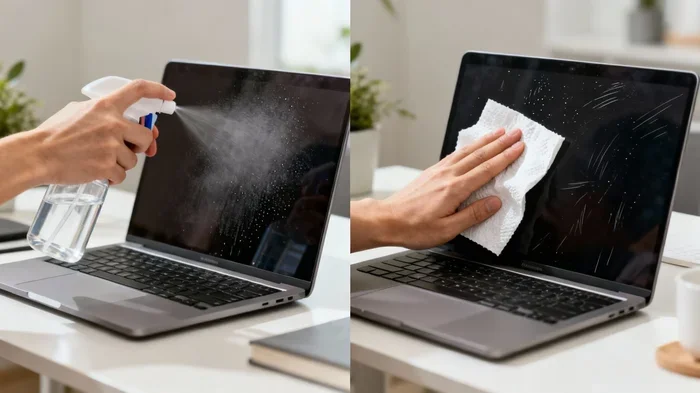
Can I Use Glasses Wipes On My Laptop Screen Safely
Using glasses wipes on your laptop screen might seem convenient, but it is not always safe. Many lens cleaning wipes contain ingredients that can strip the anti-reflective coating on laptop displays. This guide covers everything you need to know about cleaning your laptop screen the right way. We will explore the risks, safe alternatives, and step-by-step methods to keep your display looking brand new.
You are sitting at your desk, and you notice a smudge on your laptop screen. You reach for your glasses wipe, and just like that, you start wiping. But wait. Is that really a good idea? Can I use glasses wipes on my laptop screen safely? This is a question many people ask every day. The short answer is: it depends on the wipe and your screen type. But the longer answer is much more important.
Your laptop screen is not the same as your eyeglasses. The coatings, materials, and sensitivity levels are completely different. Using the wrong cleaning method can cause permanent damage. It can strip coatings, create scratches, or leave stubborn streaks behind. This article will walk you through everything you need to know. We will cover the risks, safe alternatives, and expert tips so your laptop display stays crystal clear for years to come.
Let us be honest. Most of us grab whatever is closest when a fingerprint or smudge appears on our screens. For many people, that means a glasses wipe. They are convenient. They are portable. And they seem to work well on our lenses. But convenience does not always mean safety. Cleaning your laptop screen the wrong way can lead to costly repairs or even the need for a full replacement. That is why we created this complete guide.
Key Takeaways
- Glasses wipes are not ideal: Most lens cleaning wipes contain chemicals that can damage your laptop screen’s protective coating.
- Check the ingredients: Some wipes contain isopropyl alcohol or ammonia, which are harmful to LCD and LED displays.
- Microfiber cloths are safest: A dry microfiber cloth is the best tool for daily screen cleaning.
- Use a gentle cleaning solution: Distilled water or a screen-specific cleaner works far better than lens wipes.
- Avoid paper towels and tissues: These materials are too rough and can cause permanent screen scratches.
- Turn off your laptop first: Always power down and unplug before cleaning your display panel.
- Prevention matters: Regular care and a screen protector can reduce the need for deep cleaning.
📑 Table of Contents
- What Are Glasses Wipes and What Are They Made Of?
- Can You Safely Use Glasses Wipes on a Laptop Screen?
- The Risks of Using Glasses Wipes on Laptop Screens
- Safe Alternatives for Cleaning Your Laptop Screen
- Step-by-Step Guide to Cleaning Your Laptop Screen Safely
- Expert Tips for Keeping Your Laptop Screen Pristine
- Common Mistakes People Make When Cleaning Laptop Screens
- Conclusion
What Are Glasses Wipes and What Are They Made Of?
Before we answer the big question, let us understand what glasses wipes actually are. Most people think of them as simple little cloths soaked in cleaning solution. But the truth is more complex. Not all lens cleaning wipes are created equal.
Common Ingredients in Glasses Wipes
Glasses wipes typically contain a blend of cleaning agents designed for eyeglass lenses. Here are some common ingredients you will find:
- Isopropyl alcohol: This is a common solvent used to dissolve oils and smudges.
- Surfactants: These compounds help break down dirt and grease on surfaces.
- Deionized water: Many wipes use purified water as a base.
- Fragrance or preservatives: Some brands add these to improve the user experience.
- Ammonia-based compounds: Found in some stronger cleaning formulas.
Now, here is the problem. Eyeglass lenses have a very different coating than laptop screens. Your glasses have anti-reflective coatings designed to handle certain chemicals. But laptop screens, especially modern LCD and LED displays, have much more delicate surfaces. The anti-reflective and oleophobic coatings on laptops are far more sensitive.
Types of Glasses Wipes
Not all glasses wipes are the same. There are two main types you should know about:
- Pre-moistened wipes: These come soaked in a cleaning solution. They are the most common type found in optical stores and pharmacies.
- Dry microfiber cloths: These are often sold alongside lens cleaning sprays. They are generally safer for electronics because they contain no liquid chemicals.
The pre-moistened wipes are the ones that pose the most risk to laptop screens. The dry microfiber versions are much safer, but even they need to be used correctly.
Can You Safely Use Glasses Wipes on a Laptop Screen?
This is the question everyone wants answered. Can I use glasses wipes on my laptop screen without causing harm? The honest answer is: it is risky. Let us break down why.
The Short Answer
Most experts advise against using pre-moistened glasses wipes on laptop screens. The chemicals in these wipes can damage the special coatings on your display. Over time, repeated use can wear away the protective layer. This leads to dull spots, discoloration, and even permanent screen damage.
The Long Answer
The safety of using glasses wipes depends on several factors:
- The type of laptop screen you have: Matte screens are more resistant than glossy screens. Glossy screens have more delicate coatings.
- The ingredients in the wipe: Some wipes are gentler than others. Alcohol-free wipes are less risky than those containing ammonia or strong solvents.
- How often you use them: Occasional use is less risky than daily use. But even occasional use can cause cumulative damage.
- The age and condition of your screen: Older screens with already worn coatings are more vulnerable.
Safe screen cleaning requires the right tools and the right approach. Glasses wipes were designed for a different purpose. They are formulated for eyeglass lenses, not for the sensitive displays we use every day on our laptops.
What Do Manufacturer Guidelines Say?
Most laptop manufacturers explicitly warn against using household or optical-grade cleaning products on their screens. Companies like Apple, Dell, HP, and Lenovo all recommend using only a soft, lint-free cloth. Many specifically mention microfiber cloths as the safe choice. They advise against spraying any liquid directly onto the screen as well.
This is a strong signal. If the manufacturers themselves do not recommend glasses wipes, you should think twice before using them. Laptop screen cleaning should follow the manufacturer’s guidelines whenever possible.
The Risks of Using Glasses Wipes on Laptop Screens
Understanding the risks is important. Many people use glasses wipes without any immediate visible problem. But damage can be gradual and invisible at first. Here is what can go wrong.
Stripping the Anti-Reflective Coating
Modern laptop screens have multiple layers of coatings. The anti-reflective coating reduces glare and improves visibility. Chemicals in glasses wipes can slowly dissolve this coating. Once it is gone, it cannot be replaced. You will notice dull patches and uneven shine on your display. This type of damage is permanent.
Removing the Oleophobic Layer
Many laptop screens have an oleophobic coating. This is the layer that repels fingerprints and oils. It makes your screen easier to clean on a daily basis. Glasses wipes with alcohol or harsh surfactants can strip this layer away. After that, your screen will attract smudges much faster, making it harder to keep clean.
Causing Micro-Scratches
Even the softest glasses wipe can cause damage if it contains trapped particles. Tiny dust or fiber fragments in the wipe can act as abrasive agents. Over time, these create micro-scratches on the screen surface. Screen scratches are almost impossible to remove and can significantly affect your viewing experience.
Leaving Streaks and Residue
Glasses wipes are not formulated for the larger surface area of a laptop screen. The cleaning solution can evaporate unevenly, leaving behind streaks and residue. These streaks can be very frustrating to remove and may require additional cleaning attempts, which compounds the risk of damage.
Voiding Your Warranty
This is something many people overlook. If you damage your laptop screen by using an unauthorized cleaning product, your warranty may not cover the repair. Manufacturers can deny claims if they determine the damage was caused by improper cleaning methods. Laptop maintenance using recommended products helps protect your investment.
Safe Alternatives for Cleaning Your Laptop Screen
The good news is there are much safer options for cleaning your laptop screen. These alternatives are effective and won’t risk damaging your display.
Microfiber Cloths
A dry microfiber cloth is the gold standard for daily screen cleaning. These cloths are incredibly soft and gentle on coated surfaces. They lift oils and smudges without scratching. Here is how to use one properly:
- Power off your laptop and unplug it from the charger.
- Use a clean, dry microfiber cloth.
- Gently wipe the screen in circular motions.
- Avoid pressing too hard on the display.
- Fold the cloth to use a clean section as needed.
Microfiber cloths are inexpensive and reusable. You can wash them and use them again and again. Keep one in your laptop bag at all times.
Distilled Water
For tougher smudges, distilled water is a safe and effective option. Unlike tap water, distilled water does not contain minerals that can leave spots on your screen. Here is how to use it:
- Lightly dampen a microfiber cloth with distilled water. Never spray liquid directly onto the screen.
- Gently wipe the display using soft, circular motions.
- Follow up with a dry section of the cloth to remove any remaining moisture.
This method is safe for almost all laptop screen types. It is the go-to recommendation from most laptop manufacturers.
Screen-Specific Cleaning Solutions
If you want something stronger than water, look for cleaning solutions specifically designed for electronic screens. These products are formulated to be safe on coated displays. They do not contain alcohol, ammonia, or harsh solvents. When choosing a cleaner, look for labels that say:
- Safe for LCD and LED screens
- Alcohol-free and ammonia-free
- Anti-static formula
- Streak-free cleaning
These solutions are widely available and affordable. They are a worthwhile investment if you clean your screen regularly.
Comparison: Glasses Wipes vs. Safe Alternatives
| Feature | Glasses Wipes | Microfiber Cloth | Screen Cleaner |
|---|---|---|---|
| Safe for laptop screens | Not recommended | Yes | Yes |
| Cost per use | Low | Very low (reusable) | Low to moderate |
| Risk of coating damage | High | None | Very low |
| Convenience | Very high | High | Moderate |
| Streak-free results | Sometimes | Good for light smudges | Excellent |
| Recommended by manufacturers | No | Yes | Yes (if screen-safe) |
DIY Cleaning Solution
You can make your own gentle cleaning solution at home. Mix equal parts distilled water and white vinegar. Put the mixture in a spray bottle. Lightly mist your microfiber cloth, not the screen, and wipe gently. This is a cost-effective and completely safe option for most laptop displays.
Step-by-Step Guide to Cleaning Your Laptop Screen Safely
Now that you know what to use, let us walk through the proper cleaning process. Following these steps will keep your display safe and looking great.
Step 1: Power Down and Unplug
Always turn off your laptop before cleaning. A dark screen makes it easier to see dirt and smudges. It also reduces the risk of electrical damage if any moisture gets inside. Unplug the power cable and disconnect any peripherals.
Step 2: Remove Loose Dust
Use a dry microfiber cloth to gently sweep away loose dust particles. Do this in soft, light strokes. Skipping this step can push particles into the screen surface, causing scratches.
Step 3: Apply Your Cleaning Solution
If you are using a damp cloth or cleaning solution, apply it to the cloth, not directly to the screen. Spraying liquid onto the display can allow moisture to seep into the edges and damage internal components.
Step 4: Wipe Gently
Use gentle, circular motions to clean the screen. Do not press hard. Let the cloth do the work. Aggressive scrubbing increases the risk of coating damage and scratches.
Step 5: Dry Thoroughly
Use a dry section of the cloth to remove any remaining moisture. Make sure the screen is completely dry before turning your laptop back on. Lingering moisture can cause water spots or internal damage.
Step 6: Store Your Tools Properly
Keep your microfiber cloth in a clean, dry place. Wash it regularly with mild soap and water. Avoid using fabric softeners, as they can leave a residue on the cloth that transfers to your screen.
Expert Tips for Keeping Your Laptop Screen Pristine
Cleaning is only part of the equation. Prevention plays a huge role in keeping your laptop display looking its best. Here are some laptop care tips from the experts.
Use a Screen Protector
A high-quality screen protector adds an extra layer of defense. It absorbs the impact of fingerprints, dust, and minor scratches. You can replace the protector when it gets worn, keeping your actual screen safe underneath.
Clean Your Screen Regularly
Make it a habit to wipe your screen once a week. Regular cleaning prevents buildup that requires more aggressive cleaning methods later. A quick pass with a dry microfiber cloth takes only seconds.
Wash Your Hands Before Use
This sounds simple, but it makes a big difference. Oils and dirt from your hands are the primary cause of screen smudges. Clean hands mean a cleaner screen for longer.
Keep Your Laptop Away from Dusty Environments
Dust particles settle on screens and act as abrasives when you wipe them. Keep your laptop in a sleeve or case when you are not using it. Store it in a clean, dry place.
Avoid Direct Sunlight and Heat
Prolonged exposure to sunlight and heat can degrade screen coatings over time. Do not leave your laptop in a hot car or in direct sunlight for extended periods.
Replace Your Microfiber Cloth Regularly
Even microfiber cloths wear out over time. Frayed or dirty cloths can scratch your screen. Replace your cloth every few months or whenever you notice it is no longer as soft as it used to be.
Common Mistakes People Make When Cleaning Laptop Screens
Even with good intentions, many people make mistakes that damage their screens. Here are the most common ones to avoid.
Using Paper Towels or Tissues
Paper products are one of the worst things you can use on a laptop screen. They are made from wood fibers that are far too abrasive. They can cause immediate scratches and leave behind lint and fibers. Always stick with microfiber cloths.
Spraying Cleaner Directly on the Screen
Never spray any liquid directly onto your laptop display. The liquid can seep into the edges and reach the internal electronics. Always apply the cleaner to the cloth first. Safe screen cleaning means controlling where the moisture goes.
Using Household Glass Cleaners
Window and glass cleaners like Windex contain ammonia and other harsh chemicals. These are designed for glass, not for coated plastic or LCD panels. Using them on your laptop screen can cause irreversible damage.
Pressing Too Hard
Laptop screens are not built to withstand heavy pressure. Pressing too hard while cleaning can damage the display panel from the inside. This can lead to dead pixels or a cracked screen. Use a light touch and let the cloth do the work.
Cleaning When the Screen is Dry and Dirty
Wiping a dry, dusty screen is a recipe for scratches. Always dampen your cloth slightly before cleaning. Dry wiping pushes particles around and grinds them into the surface.
Conclusion
Can I use glasses wipes on my laptop screen safely? The answer is clear now. While it might be tempting to grab a glasses wipe for a quick clean, the risks far outweigh the convenience. Glasses wipes contain chemicals that are not designed for the delicate coatings on laptop displays. The potential for permanent damage is real.
The safest and most effective approach is simple. Use a dry microfiber cloth for daily cleaning. For tougher smudges, use distilled water or a screen-specific cleaner. These methods protect your investment and keep your display looking flawless.
Proper laptop screen cleaning is a small habit that pays off big. It takes just a few minutes a week and can extend the life of your display by years. Your laptop screen works hard for you every day. Give it the care it deserves. Start today by swapping out those glasses wipes for a good microfiber cloth. Your future self will thank you.
Remember, safe screen cleaning is not complicated. It just requires the right tools and a little awareness. Share this guide with friends and family who might be making the same mistake. Everyone deserves to know how to keep their screens clean and protected.
Frequently Asked Questions
Can I use glasses wipes on my laptop screen in an emergency?
If you absolutely have no other option, a glasses wipe will not cause immediate catastrophe in most cases. However, it is still not recommended. The chemicals can cause gradual damage over time. If you must use one, make sure it is alcohol-free and use it as rarely as possible. Ideally, keep a microfiber cloth in your bag so you are never stuck without a safe option.
Are all glasses wipes bad for laptop screens?
Not all glasses wipes are equally harmful. Dry microfiber cloths sold as glasses wipes are generally safe. The real risk comes from pre-moistened wipes that contain cleaning chemicals. Always check the ingredients before using any wipe on your laptop screen. If it contains alcohol, ammonia, or strong surfactants, avoid using it on your display.
What is the best way to remove stubborn smudges from a laptop screen?
For stubborn smudges, lightly dampen a microfiber cloth with distilled water or a screen-safe cleaning solution. Gently wipe in circular motions. Do not press hard. If the smudge persists, let the damp cloth sit on the area for a few seconds to loosen the grime before wiping again. Never use abrasive materials or harsh chemicals.
Can using glasses wipes void my laptop warranty?
It is possible. Many laptop warranties cover manufacturing defects but not damage caused by improper care. If using glasses wipes damages your screen, the manufacturer may deny your warranty claim. Always follow the manufacturer’s cleaning recommendations to keep your warranty valid. When in doubt, stick with microfiber cloths and distilled water.
How often should I clean my laptop screen?
A quick wipe with a dry microfiber cloth once a week is usually sufficient for most users. If you use your laptop in a dusty environment or eat near it often, you may need to clean it more frequently. Deep cleaning with a damp cloth can be done once every two weeks or as needed. Regular light cleaning is better than occasional aggressive cleaning.
Is it safe to use eyeglass cleaning spray on a laptop screen?
Most eyeglass cleaning sprays are formulated for glass lenses, not for coated plastic or LCD displays. They often contain ingredients that can damage laptop screen coatings. It is best to use cleaning solutions specifically designed for electronic screens. If you want a safe alternative, distilled water on a microfiber cloth works perfectly for most situations.