Can I Power My Laptop With DC Power Without Problems
Yes, you can power your laptop with DC power, and it is simpler than most people think. Whether you are using a DC adapter, a portable power station, or solar panels, understanding your laptop’s voltage and wattage requirements is the key to doing it safely. This guide walks you through everything you need to know about DC power for laptops without any confusion.
Have you ever found yourself in a situation where your laptop charger just would not work? Maybe you lost it while traveling, or perhaps your power outlet is not compatible with your adapter. In moments like these, the question naturally pops up: can I power my laptop with DC power directly? The short answer is absolutely yes. Laptops run on DC power by design. Your battery stores direct current, and your charger converts AC wall power into DC before it reaches your device.
But knowing the answer is only half the battle. Understanding how to do it safely, what specifications to look for, and which options work best for different situations is what truly matters. This guide breaks it all down in plain, simple language. You will learn about voltage requirements, wattage matching, connector types, and even alternative DC power sources like solar panels and portable stations. By the end, you will feel confident about powering your laptop with DC power in almost any scenario.
Let us start with the basics and build from there. No jargon. No confusing tech talk. Just clear, practical information you can use right away.
Key Takeaways
- DC power is the native power source for laptops: Your laptop battery and charger both use direct current to operate safely.
- Matching voltage and wattage is critical: Using the wrong DC power supply can damage your laptop or fail to charge it.
- Multiple DC power options exist: From traditional barrel connectors to USB-C PD, there are several ways to deliver DC power to your laptop.
- Portable power stations and solar panels work well: These are great DC power sources for travel, camping, or emergencies.
- Common mistakes can be avoided easily: Checking polarity, connector size, and power ratings prevents most problems.
- USB-C Power Delivery has changed the game: Many modern laptops can now charge through a single USB-C DC cable.
📑 Table of Contents
- Understanding DC Power and How Laptops Use It
- Can I Power My Laptop With DC Directly?
- Different Ways to Power Your Laptop With DC Power
- Comparing DC Power Options for Laptops
- Common Mistakes When Using DC Power for Laptops
- Expert Tips for Safe DC Laptop Charging
- Can I Power My Laptop With DC in Emergency Situations?
- Final Thoughts
Understanding DC Power and How Laptops Use It
Before you plug anything in, it helps to understand what DC power actually is and why laptops depend on it so heavily.
What Is DC Power?
DC stands for Direct Current. It means electricity flows in one direction only. Your car battery, your phone battery, and your laptop battery all store and use DC power. This is different from AC power, or Alternating Current, which is what comes out of the wall outlets in your home. AC power switches direction many times per second, while DC power stays steady and constant.
Laptops need a stable, consistent flow of electricity to work properly. That is why they are designed to run on DC power. When you plug your laptop into the wall, the power brick or adapter converts AC power into DC power before it reaches your computer.
How Your Laptop Charger Converts Power
Your laptop charger does two important jobs. First, it steps down the high voltage from your wall outlet to a lower, safer voltage. Second, it converts AC power into DC power. This converted power then flows through the charging cable into your laptop. Inside the laptop, the power goes to the battery for storage and also directly to the components that keep your laptop running.
Most laptop chargers output between 19 volts and 20 volts DC. Some smaller laptops use 12 volts or 15 volts. The exact voltage depends on the manufacturer and model. This is why it is so important to match the right DC power source when replacing or using an alternative charger.
Can I Power My Laptop With DC Directly?
The answer is yes, but with some important conditions. You cannot just connect any DC power source to your laptop and expect it to work safely. There are specific requirements you must meet.
Voltage Matching Is Essential
Your laptop expects a very specific voltage from its DC power supply. If you supply too much voltage, you can fry the internal components. Too little voltage, and the laptop will not charge or may behave erratically. Always check the label on your original charger or look in your laptop manual for the required voltage. This number is usually printed on the bottom of the power brick as well.
For example, if your laptop requires 19 volts DC, you need a DC power source that outputs exactly 19 volts. Using a 12-volt DC source will likely not charge your laptop. Using a 24-volt DC source could cause serious damage.
Wattage and Current Requirements
Voltage is only part of the equation. You also need to consider wattage and current. Wattage is the total power your laptop consumes, and current is measured in amps. The formula is simple: Watts equals Volts times Amps. Most laptops need between 45 watts and 100 watts to charge and run at the same time.
If your DC power source cannot deliver enough wattage, your laptop may charge very slowly or not at all. It might even drain the battery while you use it. Always make sure your DC power supply meets or exceeds your laptop’s wattage requirement.
Connector Type and Polarity
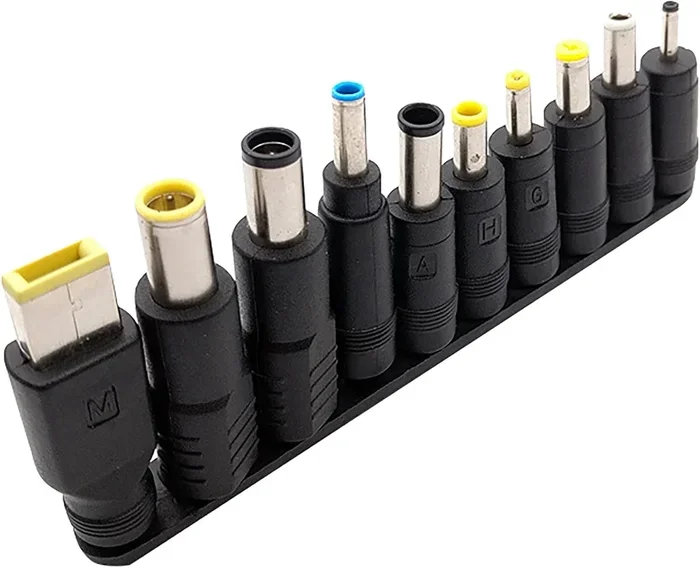
Laptops use different DC connector types. The most common is the barrel connector, which has a metal pin inside a circular outer sleeve. The size of the connector matters. A 5.5mm by 2.1mm connector will not fit a laptop that needs a 5.5mm by 2.5mm connector, even if the voltage is correct.
Polarity is another critical factor. DC connectors have a positive and negative center pin. If you reverse the polarity, you can damage your laptop. Always check the polarity symbol on your laptop or charger. It usually looks like a circle with a plus and minus sign inside it.
Different Ways to Power Your Laptop With DC Power
There are several practical ways to deliver DC power to your laptop. Each method has its own advantages and best use cases. Let us explore them one by one.
Using a DC Power Adapter
The most common method is using a dedicated DC power adapter. These are the power bricks that come with your laptop. If your original adapter breaks or gets lost, you can buy a replacement. Just make sure the replacement matches your laptop’s voltage, amperage, connector size, and polarity.
Universal DC adapters are also available. These come with multiple connector tips and adjustable voltage settings. They are a great option if you have multiple devices or if you travel frequently. Just be very careful to set the correct voltage before plugging it in.
USB-C Power Delivery
USB-C Power Delivery, often called USB-C PD, has become a game-changer for laptop charging. Many modern laptops now support charging through a USB-C cable that delivers DC power. USB-C PD can supply up to 100 watts or even 240 watts with the latest standards.
This means you can use a USB-C PD charger or a portable battery pack to power your laptop. The beauty of USB-C PD is that it negotiates the correct voltage automatically between the charger and the laptop. You do not have to manually adjust anything. Just plug in and charge.
However, not all USB-C cables support high wattage. Make sure your cable is rated for the power level you need. A cheap, low-quality cable may limit your charging speed or fail to charge at all.
Portable Power Stations
Portable power stations are large battery packs that output DC power through various outlets, including USB-C, barrel jacks, and even AC outlets. They are perfect for camping trips, outdoor work, or emergency backup power.
Brands like Jackery, EcoFlow, and Anker make popular portable power stations that can easily power a laptop. Look for a station that offers USB-C PD output at 65 watts or higher for the best results. These stations recharge from wall outlets, car adapters, or even solar panels, making them incredibly versatile DC power sources.
Solar Panels for DC Laptop Charging
Solar panels generate DC power directly from sunlight. You can use them to charge your laptop through a compatible adapter or a portable power station. This is an excellent option for outdoor enthusiasts, travelers, or anyone who wants a sustainable power source.
To charge a laptop directly with solar panels, you typically need a panel that outputs at least 60 watts. Some foldable solar panels are designed specifically for laptop charging and come with USB-C PD outputs built in. This makes the setup simple and portable.
Car and Vehicle DC Outlets
Your car or truck has a 12-volt DC outlet, commonly known as a cigarette lighter socket. You can use a DC-to-DC converter or a car laptop charger to power your laptop from this outlet. These adapters step up the 12-volt DC from your car to the 19-volt or 20-volt DC that your laptop needs.
This is a great option for road trips, commutes, or situations where you need to work in your vehicle. Just make sure your car adapter matches your laptop’s voltage and wattage requirements.
Comparing DC Power Options for Laptops
Not all DC power sources are created equal. Here is a quick comparison of the most popular options so you can choose the best one for your needs.
| Power Source | Typical Output | Best For | Portability |
|---|---|---|---|
| DC Power Adapter | 19V-20V, 45W-100W | Home or office use | Medium |
| USB-C PD Charger | 5V-20V, up to 100W | Travel and daily use | High |
| Portable Power Station | Variable, up to 100W+ | Camping, emergencies | Low to Medium |
| Solar Panel | 60W-200W DC | Outdoor and off-grid | Medium |
| Car DC Adapter | 12V DC converted to 19V-20V | Road trips and commutes | High |
As you can see, each option has a specific sweet spot. Your choice depends on where you need to power your laptop and how much portability you require.
Common Mistakes When Using DC Power for Laptops
Even when your intentions are good, mistakes can happen. Here are the most common errors people make when powering their laptops with DC power, and how to avoid them.
Using the Wrong Voltage
This is the number one mistake people make. Plugging a 12-volt DC source into a laptop that needs 19 volts will not work. In some cases, it can cause the laptop to malfunction or refuse to charge. Always double-check the voltage requirement before connecting any DC power source.
Ignoring Polarity
Reversing the positive and negative connections on a DC barrel connector can damage your laptop’s charging circuit. Always verify the polarity symbol matches between your power source and your laptop. This small step can save you from expensive repairs.
Using an Underpowered Supply
If your DC power source cannot deliver enough wattage, your laptop will still turn on, but it will slowly drain the battery while you use it. This defeats the purpose of having an external power source. Always choose a DC supply that meets or exceeds your laptop’s power needs.
Using Cheap or Incompatible Cables
A poor-quality cable can limit power delivery, cause slow charging, or even overheat. This is especially true with USB-C cables. Invest in high-quality cables that are rated for the wattage you need.
Expert Tips for Safe DC Laptop Charging
Here are some practical tips from charging experts that will help you get the most out of your DC power setup.
- Always check the label first: Look at the bottom of your laptop or the original charger for voltage, amperage, and wattage information before connecting any DC power source.
- Use a multimeter to verify output: If you are using an unfamiliar DC power source, test its output with a multimeter before connecting it to your laptop. This simple step can prevent damage.
- Keep your DC connections clean: Dust and debris in barrel connectors can cause poor contact and intermittent charging. Clean your connectors regularly with a dry cloth.
- Invest in a quality USB-C PD charger: For most modern laptops, a good USB-C PD charger is the simplest and safest DC power option. Look for chargers from reputable brands like Anker, Belkin, or GaNPrime.
- Do not leave unattended: When testing a new DC power source, monitor your laptop for the first few minutes. If it gets unusually hot or behaves strangely, disconnect it immediately.
These tips may seem simple, but they can save you a lot of trouble and protect your investment. A little precaution goes a long way when dealing with DC power and your valuable laptop.
Can I Power My Laptop With DC in Emergency Situations?
Emergencies happen. Power outages, natural disasters, and unexpected situations can leave you without access to wall outlets. Having a DC power plan for your laptop can make a huge difference during these times.
A portable power station is probably the best emergency DC power source for laptops. These devices store energy in large batteries and can power a laptop for several hours on a single charge. Some models can even be recharged using solar panels, giving you a renewable power backup that never runs out as long as the sun shines.
Another great emergency option is a car jump starter with USB-C PD output. These compact devices are designed to start your car battery, but many models also include USB-C ports capable of charging laptops. They are small enough to keep in your trunk and provide reliable DC power when you need it most.
The key to emergency preparedness is having the right equipment ready before you need it. Keep your portable power station charged, store your car adapter in your vehicle, and make sure you have the correct cables on hand. A little planning now can save you from a major headache later.
Final Thoughts
So, can I power my laptop with DC power without problems? Absolutely. The key lies in understanding your laptop’s voltage and wattage requirements, choosing the right DC power source, and paying attention to connector type and polarity. Whether you are using a traditional DC adapter, a USB-C PD charger, a portable power station, or even solar panels, the principles remain the same. Match the specifications, use quality equipment, and always verify before you connect.
DC power is the natural language of your laptop. It is how your battery stores energy, and it is how your charger delivers power. Once you understand this relationship, you open up a world of flexible charging options. You are no longer tied to a wall outlet. You can work from anywhere, travel lighter, and be prepared for unexpected situations.
Take the time to learn your laptop’s power requirements. Keep the right adapters and cables handy. And never be afraid to explore alternative DC power sources like portable stations or solar panels. With the right knowledge and equipment, powering your laptop with DC power becomes second nature. You will wonder how you ever managed without these options.
Start small. Pick one alternative DC power source that fits your lifestyle, test it safely, and build from there. Your laptop and your peace of mind will thank you.
Frequently Asked Questions
Can I use any DC adapter to power my laptop?
No, you cannot use just any DC adapter. You must match the voltage, wattage, connector size, and polarity of your laptop’s requirements. Using the wrong adapter can damage your laptop or fail to charge it. Always check the specifications on your original charger before purchasing a replacement.
Is USB-C PD a reliable way to deliver DC power to my laptop?
Yes, USB-C Power Delivery is a highly reliable and widely adopted standard for delivering DC power to laptops. It automatically negotiates the correct voltage between the charger and your device. Just make sure you use a high-quality USB-C cable rated for the wattage your laptop needs.
Can I charge my laptop with a solar panel directly?
Yes, you can charge your laptop directly with a solar panel that outputs the correct DC voltage and wattage. Many foldable solar panels are designed for this purpose and include USB-C PD outputs. For best results, choose a solar panel with at least 60 watts of output.
What happens if I use a DC power source with the wrong polarity?
Using a DC power source with reversed polarity can damage your laptop’s charging circuit or internal components. Always verify the polarity matches your laptop’s requirements. This information is usually printed on the laptop bottom or in the user manual.
How long can a portable power station run a laptop?
This depends on the capacity of the power station and your laptop’s power consumption. A 100-watt-hour portable power station can typically charge a 50-watt laptop about two times. Higher-capacity stations can run a laptop for many hours, making them great for travel and emergencies.
Do I need a special converter to power my laptop from a car?
Yes, you need a DC-to-DC converter or a car laptop charger that steps up the 12-volt DC from your car’s outlet to the 19-volt or 20-volt DC your laptop requires. These adapters are widely available and affordable. Make sure the converter matches your laptop’s voltage and wattage needs.
=== CONCLUSION ===
Powering your laptop with DC power is not only possible but also practical and safe when done correctly. The key takeaways are simple: match your voltage, meet your wattage requirements, use the right connector, and always verify polarity. With options ranging from traditional DC adapters to modern USB-C PD chargers, portable power stations, and solar panels, you have more flexibility than ever before.
The next time you find yourself without a wall outlet, remember that DC power has you covered. Whether you are on the road, in the great outdoors, or preparing for an emergency, the right DC power source keeps your laptop running. Take action today. Check your laptop’s power specifications, invest in a reliable DC power option, and enjoy the freedom of charging your laptop anywhere, anytime.