Can I Convert My Old Car Stereo To Bluetooth With Ease
Yes, you can convert your old car stereo to Bluetooth, and it is much easier than you think. Whether you use a Bluetooth adapter, an FM transmitter, or upgrade to an aftermarket stereo, you can enjoy wireless music streaming and hands-free calling in your vehicle. This guide walks you through every option so you can pick the best solution for your car and budget.
Do you still have an old car stereo that only plays CDs or AM/FM radio? You are not alone. Many drivers still rely on outdated car audio systems that cannot connect to their phones. But here is the good news. You can convert your old car stereo to Bluetooth without spending a fortune or hiring a mechanic.
Converting your stereo opens up a whole new world of convenience. You can stream music from Spotify, Apple Music, or any app on your phone. You can take calls hands-free. You can even use voice assistants like Siri or Google Assistant while driving. All of this becomes possible with the right Bluetooth conversion method.
In this guide, we will walk you through every option available. We will cover Bluetooth adapters, FM transmitters, and full stereo replacements. By the end, you will know exactly which method fits your car, your budget, and your needs. Let us get into it.
Key Takeaways
- Bluetooth adapters are the simplest and most affordable way to add wireless streaming to any old car stereo with an AUX input or FM radio.
- Aftermarket stereos with built-in Bluetooth offer the best sound quality and the most features for a long-term upgrade.
- FM transmitters are a great no-wiring option that works with almost any car stereo, even older models without AUX ports.
- Sound quality varies by method, so choosing the right option depends on your priorities and budget.
- Hands-free calling and music streaming are both possible once you convert your stereo, making every drive safer and more enjoyable.
- Installation can be DIY or professional, and most methods take under 30 minutes to set up.
📑 Table of Contents
- Why You Should Convert Your Old Car Stereo to Bluetooth
- Understanding Your Current Car Stereo Setup
- Option 1: Add a Bluetooth Adapter (Easiest Method)
- Option 2: Install an Aftermarket Stereo with Built-in Bluetooth
- Option 3: Use an FM Transmitter for Bluetooth
- How to Choose the Right Bluetooth Conversion Method
- Common Mistakes to Avoid When Converting Your Car Stereo
- Expert Insights: Getting the Most From Your Bluetooth Car Stereo
- Key Takeaways
- Frequently Asked Questions
- Final Thoughts
Why You Should Convert Your Old Car Stereo to Bluetooth
Old car stereos still work fine for playing CDs or tuning into radio stations. But they miss out on the features that modern drivers take for granted. Converting your car stereo to Bluetooth brings your vehicle into the current century. Here are the biggest reasons to make the switch.
Wireless Music Streaming
Instead of burning CDs or fiddling with USB cables, you can stream any song directly from your phone. Apps like Spotify, Pandora, YouTube Music, and Apple Music all support Bluetooth connections. This means your entire music library is available at your fingertips.
Hands-Free Calling
Safety matters when you are behind the wheel. A Bluetooth connection lets you answer and make calls without taking your hands off the steering wheel. Many car stereos with Bluetooth also support microphone integration, so the person on the other end hears you clearly.
Better Sound Quality
Modern Bluetooth technology, especially versions 4.0 and above, delivers surprisingly good sound. You get clear highs, solid mids, and decent bass. For most drivers, the difference between Bluetooth and a CD player is barely noticeable.
Convenience and Compatibility
Almost every smartphone made in the last decade supports Bluetooth. Once you pair your phone, it connects automatically every time you get in the car. No cables. No fuss. Just seamless integration between your phone and your car entertainment system.
Understanding Your Current Car Stereo Setup
Before you choose a conversion method, you need to understand what kind of stereo you currently have. The type of stereo you own determines which Bluetooth options will work best for you. Let us break down the most common setups.
Stock OEM Stereos
OEM stands for original equipment manufacturer. This means the stereo came installed in your car from the factory. Many older OEM stereos do not have Bluetooth or AUX inputs. They may only have a CD player, an FM/AM radio, and maybe a cassette deck. If this sounds familiar, do not worry. You still have options.
Aftermarket Stereos with AUX Input
If your car has an aftermarket stereo, it might already have an AUX input port. This is a simple 3.5mm jack, similar to what you find on headphones. An AUX input makes the Bluetooth conversion process much easier and cheaper. You just need a Bluetooth receiver that plugs into the AUX port.
Stereos with USB Ports but No Bluetooth
Some older stereos include USB ports for charging or playing music from a USB drive. These stereos may not support Bluetooth audio streaming, but they still can be upgraded. A Bluetooth adapter that connects via USB or AUX can add wireless capability to these systems.
Stereos with No Inputs at All
If your stereo only has a radio and a CD player with no AUX or USB ports, you are not out of luck. An FM Bluetooth transmitter can bridge the gap. It sends audio wirelessly from your phone to your stereo through an open FM radio frequency.
Option 1: Add a Bluetooth Adapter (Easiest Method)
The simplest and most popular way to convert an old car stereo to Bluetooth is by using a Bluetooth adapter. This small device plugs into your stereo and creates a wireless connection with your phone. It is affordable, easy to install, and works with most stereo setups.
How a Bluetooth Adapter Works
A Bluetooth adapter receives audio signals from your paired phone and sends them to your stereo. Most adapters plug into the AUX input or connect via a cassette adapter for older decks. Once paired, your phone streams music directly to the adapter, which then plays through your car speakers.
Types of Bluetooth Adapters
- AUX Bluetooth receivers: These plug directly into the AUX port. They are small, discreet, and easy to use. Popular brands include Mpow, TaoTronics, and Anker.
- Cassette Bluetooth adapters: If your car has a cassette player, these adapters sit inside the cassette slot and transmit Bluetooth audio through the stereo speakers.
- USB Bluetooth adapters: Some stereos with USB ports can work with USB Bluetooth receivers, though compatibility varies.
Pros and Cons of Bluetooth Adapters
- Pros: Affordable (usually $15 to $40), easy to install, no wiring required, portable between cars.
- Cons: May have slight audio delay, dependent on AUX or cassette availability, battery needs charging.
Quick Tips for Choosing a Bluetooth Adapter
Look for an adapter that supports Bluetooth 4.0 or higher for better sound quality and range. Check that it has a built-in microphone for hands-free calling. Also, consider battery life. A good adapter should last at least 8 to 10 hours on a single charge, which covers most daily commutes and road trips.
Option 2: Install an Aftermarket Stereo with Built-in Bluetooth
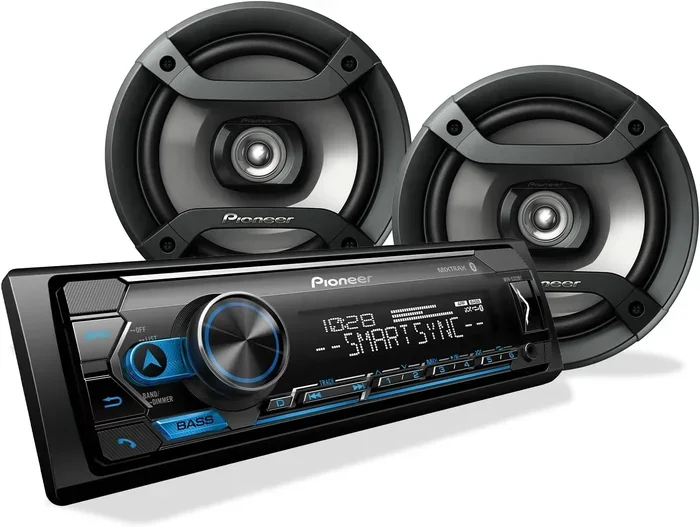
If you want a permanent and premium upgrade, replacing your old stereo with an aftermarket car stereo that has built-in Bluetooth is the way to go. This option costs more than an adapter, but it delivers the best overall experience.
What to Look for in an Aftermarket Stereo
When shopping for a new stereo, look for these features:
- Built-in Bluetooth: Make sure it supports both audio streaming and hands-free calling.
- AUX and USB ports: These give you backup options if Bluetooth is not available.
- Steering wheel controls: Many aftermarket stereos can integrate with your existing steering wheel buttons for volume and track control.
- Touchscreen or intuitive controls: A user-friendly interface makes the whole experience better.
- USB charging port: Keeps your phone charged while you drive.
Popular Brands for Bluetooth Car Stereos
Brands like Pioneer, Kenwood, Sony, and Alpine offer excellent aftermarket stereos with Bluetooth. Pioneer’s DMH series and Kenwood’s DDX series are particularly popular for their sound quality and smart features. Prices range from about $100 for basic models to $400 or more for high-end units with touchscreen displays.
Installation Considerations
Installing an aftermarket stereo requires some basic tools and a wiring harness adapter. The wiring harness matches your car’s factory wiring to the new stereo, making the process much simpler. Most people can complete the installation in 30 to 60 minutes. If you are not comfortable with DIY car projects, a local car audio shop can handle it for a reasonable fee.
Is It Worth the Investment?
If you plan to keep your car for several years, an aftermarket stereo is a smart investment. It improves sound quality, adds modern features like Bluetooth, and can even increase the resale value of your vehicle. Plus, you get a cleaner, more integrated look in your dashboard compared to a dangling Bluetooth adapter.
Option 3: Use an FM Transmitter for Bluetooth
An FM Bluetooth transmitter is a fantastic option if your car stereo does not have an AUX input or USB port. This small device plugs into your car’s cigarette lighter or 12V power outlet and broadcasts your phone’s audio over an FM radio frequency that your stereo can pick up.
How FM Transmitters Work
The transmitter connects to your phone via Bluetooth. It then broadcasts the audio signal on a specific FM frequency. You tune your car stereo to that same frequency, and the music plays through your speakers. It is a simple and effective workaround for older car stereos.
Best FM Transmitters for Bluetooth Conversion
Some well-known FM transmitters include the Nulaxy K3, the Auxtrix B06, and the Scosche Rhythm. Look for a model that allows you to choose your FM frequency to avoid interference with local radio stations. A built-in USB charging port is also a nice bonus.
Pros and Cons of FM Transmitters
- Pros: Works with any stereo that has an FM radio, no wiring needed, affordable ($15 to $35), charges your phone.
- Cons: Sound quality can be slightly lower than AUX or built-in Bluetooth, potential for radio frequency interference, limited range in areas with crowded FM bands.
Tips for Best Results with an FM Transmitter
Choose an FM frequency that is not used by any local radio stations in your area. Rural areas usually have more open frequencies. Urban areas may require more trial and error. Also, keep the transmitter close to your car stereo for the strongest signal. Placing it near the front seat or the center console works best.
How to Choose the Right Bluetooth Conversion Method
With three main options available, choosing the right one depends on your budget, your stereo setup, and your expectations for sound quality. Here is a quick comparison to help you decide.
| Feature | Bluetooth Adapter | Aftermarket Stereo | FM Transmitter |
|---|---|---|---|
| Cost | $15 – $40 | $100 – $400+ | $15 – $35 |
| Sound Quality | Good | Excellent | Fair to Good |
| Ease of Installation | Very Easy | Moderate | Very Easy |
| Hands-Free Calling | Yes (with mic) | Yes | Yes (with mic) |
| Works With Any Stereo | Needs AUX or Cassette | Replaces Existing Stereo | Yes (FM Radio Only) |
| Permanence | Semi-Portable | Permanent | Semi-Portable |
If you want the quickest and cheapest solution, go with a Bluetooth adapter or FM transmitter. If you want the best long-term upgrade and are willing to invest more, an aftermarket stereo with built-in Bluetooth is the clear winner.
Common Mistakes to Avoid When Converting Your Car Stereo
Even though the process is straightforward, some common mistakes can cause frustration. Here is what to watch out for.
Buying the Wrong Adapter
Not all Bluetooth adapters are the same. Some only support audio streaming but lack a microphone for calls. Others have outdated Bluetooth versions that cause lag or connection drops. Always check the product specifications before buying.
Ignoring Sound Quality
Cheap Bluetooth adapters sometimes compress audio, which reduces sound quality. If you care about how your music sounds, invest in a reputable brand with support for aptX or AAC codecs. These codecs deliver higher-quality audio over Bluetooth.
Choosing a Crowded FM Frequency
If you use an FM transmitter, make sure the frequency you select is truly open. Testing it in different locations around your city helps you find the clearest signal. Interference from nearby radio stations ruins the listening experience.
Skipping the Wiring Harness
If you are installing an aftermarket stereo, do not try to wire it directly without a harness adapter. A wiring harness prevents damage to your car’s electrical system and makes installation much cleaner and safer.
Forgetting to Charge the Adapter
Bluetooth adapters and FM transmitters need power. If your device runs on a built-in battery, keep it charged. A dead adapter means no Bluetooth connection, which defeats the purpose of the upgrade.
Expert Insights: Getting the Most From Your Bluetooth Car Stereo
We spoke with a few car audio experts to get their top tips for maximizing your Bluetooth car stereo experience.
Keep your firmware updated. Many modern Bluetooth adapters and aftermarket stereos receive firmware updates that improve connection stability and sound quality. Check the manufacturer’s app or website periodically.
Pair only one device at a time. While some stereos support multiple paired devices, connecting too many phones can slow down the system and cause audio stuttering. Keep your primary device paired for the best experience.
Use high-quality audio files when possible. Streaming services like Spotify offer different quality settings. Choosing a higher bitrate setting improves the sound you hear through your car speakers.
Place your phone within range. Bluetooth has a typical range of about 30 feet. Keeping your phone in a cup holder or center console ensures a strong, uninterrupted connection.
Consider a Bluetooth adapter with a built-in DAC. A digital-to-analog converter (DAC) improves the audio signal before it reaches your stereo. This small upgrade can make a noticeable difference in sound clarity and depth.
Key Takeaways
- Bluetooth adapters are the simplest and most affordable way to add wireless streaming to any old car stereo with an AUX input or FM radio.
- Aftermarket stereos with built-in Bluetooth offer the best sound quality and the most features for a long-term upgrade.
- FM transmitters are a great no-wiring option that works with almost any car stereo, even older models without AUX ports.
- Sound quality varies by method, so choosing the right option depends on your priorities and budget.
- Hands-free calling and music streaming are both possible once you convert your stereo, making every drive safer and more enjoyable.
- Installation can be DIY or professional, and most methods take under 30 minutes to set up.
Frequently Asked Questions
Can I convert any old car stereo to Bluetooth?
Yes, you can convert almost any old car stereo to Bluetooth. If your stereo has an AUX input, a Bluetooth adapter is the easiest solution. If it only has an FM radio, an FM Bluetooth transmitter works well. For a complete upgrade, you can replace the stereo with an aftermarket unit that has built-in Bluetooth.
How much does it cost to add Bluetooth to an old car stereo?
The cost depends on the method you choose. Bluetooth adapters cost between $15 and $40. FM transmitters range from $15 to $35. Aftermarket stereos with built-in Bluetooth can cost anywhere from $100 to $400 or more, depending on the brand and features. Overall, it is a very affordable upgrade.
Will adding Bluetooth affect my car stereo’s sound quality?
It depends on the method. A quality Bluetooth adapter or an aftermarket stereo with built-in Bluetooth delivers excellent sound. FM transmitters may have slightly lower audio quality due to the nature of FM broadcasting. Using adapters that support modern codecs like aptX helps maintain high sound quality across all methods.
Can I make hands-free calls with a Bluetooth car stereo conversion?
Yes, most Bluetooth adapters and aftermarket stereos include a built-in microphone for hands-free calling. Just make sure the product you choose supports both audio streaming and call functionality. This feature makes driving safer by keeping your hands on the wheel and your eyes on the road.
Is it hard to install a Bluetooth adapter in my car?
Not at all. Most Bluetooth adapters plug directly into the AUX port or cigarette lighter. No wiring or technical skills are needed. You simply pair your phone with the adapter, and you are ready to go. It is one of the easiest car upgrades you can do yourself in minutes.
What Bluetooth version should I look for in a car stereo adapter?
Look for Bluetooth 4.0 or higher. Newer versions like 5.0 offer better range, faster connection, and improved battery efficiency. They also tend to have better audio codec support, which translates to clearer and richer sound from your car speakers.
Final Thoughts
Converting your old car stereo to Bluetooth is one of the best upgrades you can make for your daily driving experience. Whether you choose a simple Bluetooth adapter, an FM transmitter, or a full aftermarket stereo replacement, the result is the same: wireless music streaming, hands-free calling, and a more enjoyable ride every time you get behind the wheel.
The process is straightforward, the costs are low, and the benefits are immediate. You do not need to be a tech expert or a car mechanic. With the right tool and a few minutes of your time, your old stereo will feel brand new again.
So go ahead and make the switch. Your car, your music, and your driving experience will thank you. Converting your old car stereo to Bluetooth with ease is not just possible, it is one of the smartest upgrades you can make today.