Can I Connect Soundbar Without Hdmi Arc Right Here
Yes, you can connect a soundbar without HDMI ARC. There are several easy alternatives like optical cables, Bluetooth, RCA, and AUX connections that deliver great sound. This guide shows you every method, setup step, and troubleshooting tip so you can enjoy rich audio from your TV quickly and easily.
You just bought a soundbar and you are excited to set it up. But then you look at the back of your TV and realize there is no HDMI ARC port. Or maybe your TV has HDMI but not ARC. Either way, you are left wondering, can I connect soundbar without HDMI ARC? The short answer is absolutely yes. You have several options to get your soundbar up and running without needing that specific HDMI port.
Many people assume HDMI ARC is the only way to connect a soundbar to a TV. That is simply not true. Whether your TV is older or newer, there are reliable methods that work great. You can use optical cables, Bluetooth, RCA connections, and even simple AUX cables. Each method has its own benefits, and this guide will walk you through all of them step by step.
We will cover every connection type, show you how to set things up, and help you troubleshoot common issues. By the end, you will know exactly which method works best for your setup. Let us get into it.
Key Takeaways
- Multiple Connection Options: You can use optical, Bluetooth, RCA, AUX, or coaxial cables to connect a soundbar without HDMI ARC.
- Optical Cable Is the Best Alternative: It provides digital audio quality and works with most TVs and soundbars.
- Bluetooth Works Wirelessly: If your TV supports Bluetooth, you can pair your soundbar without any cables at all.
- Check Your TV Ports First: Knowing what outputs your TV has makes the setup process much faster and simpler.
- Audio Settings Matter: You often need to change your TV audio output settings after connecting the soundbar.
- HDMI eARC Is the Upgrade Path: If you want the best experience, consider upgrading to a TV or soundbar with eARC support.
📑 Table of Contents
- Why HDMI ARC Matters and Why You Might Not Have It
- How to Connect a Soundbar Without HDMI ARC Using an Optical Cable
- Connecting Your Soundbar Using Bluetooth
- Using RCA Cables or AUX to Connect Your Soundbar
- Can I Connect Soundbar Without HDMI Arc Using Coaxial or Other Cables
- Comparing Connection Methods for Soundbars Without HDMI ARC
- Quick Tips for the Best Soundbar Setup Without HDMI ARC
- Common Mistakes When Connecting a Soundbar Without HDMI ARC
- What About HDMI eARC? Should You Upgrade?
- Final Thoughts
Why HDMI ARC Matters and Why You Might Not Have It
HDMI ARC stands for Audio Return Channel. It lets your TV send audio to your soundbar through a single HDMI cable. It also allows your soundbar to send commands back to your TV. This means you can use one remote for everything. It is very convenient. But not every TV has HDMI ARC. And not every soundbar needs it.
What HDMI ARC Does
HDMI ARC does two main things. First, it sends audio from your TV to your soundbar. Second, it lets you control the soundbar volume using your TV remote. This is called CEC, or Consumer Electronics Control. Without HDMI ARC, you usually need a separate remote for your soundbar. That is not the end of the world, but it is less convenient.
Why Your TV Might Not Have HDMI ARC
Older TVs often lack HDMI ARC. Some budget TVs skip it to save money. Even some newer TVs only have HDMI ARC on one port, or they use eARC instead. eARC is the newer version and it supports higher quality audio formats like Dolby Atmos. But if your TV does not have HDMI ARC, you are not stuck. There are plenty of other ways to connect your soundbar.
How to Connect a Soundbar Without HDMI ARC Using an Optical Cable
The optical cable method is the most popular alternative to HDMI ARC. It uses a TOSLINK cable to send digital audio from your TV to your soundbar. The connection is simple and the sound quality is excellent.
What You Need
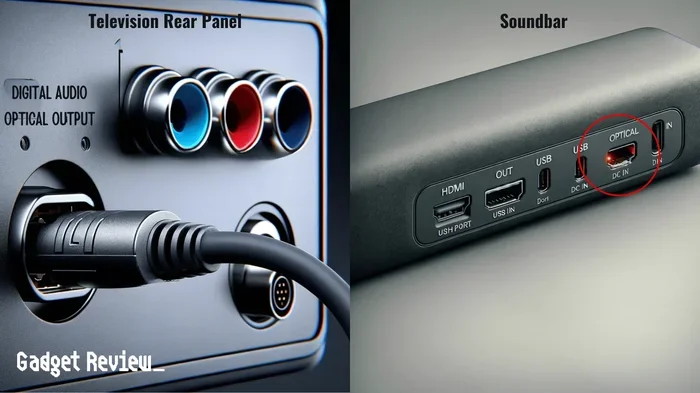
You need an optical cable, also called a TOSLINK cable. Most soundbars come with one in the box. Your TV needs to have a digital optical output port. This port looks like a small square with a red light inside when you shine a flashlight at it.
Step-by-Step Setup
- Turn off both your TV and soundbar. This prevents any signal interference during setup.
- Plug one end of the optical cable into your TV. Look for the port labeled “OPTICAL OUT” or “DIGITAL AUDIO OUT.”
- Plug the other end into your soundbar. Look for the port labeled “OPTICAL IN” or “DIGITAL IN.”
- Turn on both devices.
- Go to your TV audio settings. Change the audio output to “OPTICAL” or “DIGITAL AUDIO.”
- Select the correct input on your soundbar. Use the soundbar remote to choose optical input.
Pros and Cons of Optical Connection
The optical cable method has some clear advantages. It delivers digital audio without any loss of quality. It is not affected by electromagnetic interference. The cable is inexpensive and widely available. However, it does not support the newest audio formats like Dolby Atmos. It also does not allow you to control volume with your TV remote.
Connecting Your Soundbar Using Bluetooth
If your TV supports Bluetooth, this is the easiest method. No cables at all. You just pair your soundbar to your TV wirelessly and you are good to go.
Checking If Your TV Has Bluetooth
Most smart TVs made after 2018 have Bluetooth built in. Check your TV settings menu for a Bluetooth option. If you do not see it, your TV might not support Bluetooth. In that case, you can buy a Bluetooth transmitter that plugs into your TV’s audio output.
How to Pair via Bluetooth
- Put your soundbar in pairing mode. Usually you hold down the Bluetooth button on the remote or the soundbar itself.
- Go to your TV Bluetooth settings. Look for “Add New Device” or “Pair Device.”
- Select your soundbar from the list.
- Wait for the connection to complete. You should hear a confirmation sound.
Things to Keep in Mind
Bluetooth audio can have slight latency. This means the sound might be a tiny bit behind the video. For casual watching, this is usually not noticeable. But for gaming or fast-action movies, you might want to use a wired connection instead. Bluetooth also compresses audio slightly, so the quality is good but not as good as optical or HDMI.
Using RCA Cables or AUX to Connect Your Soundbar
RCA cables and AUX connections are older but still very effective. Many soundbars and TVs still have these ports, especially if your TV is a few years old.
What Are RCA Cables?
RCA cables have red and white connectors. They carry analog audio signals. You plug the red connector into the red port and the white connector into the white port. Simple as that. Some soundbars have RCA inputs on the back panel.
What Is an AUX Connection?
An AUX connection uses a 3.5mm jack, like the one on your headphones. Some soundbars have an AUX input. You use a cable that has a 3.5mm plug on each end. One side goes into your TV’s headphone jack or audio output, and the other goes into your soundbar.
Setting Up RCA or AUX
- Identify the audio output on your TV. It could be a headphone jack or RCA ports.
- Connect the appropriate cable to your TV.
- Connect the other end to your soundbar.
- Go to your TV audio settings. Set the output to “Analog” or “Headphones.”
- Adjust the volume on both your TV and soundbar.
Limitations of RCA and AUX
These are analog connections, so they do not support the best digital audio formats. The sound quality is good but not as crisp as optical or HDMI. Also, you cannot send video through these cables. They only carry audio. And controlling volume with your TV remote is not always possible with these methods.
Can I Connect Soundbar Without HDMI Arc Using Coaxial or Other Cables
There are a few other cable options worth mentioning. Coaxial digital cables are similar to optical cables but use a different connector. They carry digital audio and work well with many soundbars.
Coaxial Digital Connection
A coaxial cable has an RCA-style connector but carries a digital signal. If your TV has a coaxial digital output and your soundbar has a coaxial input, this works great. The setup is the same as optical. Just plug it in, go to your TV settings, and select the correct output.
HDMI Without ARC
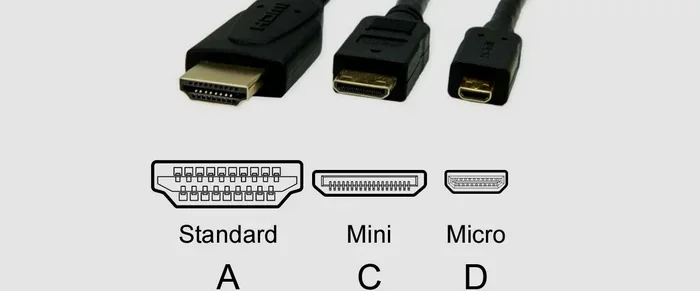
You can plug an HDMI cable from your TV to your soundbar even without ARC. But this only works if your soundbar has an HDMI pass-through or input. In this setup, the soundbar acts as a middleman between your TV and other devices. The audio quality depends on the HDMI version and your TV settings.
Wireless HDMI Transmitters
Some wireless transmitters send audio from your TV to your soundbar without cables. These are great if you want a clean setup with no visible wires. They work well but can be more expensive than a simple optical cable.
Comparing Connection Methods for Soundbars Without HDMI ARC
Not all connection methods are created equal. Here is a quick comparison to help you decide which one is best for your situation.
| Method | Audio Quality | Ease of Setup | Remote Control | Best For |
|---|---|---|---|---|
| Optical Cable | Excellent | Easy | No | Most TVs and soundbars |
| Bluetooth | Good | Very Easy | No | Wireless convenience |
| RCA Cables | Good | Easy | No | Older TVs and soundbars |
| AUX (3.5mm) | Good | Very Easy | No | Quick setups |
| Coaxial | Excellent | Easy | No | Digital audio fans |
| HDMI (No ARC) | Very Good | Moderate | Sometimes | Advanced setups |
As you can see, the optical cable method offers the best balance of quality and ease. Bluetooth wins for convenience. Choose the method that fits your TV ports and your preferences.
Quick Tips for the Best Soundbar Setup Without HDMI ARC
Here are some practical tips to make your setup smoother and your sound better.
- Check your TV manual. It lists all audio output options. This saves you time searching for ports.
- Use the optical cable first. It gives the best quality without HDMI ARC and is very reliable.
- Keep cables short. Longer cables can cause signal loss, especially with optical and coaxial connections.
- Update your TV firmware. Sometimes audio output issues are fixed with a simple software update.
- Set your TV audio output to the correct format. If your soundbar supports Dolby Digital, set your TV to output Dolby Digital.
- Test different audio formats. Try PCM, Dolby Digital, and Auto to see which sounds best on your setup.
Common Mistakes When Connecting a Soundbar Without HDMI ARC
Even with a simple setup, mistakes can happen. Here are the most common ones and how to avoid them.
Forgetting to Change TV Audio Settings
This is the number one mistake. You plug in the cable but your TV is still sending audio to its own speakers. Go to your TV settings and change the audio output to match your cable type. If you used an optical cable, select “Optical” or “Digital.” If you used AUX, select “Analog” or “Headphones.”
Using the Wrong Cable
Not all cables are the same. An optical cable will not work in an AUX port. An RCA cable will not work in an HDMI port. Make sure you are using the right cable for the right port. Check the labels on both your TV and soundbar.
Ignoring Soundbar Input Selection
Most soundbars have multiple input options. After you plug in the cable, you need to select the right input on your soundbar. Use the remote or the buttons on the soundbar to switch to the correct input source.
Placing the Soundbar Too Far Away
If you are using Bluetooth, distance matters. Keep your soundbar within 10 to 15 feet of your TV for the best connection. Walls and other obstacles can weaken the Bluetooth signal.
What About HDMI eARC? Should You Upgrade?
If you are reading this because your current setup does not have HDMI ARC, you might want to consider upgrading in the future. HDMI eARC is the latest standard and it supports the best audio formats available today. It includes Dolby Atmos, DTS:X, and uncompressed audio. eARC also supports CEC, so you can still control your soundbar with your TV remote.
You do not need to replace your TV right now. But if you are shopping for a new TV or soundbar, look for eARC support. It gives you the best possible audio experience and is future-proof.
How to Know If Your Devices Support eARC
Check the product specifications on the manufacturer website. Look for “eARC” or “Enhanced Audio Return Channel.” Both your TV and soundbar need to support eARC for it to work. You also need an HDMI cable that supports eARC, which is usually an HDMI 2.1 cable.
Final Thoughts
So, can I connect soundbar without HDMI ARC? Absolutely. You have more options than you might think. The optical cable method is the most reliable and delivers excellent sound quality. Bluetooth offers the most convenience. RCA and AUX cables work well for older setups. And coaxial or HDMI without ARC can also get the job done.
The key is knowing what ports your TV has and choosing the right cable or connection method. Once you set it up, you will not even think about HDMI ARC again. Your soundbar will fill your room with rich, clear audio and you will wonder why you ever watched TV without one.
Take your time with the setup. Follow the steps in this guide. And if you run into any issues, go back and check the troubleshooting tips. You will be enjoying cinema-quality sound in no time. Happy listening.
Frequently Asked Questions
Can I connect any soundbar to my TV without HDMI ARC?
Yes, most soundbars can connect without HDMI ARC. You can use an optical cable, Bluetooth, RCA, or AUX depending on what ports are available on your TV and soundbar. Check both devices for compatible ports before buying a cable.
Is optical audio better than Bluetooth for a soundbar?
Yes, optical audio generally provides better sound quality than Bluetooth. Optical sends uncompressed digital audio, while Bluetooth compresses the audio signal. For movies and music, optical is the preferred wireless alternative to HDMI ARC.
Will I lose any features if I do not use HDMI ARC?
You may lose some convenience features like controlling the soundbar volume with your TV remote. You also might not get support for the newest audio formats like Dolby Atmos unless you use eARC. But the core audio experience remains excellent with other connection methods.
Can I use a Bluetooth transmitter if my TV does not have Bluetooth?
Yes, you can buy a Bluetooth transmitter that plugs into your TV’s audio output. This small device pairs with your soundbar and sends audio wirelessly. It is an affordable and easy solution for TVs without built-in Bluetooth.
How do I know which input to select on my soundbar?
Look at the back or side of your soundbar for labels on the input ports. If you connected an optical cable, select the “OPTICAL” or “OPT” input. If you used Bluetooth, select “BT” or “Bluetooth.” Use your soundbar remote to switch between inputs.
Do I need any special equipment to connect a soundbar without HDMI ARC?
You only need the right cable or adapter for your setup. Most soundbars come with an optical cable in the box. For Bluetooth, no extra equipment is needed if your TV supports it. For older TVs, you might need an RCA cable or a 3.5mm AUX cable, both of which are inexpensive and widely available.