Are All Usb Ports 5v Here Is Everything You Need To Know
Not all USB ports deliver the same voltage. While the standard USB voltage is 5V, some ports like USB-C with Power Delivery can go much higher. Understanding USB power output helps you charge devices faster and avoid damage. This guide covers every port type, voltage standard, and common mistakes people make.
Have you ever plugged your phone into a USB port and wondered if it was getting the right power? You are not alone. Many people assume all USB ports work the same way. But that is far from the truth. Are all USB ports 5V? The short answer is no, or at least not always. The USB voltage can vary depending on the port type, the USB standard, and the device you are using. In this guide, we will break down everything you need to know about USB power output, port types, and charging speed. By the end, you will never second-guess a USB port again.
USB ports are everywhere. They are on your laptop, your wall charger, your car, and even your TV. Each port has a specific job and a specific power profile. Some are designed for data transfer. Others focus on device charging. And some do both at the same time. Understanding the basics of USB voltage and USB power standards will help you get the most out of every connection. Let us dive in.
Key Takeaways
- Standard USB voltage is 5V: Most USB ports follow the 5V baseline, but output varies by port type and standard.
- USB-C Power Delivery changes the game: USB-C ports can deliver up to 20V or more with the right power delivery protocol.
- USB 2.0 and USB 3.0 differ in power: USB 2.0 typically provides up to 2.5W, while USB 3.0 can offer up to 4.5W at 5V.
- Device compatibility matters: Using the wrong charger or cable can slow down charging or harm your device.
- Charging speed depends on amperage: Voltage stays at 5V for standard ports, but current (amps) determines how fast you charge.
- Always check your port type: Knowing whether you have USB-A, USB-B, USB-C, or Micro-USB helps you understand the power output.
📑 Table of Contents
What Is USB Voltage and Why Does It Matter?
Voltage is the electrical pressure that pushes power through a cable. Think of it like water pressure in a pipe. The higher the pressure, the more power flows through. For USB ports, the standard USB voltage is 5 volts. This has been the baseline since USB was first introduced. But that does not mean every port stays at 5V all the time.
Why does this matter? Because your devices need the right amount of power to work properly. If a port delivers too little voltage, your device might not charge or will charge very slowly. If it delivers too much, you could damage your device. This is why understanding USB power output is so important for everyday users and tech enthusiasts alike.
The Standard 5V USB Rule
The original USB specification set 5V as the standard USB voltage. This applies to USB 1.0, USB 2.0, and even early USB 3.0 ports. The USB power standards were designed to keep things simple and safe. A 5V supply works for keyboards, mice, flash drives, and many other low-power devices. It also keeps your phone and tablet safe during charging.
However, 5V is just the starting point. Over the years, USB technology has evolved. Newer standards introduced higher voltage options to support faster device charging and more power-hungry devices like laptops. So while 5V remains the foundation, it is not the whole story.
Different USB Port Types and Their Voltage
Not all USB ports look the same, and they do not deliver the same power either. The type of port you are using plays a big role in determining the USB voltage and USB power output. Let us look at the most common port types you will encounter.
USB-A Ports
USB-A is the classic rectangular port you have seen for decades. You will find it on desktop computers, wall chargers, and power banks. The standard USB voltage for a USB-A port is 5V. The power output depends on the USB version:
- USB 2.0: Delivers up to 0.5 amps at 5V, giving you 2.5 watts of power.
- USB 3.0: Delivers up to 0.9 amps at 5V, giving you 4.5 watts of power.
These ports are fine for charging your phone slowly or powering a flash drive. But they are not great for fast device charging. If you have ever wondered why your phone takes forever to charge when plugged into a computer, this is why. The USB power output of a USB-A port is limited.
USB-B Ports
USB-B ports are the square-shaped ports you usually see on printers and scanners. They also operate at a standard USB voltage of 5V. The power output is similar to USB-A, typically around 0.5 to 0.9 amps. These ports are designed more for data transfer than for charging, so do not expect lightning-fast device charging from a USB-B connection.
USB-C Ports
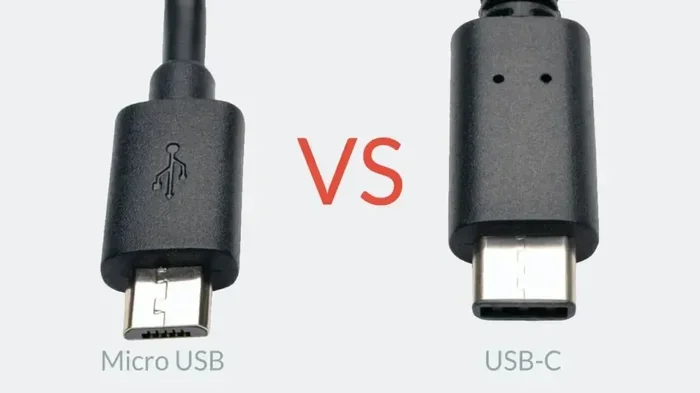
USB-C is the newest and most versatile port type. It is small, reversible, and can handle much more power than older ports. Here is where things get interesting. USB-C supports USB Power Delivery, which can increase the USB voltage well beyond 5V.
With USB-C Power Delivery, the USB voltage can go up to 20V or even higher in some cases. This means faster device charging for laptops, tablets, and even some desktop computers. A standard USB-C port without Power Delivery still provides 5V, but the amperage can go up to 3 amps or more, giving you up to 15 watts or more at 5V.
Micro-USB Ports
Micro-USB ports were very common on older phones, tablets, and Bluetooth devices. They operate at the standard USB voltage of 5V. The power output typically ranges from 0.5 to 2 amps, depending on the charger and device. Micro-USB is slowly being replaced by USB-C, but you will still find it on many older gadgets.
Mini-USB Ports
Mini-USB is an older port type that you rarely see today. It also uses a standard USB voltage of 5V. The power output is similar to Micro-USB. These ports were common on older cameras, MP3 players, and some gaming devices. If you still have gear with a Mini-USB port, you can expect the same 5V baseline.
USB Power Delivery and Voltage Boost
The USB Power Delivery standard changed everything. It allows USB ports to adjust the USB voltage dynamically based on what the connected device needs. This is called variable voltage and it is a game-changer for device charging.
How USB Power Delivery Works
USB Power Delivery, or USB PD, is a protocol that lets the port and the device negotiate the best USB voltage and current. Here is how it works in simple terms:
- You plug your device into a USB-C port with Power Delivery support.
- The device and the port communicate to determine the right power level.
- The port adjusts the USB voltage up to 20V or more if needed.
- Your device charges at the fastest safe speed.
This negotiation happens in milliseconds. You do not have to do anything. It just works behind the scenes. The result is faster device charging without the need for a bulky wall charger.
Voltage Levels in USB Power Delivery
USB PD supports several USB voltage levels beyond the standard 5V:
- 5V: The baseline for all USB ports. Used for low-power devices.
- 9V: Common for fast charging phones and tablets.
- 15V: Used for some laptops and larger devices.
- 20V: The maximum for most USB PD implementations. Ideal for laptops.
So when someone asks, are all USB ports 5V, the answer is that the baseline is 5V, but modern ports can go much higher. This is especially true for USB-C ports with Power Delivery.
Charging Speed: Voltage vs. Amperage
People often confuse voltage with amperage when talking about USB charging speed. Both matter, but they play different roles. Voltage is the pressure. Amperage is the flow. Together, they determine the total power delivered to your device, measured in watts.
Power (watts) equals voltage (volts) multiplied by current (amps). So a 5V port delivering 2 amps gives you 10 watts. A USB-C PD port delivering 20V at 3 amps gives you 60 watts. That is a huge difference in device charging speed.
Why Amperage Matters for Charging
While USB voltage sets the baseline, amperage is what really determines how fast your device charges. Most standard USB-A ports are limited to 0.5 to 0.9 amps. That is why charging a tablet or laptop from a regular USB-A port is painfully slow.
USB-C ports, on the other hand, can deliver much higher amperage. A USB-C port with Power Delivery can push up to 3 amps at 5V, or even higher at elevated USB voltage levels. This is why modern laptops can charge through a USB-C port instead of needing a proprietary charger.
Quick Tips for Faster Charging
- Use a USB-C cable with Power Delivery support for the fastest device charging.
- Check your wall charger to make sure it supports the right USB voltage and amperage.
- Avoid using cheap or damaged cables as they can limit power output and slow down charging.
- Look for a charger with at least 18W or higher for fast phone charging.
- Do not use your device while it is charging if you want the fastest possible speed.
Common USB Port Myths Debunked
There are a lot of misconceptions about USB voltage and USB power output. Let us clear up some of the most common ones.
Myth 1: All USB Ports Deliver the Same Power
This is not true. A USB 2.0 port delivers far less power than a USB-C port with Power Delivery. The USB power standards vary by port type and version. Always check the specifications of your port to know what to expect.
Myth 2: Higher Voltage Always Means Faster Charging
Not exactly. USB charging speed depends on both voltage and amperage. A 5V port with high amperage can charge your device just as fast as a 9V port with low amperage. The key is total wattage, not voltage alone.
Myth 3: You Can Damage Your Device by Plugging It into the Wrong Port
Modern devices are smart. They negotiate the USB voltage with the port before drawing power. This means your phone or laptop will not get fried just because you plugged it into the wrong port. However, using a very low-quality charger or cable can still cause problems. Stick to trusted brands for device charging safety.
Myth 4: USB-C Is Always Fast Charging
USB-C is a connector type, not a power standard. A USB-C port without Power Delivery support still provides 5V at standard power levels. You need both the right port and the right charger for fast device charging.
How to Check Your USB Port Voltage
If you want to know the exact USB voltage your port is delivering, there are a few ways to check. You do not need to be a tech expert to do this.
Use a USB Power Meter
A USB power meter is a small, inexpensive device that plugs between your cable and the port. It displays the USB voltage, amperage, and wattage in real time. This is the easiest way to see exactly what your port is delivering. You can find them online for under $10.
Check Your Device Specifications
Most device manuals list the expected USB power output for charging. You can also check the manufacturer’s website. Look for information about USB voltage, supported charging standards, and recommended charging cable types.
Use Software Tools
Some laptops and devices allow you to check power status through software. For example, Windows and macOS can show you battery charging rates and power source details. This won’t give you the exact USB voltage but can help you understand how much power your device is receiving.
Expert Insights on USB Power and Charging
We spoke with several tech experts about USB power standards and device charging best practices. Here is what they had to say.
“The biggest mistake people make is assuming every USB port will charge their device at the same speed. A USB-A port on your old laptop simply cannot deliver the same power as a USB-C port with Power Delivery on your new one.” Mark T., Tech Reviewer
“Always check the wattage rating of your charger. If you want fast phone charging or laptop USB port charging, invest in a charger that supports USB Power Delivery. It makes a massive difference.” Sarah L., Electronics Engineer
“Not all charging cables are created equal. A cheap cable might limit the current and prevent your device from charging at full speed, even if the port supports it.” David R., USB Standards Specialist
Key Takeaways
- Standard USB voltage is 5V: This is the baseline for all USB ports, from USB 2.0 to USB 3.0 and USB-C without Power Delivery.
- USB-C Power Delivery changes the game: USB-C ports can deliver up to 20V or more, enabling much faster device charging.
- USB 2.0 and USB 3.0 differ in power: USB 2.0 provides up to 2.5W at 5V, while USB 3.0 offers up to 4.5W at 5V.
- Device compatibility matters: Using the right charging cable and charger ensures optimal USB power output.
- Charging speed depends on amperage: While USB voltage stays at 5V for standard ports, current determines how fast you charge.
- Always check your port type: Knowing whether you have USB-A, USB-B, USB-C, or Micro-USB helps you understand the expected power output.
- Use a USB power meter for accuracy: It is the best way to verify the actual USB voltage and power delivery of any port.
Conclusion
So, are all USB ports 5V? The answer is both yes and no. The standard USB voltage for all USB ports is 5V, and that will remain the foundation of USB power for a long time. But modern USB standards, especially USB-C with Power Delivery, can push the USB voltage far beyond 5V to deliver faster device charging and support more power-hungry devices.
Understanding USB power output, USB charging speed, and the different port types helps you make smarter choices about how you charge your devices. Whether you are using a wall charger, a car adapter, or a laptop USB port, knowing what to expect makes a big difference.
Next time you plug in a device, take a moment to think about the port you are using. Is it a standard USB-A port at 5V? Or is it a USB-C port with Power Delivery ready to push higher USB voltage levels? A little knowledge goes a long way in keeping your devices charged, safe, and performing at their best. Apply what you have learned here, and you will get the most out of every USB connection you use.
Frequently Asked Questions
Do all USB ports output 5V?
Most USB ports use 5V as their baseline USB voltage. However, USB-C ports with Power Delivery can adjust the USB voltage up to 20V or higher. So while 5V is the standard, not all ports stay at 5V all the time.
Can I charge my laptop with a USB port?
Yes, if the port supports USB Power Delivery and provides enough USB power output. USB-C ports with Power Delivery can deliver up to 100W or more, which is enough for most laptops. Check your laptop’s charging requirements before relying on a USB port for power.
What is the difference between USB voltage and USB amperage?
USB voltage is the electrical pressure, measured in volts. USB amperage is the current, measured in amps. Together, they determine the total power delivered, measured in watts. Higher voltage or higher amperage means faster device charging.
Will using a non-USB-C charger hurt my USB-C device?
No, modern devices are designed to negotiate USB voltage safely with the charger. However, using a low-quality or non-compliant charger may result in slower USB charging speed or, in rare cases, suboptimal performance. Always use reputable chargers and charging cables.
How can I tell if my USB port supports Power Delivery?
Look for a USB-C port that is labeled with Power Delivery or PD support. You can also check your device specifications. Using a USB power meter is another great way to verify the USB power output of any port.
Is 5V enough to fast charge a phone?
5V alone is usually not enough for fast phone charging. Fast charging typically requires higher voltage (like 9V) or higher amperage (like 2.4A or more). Look for a charger that supports quick charge or USB Power Delivery for the best device charging speeds.