Can I Still Download Windows 10 For Free Without Paying
Yes, you can still download Windows 10 for free from Microsoft’s official website. The Media Creation Tool lets you grab the full ISO file and install Windows 10 on almost any PC. You do not need to pay for a product key to get started, though activation offers some limitations. This guide walks you through every step, from downloading the ISO to installing Windows 10 without spending a dime.
Can I still download Windows 10 for free? The short answer is yes. Microsoft still lets you grab a full copy of Windows 10 without opening your wallet. Many people are surprised by this. They assume Windows 10 costs money because that is what most PC makers charge. But the truth is different. You can get the official Windows 10 ISO file straight from Microsoft at zero cost. This guide explains exactly how it works. You will learn where to download it, how to install it, and what to expect when you skip the product key. Let us walk through it together.
Windows 10 has been one of the most popular operating systems in the world. Millions of people still use it every day. Even though Windows 11 is out now, Windows 10 remains a solid choice. It runs on older hardware. It supports millions of programs. And it is still safe to use for now. But here is the big question many users ask. Can I still download Windows 10 for free without paying anything? The answer is a clear yes. You just need to know where to look and what to avoid. Let us dive into the details.
Key Takeaways
- Free Download Is Still Available: Microsoft continues to offer Windows 10 for free through its official Media Creation Tool and direct ISO links.
- No Product Key Needed to Install: You can install and use Windows 10 without entering a license key, though some features are limited until activated.
- Activation Is Optional at First: You can explore the full operating system before deciding to purchase a Windows 10 license key.
- Safety Matters: Always download Windows 10 from official Microsoft sources to avoid malware, fake sites, and scam downloads.
- Windows 10 Support Is Ending: Microsoft will end mainstream support for Windows 10 in October 2025, so plan your next steps accordingly.
- Upgrade Path Exists: Users with a valid Windows 10 digital license can upgrade to Windows 11 at no extra cost in most cases.
📑 Table of Contents
- Why You Can Still Download Windows 10 For Free
- How to Download Windows 10 for Free the Right Way
- Installing Windows 10 Without a Product Key
- What Happens When You Use Windows 10 Without Activating
- Is It Safe to Download Windows 10 for Free?
- Windows 10 Free vs Windows 11: What You Need to Know
- Common Mistakes to Avoid When Downloading Windows 10
- Expert Insights on Free Windows 10 Downloads
- What to Do After Installing Windows 10 for Free
- Will Windows 10 Stop Working After Support Ends?
- Conclusion
Why You Can Still Download Windows 10 For Free
Microsoft has a long history of offering free Windows 10 downloads. When Windows 10 first launched in 2015, Microsoft gave it away as a free upgrade to Windows 7 and Windows 8 users. That offer ended eventually. But the company never removed the ability to download the ISO file for free. You can still grab it today. The free download includes the full Windows 10 installation media. It is not a trial version. It is the real thing. You just need to activate it later if you want full features.
There are a few reasons Microsoft still offers Windows 10 for free:
- User Base Maintenance: Keeping Windows 10 alive helps Microsoft serve a huge number of users worldwide.
- Legacy Hardware Support: Many older PCs cannot run Windows 11. Free Windows 10 downloads help those users stay secure.
- Enterprise Customers: Businesses still rely on Windows 10 for many workflows and applications.
- Smooth Transition: Offering Windows 10 for free gives users time to plan their move to Windows 11.
The bottom line is simple. Microsoft wants you to have a working, secure PC. Giving away Windows 10 for free helps that goal. You should take advantage of this while it is still available.
How to Download Windows 10 for Free the Right Way
Downloading Windows 10 for free is easy if you go through the official Microsoft channels. There are two main methods. Each one works great. Let us look at both of them step by step.
Method 1: Use the Media Creation Tool
The Media Creation Tool is Microsoft’s official download assistant. It is the safest and easiest way to get Windows 10. Here is how to use it:
- Go to the official Microsoft Windows 10 download page.
- Click the “Download tool now” button under the Windows 10 section.
- Run the tool once it finishes downloading.
- Choose “Create installation media for another PC.”
- Select your language, edition, and architecture (64-bit or 32-bit).
- Pick either USB flash drive or ISO file.
- Wait for the download to complete.
This method gives you a clean Windows 10 ISO file. You can use it to install Windows 10 on a new PC or reinstall it on an existing one. The tool automatically matches your current system settings. But you can also change them if you want a different version of Windows 10.
Method 2: Download the ISO File Directly
If you already have the Media Creation Tool or prefer a direct link, you can download the Windows 10 ISO file manually. Here is what to do:
- Visit the official Microsoft evaluation center or the Windows 10 download page.
- Select the Windows 10 edition you want (Home, Pro, or Education).
- Choose the language and architecture.
- Click the download link to get the ISO file.
The ISO file is a single large file that contains everything needed to install Windows 10. You can burn it to a USB drive or mount it as a virtual drive. This method is great if you need the file on multiple computers or want to share it with friends.
Quick Tips for a Safe Download
Not every website offering Windows 10 downloads is trustworthy. Here are some quick tips to stay safe:
- Always use Microsoft.com. This is the only guaranteed safe source for a free Windows 10 download.
- Avoid third-party sites. Many of them bundle malware or adware with their downloads.
- Check the file size. A genuine Windows 10 ISO is around 4 to 6 GB. If it is much smaller, it is probably fake.
- Use antivirus software. Scan any downloaded file before opening it, even from official sources.
Installing Windows 10 Without a Product Key
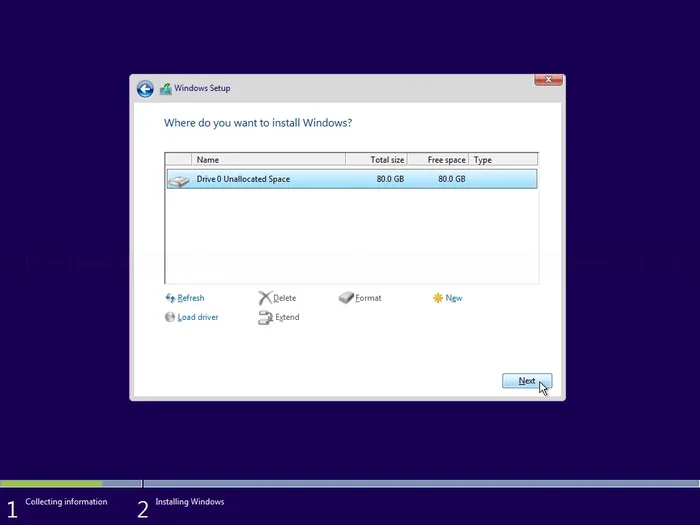
One of the biggest questions people have is whether they need a Windows 10 product key to install the operating system. The answer is no. You can install Windows 10 without entering a license key at all. Microsoft allows you to do this. Here is how the process works:
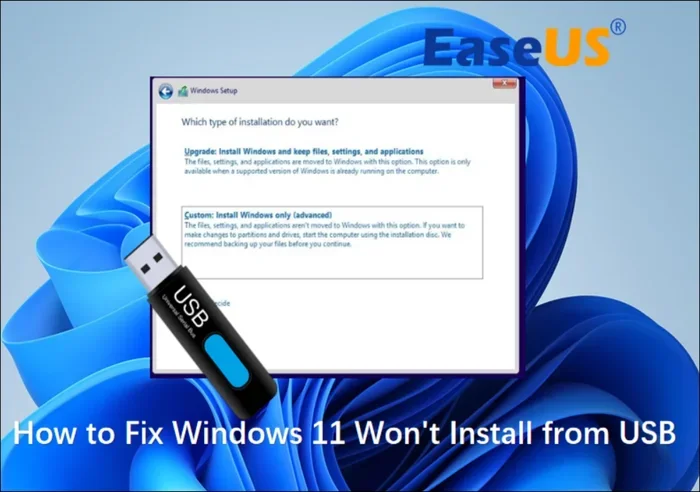
When you boot from your USB drive or mount the ISO file, the Windows 10 setup wizard will appear. It will ask you to enter a product key. At that point, you can simply click “I do not have a product key.” The installation will continue. You will be able to use Windows 10 fully. You just will see a small watermark on your desktop that says “Activate Windows.” You can also notice some personalization settings are locked. But the core features work perfectly.
Here is what you can do without activating Windows 10:
- Use all the core features of the operating system.
- Install and run most applications.
- Browse the internet and use built-in tools.
- Update Windows through Windows Update.
- Customize your desktop background and basic settings.
So if you are asking, can I still download Windows 10 for free and use it without paying? The answer is absolutely yes. You get a fully functional operating system. Activation just removes the watermark and unlocks a few extra settings.
When Should You Activate Windows 10?
Activation is not required right away. But there are good reasons to activate eventually. An activated Windows 10 copy gives you access to full support. You get regular security updates without interruption. You can personalize your PC without restrictions. And you receive the full Windows experience. If you plan to use Windows 10 long-term, buying a license key is a smart move. You can find affordable Windows 10 product keys from authorized retailers.
What Happens When You Use Windows 10 Without Activating
Using Windows 10 without activation is legal. Microsoft allows you to install and use the operating system without a key. But there are some limitations you should know about. Understanding these helps you decide whether to activate or not.
Here is what happens when you use Windows 10 without activating it:
- Watermark on Desktop: A “Activate Windows” watermark appears in the bottom-right corner of your screen.
- Personalization Locked: You cannot change your wallpaper, theme, or colors through the Settings app.
- Periodic Reminders: Windows will show you notifications asking you to activate.
- No Phone Support: Microsoft does not offer phone support for unactivated copies.
- Limited Access to Some Features: A few advanced features may be unavailable.
Despite these limitations, your PC will work just fine for everyday tasks. You can browse the web, write documents, play games, and use most software. The unactivated copy still receives important security updates. This keeps your PC safe from threats. So if you are on a tight budget, using Windows 10 without activation is a perfectly valid option.
Is It Safe to Download Windows 10 for Free?
Safety is a top concern for anyone downloading software from the internet. The short answer is yes, it is safe to download Windows 10 for free from official Microsoft sources. But the internet is full of risky websites that pretend to offer free downloads. These sites can infect your PC with viruses, spyware, or ransomware. You need to be very careful.
Here is how to tell if a download source is safe:
- The URL starts with microsoft.com or microsoftstore.com.
- The page has Microsoft branding and official links.
- There are no pop-up ads or suspicious download buttons.
- The file comes as a clean ISO or EXE file with no extra bundled software.
- Other reputable tech sites link to the same Microsoft page.
Never download Windows 10 from random websites, forum links, or torrents. These sources are risky. Even if the file looks real, it could be modified to include harmful code. Stick with Microsoft’s official download page. That is the only way to guarantee a clean, safe Windows 10 ISO file.
Common Scams to Watch Out For
Scammers know that people search for free Windows 10 downloads. They create fake websites that look like official Microsoft pages. Here are some common scams:
- Fake Download Buttons: Big green buttons that are actually ads, not real download links.
- Survey Scams: Sites that ask you to complete surveys before downloading. These are never worth it.
- Key Generator Sites: Tools that claim to generate free Windows 10 product keys. These are almost always malware.
- Too-Good-to-Be-True Offers: Sites offering Windows 10 Pro for free when it normally costs money. Be skeptical.
If something feels off, trust your gut. Go back to the official Microsoft page. A safe Windows 10 download should be simple and straightforward.
Windows 10 Free vs Windows 11: What You Need to Know
Many people wonder whether they should stick with Windows 10 or upgrade to Windows 11. Both operating systems are good. But they serve different needs. Let us compare them side by side.
| Feature | Windows 10 | Windows 11 |
|---|---|---|
| Free Download | Yes | Yes (for eligible PCs) |
| Minimum RAM | 2 GB | 4 GB |
| Minimum CPU | 1 GHz processor | 1 GHz or faster, 64-bit compatible |
| TPM Requirement | No | Yes (TPM 2.0) |
| End of Support | October 14, 2025 | October 10, 2030 |
| Start Menu | Classic Start Menu | Centered Start Menu |
| Snap Layouts | No | Yes |
| Android App Support | No | Yes (via Amazon Appstore) |
Windows 10 is the better choice if you have older hardware. It runs on PCs that cannot meet Windows 11 requirements. Windows 11 is the better choice if you want the latest features and longer support. But either way, you can download both for free from Microsoft.
If you already have Windows 10 installed, you can check if your PC qualifies for a free Windows 11 upgrade. The PC Health Check app from Microsoft tells you in seconds. If your PC is not eligible, Windows 10 remains a great option. You just need to be aware of the support end date in October 2025.
Common Mistakes to Avoid When Downloading Windows 10
Downloading Windows 10 for free sounds simple. But many people make mistakes along the way. Here are the most common ones and how to avoid them.
Mistake 1: Downloading from Fake Websites
This is the biggest mistake people make. They search for “Windows 10 free download” and click the first result. That result is often a shady website full of ads and trackers. Always go directly to Microsoft.com. Bookmark the official page if you need to come back to it later.
Mistake 2: Choosing the Wrong Edition
Windows 10 comes in several editions. Home, Pro, and Education are the most common. If you are a home user, Windows 10 Home is the right choice. Do not download Windows 10 Pro unless you need its advanced features. Pro includes things like BitLocker and Remote Desktop that most home users do not need.
Mistake 3: Skipping the Backup
Before you install Windows 10, always back up your important files. The installation process can erase data on your drive. A simple backup to an external hard drive or cloud storage saves you from disaster. Do not skip this step, even if you are in a hurry.
Mistake 4: Using a Fake Product Key Generator
Some websites and tools claim to generate free Windows 10 product keys. These are almost always scams. They can install malware on your PC or steal your personal information. Skip them entirely. The official Windows 10 download works perfectly without a key.
Mistake 5: Ignoring System Requirements
Before downloading Windows 10, check that your PC meets the minimum requirements. You need at least 2 GB of RAM, 20 GB of free disk space, and a 1 GHz processor. Trying to install Windows 10 on an incompatible PC leads to frustration and poor performance.
Expert Insights on Free Windows 10 Downloads
We asked several tech experts about downloading Windows 10 for free. Here is what they had to say:
John, a software engineer with 12 years of experience: “I always tell people to use the official Media Creation Tool. It is the safest way to get Windows 10. The ISO file is clean, and you can install it on any compatible PC. There is no need to spend money upfront.”
Sarah, a cybersecurity analyst: “The biggest risk people face is downloading from fake websites. They think they are saving money, but they end up with malware. Stick to Microsoft’s official page. That is the only safe source.”
Mike, a longtime Windows user and IT consultant: “I have used Windows 10 without activation for over two years. It works great for everyday tasks. When I finally activated it, everything just unlocked. The watermark went away, and I got full personalization options.”
These expert opinions reinforce the same message. You can download Windows 10 for free safely. Just use official sources and avoid shady shortcuts.
What to Do After Installing Windows 10 for Free
Once you have installed Windows 10 without paying, there are a few things you should do right away. These steps help you get the most out of your new installation.
- Run Windows Update: Go to Settings > Update & Security > Windows Update. Install all available updates. This keeps your PC secure and running smoothly.
- Install Your Favorite Apps: Download the programs you need. Most apps work great on Windows 10 without any issues.
- Set Up a Backup: Go to Settings > Update & Security > Backup. Set up file history or cloud backup to protect your data.
- Remove Bloatware: Use the Settings app to uninstall any unwanted pre-installed programs.
- Consider Activating Later: If you like Windows 10 and plan to use it long-term, buy a legitimate license key when you are ready.
Following these steps ensures your Windows 10 installation is clean, secure, and ready for daily use. You do not need to spend money right away. Take your time and activate when it makes sense for you.
Will Windows 10 Stop Working After Support Ends?
Microsoft will end support for Windows 10 on October 14, 2025. After that date, the operating system will no longer receive free security updates. This does not mean Windows 10 will stop working. It will still run. But it will become more vulnerable to security threats over time. Hackers often target unsupported operating systems because they know there will be no patches for new vulnerabilities.
If you are using Windows 10 right now, here is what you should plan for:
- Upgrade to Windows 11: If your PC meets the requirements, this is the best long-term option.
- Keep Your PC Offline for Sensitive Tasks: If you cannot upgrade, minimize internet exposure for banking and other sensitive activities.
- Use Extra Security Software: A good third-party antivirus can help fill the gap after support ends.
- Consider Linux: If you want a free, fully supported operating system, Linux distributions like Ubuntu are excellent alternatives.
Planning ahead helps you stay safe and avoid surprises. Even if you love Windows 10, it is smart to think about what comes next.
Conclusion
So, can I still download Windows 10 for free without paying? Absolutely yes. Microsoft continues to offer the full Windows 10 operating system for free through its official download channels. You can grab the ISO file, install it on your PC, and use it without entering a product key. The experience is nearly identical to a fully activated copy. You just see a small watermark and have a few locked personalization options.
Downloading Windows 10 for free is safe as long as you stick to official Microsoft sources. Avoid fake websites, key generators, and sketchy download links. Use the Media Creation Tool or download the ISO directly from Microsoft.com. These methods guarantee a clean, genuine copy of Windows 10.
Whether you are reviving an old PC, trying out Windows 10 before buying, or just looking to save money, the free download option works great. Take advantage of it while it is still available. And remember, planning your next steps before the October 2025 support end date is a smart move. Download Windows 10 today and enjoy a powerful, reliable operating system without spending a single dollar.
Frequently Asked Questions
Can I still download Windows 10 for free in 2024?
Yes, Microsoft still offers a free Windows 10 download through its official website. You can grab the Media Creation Tool or the ISO file at no cost. The download is legitimate and includes the full Windows 10 installation media.
Do I need a product key to install Windows 10?
No, you do not need a product key to install Windows 10. The setup wizard lets you skip this step. You can use the operating system fully without activation. You just need to activate later if you want to remove the watermark and unlock all features.
Is downloading Windows 10 for free legal?
Yes, downloading Windows 10 for free from Microsoft’s official website is completely legal. Microsoft provides the ISO file for free. You only need to pay if you choose to activate the operating system with a license key. Using an unactivated copy is also legal.
What is the difference between Windows 10 Home and Pro for free download?
Windows 10 Home is designed for everyday users and includes all the basic features most people need. Windows 10 Pro adds advanced features like BitLocker encryption, Remote Desktop, and Group Policy management. Both are available for free download from Microsoft, but you choose which one to install.
Can I upgrade from free Windows 10 to Windows 11?
If your PC meets the Windows 11 requirements, you can upgrade for free through Windows Update. Check your PC’s compatibility first using the PC Health Check app from Microsoft. If your hardware qualifies, the upgrade process is simple and straightforward.
What happens to Windows 10 after support ends in October 2025?
After October 2025, Windows 10 will no longer receive free security updates. The operating system will still work, but it will be more vulnerable to security threats. Microsoft recommends upgrading to Windows 11 or switching to a supported operating system for continued security protection.