Do I Need A Wifi Adapter If My Motherboard Has Wifi Already
You might not need a separate wifi adapter if your motherboard already has wifi built in. Most modern motherboards come with wireless connectivity right out of the box, but that doesn’t always mean it’s the best option for your needs. This guide will help you decide whether to stick with your motherboard’s built-in wifi or invest in a dedicated wifi adapter for better wireless performance.
So you just built or bought a new computer, and you noticed something on the motherboard box or spec sheet. It says “built-in wifi.” Great, right? You plug it in, connect to your router, and you’re online. No extra gear needed. But wait—what if the wifi feels slow? What if your signal drops in the next room? That’s when the question starts creeping in: do I need a wifi adapter if my motherboard has wifi?
The short answer is: it depends. A lot depends on what you do with your computer, how fast your internet plan is, and what kind of wireless signal your motherboard’s built-in module can handle. In this guide, we’ll walk through everything you need to know. We’ll cover when built-in wifi is enough, when you should upgrade, and what kind of wifi adapter to pick if you do decide to add one.
Key Takeaways
- Built-in wifi is convenient: If your motherboard has wifi, you can connect to a network without buying extra hardware.
- A separate wifi adapter can boost speed: Dedicated adapters often offer faster speeds and better range than onboard wifi.
- Check your motherboard specs first: Not all motherboards with wifi are created equal—some use older wireless standards.
- USB wifi dongles are easy to add: They’re plug-and-play and don’t require opening your PC case.
- PCIe wifi cards deliver the best performance: If you need top-tier wireless connectivity, a PCIe card is the way to go.
- Driver support matters: Always make sure your operating system supports the network adapter you choose.
- Consider your internet usage: Casual browsing needs less than heavy gaming or streaming.
📑 Table of Contents
- What Does It Mean When a Motherboard Has Wifi?
- When Is Motherboard Wifi Good Enough?
- When Should You Add a Separate Wifi Adapter?
- Types of Wifi Adapters You Can Buy
- Comparison: Motherboard Wifi vs. Separate Adapter
- Quick Tips for Choosing the Right Wifi Adapter
- Common Mistakes People Make With Motherboard Wifi
- Expert Insights on Built-In Vs. Dedicated Wifi
- Key Takeaways
- Conclusion
What Does It Mean When a Motherboard Has Wifi?
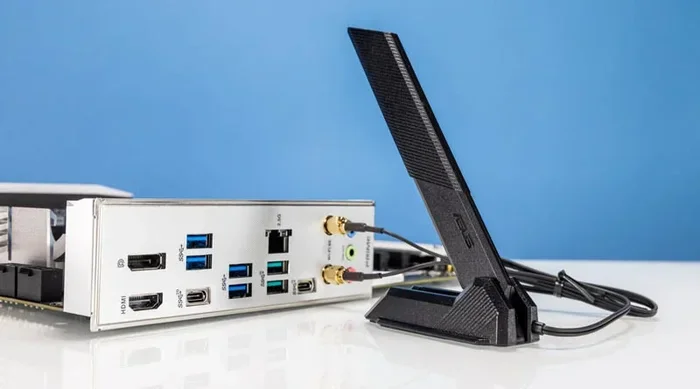
When a motherboard has wifi, it means the manufacturer has already installed a small wireless network card right on the board. You don’t need to buy a separate piece of hardware. The wifi module usually sits near the back I/O panel, and it connects to a small wifi antenna that you mount inside your PC case or on the back of your monitor.
Most modern motherboards in the mid-range and premium tiers come with built-in wifi. This is especially true for boards that target gamers, content creators, or anyone who wants a clean desk setup without extra cables. The wifi chip on the motherboard handles both wireless networking and often bluetooth too.
How Built-In Wifi Works
The internal wifi module on your motherboard connects to your PC through the PCIe bus or through a USB header. It uses the same wireless standard that any standalone adapter uses—like wifi 5 (802.11ac) or wifi 6 (802.11ax). The difference is just that it’s already there, soldered or plugged into a slot on the board.
Here’s what you get with built-in wifi:
- No extra hardware to buy
- Cleaner setup with fewer cables
- Bluetooth support built in
- Smaller footprint inside your case
- Easy to set up right out of the box
That all sounds great. And for many people, it is. But there’s a catch. The wireless connectivity on a motherboard is usually a basic or mid-range module. It’s not always the fastest or most powerful option available.
When Is Motherboard Wifi Good Enough?
Not everyone needs a separate wifi adapter. If your usage is pretty simple, the built-in wifi on your motherboard might be all you’ll ever need. Here are some situations where you can skip buying extra hardware.
You Do Light Online Tasks
If you mostly browse the web, check email, watch YouTube videos, and use social media, your motherboard’s wifi will handle this just fine. These activities don’t demand a lot of wireless bandwidth. Even an older wireless standard like wifi 4 (802.11n) can manage casual browsing without any noticeable lag.
Your Router Is Close to Your PC
Wireless range matters a lot. If your PC sits in the same room as your router, the signal will be strong. A motherboard’s wifi antenna will work well in this setup. You’ll get stable speeds and won’t experience much interference from walls or other devices.
Your Internet Plan Is Slow
This is a key point people often miss. If your internet plan only gives you 50 Mbps, no wifi adapter in the world will make your connection faster than that. Your wireless network card on the motherboard can easily handle 50 Mbps. So upgrading your adapter won’t improve your actual internet speed in this case.
You Use Ethernet Instead
Some people with motherboard wifi still prefer to use a wired ethernet connection for gaming or work. If that’s you, then the built-in wifi is just a backup option. In that case, you really don’t need a separate adapter at all.
When Should You Add a Separate Wifi Adapter?
Now let’s flip the coin. There are plenty of reasons why a separate wifi adapter beats the built-in wifi on your motherboard. If any of these situations sound like you, an upgrade is worth considering.
You Have a Fast Internet Plan
If your internet plan gives you 300 Mbps, 500 Mbps, or even 1 Gbps, your motherboard’s wifi module might be the bottleneck. Older wireless standards like wifi 5 top out around 866 Mbps in theory, but real-world speeds are often much lower. A wifi 6 or wifi 6E adapter can unlock the full potential of your internet plan.
You Game Online
Online gaming needs a stable, low-latency connection. Motherboard wifi chips are not always optimized for this. A dedicated PCIe wifi card or a high-quality USB wifi dongle can give you lower ping, fewer disconnects, and a smoother gaming experience. The difference can be the gap between winning and losing a match.
Your Router Is Far Away
If your PC is in a different room, on a different floor, or far from the router, signal strength drops. Motherboard wifi antennas are small and not very powerful. A wifi adapter with a better antenna or a dual band wifi module can pick up stronger signals from farther away.
You Need Bluetooth 5.0 or Higher
Some older motherboards only have bluetooth 4.0 or lower. If you use wireless headphones, a wireless mouse, or a keyboard, you might notice lag or connection drops. A modern wifi adapter with bluetooth 5.0 or 5.3 will give you much better wireless peripheral performance.
You Want the Latest Wifi Technology
Wifi 6 and wifi 6E are the newest standards. They offer faster speeds, better performance in crowded areas (like apartments or offices), and lower latency. If your motherboard only has wifi 5, adding a wifi 6 adapter is a smart move to future-proof your setup.
Types of Wifi Adapters You Can Buy
If you’ve decided you need a separate wifi adapter, you have a few options. Each type has its own pros and cons. Let’s break them down.
USB Wifi Dongles
A USB wifi dongle is the easiest option. You plug it into any USB port, install the driver, and you’re connected. No need to open your PC case. These are great for laptops too, since they’re portable.
Pros:
- Plug and play
- No opening the PC case
- Portable and easy to move between PCs
- Budget-friendly
Cons:
- Slower speeds compared to PCIe cards
- Can block nearby USB ports
- Smaller antennas mean weaker signal
PCIe Wifi Cards
A PCIe wifi card installs inside your PC on an empty PCIe slot. These cards have bigger antennas and better wireless performance than USB dongles. They also tend to support the latest wireless standards like wifi 6 and wifi 6E.
Pros:
- Faster speeds and better range
- Better antennas for stronger wireless signal
- Dedicated processing power
- Supports the latest wifi standards
Cons:
- Requires opening the PC case
- Needs an available PCIe slot
- Pricier than USB dongles
M.2 Wifi Cards
Some wifi adapters come in M.2 format, the same type of slot used for NVMe SSDs. These are compact and install inside the laptop or mini PC. They’re a great choice if you want a clean internal setup without a bulky card or dongle.
Comparison: Motherboard Wifi vs. Separate Adapter
Not sure which option is right for you? Here’s a quick comparison to help you decide.
| Feature | Motherboard Built-In Wifi | Separate Wifi Adapter |
|---|---|---|
| Convenience | Already installed | Needs setup and installation |
| Speed | Usually mid-range | Can be top-tier |
| Range | Limited by small antenna | Better with larger antenna |
| Cost | Included with motherboard | Extra cost ($20 to $150+) |
| Upgradeability | Fixed, can’t be changed | Easy to swap or upgrade |
| Bluetooth | Usually included | Depends on the model |
| Driver Support | Good, but can lag behind | Check for OS compatibility |
As you can see, each option has its place. The best choice depends on your needs, budget, and how you use your computer.
Quick Tips for Choosing the Right Wifi Adapter
If you’re ready to buy a wifi adapter, here are some tips to make the right choice.
- Check your motherboard’s current wifi standard. Look at the specs sheet. If it says wifi 5, and your router supports wifi 6, a wifi 6 adapter will give you a speed boost.
- Make sure you have a free PCIe slot or USB port. PCIe cards need a slot. USB dongles need an open port.
- Check driver support for your operating system. Windows 11 and macOS both have good support, but always verify before buying.
- Look for dual band wifi. A dual band wifi adapter can connect to both 2.4 GHz and 5 GHz bands, giving you more flexibility.
- Read reviews for real-world performance. Speed numbers on the box don’t always match real-world results.
- Consider antenna design. External antennas pick up signals better than internal ones.
Common Mistakes People Make With Motherboard Wifi
Here are some mistakes that can hurt your wireless performance without you even realizing it.
- Assuming built-in wifi is always fast. It’s not. Many motherboard wifi modules use older or budget chips.
- Ignoring driver updates. Outdated driver software can slow down your connection or cause disconnects.
- Placing the antenna poorly. The wifi antenna should be positioned vertically and away from metal objects.
- Not updating the BIOS. Sometimes a BIOS update improves wireless connectivity on the motherboard.
- Confusing wifi speed with internet speed. Your adapter might support 1200 Mbps, but if your internet plan is 50 Mbps, that’s all you’ll get.
Expert Insights on Built-In Vs. Dedicated Wifi
Expert Insight: According to networking professionals, most people don’t need a separate wifi adapter unless they’re hitting the limits of their motherboard’s wireless module. If you’re getting the speeds you need and your connection is stable, stick with what you have. But if you’re a power user, a gamer, or someone with a fast internet plan, a dedicated network adapter can make a noticeable difference.
Expert Insight: When choosing a PCIe wifi card, look for models with at least two external antennas. These consistently outperform internal antenna designs in real-world wireless signal strength and range.
Key Takeaways
- Motherboard wifi is convenient: It saves you money and keeps your setup clean. For light use, it’s often enough.
- A separate wifi adapter can improve speed and range: Especially if you have a fast internet plan or a far-away router.
- USB dongles are the easiest to add: No case opening required. Great for quick upgrades or laptops.
- PCIe cards offer the best performance: If you want the fastest wireless connectivity, go with a PCIe wifi adapter.
- Always check your wireless standard: Wifi 6 and wifi 6E are the current best options for future-proofing.
- Driver updates matter: Keep your network adapter drivers up to date for the best wireless performance.
- Match your adapter to your needs: Casual browsing needs less than competitive online gaming or 4K streaming.
Conclusion
So, do you need a wifi adapter if your motherboard has wifi? The honest answer is: maybe. For many users, the built-in wifi on a modern motherboard works perfectly fine. You’ll connect to your network, browse the web, and stream videos without any issues.
But if you want faster speeds, better range, lower latency for gaming, or support for the latest wireless standards, a separate wifi adapter is a smart investment. Whether you choose a simple USB dongle or a powerful PCIe card, the upgrade can transform your wireless connectivity experience.
Take a look at your current setup. Check your motherboard specs. Think about how you use your computer. If the built-in wifi is holding you back, now is a great time to explore your options. A small change can make a big difference in how your PC connects to the world.
Frequently Asked Questions
Can I use a wifi adapter with a motherboard that already has wifi?
Yes, you can. You don’t have to disable the built-in wifi on your motherboard. You can use both at the same time or switch between them. Just make sure you install the right driver software for the new adapter so your system recognizes it properly.
Is a USB wifi adapter as good as a PCIe wifi card?
Generally, no. A PCIe wifi card offers faster speeds and better wireless performance because it connects directly to the motherboard’s PCIe bus. A USB wifi dongle is convenient and easy to use, but it’s limited by the USB connection speed and usually has smaller antennas.
Does a wifi adapter improve internet speed?
A wifi adapter can improve your wireless speed if your motherboard’s built-in module is slower than your internet plan. But it can’t make your internet faster than what your ISP provides. If your plan gives you 100 Mbps, the best adapter in the world won’t give you 500 Mbps.
Do I need a wifi adapter for wifi 6?
Only if your motherboard doesn’t support wifi 6. Many newer motherboards come with wifi 6 built in. If yours only has wifi 5 or older, adding a wifi 6 adapter will let you take advantage of faster speeds and better performance on a wifi 6 router.
Can a wifi adapter help with weak wireless signal?
Yes, it can. A wifi adapter with a better antenna or dual band wifi support can pick up stronger signals than a basic motherboard wifi module. This is especially helpful if your PC is far from the router or behind thick walls.
Are expensive wifi adapters worth it?
For most users, a mid-range wifi adapter offers the best value. You don’t need to spend $150 unless you need top-tier wireless bandwidth for competitive gaming or professional work. A $30 to $60 adapter can make a big difference over basic motherboard wifi.