Do I Need A Router For Spectrum Wifi Service Today
Do I Need A Router For Spectrum Wifi? The answer depends on your setup and internet needs. Many Spectrum plans come with a gateway device that handles both modem and router functions. However, a separate wireless router can boost your WiFi coverage, speed, and overall network performance. This guide breaks down everything you need to know about router requirements for Spectrum internet service.
So, you just signed up for Spectrum internet. You got the box in the mail, plugged in a few cables, and suddenly you’re wondering — Do I Need A Router For Spectrum Wifi to get online? It’s a fair question. Plenty of people find themselves confused by all the boxes, cables, and blinking lights that come with internet service. The short answer is: it depends. Some Spectrum plans include a device that does everything for you. Others leave you needing a separate wireless router to get WiFi in your home.
In this article, we’ll walk through everything you need to know. We’ll cover what a router does, how Spectrum WiFi works, and whether you should buy your own equipment. By the end, you’ll have a clear answer for your specific situation. No jargon. No confusing tech talk. Just straightforward advice you can use right away.
Key Takeaways
- Spectrum internet may or may not require a separate router: It depends on whether your plan includes a gateway or just a modem.
- A gateway combines modem and router functions: It provides WiFi and connects multiple devices to the internet.
- Buying your own router can improve speed and coverage: Third-party routers often outperform Spectrum-provided equipment.
- WiFi dead zones are a common problem: A dedicated router or mesh system can solve coverage issues in larger homes.
- Spectrum WiFi plans vary in speed and data limits: Your router choice should match your plan’s capabilities.
- Setting up a router is simple: Most devices come with easy step-by-step instructions for home network setup.
📑 Table of Contents
- What Is a Router and Why Does It Matter?
- How Spectrum WiFi Works
- Do You Really Need a Separate Router for Spectrum?
- Spectrum Gateway: The All-in-One Solution
- When to Buy Your Own Router for Spectrum
- Tips for Setting Up Your Spectrum WiFi Router
- Common Mistakes People Make With Spectrum WiFi Setup
- Expert Insights: Router vs. Gateway for Spectrum
- Key Takeaways
- Conclusion
What Is a Router and Why Does It Matter?
A router is a device that creates a home network. It takes the internet signal from your modem and shares it with all your devices. Think of it as the traffic controller for your internet connection. Without a router, only one device could connect to the internet at a time using a cable. That’s not very practical in today’s world.
Most people use a wireless router these days. This type of router sends out a WiFi signal. Your phone, laptop, smart TV, and tablets can all connect without any cables. The router makes sure each device gets a fair share of the internet speed.
How a Router Works With Spectrum Internet
When you subscribe to a Spectrum internet plan, you get access to their network infrastructure. The signal comes into your home through a cable or fiber line. That signal needs to be translated and distributed. This is where the router comes in. It receives the signal and turns it into a WiFi network you can use.
Here’s a simple way to think about it. The modem brings the internet into your house. The router spreads it around. Some devices do both jobs at once. We’ll talk more about that in a moment.
How Spectrum WiFi Works
Spectrum WiFi is the wireless internet service provided by Charter Communications, the company behind Spectrum. When you sign up for a plan, you get access to their network. The speed you receive depends on the package you choose. Plans range from basic internet to ultra-fast gigabit options.
Spectrum offers different types of equipment to get you online. Some customers receive a modem only. Others get a Spectrum gateway, which is an all-in-one device. And some customers use their own router for Spectrum setup. Let’s look at each option more closely.
Spectrum Internet Plans and Equipment
Spectrum has several tiers of internet service. Each tier has different speed ranges and equipment options. Here’s a quick look at what you might encounter:
- Spectrum Internet Ultra: Speeds up to 500 Mbps. Great for most households with multiple devices.
- Spectrum Internet Gigabit: Speeds up to 940 Mbps. Ideal for heavy users, gamers, and large families.
- Spectrum Internet Basic: Speeds up to 200 Mbps. Good for light browsing and streaming.
Your equipment needs will depend on the plan you choose. Higher speeds often benefit from better WiFi equipment. A basic router might struggle to handle gigabit speeds. This is important to keep in mind when deciding your setup.
Do You Really Need a Separate Router for Spectrum?
This is the big question, right? Do I Need A Router For Spectrum Wifi if I already have a device from Spectrum? The answer is: not always. Let’s break it down.
If Spectrum sends you a gateway device, that single box handles both modem and router duties. It brings in the internet signal and creates a WiFi network. In this case, you don’t technically need a separate router. The gateway does it all.
But here’s the catch. Gateway devices are often basic. They may not deliver the best WiFi performance. They might struggle with larger homes or many connected devices. If you notice slow speeds, dead zones, or frequent disconnections, a separate router for Spectrum WiFi could be the fix.
When a Separate Router Makes Sense
There are several situations where adding a dedicated router is a smart move:
- Your home is larger than 1,500 square feet: Gateway routers often have limited range. A stronger router can cover more space.
- You have many smart home devices: Doorbells, cameras, smart speakers, and more all compete for bandwidth. A better router manages this traffic better.
- You play online games or stream 4K content: These activities need stable, fast connections. A gaming or performance router helps a lot.
- You experience WiFi dead zones: Rooms far from the gateway often lose signal. A separate router placed strategically can fix this.
- You want advanced features: Parental controls, guest networks, and QoS settings are easier to access with a dedicated router.
On the other hand, if you live alone or with one other person in a small apartment, the gateway might be perfectly fine. You don’t need to spend extra money if your current setup works well.
Spectrum Gateway: The All-in-One Solution
Spectrum’s gateway device is also known as the Spectrum WiFi router. It combines a modem and a router into one box. This makes setup simple. You plug it in, follow the instructions, and you’re online. No extra equipment needed.
The gateway typically supports dual-band WiFi. This means it broadcasts on both 2.4 GHz and 5 GHz frequencies. The 2.4 GHz band covers more distance but is slower. The 5 GHz band is faster but has a shorter range. Most gateways handle both bands automatically.
Pros and Cons of Using the Spectrum Gateway
Like any equipment choice, the Spectrum gateway has advantages and disadvantages. Let’s weigh them:
- Pros: Easy setup, no extra cost upfront, all-in-one device, supported by Spectrum customer service, and works well for basic needs.
- Cons: Limited advanced features, may not handle very high speeds well, rental fees add up over time, and hardware may be outdated compared to newer routers.
The rental fee for Spectrum equipment is typically around $14.99 per month. Over a few years, that adds up. Many people find that buying their own router saves money in the long run. But the gateway works fine for casual internet users who just want to browse and stream.
When to Buy Your Own Router for Spectrum
If you’ve decided the gateway isn’t cutting it, it might be time to buy your own WiFi router. This is a big decision, but it can seriously improve your internet experience. Let’s explore when and why you should make the switch.
Signs You Need a Better Router
How do you know your current setup isn’t enough? Watch for these warning signs:
- Slow speeds in certain rooms: If your WiFi is fast near the gateway but slow in the bedroom, you have a coverage problem.
- Frequent buffering during streaming: Netflix or YouTube should not buffer on a good internet plan.
- Devices disconnecting often: If your phone or laptop keeps dropping the WiFi signal, the router may be the issue.
- Too many devices causing lag: A family of five with multiple phones, tablets, and laptops needs a router that can handle the load.
- You’re paying for fast speeds but not getting them: Run a speed test. If you’re paying for 400 Mbps but only getting 50, your router might be the bottleneck.
Best Routers Compatible with Spectrum
Not all routers work perfectly with Spectrum. You need a device that supports the right connection types and speed standards. Here are some popular options:
- TP-Link Archer AX73: A solid mid-range router with WiFi 6 support. Great value for most households.
- Netgear Nighthawk R7000: A reliable choice with strong range and fast speeds. Popular among Spectrum users.
- ASUS RT-AX86U: A high-performance option for gamers and heavy users. Excellent for handling many devices.
- Google Nest WiFi: A mesh system that extends coverage throughout your home. Great for larger spaces.
Before buying any router for Spectrum internet, check the specifications. Make sure it supports DOCSIS 3.0 or higher if you’re using a cable connection. Also confirm it supports the speed tier of your Spectrum plan.
Tips for Setting Up Your Spectrum WiFi Router
Once you have your equipment figured out, setting everything up is easier than you might think. Whether you’re using the Spectrum gateway or a third-party router, the process follows a similar pattern.
Step-by-Step Setup Guide
Follow these steps to get your Spectrum WiFi router up and running:
- Place your router in a central location: Avoid putting it in a closet or behind furniture. Central placement gives the best coverage.
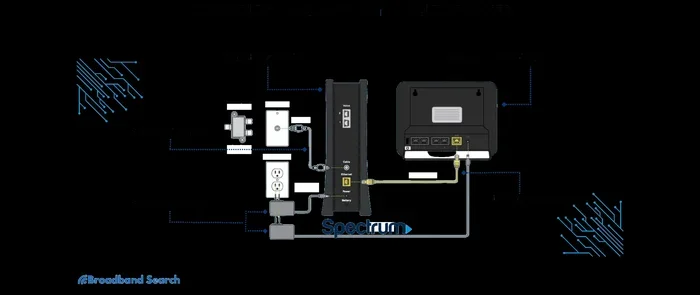
- Connect the modem or gateway to the wall outlet: Use the coaxial cable that Spectrum provided. Plug it into the correct port.
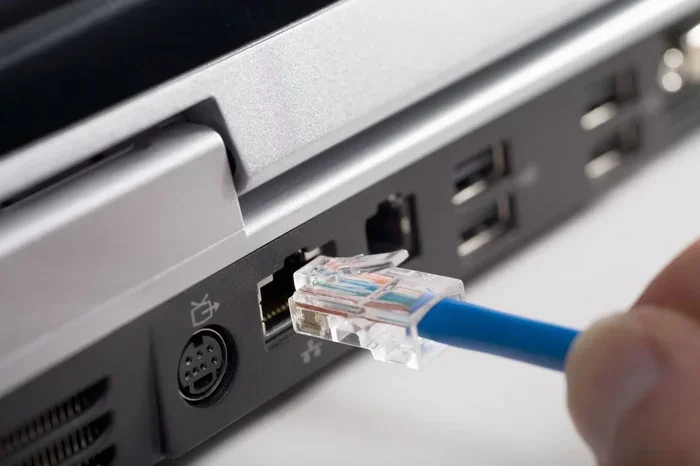
- Connect the router to the modem: Use an Ethernet cable. Plug one end into the modem and the other into the router’s WAN port.
- Power on both devices: Wait for the lights to stabilize. This usually takes one to two minutes.
- Connect to the WiFi network: Look for the network name on the router label or in the setup guide.
- Enter the password: Find the default password on the router or in the welcome packet.
- Change the default settings: Update the network name and password to something secure and easy to remember.
Quick Tips for Better WiFi Performance
Small adjustments can make a big difference in your home network quality. Try these quick tips:
- Restart your router regularly: A simple reboot once a week can fix many connection issues.
- Update your router’s firmware: Manufacturers release updates that improve speed and security. Check for updates in the router settings.
- Use the 5 GHz band for streaming and gaming: It’s faster and less crowded than the 2.4 GHz band.
- Keep your router away from microwaves and cordless phones: These devices can interfere with the WiFi signal.
- Consider a WiFi extender or mesh system: If your home has dead zones, these devices boost the signal to hard-to-reach areas.
Common Mistakes People Make With Spectrum WiFi Setup
Even with the best equipment, people sometimes make setup mistakes that hurt their internet experience. Here are a few to avoid.
Placing the Router in the Wrong Spot
The worst place for a router is in a corner of the house or on the floor. Walls, metal objects, and appliances block WiFi signals. Put your router on a high shelf in the center of your home for the best coverage.
Ignoring the Modem-Router Connection
Some people plug the router into the wrong port. Always connect the Ethernet cable from the modem to the router’s WAN or internet port. Connecting it to a LAN port will not work properly.
Not Updating Equipment
Technology moves fast. Routers from five years ago may not handle today’s internet speeds well. If your equipment feels outdated, it might be time for an upgrade. Check with Spectrum about the latest gateway options or invest in a modern third-party router.
Forgetting About Security
An open or weakly secured WiFi network is a risk. Always use WPA3 or WPA2 encryption. Set a strong password that includes letters, numbers, and symbols. This protects your internet connection from unauthorized users.
Expert Insights: Router vs. Gateway for Spectrum
We asked networking experts what they recommend for Spectrum customers. The consensus is clear: it depends on your needs.
“For most casual users, the Spectrum gateway works fine,” says tech reviewer Mark Stevens. “But power users, gamers, and large households benefit greatly from a dedicated wireless router paired with the Spectrum modem.”
The key takeaway is this: evaluate your usage. If you stream, game, and work from home, invest in better equipment. If you just check email and browse occasionally, the gateway should serve you well.
Also keep in mind that Spectrum occasionally updates their gateway devices. Newer models support faster speeds and more connections. Check with Spectrum support to see if an upgraded gateway is available for your plan.
Key Takeaways
- Do I Need A Router For Spectrum Wifi: Not always, if your plan includes a gateway. But a separate router can improve performance significantly.
- Spectrum gateways handle both modem and router duties: They work well for basic internet use but may lack advanced features.
- Buying your own router saves money over time: Rental fees for Spectrum equipment add up, and a personal router often delivers better speeds.
- Router placement matters: Central, elevated placement gives the best WiFi coverage throughout your home.
- Match your router to your internet plan speed: A router that supports WiFi 6 is ideal for plans above 200 Mbps.
- Mesh systems solve coverage problems: They extend WiFi to every corner of larger homes without dead zones.
Conclusion
So, back to the original question: Do I Need A Router For Spectrum Wifi service today? The answer is not a simple yes or no. It depends on your equipment, your home size, your internet usage, and your performance expectations.
If Spectrum sent you a gateway and it works well, you’re all set. But if you’re dealing with slow speeds, weak signals, or too many connected devices, a separate router for Spectrum WiFi can transform your internet experience. The right equipment makes a real difference in how fast, stable, and reliable your connection feels every day.
Take a look at your current setup. Run a speed test. Check for dead zones in your home. If something isn’t working right, now is the perfect time to make a change. Whether you stick with the Spectrum gateway or invest in a new WiFi router, the goal is the same: a fast, stable internet connection that keeps everyone in your home connected.
Start with what you have. Upgrade when you need to. And never settle for a WiFi experience that doesn’t match the speed you’re paying for. Your home network should work for you, not the other way around.
Frequently Asked Questions
Can I use my own router with Spectrum internet?
Yes, absolutely. Spectrum allows customers to use their own compatible router. You just need to make sure the router supports the connection type and speed tier of your Spectrum plan. Many users find that a personal router delivers better performance than the rental gateway.
What is the difference between a modem and a router?
A modem brings the internet signal into your home from Spectrum’s network. A router takes that signal and distributes it to your devices via WiFi or Ethernet cables. Some devices, like the Spectrum gateway, combine both functions into one box.
Do I need a router if I have a Spectrum gateway?
Not technically. The Spectrum gateway acts as both a modem and a router. It creates a WiFi network and connects multiple devices. However, a separate router can improve speed, range, and performance if your needs go beyond what the gateway offers.
How much does Spectrum charge for WiFi equipment?
Spectrum charges a monthly rental fee for their gateway equipment, typically around $14.99 per month. This fee adds up over time, which is why many customers choose to buy their own compatible router instead.
What WiFi standard should I look for in a router?
Look for WiFi 6 (802.11ax) or WiFi 6E for the best performance. These standards offer faster speeds, better device handling, and improved range. They are ideal for modern internet plans and homes with many connected devices.
Can a router improve my Spectrum internet speed?
A better router won’t increase the speed tier you pay for, but it can help you reach those speeds more consistently. Old or weak routers often bottleneck your connection. A modern router ensures you get the most out of your Spectrum internet plan.