How To Transfer Your Tracfone Number To Another Service
Yes, you can transfer your Tracfone number to another service provider. The process is called mobile number portability, and it allows you to keep your phone number when switching from Tracfone to a new wireless carrier. This guide walks you through every step, from gathering your account details to completing the number transfer process without losing your existing number.
If you have been using Tracfone for a while and want to switch to a different wireless carrier, you might be wondering about your phone number. The good news is that you can absolutely transfer your Tracfone number to another service. You do not need to give up the number you have had for years just because you are changing providers.
The process is called mobile number portability, and it is a standard feature across all major carriers in the United States. Whether you are moving to T-Mobile, AT&T, Verizon, or any smaller wireless service provider, you can bring your Tracfone number with you. This guide will show you exactly how to do it, step by step.
Switching carriers can feel intimidating. There are forms to fill out, accounts to manage, and a few things that can go wrong if you are not careful. But with the right preparation, the number transfer process is smooth and straightforward. Let us walk through everything you need to know.
Key Takeaways
- You can keep your number: Mobile number portability lets you retain your Tracfone number when switching to a new carrier.
- Gather your info first: You need your Tracfone account number, PIN, and phone number before starting the transfer.
- Activate your new SIM first: Most carriers require you to set up your new service before initiating the port.
- Timing matters: Plan the transfer carefully to avoid gaps in service or losing access to your Tracfone account too early.
- Unlock your phone: Your Tracfone device may need to be unlocked before it works with a new carrier.
- Expect a short transition: The port typically takes a few hours to a few days, and you may experience brief service interruptions.
📑 Table of Contents
- Understanding How Number Transfer Works
- Prepare Before You Start the Transfer
- Step-by-Step Guide to Transferring Your Tracfone Number
- Common Mistakes to Avoid During the Transfer
- What Happens to Your Tracfone Account After the Transfer?
- Can You Transfer Your Tracfone Number to Any Carrier?
- Tips for a Smooth Number Transfer Experience
- Frequently Asked Questions
- Final Thoughts
Understanding How Number Transfer Works
What Is Mobile Number Portability?
Mobile number portability is a federal regulation that gives you the right to keep your phone number when you switch carriers. This law applies to all wireless providers in the U.S., including Tracfone and its parent company, T-Mobile. It means your phone number belongs to you, not to the carrier.
When you port your number, the old carrier releases it, and the new carrier picks it up. The transfer happens behind the scenes, and your number moves from one network to another. You keep the same digits, the same contacts, and the same identity tied to that number.
How Tracfone Handles Number Transfers
Tracfone operates as a prepaid wireless service on multiple networks, including T-Mobile and AT&T. Because Tracfone is a prepaid service, the port-out process follows specific rules. You need to make sure your account is in good standing before you request a transfer.
Tracfone must release your number once you submit a valid port-out request. They cannot hold your number hostage or make the process difficult. If they do, you can file a complaint with the FCC. But in most cases, Tracfone cooperates just fine when you follow the proper steps.
Prepare Before You Start the Transfer
Gather Your Tracfone Account Information
Before you do anything else, collect all the information you will need. Having everything ready saves time and prevents delays. Here is what you should have on hand:
- Tracfone account number: This is the unique ID tied to your account. You can find it on your bill or by logging into your Tracfone online account.
- Account PIN or password: Tracfone uses a PIN to verify your identity during the port-out process. If you do not know it, you can reset it online or call customer service.
- Your Tracfone phone number: The number you want to transfer must be clearly identified.
- Device information: Know your phone model and IMEI number. You can find the IMEI by dialing *#06# on your phone.
- SIM card details: Your Tracfone SIM card number may be needed during the process.
Check Your Account Standing
Tracfone will not release your number if you have outstanding balances or unresolved issues. Make sure your account is fully paid up. If you have any pending bills or fees, settle them before requesting the port.
Also, make sure your number is not tied to any ongoing promotions or contracts that could complicate the transfer. Most Tracfone plans are month-to-month, so this is rarely an issue. But it is always worth checking.
Unlock Your Tracfone Device
Your Tracfone phone may be locked to the Tracfone network. Before it can work with a new carrier, you need to unlock Tracfone device. Tracfone is required by law to unlock your phone once certain conditions are met.
You can request an unlock through your Tracfone account online or by contacting customer support. They will verify your eligibility, and if everything checks out, they will send you an unlock code or process it remotely. Once unlocked, your phone can accept SIM cards from other carriers.
Step-by-Step Guide to Transferring Your Tracfone Number
Step 1: Choose Your New Carrier
Not all carriers are the same. Before you start the number transfer process, pick the carrier you want to move to. Consider coverage in your area, plan pricing, data limits, and whether the carrier supports your phone model.
Popular alternatives to Tracfone include:
T-Mobile, AT&T, Verizon, Mint Mobile, Visible, US Mobile, and Google Fi. Each offers different benefits, so compare a few before deciding.
Step 2: Purchase a Plan and Activate Your New Service
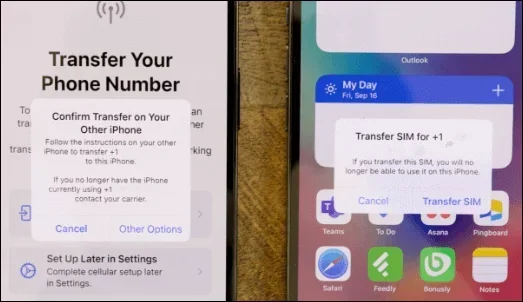
You need to set up your new service before you can port your number. Buy a plan from your chosen carrier and activate it. Most carriers will give you a new SIM card during this process.
During activation, the carrier will ask if you want to port your existing number. Tell them yes. They will walk you through the rest of the process. Some carriers let you start the port online, while others require you to call their support team.
Step 3: Provide Your Tracfone Details to the New Carrier
The new carrier will need your Tracfone account information to initiate the port. They will typically ask for:
- Your Tracfone phone number
- Your Tracfone account number
- Your Tracfone account PIN
- The SIM card number from your Tracfone phone
Make sure you provide accurate information. Even a small mistake can delay the transfer by days.
Step 4: Wait for the Port to Complete
Once the port request is submitted, the transfer usually takes between a few hours and two business days. During this time, you may notice some changes in your service:
- Your Tracfone signal may drop briefly.
- You might see “Suspended” or “No Service” on your screen for a short period.
- Calls and texts may not work for a few minutes while the switch happens.
This is completely normal. The port is happening in the background, and your number is moving from one network to another. Once it is complete, your new carrier will take over, and your Tracfone service will end.
Step 5: Confirm the Transfer and Test Your Service
After the port is done, test everything. Make a call, send a text, and use mobile data. Check that your number displays correctly on the recipient’s caller ID. Also, verify that your contacts and settings are intact.
If something is not working, contact your new carrier’s support team right away. Most port issues get resolved quickly, especially if you report them within the first 24 hours.
Common Mistakes to Avoid During the Transfer
Canceling Tracfone Too Early
This is the biggest mistake people make. Do not cancel your Tracfone account before the port is complete. If you do, your number may be permanently lost, and the transfer will fail. Let the new carrier handle the cancellation of your old service once the port goes through.
Not Having Your Account PIN Ready
Tracfone requires a PIN to authorize the port-out request. If you do not know your PIN and cannot reset it, the transfer will be delayed. Take care of this before you begin the process with your new carrier.
Switching SIM Cards Too Soon
Wait until the port is complete before you start using the new SIM card regularly. Using the old Tracfone SIM and the new SIM at the same time can create confusion and delay the transfer.
Ignoring Network Compatibility
Not all phones work on all networks. Make sure your device supports the frequency bands and technologies used by your new carrier. A Tracfone BYOP (Bring Your Own Phone) device may need to be compatible with the new network’s technology, such as LTE or 5G.
What Happens to Your Tracfone Account After the Transfer?
Once your number has been successfully ported to the new carrier, your Tracfone account will be closed. Any remaining balance on your Tracfone account may be forfeited, so try to use it up before the transfer. Tracfone does not typically refund unused prepaid balances after a port-out.
Your Tracfone SIM card will no longer work once the port is complete. You can dispose of it or keep it as a backup. Your old Tracfone phone, if unlocked, can still be used as a Wi-Fi-only device or with a different SIM card.
Can You Transfer Your Tracfone Number to Any Carrier?
In most cases, yes. The wireless service provider you choose must support number porting, which all major carriers do. Some smaller MVNOs (Mobile Virtual Network Operators) also support ports from Tracfone. However, there are a few exceptions:
- If your Tracfone number is a landline or VoIP number, the port rules may differ.
- Some carriers may not accept ports from certain Tracfone plans or older account types.
- Numbers associated with business accounts may require additional verification steps.
If you are unsure whether your target carrier will accept your port, call them first and ask. They can confirm whether your Tracfone wireless number is eligible for transfer.
Tips for a Smooth Number Transfer Experience
Follow these tips to make your carrier transfer as painless as possible:
- Start on a Friday or early in the week. This gives you time to resolve any issues before the weekend.
- Keep both phones with you during the transfer. You may need to receive a confirmation code on your Tracfone phone.
- Back up all your data before the port. Contacts, photos, and messages should be safely stored in case anything goes wrong.
- Do not turn off your Tracfone during the transfer. Keeping it on helps the port process go smoothly.
- Be patient. Ports can take a few hours. If it has been more than 48 hours, contact your new carrier for a status update.
Frequently Asked Questions
How long does it take to transfer a Tracfone number to another carrier?
The transfer usually takes between a few hours and two business days. In some cases, it may take up to three business days, especially if there are verification delays. Keep your Tracfone phone on during this time so the new carrier can reach your account if needed.
Will I lose my Tracfone number if I cancel my account?
Yes, if you cancel your Tracfone account before completing the port, you will lose your number. Always complete the transfer first and let the new carrier handle the closure of your old account. Never cancel Tracfone manually before the port is done.
Do I need to unlock my Tracfone phone before transferring the number?
Yes, you should unlock your Tracfone device before switching carriers. An unlocked phone can accept SIM cards from any carrier. Tracfone is legally required to unlock your phone once you meet their eligibility requirements, which typically include having an active account for a certain period.
Can I transfer my Tracfone number to a carrier outside the United States?
Generally, no. Mobile number portability is a domestic service and only works within the same country. If you are moving abroad, you will need to set up a new number with a local carrier in your destination country. Your Tracfone number cannot be ported internationally.
Is there a fee to transfer my Tracfone number?
No, federal law prohibits carriers from charging a fee for number porting. Your new carrier cannot bill you for the port, and neither can Tracfone. If anyone asks for a porting fee, it is likely a scam. Report it to the FCC.
What should I do if the port fails?
If the port fails, contact your new carrier first. They can resubmit the request or troubleshoot the issue. Common reasons for a failed port include incorrect account details, an outstanding Tracfone balance, or a recently changed account PIN. Fix the issue and try again.
Final Thoughts
Transferring your Tracfone number to another service is entirely possible and much easier than most people think. The key is preparation. Gather your account details, unlock your phone, choose the right new carrier, and follow the port process carefully.
Do not rush into canceling your Tracfone account. Let the new carrier handle the transition. And remember, your phone number is yours. Federal law protects your right to keep it, no matter which carrier you choose.
Whether you are switching for better coverage, lower prices, or simply a change of scenery, the number transfer process should not stop you. With the steps outlined in this guide, you are fully equipped to port your number and move to your new wireless service provider with confidence.
Take your time, double-check your information, and enjoy your new carrier without losing the number you have grown comfortable with. Your Tracfone number can live on with a new provider, and you will barely notice the switch.