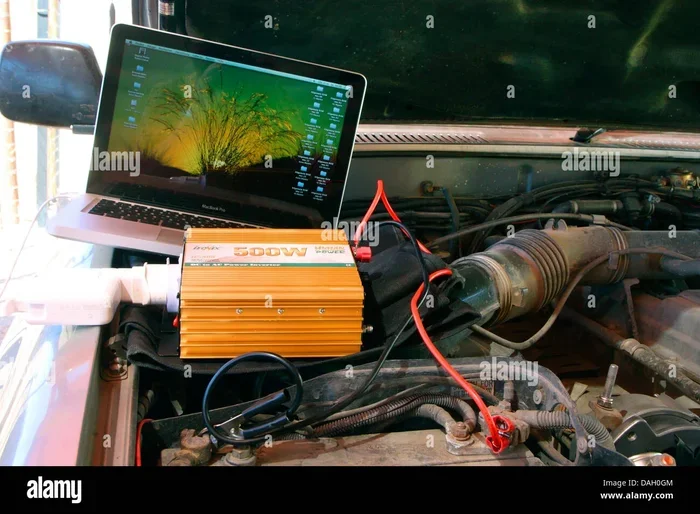
Can I Use A Car Battery To Power My Laptop Right Now
Yes, you can use a car battery to power your laptop with the right equipment and setup. A power inverter converts DC energy from your car battery into AC power that your laptop charger needs. Whether you are camping, facing a power outage, or stuck on the road, this guide shows you exactly how to do it safely and efficiently.
Have you ever been in a situation where your laptop is dying and there is no outlet in sight? Maybe you are on a long road trip, camping in the woods, or dealing with a blackout at home. The thought might cross your mind: can I use a car battery to power my laptop? The short answer is yes. But the full answer involves knowing what equipment you need, how to set it up safely, and what mistakes to avoid.
In this guide, we walk you through everything you need to know about using your car battery as a laptop power source. We will cover the science behind it, the gear you need, step-by-step instructions, and plenty of practical tips. By the end, you will feel confident about powering your laptop from your vehicle. Let us dive in.
Key Takeaways
- It works: A car battery can power your laptop using a power inverter or DC adapter.
- You need the right equipment: A pure sine wave inverter, proper cables, and the right wattage are essential.
- Safety matters: Never drain your car battery completely, and follow all connection steps carefully.
- It is great for emergencies and camping: Off-grid power and road trips become much more manageable.
- Know your laptop’s power needs: Check wattage and voltage before buying any equipment.
- Alternative options exist: Portable power stations and jump starters offer convenient solutions too.
📑 Table of Contents
- Can I Use A Car Battery To Power My Laptop?
- How Does A Car Battery Power A Laptop?
- What You Need To Set This Up
- Step-By-Step Guide To Connecting Your Laptop
- Safety Tips And Common Mistakes
- When Does It Make Sense And When Does It Not?
- Alternative Ways To Power Your Laptop From Your Car
- How To Maximize Your Car Battery Life While Charging Your Laptop
- Conclusion
Can I Use A Car Battery To Power My Laptop?
The idea of using a car battery to charge a laptop is simpler than most people think. Your car battery stores direct current (DC) energy. Your laptop charger, on the other hand, needs alternating current (AC) power from a wall outlet. So you need a device that bridges this gap.
That device is called a power inverter. It takes the 12V DC power from your car battery and converts it into 110V or 120V AC power. This is the same type of electricity that comes from your home outlets. Once you have that AC power, you plug in your laptop charger just like you normally would.
Another option is using a DC-to-DC adapter. This skips the AC conversion step entirely. It connects directly to your car’s power outlet and delivers the right voltage for your laptop. Both methods work well. The best choice depends on your setup and what you are trying to accomplish.
Can I use a car battery to power my laptop right now? Yes, you can, as long as you have the right adapter or inverter. It is one of the most practical emergency power backup solutions available. Whether you are stuck on the highway or enjoying a weekend camping trip, your car becomes a portable power station.
How Much Power Does Your Laptop Actually Need?
Before you connect anything, you need to understand your laptop’s power consumption. Every laptop has different energy requirements. A lightweight ultrabook uses far less power than a gaming laptop. Checking this information takes just a few seconds.
Look at your original laptop charger. You will find a label on the side that lists the output voltage and amperage. For example, it might say 19.5V and 3.33A. Multiply those two numbers together to get the wattage. In this case, it would be about 65 watts.
Here is a quick reference for common laptop types:
- Ultrabooks and Chromebooks: 30 to 50 watts
- Standard business laptops: 50 to 70 watts
- Gaming laptops: 100 to 200 watts
- Workstations and high-performance laptops: 200 watts or more
Knowing your wattage matters because it determines what size power inverter you need. If you buy an inverter that is too small, it will not work properly. If you buy one that is too large, you waste money. Aim for an inverter that handles at least double your laptop’s wattage to be safe.
How Does A Car Battery Power A Laptop?
Understanding the basic science helps you make smarter decisions. Your car battery is a 12-volt DC power source. It provides steady energy to start the engine and run your car’s electrical systems. When the engine is running, the alternator recharges the battery and supplies extra power to the vehicle.
When you want to power a laptop, you need to convert that 12V DC into something your laptop can use. There are two main paths to do this:
- DC to AC conversion: A power inverter changes 12V DC into 120V AC. Your laptop charger then converts that AC back into the DC your laptop needs.
- DC to DC conversion: A direct DC adapter takes 12V DC from the car and converts it to the exact DC voltage your laptop requires.
Both paths get the job done. But the second option is generally more efficient because it skips one conversion step. Less conversion means less energy wasted as heat. It also means less strain on your car battery.
The Role of the Cigarette Lighter Socket
Most cars have a cigarette lighter socket, also known as a 12V power outlet. This is your easiest access point for drawing power. Standard cigarette lighter sockets are rated for about 10 to 15 amps. That gives you roughly 120 to 180 watts of power.
For most laptops, this is more than enough. A 65-watt laptop charger draws about 5.4 amps from a 12V source. So you have plenty of headroom. However, if you are running a gaming laptop that pulls 150 watts or more, you might push the socket to its limit.
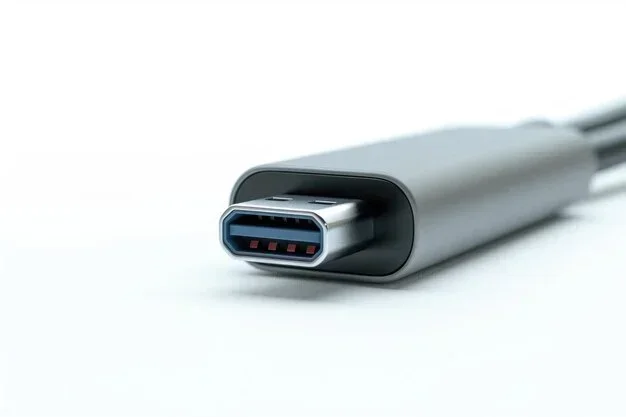
Some vehicles also have higher-output USB-C ports built into the dashboard. These can deliver up to 100 watts of power directly. If your laptop supports USB-C charging, this can be a very clean and simple solution. Check your car’s manual to see what options are available.
What You Need To Set This Up
Setting up your car battery to power a laptop is straightforward. You do not need advanced technical skills. You just need the right equipment. Here is a list of everything you might need:
- Power inverter (pure sine wave): This is the most common solution. Look for a pure sine wave inverter because it provides clean, stable power that is safe for sensitive electronics like laptops.
- DC-to-DC car laptop charger: A direct adapter that plugs into the 12V socket and delivers the correct voltage for your specific laptop model.
- Battery clamps or alligator clips: These let you connect directly to the battery terminals for higher power draws.
- Extension cables: A longer power cord gives you more flexibility in where you can place your laptop.
- Multimeter: This tool helps you monitor your battery voltage and make sure you are not draining it too low.
Why Pure Sine Wave Inverters Matter
Not all inverters are created equal. There are two main types: modified sine wave and pure sine wave. A modified sine wave inverter is cheaper, but it produces a choppy, less stable power output. This can cause issues with some laptops and other sensitive electronics.
A pure sine wave inverter produces smooth, clean power that matches what you get from a wall outlet. Your laptop charger works exactly as it should with this type of inverter. For the best results and to protect your laptop, always choose a pure sine wave model.
Popular reliable brands include Giandel, AIMS, and Renogy. These inverters come in various sizes, from 300 watts to 2000 watts. For laptop use, a 300-watt to 500-watt inverter is usually the sweet spot.
Understanding Wattage and Voltage Ratings
When shopping for an inverter, pay close attention to two numbers:
- Continuous wattage: This is the maximum power the inverter can supply steadily over time. Make sure this exceeds your laptop’s wattage.
- Peak wattage: This is the short-burst power the inverter can handle. It matters when your laptop first starts up and draws a spike of power.
Also check the input voltage of the inverter. Most car inverters are designed for 12V systems. If you have a truck or RV with a 24V system, you need a compatible inverter.
Step-By-Step Guide To Connecting Your Laptop
Now that you have your equipment, let us walk through the setup process. Follow these steps carefully for a safe and successful connection.
Step 1: Check Your Car Battery Health
Before you draw any power, make sure your car battery is in good condition. A healthy battery should read around 12.6 volts when the engine is off. If it reads below 12.0 volts, your battery may be weak and could struggle to power your laptop.
Use a multimeter to check the voltage. If you do not have one, most auto parts stores will test your battery for free. A weak battery means you risk not being able to start your car after you are done charging your laptop.
Step 2: Choose Your Connection Method
Decide whether you want to use a power inverter or a DC adapter. If you are using an inverter, plug it into the cigarette lighter socket. If you are using a DC adapter, plug it into the same socket or connect it directly to the battery with clamps.
Step 3: Connect Your Laptop
Once the inverter or adapter is connected, plug your laptop charger into it. Turn on the inverter if it has a power switch. Your laptop should recognize the charger and begin charging. You can check the charging status on your laptop screen just like you normally would.
Step 4: Monitor Battery Drain
Keep an eye on your car battery while your laptop is charging. A typical laptop draws 50 to 100 watts, which translates to about 4 to 8 amps from the battery. Over several hours, this can noticeably reduce your battery charge.
If you are not running the engine, limit your charging time to one or two hours. If the engine is running, the alternator will recharge the battery while you charge your laptop. This is the safest way to power your laptop for extended periods.
Step 5: Disconnect Properly
When you are done, turn off the inverter first, then unplug everything. Disconnect the cables in reverse order of how you connected them. This prevents electrical spikes and keeps your equipment safe.
Safety Tips And Common Mistakes
Using your car battery to power a laptop is generally very safe. But there are a few important precautions to keep in mind. Following these tips will protect both you and your equipment.
Common Mistakes to Avoid
- Using a modified sine wave inverter: This can damage sensitive electronics over time. Always go with pure sine wave.
- Draining the car battery completely: A fully drained battery may not start your car again. Never let the voltage drop below 11.5 volts.
- Overloading the inverter: Do not plug multiple high-wattage devices into the same inverter. This can cause overheating.
- Leaving the inverter on when the car is off: This slowly drains the battery even when nothing is connected.
- Ignoring ventilation: Inverters generate heat. Keep them in a well-ventilated area and never cover them while they are running.
Quick Tips for Safe Operation
- Start the engine before you begin charging your laptop.
- Use the shortest cables possible to reduce energy loss.
- Keep the inverter and cables away from hot engine parts.
- Inspect cables regularly for fraying or damage.
- Store your inverter in a cool, dry place when not in use.
Expert Insight: How Long Can Your Battery Power a Laptop?
A standard car battery holds about 45 to 60 amp-hours of energy. A laptop charging at 6 amps will drain roughly 10% of that battery per hour. So a fully charged car battery could power a laptop for about 7 to 10 hours without the engine running. With the engine on, you can run your laptop indefinitely because the alternator keeps the battery topped off.
This makes your vehicle an excellent off-grid power source for camping trips, outdoor work sessions, or emergency situations during a blackout.
When Does It Make Sense And When Does It Not?
Using a car battery to power a laptop is not always the best choice. Let us look at when this approach shines and when you should consider alternatives.
Great Scenarios for Car Battery Laptop Power
- Road trips and long drives: Keep your laptop charged while you travel. Work or watch movies during rest stops.
- Camping and outdoor adventures: Run your laptop from the car while you enjoy nature. The car serves as a silent generator.
- Power outages at home: Use your car battery as a temporary backup power source during blackouts.
- Emergency situations: Stay connected when the power grid goes down or you are stranded on the road.
- Outdoor work sites: Construction workers, photographers, and field researchers can benefit from this setup.
When You Should Look for Alternatives
- You need to power multiple devices: A single car battery may not handle a laptop, phone charger, and other devices all at once.
- You are not near your vehicle: If your car is parked far away, this setup is not practical.
- You need long-term, reliable power: A portable power station is a better option for extended off-grid use.
- Your car battery is old or weak: Do not risk draining a battery that is already struggling to hold a charge.
Comparing Car Battery vs Portable Power Station
Both options can power your laptop, but they have different strengths. Here is a quick comparison:
| Feature | Car Battery + Inverter | Portable Power Station |
|---|---|---|
| Cost | Low (if you already have a car) | Moderate to high |
| Portability | Requires your vehicle | Lightweight and standalone |
| Runtime | Long with engine running | 8 to 24 hours depending on capacity |
| Setup Complexity | Moderate | Very simple |
| Recharge Method | Alternator while driving | Wall outlet, car charger, or solar panel |
| Best For | Road trips and emergencies | Camping and off-grid adventures |
As you can see, each option has its place. A car battery setup is ideal when your vehicle is already part of the plan. A portable power station is better when you want lightweight, independent power without needing a car.
Alternative Ways To Power Your Laptop From Your Car
Beyond the standard inverter setup, there are a few other creative ways to keep your laptop charged on the go. Let us explore some of these options.
USB-C Direct Charging
Many modern laptops support USB-C charging. If your car has a USB-C port that delivers enough power, you can charge your laptop directly without any inverter. This is the simplest and most efficient method available. Just make sure the port delivers at least 65 watts of power for most laptops.
Jump Starters With AC Outlets
Portable jump starters are small battery packs designed to start your car. Many models also include AC outlets and USB ports. These compact devices can easily power a laptop for several hours. They are lightweight, rechargeable, and perfect for emergency kits.
Brands like NOCO, DBPOWER, and Tacklife make excellent jump starters with built-in inverters. They cost between $50 and $150, making them an affordable backup power solution.
Solar Panels For Extended Off-Grid Use
If you plan to be off the grid for multiple days, consider pairing your car battery with a solar panel. A portable solar panel can keep your battery charged during the day, giving you a renewable source of power for your laptop and other devices. This is the ultimate setup for serious campers and outdoor enthusiasts.
How To Maximize Your Car Battery Life While Charging Your Laptop
Taking care of your car battery while using it for laptop charging is important. A healthy battery ensures your car starts every time and your laptop stays powered.
First, always start the engine if you plan to charge for more than an hour. The alternator replenishes the battery while you drive. Second, turn off unnecessary electronics in your car. Dashboard lights, the radio, and heated seats all draw power. Reducing these loads gives more energy to your laptop.
Third, keep your battery terminals clean. Corrosion on the terminals reduces efficiency and can cause connection problems. A simple wire brush and some baking soda paste can clean the terminals in minutes. Fourth, invest in a battery maintainer if you plan to use this setup regularly. A maintainer keeps your battery at optimal charge levels when the car is not in use.
Finally, know when to replace your battery. Most car batteries last 3 to 5 years. If your battery is older than that, consider replacing it before relying on it for off-grid power. A fresh battery performs much better and lasts longer under load.
Conclusion
Can I use a car battery to power my laptop right now? Absolutely yes. With a pure sine wave inverter or a DC-to-DC adapter, you can turn your vehicle into a reliable power source for your laptop. It is a simple, effective solution for road trips, camping adventures, emergency backup, and off-grid work sessions.
Remember to check your laptop’s wattage requirements, choose the right equipment, and follow all safety precautions. Never drain your car battery below safe levels, and always monitor your setup while it is running. With the right approach, you will enjoy uninterrupted laptop power wherever your adventures take you.
Start small with a basic inverter and DC adapter. As you get comfortable, you can explore more advanced setups like solar panels and portable power stations. The key is to stay prepared and keep your equipment in good shape. Happy charging.
Frequently Asked Questions
Can I charge my laptop directly from a car battery without an inverter?
Yes, you can use a DC-to-DC adapter that connects directly to your car battery or cigarette lighter socket. This adapter converts the 12V DC from your car to the correct voltage your laptop needs. It is more efficient than using an inverter because it skips the AC conversion step.
How long can a car battery power a laptop?
A standard car battery can power a typical laptop for about 7 to 10 hours without the engine running. This depends on your laptop’s wattage and the battery’s condition. With the engine running, you can charge your laptop indefinitely because the alternator keeps the battery recharged.
Is it safe to use a power inverter with my laptop?
Yes, it is safe as long as you use a pure sine wave inverter and do not exceed the inverter’s wattage rating. Pure sine wave inverters provide clean, stable power that is safe for sensitive electronics. Avoid modified sine wave inverters, as they can cause issues with some laptop models over time.
Will powering my laptop drain my car battery?
Yes, it will draw power from the battery. A typical laptop uses about 4 to 8 amps per hour. If you do not start the engine, you should limit charging to one or two hours to avoid draining the battery too low. Always keep the voltage above 11.5 volts to ensure you can still start your car.
What size inverter do I need to power a laptop?
Most laptops need between 50 and 100 watts. A 300-watt pure sine wave inverter is more than enough for any laptop. It provides plenty of headroom and can also charge your phone, tablet, or other small devices at the same time.
Can I use a car battery to power my laptop while driving?
Absolutely. Charging your laptop while driving is the safest and most efficient method. The alternator recharges the battery as you drive, so you never risk draining it. Just make sure your inverter or adapter is properly connected and not drawing more power than your car’s electrical system can handle.