Can I Run 12v Through Usb And What You Need To Know
Can I Run 12v Through USB? The short answer is no, not directly. USB ports are designed to output 5 volts, and pushing 12 volts through them can damage your devices. However, with the right voltage conversion tools and adapters, you can safely use 12V power with USB devices. This guide covers everything you need to know about USB power delivery, compatibility, and how to avoid costly mistakes.
You have a 12V battery, a car charger, or a power supply sitting on your desk. Your phone or gadget needs USB power. So the question pops up: Can I Run 12v Through USB? It sounds simple enough, right? Just plug it in and go. But the truth is a lot more nuanced than that.
The world of USB power is surprisingly complex. Not all USB ports are created equal. Not all cables handle the same amount of power. And most importantly, your devices were not built to receive 12 volts through a standard USB connection. So before you grab any cable and start experimenting, let us break down exactly what is going on with USB power delivery, why voltage matters, and how you can safely power your gear without frying it.
Whether you are camping with a 12V battery, working in a workshop, or just trying to charge your phone from a car outlet, understanding the relationship between 12V and USB is critical. This guide walks you through everything step by step. No fluff. No jargon. Just clear, practical advice you can use right away.
Key Takeaways
- Standard USB ports deliver 5V: USB was never designed to handle 12 volts natively, and doing so can fry your devices.
- Voltage conversion is essential: You need a step-down converter or a specialized adapter to safely bridge the gap between 12V and USB.
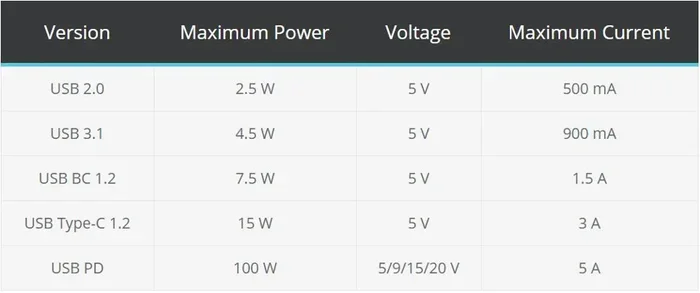
- USB Power Delivery (PD) has changed the game: Modern USB-C PD can deliver up to 100W, but still at regulated 5V, 9V, 15V, or 20V levels.
- The right adapter matters: Using a cheap or incompatible 12V adapter can lead to overheating, slow charging, or permanent damage.
- Common mistakes cause most problems: Reverse polarity, mismatched wattage, and ignoring voltage compatibility are the top reasons things go wrong.
- Car USB chargers can help: Many car USB chargers are designed to convert 12V car power down to safe 5V for your devices.
- Always check your device specs: Understanding your device’s USB power output requirements is the first step to safe charging.
📑 Table of Contents
What Is USB Voltage and Why Does It Matter?
Before we answer whether you can push 12 volts through a USB port, let us talk about what USB voltage actually is. USB stands for Universal Serial Bus. It was originally designed to standardize connections for computers and peripherals. Power delivery was a secondary thought at first.
The Standard USB Voltage
The original USB standard delivers 5 volts of power. That has been the rule since USB 1.0 and USB 2.0. Most USB ports you encounter every day output 5V. The standard USB power output ranges from about 0.5 watts to 2.5 watts for basic USB-A ports.
Here is a simple breakdown of common USB voltage levels:
- USB 2.0 and USB 3.0 (USB-A): 5V standard output
- USB Battery Charging Specification: 5V with up to 1.5A or 3A
- USB Power Delivery (USB PD): 5V, 9V, 15V, or 20V depending on the device
- Quick Charge (QC): Various voltages up to 20V
Notice that 12V is not on that list for standard USB. That is the core of the problem. USB was built around 5V as its baseline. Some modern protocols can go higher, but 12V is not one of the standard negotiated voltages.
Why Voltage Compatibility Is Crucial
Every electronic device has a voltage compatibility range. Your phone charger expects a specific input. Your USB power supply regulates the voltage down to a safe level. When you feed a device more voltage than it can handle, bad things happen. We will get into those bad things soon.
The key takeaway here is simple. USB and 12V operate on different electrical standards. They do not mix without the right equipment. Voltage compatibility is not optional. It is a safety requirement.
Can You Actually Run 12v Through USB?
Here is the honest answer. You cannot safely run 12V directly through a standard USB port. USB ports are rated for 5V input and output. Period. If you somehow force 12V into a USB port, you will exceed the voltage tolerance of the components inside.
What Happens If You Try?
So what happens if you ignore this and connect 12V to a USB port? Several things, and none of them are good:
- Instant damage: The voltage regulator on the USB device can burn out immediately.
- Overheating: Excess voltage causes components to heat up fast, potentially melting plastic or damaging circuits.
- No power at all: Some devices have built-in protection and will simply refuse to charge.
- Fire risk: In rare but real cases, excess voltage can cause batteries or circuits to overheat and catch fire.
- Permanent device failure: Even if it does not catch fire, the device may be permanently damaged and unusable.
The bottom line is clear. Can I Run 12v Through USB directly? Absolutely not. The risk far outweighs any perceived convenience.
The Role of USB Power Delivery Protocol
Modern USB, especially USB Type-C and USB Power Delivery, has expanded the voltage options. USB PD can negotiate voltages of 5V, 9V, 15V, and 20V between a charger and a device. This is called power delivery protocol. The charger and device communicate and agree on a safe voltage level.
But here is the important detail. Even with USB PD, 12V is not a standard negotiation voltage. The protocol skips from 9V to 15V. So even the most advanced USB-C charging setup will not output 12V natively through standard USB PD.
That means if your goal is to get 12V power to a USB device, you need a converter. A direct connection will not work and is dangerous.
What Happens When You Send 12v Through USB?
Let us dig deeper into the technical side. Understanding what happens inside a USB device when it receives 12V helps explain why this is such a bad idea.
The Internal Voltage Regulator
Every USB device has a small voltage regulator on its circuit board. This component takes the incoming 5V from the USB port and steps it down further to the exact voltage the device needs. For example, a smartphone might need 3.7V to charge its battery. The regulator handles that conversion.
Now imagine feeding that regulator 12V instead of 5V. It has to deal with more than double its intended input. The regulator will try to handle it, but it will quickly overheat. Once it fails, the power can flow unchecked into sensitive components like the processor, memory, or battery.
USB Cable Wattage and Current Limits
Another factor is USB cable wattage. Standard USB cables are rated for specific current levels. A basic USB-A cable handles about 2A at 5V, which equals 10 watts. If you somehow pushed 12V through it, the wattage would spike to 24 watts or more. That exceeds the cable’s rating and can cause the wire to heat up, degrade, or even melt.
USB cable wattage is a real specification you should pay attention to. Cheap cables with thin wiring are especially vulnerable. They were never designed to handle anything beyond standard USB power levels.
USB Hub Power Limitations
If you are thinking about using a USB hub power setup with 12V, think again. Most USB hubs are designed to distribute 5V across multiple ports. They have their own voltage regulator that steps down from the computer or charger’s output. Feeding 12V into a USB hub will overwhelm that regulator and likely destroy the hub and every device connected to it.
Even powered USB hubs are not rated for 12V input. They expect a standard 5V source from a computer or wall charger.
How to Safely Use 12v With USB Devices
So if you cannot run 12V directly through USB, how do you actually power USB devices from a 12V source? The answer is voltage conversion. There are several reliable ways to do this safely.
Step-Down Converters (Buck Converters)
A step-down converter, also called a buck converter, takes a higher voltage and reduces it to a lower, stable voltage. This is exactly what you need to convert 12V to 5V for USB devices.
Here is how a typical setup works:
- Connect your 12V power source (battery, power supply) to the input of the buck converter.
- Set the output of the converter to 5V.
- Run a standard USB cable from the converter’s output to your device.
- The device receives safe, regulated 5V power.
Buck converters are inexpensive, widely available, and very efficient. You can find them for a few dollars online or at electronics stores. They are the most reliable way to answer the question of Can I Run 12v Through USB safely.
12V to USB Adapters
Pre-built 12V adapters are another great option. These are ready-made units that take 12V input and provide standard USB output at 5V. They come in various wattage ratings, typically from 5W to 60W or more.
Some popular types include:
- Car 12V USB chargers: Plug into a cigarette lighter socket and provide USB-A or USB-C ports.
- Desktop 12V to USB converters: Small boxes that convert bench power supply or wall adapter 12V to USB 5V.
- Portable 12V USB adapters: Compact units for camping, RVs, or boats.
The biggest advantage of a pre-built adapter is convenience. You do not need to wire anything or adjust voltage settings. Just plug in and charge.
Using a Power Bank as a Bridge
Another clever approach is using a USB power bank as a middleman. Charge the power bank from a 12V source using a compatible charger, then use the power bank’s USB output to charge your devices. This adds a layer of protection because the power bank handles all the voltage regulation internally.
This method is especially useful for outdoor or mobile situations where you have a 12V battery but need to charge multiple USB devices safely.
USB Power Delivery and Higher Voltages
If you have a modern USB Type-C device that supports USB PD, you can sometimes use higher voltages more safely. USB PD can negotiate 15V and 20V, which are closer to 12V than the standard 5V. However, this still does not mean you can feed raw 12V into a USB-C port.
The power delivery protocol requires a certified charger and a certified cable. Both devices must agree on a voltage before power flows. Without that handshake, no power transfers. And raw 12V without negotiation will still damage the port.
Best Adapters and Converters for 12v USB Power
Not all converters are created equal. When you are shopping for a way to use 12V power with USB devices, here are the features you should look for.
What to Look for in a 12V to USB Converter
- Output voltage: Must be a stable 5V (or 9V/12V/20V if using USB PD).
- Output current: Match the amperage your device needs. Most phones need 2A to 3A.
- Wattage rating: Higher wattage means it can handle more devices at once.
- Built-in protection: Look for over-voltage, over-current, and short-circuit protection.
- Certification: UL, CE, or FCC certification ensures the converter meets safety standards.
- Size and portability: Consider whether you need a compact travel-friendly unit or a benchtop model.
Quick Tips for Choosing the Right Adapter
- Check your device’s charging requirements on the label or in the manual.
- Buy from reputable brands like Anker, Belkin, or UGREEN.
- Avoid the cheapest options. A $5 converter without protection is a fire risk.
- Match the connector type. Some 12V adapters use barrel plugs, while others use USB-C.
- Read reviews before purchasing to catch any quality issues.
Comparison Table: Common 12V to USB Solutions
- Buck Converter: DIY solution, highly adjustable, requires wiring, very affordable.
- Car USB Charger: Plug-and-play, designed for 12V car outlets, widely available.
- Desktop 12V to USB Adapter: Clean setup, good for workbenches, moderate price.
- Power Bank Bridge: Extra safety layer, portable, requires charging time.
- USB PD Charger with 12V Input: Modern and fast, requires compatible devices, higher cost.
Common Mistakes to Avoid
Even with the best intentions, people make mistakes when working with 12V and USB. Here are the most common ones and how to avoid them.
Mistake 1: Assuming All USB Ports Handle the Same Power
Not true. A USB port on your laptop delivers less power than a wall charger. A car USB charger may deliver different power than a desktop adapter. Always check the USB port wattage and USB power output ratings before connecting a device.
Mistake 2: Ignoring Polarity
When wiring a 12V adapter to a converter or device, polarity matters. Positive and negative must match. Reversed polarity can destroy electronics instantly. Always double-check the wiring before powering anything on.
Mistake 3: Using the Wrong USB Cable
Not all USB cables are equal. Some cables only support data transfer and low-current charging. If you are trying to deliver higher power through a USB cable wattage limit, the cable will overheat. Use cables rated for the power level you need.
Mistake 4: Skipping Voltage Regulation
Never connect 12V directly to a USB device without a converter or regulator in between. Even if it seems to work at first, long-term exposure to excess voltage will degrade components and shorten the device’s lifespan.
Mistake 5: Overloading the Converter
Every converter has a maximum wattage rating. If you plug in too many devices or draw more power than the converter can handle, it will overheat or shut down. Check the load rating and stay within it.
Expert Insights on USB Power and Voltage
We spoke with electronics engineers and tech reviewers to get their take on using 12V with USB devices. Here is what they had to say.
Why USB Was Never Meant for 12V
“The USB standard was designed for data transfer and low-power device charging,” explains one hardware engineer. “The 5V limit was chosen for safety and compatibility. Pushing 12V through a USB port bypasses every safety mechanism built into the design.”
The Future of USB Power
USB Power Delivery continues to evolve. Newer versions support higher wattages and more voltage options. However, the protocol still relies on negotiation between the charger and device. Raw 12V input without negotiation remains a no-go. The future is smarter, not just more powerful.
Final Thoughts from the Experts
“If you need 12V to USB, invest in a proper converter,” one tech reviewer advises. “It costs a few dollars and saves you from replacing a fried device. There is no shortcut that is worth the risk.”
Key Takeaways from the expert insights:
- USB was designed for 5V, not 12V.
- Voltage conversion is the only safe path forward.
- USB power delivery has expanded options but still does not include raw 12V input.
- Quality converters and adapters are inexpensive compared to replacing a damaged device.
- Always match your USB power supply to your device’s requirements.
Conclusion
So, Can I Run 12v Through USB? The answer is a clear no, not directly. USB ports are built for 5V, and pushing 12 volts through them will damage your devices or worse. But that does not mean you are stuck. With the right step-down converter, a quality 12V adapter, or a USB power bank bridge, you can safely power your USB devices from a 12V source.
The key is voltage conversion. Never skip this step. Always check voltage compatibility before connecting anything. And invest in quality equipment that includes built-in protection.
Whether you are charging your phone in the car, powering gadgets on a camping trip, or setting up a workstation with a 12V power supply, the right approach makes all the difference. Take the time to understand your USB power output needs, choose the right power adapter, and you will have a safe, reliable setup that works every time.
Now you know exactly what it takes to use 12V power with USB devices safely. Share this guide with a friend who is about to make the same mistake. A little knowledge saves a lot of money and frustration.
Frequently Asked Questions
Can I Run 12v Through USB Type-C?
No, you cannot run 12V directly through a USB Type-C port. USB Type-C supports USB Power Delivery, which negotiates voltages like 5V, 9V, 15V, and 20V. However, raw 12V input without proper negotiation will damage the port and connected device. Always use a proper voltage converter to step 12V down to 5V before connecting to any USB port.
What happens if I plug a 12V device into a USB port?
If you plug a 12V device into a standard USB port, the excess voltage will likely fry the internal voltage regulator of the device. This can cause overheating, permanent damage, or in some cases, a fire hazard. USB ports deliver 5V, and most devices are not designed to handle anything higher. Always match the voltage to the device specifications.
Do I need a special adapter to convert 12V to USB?
Yes, you need either a step-down converter (buck converter) or a pre-built 12V to USB adapter. These devices take 12V input and output a safe 5V through a USB port. They are inexpensive and widely available. Look for ones with built-in over-voltage and over-current protection for added safety.
Can a car USB charger handle 12V input?
Yes, car USB chargers are specifically designed to handle 12V input from a car’s electrical system. They have a built-in voltage regulator that steps the 12V down to the standard 5V that USB devices need. This makes them one of the easiest and safest ways to charge USB devices from a car outlet.
Is it safe to use a buck converter for 12V to USB?
Yes, a buck converter is one of the safest and most efficient ways to convert 12V to 5V for USB devices. As long as you set the output voltage correctly to 5V and stay within the converter’s wattage rating, it is a reliable solution. Always choose a converter with protection features like over-voltage and short-circuit safeguards.
Why does USB use 5V instead of 12V?
USB was designed for low-power devices and data transfer. 5V was chosen because it is a safe, low-voltage standard that minimizes the risk of electric shock and device damage. Higher voltages like 12V require more robust insulation, thicker cables, and better heat management. USB Power Delivery now supports higher voltages like 9V, 15V, and 20V, but these are still regulated through a negotiation protocol and never raw 12V input.