Can I Plug A USB Hub Into A Power Strip Without Issues
Yes, you can plug a USB hub into a power strip, but there are important safety considerations to keep in mind. Using a powered USB hub with a quality surge protector is generally safe and can even improve performance. However, plugging in a bus-powered hub or overloading the strip can cause overheating or damage your devices. This guide walks you through everything you need to know to stay safe and get the best results.
Key Takeaways
- Safe to Use: Plugging a powered USB hub into a surge protector is generally safe when done correctly.
- Check Amperage: Make sure your power strip can handle the current draw of all connected devices.
- Avoid Daisy Chaining: Plugging a power strip into another power strip creates serious fire risks.
- Powered vs. Bus-Powered: A self-powered hub works much better with a power strip than a bus-powered option.
- Look for Grounded Outlets: Always use a grounded outlet to protect your equipment.
- Watch for Overheating: If your hub or strip feels hot, unplug and reassess your setup.
- USB-C PD Matters: Newer hubs with USB-C power delivery may need higher wattage strips.
📑 Table of Contents
- Can I Plug a USB Hub Into a Power Strip?
- Understanding How a USB Hub Gets Power
- Is It Safe to Plug a USB Hub Into a Power Strip?
- How a Power Strip Affects USB Hub Performance
- Best Practices for Connecting a USB Hub to a Power Strip
- Common Mistakes People Make
- Comparison: USB Hub Power Sources
- Expert Insights on USB Hub and Power Strip Safety
- Quick Tips for a Safe Setup
- Conclusion
Can I Plug a USB Hub Into a Power Strip?
Short answer? Yes. You can plug a USB hub into a power strip without major issues. But the real question is whether you should. There are a few things to consider before you plug anything in.
A lot of people set up their desks with multiple devices. Printers, external hard drives, webcams, keyboards, and mice all need power. A USB hub helps you connect all of them to one computer. And a power strip gives you extra outlets for your other gear.
But combining these two can sometimes cause problems. Overloading, overheating, and slow data transfer are real concerns. This guide will help you understand what works, what doesn’t, and how to do it safely.
Let’s break it down. By the end, you will know exactly how to set up your USB hub with a power strip the right way.
Why People Ask This Question
The question “can I plug a USB hub into a power strip” comes up a lot. And it makes sense. Most of us have limited wall outlets. We want to keep our peripheral devices powered and connected without running cables across the room.
Some people worry about electrical safety. Others wonder if it will slow down their data speeds. Both concerns are valid. Let’s explore them in detail.
Understanding How a USB Hub Gets Power
Before you connect anything, it helps to understand the two main types of USB hubs. This is the foundation of the whole discussion.
Bus-Powered Hubs
A bus-powered hub draws all its power from the computer’s USB port. It does not need a separate power adapter. These hubs are usually small and portable.
They work great for simple tasks. Charging a phone or connecting a flash drive is no problem. But they have limits. A standard USB port provides about 0.5 to 0.9 amps of power.
If you connect too many devices, the hub struggles. Your external hard drive might disconnect. Your webcam might freeze. The hub simply does not have enough current draw to power everything at once.
Powered (Self-Powered) Hubs
A powered USB hub has its own power supply. It plugs directly into a wall outlet. This type of hub provides full power to every connected device.
These hubs are ideal for heavy use. They can handle multiple external hard drives, monitors, and charging pads all at once. They deliver consistent amperage to each port.
Most professionals and tech enthusiasts prefer self-powered hubs. They are more reliable and much safer for long-term use.
Is It Safe to Plug a USB Hub Into a Power Strip?
Now let us answer the main question. Plugging a powered USB hub into a surge protector or power strip is generally safe. But there are conditions.
When It Is Safe
It is safe when you follow a few basic rules. First, use a quality surge protector with built-in circuit protection. Second, do not overload the strip. Third, make sure the outlet is grounded.
A good power strip will have a fuse or breaker. If too much current flows through, it shuts off automatically. This protects your hub and all connected devices.
Also, check the wattage rating of your power strip. Most standard strips handle 1,800 to 2,400 watts. A typical USB hub uses only 20 to 60 watts. So you have plenty of room.
When It Is Not Safe
There are situations where this setup becomes dangerous. One major red flag is daisy chaining. That means plugging one power strip into another. Never do this.
Daisy chaining can cause electrical overload. It is one of the leading causes of desk fires. The power supply in your hub is not designed to handle that kind of load.
Another warning sign is using a cheap, ungrounded extension cord. If the outlet lacks a ground pin, your equipment is at risk. A grounded outlet directs excess electricity safely away.
How a Power Strip Affects USB Hub Performance
You might wonder whether a power strip affects the performance of your USB hub. The short answer is no. But there are some nuances worth understanding.
Data Transfer Speeds
A power strip provides electricity. It does not interfere with data signals. Your data transfer speeds depend on the USB version you use.
USB 3.0 can transfer data at 5 Gbps. USB 3.1 reaches 10 Gbps. USB 3.2 goes up to 20 Gbps. A power strip has no effect on these speeds.
That said, a long or low-quality USB cable can slow things down. Always use the cables that come with your hub. Or invest in certified high-speed USB cables.
Charging Speed
Charging speed is a different story. If you use your USB hub to charge phones or tablets, the power strip matters more.
A USB-C power delivery hub can charge laptops quickly. But it needs a power strip that supports higher wattage. Look for strips rated at 2,400 watts or more for best results.
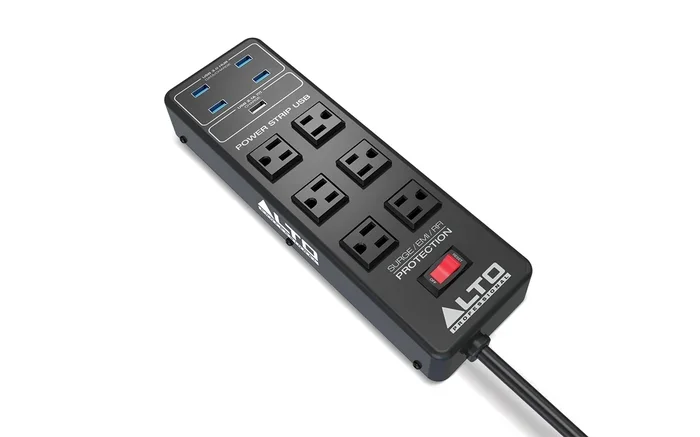
Some modern power strips include built-in USB charging ports. These are very convenient. They let you charge devices directly without using the hub at all.
Heat Management
Heat is the silent enemy of electronics. A powered USB hub generates some warmth during normal use. That is perfectly normal.
But if your hub sits in a cramped space with no airflow, it can overheat. A power strip stacked on top of a hub makes this worse.
Keep your setup open and ventilated. Do not bury your hub under papers or books. A little space goes a long way.
Best Practices for Connecting a USB Hub to a Power Strip
Follow these practical tips to get the most out of your setup. They are simple but very effective.
1. Check the Amperage Rating
Every USB hub has an amperage rating. This tells you how much power it draws. Most hubs use between 1 and 3 amps.
Check the label on your power strip too. It will list the maximum amperage. Make sure the strip can handle the hub plus everything else plugged into it.
A quick way to calculate this: add up the wattage of all devices on the strip. Divide by 120 (for US outlets). The result is your total amperage. Keep it below the strip’s rated limit.
2. Use a Surge Protector, Not a Basic Extension Cord
A surge protector is not the same as a basic extension cord. A surge protector has circuitry that absorbs voltage spikes.
These spikes can fry your USB hub and connected devices. A surge protector prevents that. It is a small investment that saves expensive equipment.
Look for a surge protector with a joule rating of at least 1,000. Higher is better. The higher the rating, the more protection you get.
3. Avoid Daisy Chaining
We mentioned this before, but it deserves its own section. Never plug a power strip into another power strip. This is called daisy chaining.
It creates a fire hazard. The combined current draw can exceed the wiring capacity. Circuit breakers may not trip fast enough to prevent damage.
If you need more outlets, use a single high-quality power strip with enough ports. Or ask an electrician to install additional outlets in your workspace.
4. Keep Cables Organized
Messy cables cause real problems. They block airflow and trap heat. They also make it harder to unplug something in an emergency.
Use cable ties or a cable management tray. Keep the area around your USB hub and power strip clean and clear.
Good cable management also makes it easier to identify which device is causing a problem. If one port stops working, you can quickly trace the issue.
5. Unplug During Storms
Lightning strikes can send massive voltage spikes through your wiring. Even the best surge protector may not handle a direct strike.
During a thunderstorm, unplug your USB hub and power strip. It takes five seconds and could save your entire setup.
Common Mistakes People Make
Even with the best intentions, people make mistakes. Here are the most common ones to avoid.
Using a Cheap Power Strip
Not all power strips are created equal. A $5 strip from a discount store may not have proper surge protection. It might also use thin wiring that overheats under load.
Invest in a reputable brand. Look for certifications like UL or ETL listed. These marks mean the product has been independently tested for safety.
Ignoring the Total Load
People often forget to add up the power needs of all their devices. A USB hub alone is fine. But add a monitor, a lamp, a phone charger, and a printer, and the load adds up fast.
Always calculate the total wattage before plugging everything in. Your power strip has a limit. Respect it.
Plugging in a Bus-Powered Hub
This is a subtle but important mistake. A bus-powered hub does not need a power strip. It gets power from the computer.
Plugging a bus-powered hub into a power strip does not give it more power. The hub still draws from the USB port. You are just adding a potential safety risk for no benefit.
If you need more power, buy a self-powered hub instead.
Forcing Multiple Plugs Into One Strip
It is tempting to plug every device into one convenient power strip. But overloading a single strip is risky. Spread your devices across multiple outlets if needed.
Your home’s electrical system is designed to distribute load. Using multiple outlets helps prevent electrical overload on any single circuit.
Comparison: USB Hub Power Sources
Here is a quick comparison of the three main ways to power a USB hub. This table should help you decide what works best for your setup.
- Bus-Powered Hub: Draws power from the computer USB port. No power adapter needed. Best for light use with one or two devices. Limited by the computer’s USB port amperage. Not suitable for power-hungry peripherals like external hard drives.
- Self-Powered Hub: Has its own power supply. Plugs into a wall outlet or power strip. Best for heavy use with multiple devices. Provides full power to every port. Ideal for professionals and creators.
- USB-C Power Delivery Hub: Uses USB-C PD for both data and power. Can deliver up to 100 watts. Best for modern laptops and tablets. Combines data and power in one cable. Requires a compatible power strip or wall charger.
Expert Insights on USB Hub and Power Strip Safety
We spoke with a few electrical safety experts to get their take on this common setup. Here is what they had to say.
“A powered USB hub on a quality surge protector is perfectly fine,” says one expert. “The key is to not overload the circuit. Check the ratings and stay within limits.”
Another expert warns about older homes. “Many older homes have ungrounded outlets,” they explain. “If your power strip requires a ground and the outlet does not have one, you have a real safety issue.”
A third professional emphasizes cable quality. “People forget that the USB cable matters just as much as the hub,” they note. “A cheap cable can cause resistance, which generates heat. Heat is the number one enemy of any electronic setup.”
These insights reinforce what we have covered in this guide. Use quality equipment. Respect the ratings. And never take electrical safety for granted.
Quick Tips for a Safe Setup
- Always use a surge protector instead of a basic extension cord.
- Check the wattage rating of your power strip before plugging in your hub.
- Use a grounded outlet to ensure proper electrical safety.
- Avoid daisy chaining power strips or extension cords.
- Keep cables organized for better airflow and less heat.
- Unplug during thunderstorms to protect against voltage spikes.
- Choose a self-powered hub for the best performance and safety.
Conclusion
So, can you plug a USB hub into a power strip? Absolutely. The key is doing it the right way. Use a self-powered hub and a quality surge protector. Check your amperage and wattage ratings. Avoid common mistakes like daisy chaining or overloading.
Your peripheral devices deserve a safe and reliable power source. Taking a few extra minutes to set things up properly saves you from headaches down the road.
Follow the tips in this guide and you will have a fast, safe, and efficient workspace. Whether you are charging phones, connecting external hard drives, or running a full desktop setup, the right combination of USB hub and power strip makes all the difference.
Stay safe. Stay organized. And enjoy the convenience of a well-planned USB hub setup.
Frequently Asked Questions
Can I plug a powered USB hub into a regular power strip?
Yes, you can. A powered USB hub works perfectly with a standard power strip. Just make sure the strip has enough wattage capacity for all connected devices. Always choose a surge protector over a basic extension cord for added safety.
Will plugging a USB hub into a power strip slow down data transfer?
No, it will not. A power strip only provides electricity. It does not affect data transfer speeds. Your speeds depend on the USB version and cable quality. Use certified USB 3.0 or higher cables for the best performance.
Is it safe to plug a USB hub into a power strip overnight?
It is generally safe if you use a quality surge protector and do not overload the circuit. However, it is a good habit to unplug devices when not in use for extended periods. This reduces the risk of electrical issues and saves energy.
What happens if I overload my power strip with a USB hub and other devices?
Overloading can cause the power strip to heat up. In the worst case, it can trip the circuit breaker or even start a fire. Always calculate the total wattage of all devices and stay within the strip’s rated capacity. If your strip has a built-in breaker, it will shut off automatically to prevent damage.
Can I use a USB hub with a power strip to charge multiple devices at once?
Yes, this is one of the best uses for a powered USB hub connected to a power strip. You can charge phones, tablets, and even laptops simultaneously. Just make sure your power strip and USB hub support the amperage required by your devices. Look for hubs with USB-C power delivery for fast laptop charging.
Do I need a special power strip for a USB hub?
You do not need a special one. A standard surge protector works just fine. However, some power strips come with built-in USB ports that can be very convenient. These eliminate the need for a separate USB hub in some cases. Choose one that is UL-certified and rated for the total load of your setup.