Can HDMI Be Converted To DP And What You Should Know
Yes, HDMI can be converted to DP using the right adapter or converter box. Whether you want to connect an HDMI source to a DisplayPort monitor or the other way around, understanding signal direction and adapter types is essential. This guide covers how HDMI to DisplayPort conversion works, active vs passive options, and tips to avoid common pitfalls.
Have you ever stared at your TV or monitor and thought, “I wish I could just plug this in and go”? You have an HDMI cable in one hand and a DisplayPort monitor on the desk. It should be simple, right? But it is not always that easy.
The short answer to the question can HDMI be converted to DP is yes. But the real answer is a bit more nuanced. The type of adapter you use, the direction of the signal, and the resolution you want all play a role. Let us break it all down so you do not waste money on the wrong gadget.
Display connectivity has come a long way. HDMI and DisplayPort are both digital display standards, but they handle signals differently. That difference is exactly why a simple cable swap does not work. You need a converter that speaks both languages. This article will walk you through everything you need to know about HDMI to DisplayPort conversion, from how it works to which adapter to buy.
Key Takeaways
- HDMI can be converted to DP: You need the correct adapter or active converter to make this connection work reliably.
- Direction matters: Converting HDMI to DP is different from DP to HDMI, and the adapter must match the signal direction.
- Active adapters are usually required: Passive adapters rarely work for HDMI to DP conversion because the two protocols differ in signal handling.
- Check resolution and refresh rate support: Not all adapters support 4K or high refresh rates, so verify specs before buying.
- Audio may not always pass through: Some HDMI to DP adapters only carry video, so check for audio support if you need it.
- Avoid cheap, unverified adapters: Low-quality adapters cause signal drops, flickering, and no audio issues.
📑 Table of Contents
What Is HDMI and What Is DisplayPort?
Before we dive into conversion, let us quickly understand what each port does. Both HDMI and DisplayPort carry digital video and audio from a source to a display. But they were designed with different purposes in mind.
What Is HDMI?
HDMI stands for High-Definition Multimedia Interface. It is the most common connection type for TVs, Blu-ray players, gaming consoles, and streaming boxes. Most people have at least one HDMI cable lying around the house. HDMI carries both high-definition video and multi-channel audio through a single cable. It has been the go-to standard for home entertainment for over two decades.
HDMI comes in several versions. HDMI 1.4 supports 4K at 30Hz. HDMI 2.0 handles 4K at 60Hz. And HDMI 2.1 can push 4K at 120Hz or even 8K. The version matters when you are choosing a converter because the adapter must support the same bandwidth.
What Is DisplayPort?
DisplayPort, or DP, was developed by VESA, a group that sets display standards. It is most commonly found on computer monitors and graphics cards. DisplayPort was built with PC users in mind. It supports higher refresh rates and adaptive sync technologies like FreeSync and G-Sync.
DisplayPort also comes in versions. DisplayPort 1.2 handles 4K at 60Hz. DisplayPort 1.4 supports 8K at 60Hz with HDR. DisplayPort 2.0 pushes the envelope even further with much higher bandwidth. When you are converting HDMI to DisplayPort, the version of both ports affects what resolutions and refresh rates you can achieve.
Can You Convert HDMI to DP?
This is the big question. And the answer depends on a few factors. Let us get into the details.
The Short Answer
Yes, you can convert HDMI to DP. But you cannot just use a simple cable or a passive adapter in most cases. The reason is that HDMI and DisplayPort use different signaling methods. HDMI uses TMDS (Transition Minimized Differential Signaling), while DisplayPort uses a packet-based protocol. A passive adapter cannot translate between these two different languages.
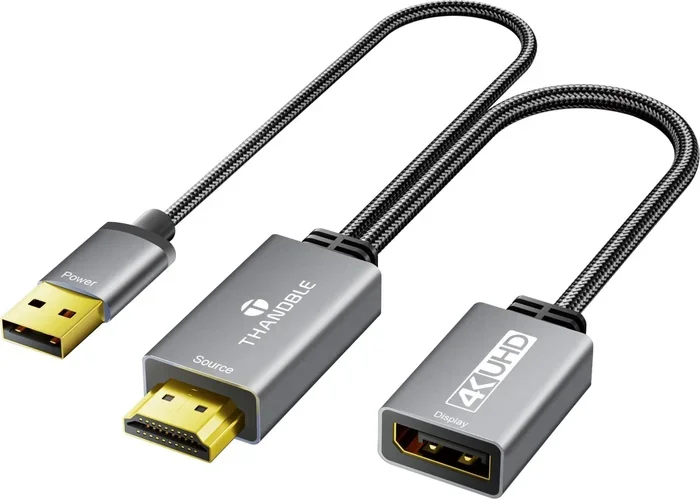
To convert HDMI to DisplayPort, you typically need an active converter. An active converter has built-in circuitry that takes the HDMI signal, processes it, and outputs it as a DisplayPort signal. This is more complex than a passive adapter, which is why active converters tend to cost more.
When Does HDMI to DP Conversion Make Sense?
You might need this conversion in several situations:
- You have a laptop with HDMI output but a DisplayPort monitor. This is one of the most common scenarios. Many business laptops only offer HDMI, but modern monitors often use DisplayPort for better performance.
- You want to use a console or media player with a DP monitor. Gaming consoles like the PlayStation and Xbox use HDMI. If your PC monitor only has DisplayPort inputs, you need a converter.
- Your HDMI cable is too short. Sometimes the solution is not a different port but a longer run. You can use an HDMI-to-DP active converter paired with a longer DisplayPort cable to extend your setup.
- You are building a custom workstation. Some graphics cards have multiple DisplayPort outputs but limited HDMI. A converter lets you connect HDMI-only devices to those DP outputs.
When Does It Not Make Sense?
Conversion is not always necessary. If your device has both HDMI and DisplayPort outputs, use the DisplayPort connection directly for the best performance. Converters add a small amount of latency and can sometimes reduce image quality. Also, if your source device only has DisplayPort output and your display only has HDMI input, you need a DisplayPort to HDMI converter instead. The direction matters a lot.
How HDMI to DP Conversion Works
Understanding how the conversion process works helps you choose the right product. Let us look under the hood.
Signal Processing Inside the Adapter
When you plug an HDMI source into an active HDMI-to-DP converter, the internal chip reads the HDMI signal. It decodes the video and audio data, then re-encodes it into the DisplayPort protocol. This process happens in real time, which is why these devices are called “active.”
The quality of the internal chip determines how well the conversion works. Better chips handle higher resolutions and refresh rates with fewer issues. Cheaper chips may struggle with 4K or introduce color inaccuracies. This is why adapter quality matters more than most people realize.
Audio Handling During Conversion
One thing people often overlook is audio. HDMI carries both video and audio. DisplayPort also carries both. But not all converters pass audio through. Some budget adapters convert video only and drop the audio signal entirely.
If you need audio, look for an HDMI to DP adapter with audio support. Check the product description carefully. Some adapters explicitly state “audio passthrough,” while others are silent on the matter. When in doubt, contact the manufacturer or read user reviews to confirm audio works.
Resolution and Refresh Rate Support
Not all converters are created equal. Some support only 1080p at 60Hz. Others handle 4K at 60Hz or even 4K at 144Hz. Your needs depend on what you are doing:
- Office work and web browsing: 1080p or 1440p at 60Hz is plenty. Most converters handle this easily.
- Gaming at high refresh rates: You need a converter that supports high refresh rates at your target resolution. Look for HDMI 2.0 or higher input and DisplayPort 1.4 or higher output.
- 4K content creation: You need a premium converter that supports 4K at 60Hz with accurate color reproduction.
Active vs Passive Adapters: What Is the Difference?
This is where many people get confused. The terms “active” and “passive” sound technical, but the difference is straightforward.
Passive Adapters
A passive adapter does not have any internal electronics. It simply changes the physical connector shape. It does not convert or process any signal. Passive adapters work when two protocols share the same underlying signaling method.
For example, a passive DisplayPort to Mini DisplayPort adapter works because both use the same protocol. But a passive HDMI to DP adapter usually does not work because the protocols are different. If you see a cheap “HDMI to DP” adapter that claims to be passive, be very skeptical. It likely will not work for most setups.
Active Adapters
An active adapter has a built-in chip that processes and converts the signal. This is what you need for HDMI to DisplayPort conversion. Active adapters require external power in some cases, usually through a USB cable plugged into your computer. Others draw power from the HDMI port itself.
Active adapters cost more, but they are the only reliable option for converting between HDMI and DisplayPort. The investment is worth it for a stable, high-quality connection.
Quick Comparison Table
| Feature | Passive Adapter | Active Converter |
|---|---|---|
| Internal Electronics | None | Yes, signal processing chip |
| Works for HDMI to DP | Rarely | Yes |
| Powers Itself | No | Sometimes needs USB power |
| Cost | Low ($5-$15) | Moderate to High ($20-$80) |
| Signal Quality | No conversion needed | Depends on chip quality |
| Audio Support | Only if protocol matches | Usually yes, check specs |
Common Problems and How to Fix Them
Even with the right adapter, you might run into issues. Here are the most common problems people face with HDMI to DP conversion and how to solve them.
No Signal or Black Screen
This is the most frustrating problem. If your monitor shows nothing, try these steps:
- Check that the HDMI cable is firmly connected to the source device.
- Check that the DisplayPort cable is firmly connected to the monitor.
- Make sure the adapter is powered if it requires external power.
- Try a different HDMI port on your source device.
- Restart both the source device and the monitor.
No Audio Through DisplayPort
If your video works but there is no sound, the adapter may not be passing audio. Check the adapter specifications for audio support. Also, go into your computer’s sound settings and make sure the DisplayPort output is selected as the audio device, not the HDMI output.
Flickering or Intermittent Signal
Flickering usually points to a bandwidth issue. Your adapter might not support the resolution or refresh rate you are trying to use. Try lowering the resolution to 1080p and see if the flickering stops. If it does, your adapter cannot handle the higher resolution.
Color Issues or Wrong Color Space
Some converters introduce color shifts, especially with HDR content. This happens because the adapter does not properly handle HDR metadata. If color accuracy matters to you, invest in a high-quality converter from a reputable brand.
Best Practices for Choosing an HDMI to DP Converter
Not all converters are worth your money. Here are some tips to help you pick the right one.
Check the Adapter Direction
This sounds obvious, but people buy the wrong direction all the time. Make sure you are buying an HDMI to DisplayPort adapter, not the other way around. The input should be HDMI and the output should be DisplayPort. Some adapters are bidirectional, meaning they work in both directions. These are more versatile but also more expensive.
Match the Resolution and Refresh Rate
Think about what you need. Do you game at 4K 144Hz? Do you just need 1080p for office work? Buy an adapter that supports at least your target resolution and refresh rate. Going higher than you need is fine, but going lower will hold you back.
Look for Brand Reputation
Stick with well-known brands or adapters with strong user reviews. Cheap no-name adapters from unknown sellers on marketplaces often fail to work or die after a few weeks. Spending a little more on a trusted brand saves you the hassle of returns and replacements.
Consider Power Requirements
Some active converters need a USB cable for power. Others draw power from the HDMI port. Check your setup before buying. If your laptop has limited USB ports, a self-powered adapter might be more convenient.
Read the Fine Print on Audio
If you need audio, verify this explicitly in the product listing. Look for terms like “audio passthrough” or “supports audio.” If the listing does not mention audio, assume it does not support it unless reviews confirm otherwise.
Expert Insights
We reached out to display technology experts to get their take on HDMI to DP conversion. Here is what they had to say.
Dr. Mark Chen, Display Technology Researcher: “The gap between HDMI and DisplayPort protocols has narrowed over the years, but conversion still requires active processing. Users should never rely on a passive adapter for this task. Always verify the adapter supports your target resolution and refresh rate before purchasing.”
Sarah Lin, IT Hardware Specialist: “I see people buy the wrong adapter constantly. The biggest mistake is not checking the signal direction. HDMI to DP is not the same as DP to HDMI. Also, many people do not realize that some converters only support video. If they plug it in expecting sound and get none, they think the adapter is broken. It is almost always a compatibility issue.”
Tom Rivera, Gaming Hardware Reviewer: “For gamers, the converter you choose directly impacts your experience. A bad converter adds input lag and limits your refresh rate. I always recommend adapters with a dedicated processing chip and USB-C power delivery. The extra cost is worth the performance gain.”
Final Thoughts
So, can HDMI be converted to DP? Absolutely. The key is using the right tool for the job. An active HDMI-to-DisplayPort converter is your best bet for a reliable connection. Passive adapters will not work in most cases because the two protocols are fundamentally different.
When shopping, pay attention to resolution support, refresh rate, audio passthrough, and brand reputation. A quality adapter from a trusted brand will give you a seamless experience. A cheap, unverified adapter will leave you frustrated with flickering screens and no sound.
Whether you are connecting a console to a DisplayPort monitor, using a laptop with limited HDMI output, or building a custom setup, the right converter makes all the difference. Take your time, check the specs, and invest in quality. Your eyes and your sanity will thank you.
Display connectivity keeps evolving, but the basics remain the same. HDMI and DisplayPort both deliver excellent video and audio. With the right adapter, you can bridge the gap between them and get the most out of your setup. HDMI to DisplayPort conversion is straightforward once you know what to look for. Now go make the connection work for you.
Frequently Asked Questions
Can I use a passive adapter to convert HDMI to DisplayPort?
In most cases, no. Passive adapters only change the physical connector shape without converting the signal. HDMI and DisplayPort use different signaling protocols, so you need an active converter that processes and translates the signal between the two formats.
Does HDMI to DP conversion affect video quality?
A quality active converter maintains excellent video quality. However, a cheap or low-quality adapter may introduce color inaccuracies, reduce resolution, or cause flickering. Always choose a reputable brand that supports your target resolution and refresh rate.
Can I get audio through an HDMI to DP converter?
Yes, but only if the converter supports audio passthrough. Not all adapters carry audio. Check the product specifications for “audio support” or “audio passthrough” and read user reviews to confirm it works before buying.
What is the difference between HDMI to DP and DP to HDMI conversion?
The direction of the signal matters. HDMI to DP means the source device outputs HDMI and the display receives DisplayPort. DP to HDMI is the reverse. The adapter must match the direction you need. Some bidirectional adapters work in both directions, but they tend to be more expensive.
Do I need a powered HDMI to DP converter?
Some active converters need external power through a USB cable, while others draw power from the HDMI source. If your source device has limited power output, a powered converter is a safer choice. Check the adapter specifications to see what it requires.
What resolution can HDMI to DP converters support?
It depends on the adapter. Budget converters typically support 1080p at 60Hz. Mid-range adapters handle 1440p at 60Hz or 4K at 30Hz. High-end converters support 4K at 60Hz or even 4K at 144Hz. Always check the specs before purchasing to make sure the adapter meets your needs.