Can You Connect Tv To Aux A Simple Step by Step Guide
Yes, you can absolutely connect tv to aux and instantly improve your sound quality. This guide walks you through every method, from using a simple aux cable to adapters and converters. Whether you have a smart TV, an older model, or a soundbar, you will find the right solution here.
Have you ever watched something on your TV and thought the sound just was not good enough? Maybe the dialogue was too quiet, or the bass felt flat. You are not alone. Many people deal with poor TV audio every single day. The good news is that fixing this problem is simpler than you might think.
The answer to the question can you connect tv to aux is a firm yes. An aux connection lets you plug your TV into external speakers, a soundbar, or even a home theater system. The result is better, richer sound that makes watching movies and shows a much more enjoyable experience. In this guide, we will walk you through every step of the process in plain, simple language.
Whether you are a tech beginner or someone who just wants a quick audio upgrade, this guide has you covered. We will explain the different types of aux connections, show you exactly how to set things up, and help you troubleshoot any issues along the way. By the end, you will feel confident making your own tv aux connection at home.
Key Takeaways
- Simple Connection: Connecting tv to aux is easy and requires only a basic aux cable or adapter.
- Multiple Methods: You can use a 3.5mm aux cable, RCA adapter, Bluetooth transmitter, or optical-to-aux converter.
- Works on Most TVs: Nearly every TV has some form of audio output that supports an aux connection.
- Better Sound Quality: An aux connection delivers clearer, louder audio than built-in TV speakers.
- Quick Troubleshooting: Most issues like no sound or static noise can be fixed in minutes.
- Affordable Upgrade: An aux setup costs very little compared to buying a new sound system.
📑 Table of Contents
- Understanding Your TV Audio Output Options
- How to Connect TV to Aux: Step-by-Step Methods
- Comparing Connection Methods
- Troubleshooting Common Connection Issues
- Tips for Better Audio Quality
- When to Consider Alternative Audio Solutions
- Common Mistakes to Avoid
- Can You Connect Tv To Aux: Final Thoughts
Understanding Your TV Audio Output Options
Before you grab any cables, it helps to know what kind of audio output your TV has. Different TVs come with different ports, and knowing what you are working with makes the whole process much smoother. Let us look at the most common options.
The 3.5mm Audio Jack
The 3.5mm audio jack is the most common type of aux port. It looks like the headphone jack on your phone. Many modern TVs have one located on the back or side panel. If your TV has this port, you are in luck. You can plug in an aux cable directly and start listening to better sound right away.
Some older TVs may not have a 3.5mm jack at all. In that case, do not worry. We will cover alternative options below. But first, let us talk about what to do if your TV does have this port.
RCA Audio Outputs
RCA cables have been around for decades. They are the red and white (or red and black) round plugs you see on the back of many devices. If your TV has RCA audio outputs, you can use an RCA-to-aux adapter cable to connect to your speakers or sound system.
RCA connections are still very common on older TVs and some budget models. They deliver solid analog audio and are easy to work with. Just make sure you match the red plug to the right port and the white plug to its matching port.
Optical Audio Output
Some TVs come with an optical audio output, which uses a small square port and a fiber optic cable. This sends digital audio to external devices. While an optical port does not connect directly to an aux cable, you can use an optical-to-aux converter to bridge the gap.
This is a great option if your TV lacks a 3.5mm jack or RCA outputs. The converter box takes the digital signal and turns it into an analog aux signal. It is a simple and affordable solution that works well in most setups.
HDMI ARC
HDMI ARC (Audio Return Channel) is a feature found on many newer smart TVs. It lets audio travel back and forth between your TV and a soundbar or receiver through a single HDMI cable. While HDMI ARC is not the same as an aux connection, it is worth mentioning because it serves a similar purpose: improving your TV audio.
If your goal is simply to get better sound from your TV, HDMI ARC is worth considering. But if you specifically want to connect tv to aux, the methods we cover below will get the job done.
How to Connect TV to Aux: Step-by-Step Methods
Now that you know what kind of output your TV has, let us get into the actual setup. Below, we cover the most popular ways to make an aux audio connection from your TV to external speakers.
Method 1: Direct Aux Cable Connection
This is the easiest and most straightforward method. You need a standard aux cable, which has a 3.5mm plug on each end. Here is how to do it:
- Find the audio output port on your TV. It is usually labeled “Audio Out” or “Headphone Out.”
- Plug one end of the aux cable into the TV’s audio output port.
- Plug the other end of the aux cable into your external speaker, soundbar, or amplifier.
- Turn on both devices and adjust the volume on your TV.
- Set your external speaker to the correct input source if needed.
That is it! You should now hear sound coming from your external device instead of the TV speakers. This method works great for simple setups and costs almost nothing.
Quick Tip: If your TV has a headphone jack that doubles as an audio out, make sure it is set to “audio out” mode in your TV settings. Some TVs default to headphone mode, which can cause volume issues.
Method 2: Using an RCA-to-Aux Adapter
If your TV only has RCA audio outputs, you will need an RCA-to-aux adapter cable. These cables have the red and white RCA plugs on one end and a single 3.5mm aux plug on the other. Here is how to set it up:
- Connect the red and white RCA plugs to the matching audio output ports on your TV.
- Plug the 3.5mm aux end into your external speaker or soundbar.
- Power on both devices and test the sound.
RCA-to-aux adapter cables are widely available and very affordable. You can find them online or at most electronics stores for just a few dollars. They are a reliable way to make an analog audio connection between your TV and external speakers.
Method 3: Bluetooth Transmitter Adapter
Do not want to deal with cables at all? A Bluetooth transmitter adapter is a great option. This small device plugs into your TV’s audio output and sends sound wirelessly to Bluetooth-enabled speakers or headphones.
Here is how it works:
- Plug the Bluetooth transmitter into your TV’s audio output (3.5mm, RCA, or optical, depending on the model).
- Power on the transmitter and put it in pairing mode.
- On your Bluetooth speaker or headphones, enable pairing mode.
- Wait for the devices to connect.
- Play audio on your TV and enjoy wireless sound.
Bluetooth transmitters are perfect for people who want a wireless audio connection without running cables across the room. They are especially useful if your TV does not have a 3.5mm aux output. Just keep in mind that Bluetooth audio may have a slight delay compared to a wired connection.
Method 4: Optical-to-Aux Converter
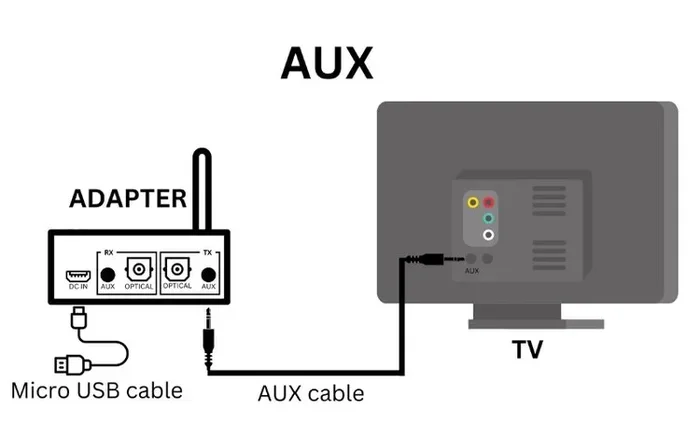
If your TV has an optical audio output but no aux port, an optical-to-aux converter is your best friend. This small box converts the digital optical signal into an analog aux signal. Here is the setup process:
- Connect the optical cable from your TV to the converter box.
- Plug an aux cable into the converter box.
- Connect the other end of the aux cable to your external speaker or soundbar.
- Power on the converter box if required.
- Adjust volume and enjoy improved audio.
Optical-to-aux converters are compact and easy to use. They typically cost between $10 and $25. They are a fantastic option for older TVs or modern smart TVs that only offer digital audio outputs.
Comparing Connection Methods
Not sure which method is right for you? Here is a quick comparison to help you decide.
| Method | Best For | Wired or Wireless | Cost | Setup Difficulty |
|---|---|---|---|---|
| Direct Aux Cable | Simple setups with a 3.5mm port | Wired | Very low | Very easy |
| RCA-to-Aux Adapter | TVs with only RCA outputs | Wired | Low | Easy |
| Bluetooth Transmitter | Wireless freedom | Wireless | Moderate | Easy |
| Optical-to-Aux Converter | TVs with optical output only | Wired | Low to moderate | Moderate |
As you can see, each method has its strengths. The direct aux cable is the simplest and cheapest. The Bluetooth transmitter offers the most freedom. Choose the one that fits your TV and your needs best.
Troubleshooting Common Connection Issues
Sometimes things do not go smoothly when you are setting up a new audio connection. Do not panic. Most issues are easy to fix. Let us look at the most common problems and their solutions.
No Sound at All
If you plug everything in and hear nothing, try these steps:
- Check that the aux cable is firmly plugged into both the TV and the speaker.
- Make sure the TV volume is turned up and not muted.
- Verify that your external speaker is powered on and set to the correct input.
- Go to your TV audio settings and make sure the output is set to “external” or “audio out.”
- Try a different aux cable to rule out a faulty cable.
In most cases, the issue is simply a loose connection or incorrect TV setting. A quick check of these basics solves the problem more often than not.
Static or Crackling Noise
Hearing static or crackling when you connect tv to aux can be frustrating. Here is what to do:
- Unplug the aux cable and plug it back in firmly.
- Move the cable away from other cables and power sources to reduce interference.
- Try a different aux cable. Damaged cables often cause static noise.
- If you are using an adapter, make sure it is securely connected on both ends.
- Check the audio settings on your TV and lower the volume slightly to see if the noise decreases.
Static noise is usually caused by a loose connection or a low-quality cable. Investing in a good shielded aux cable can make a big difference in audio clarity.
Sound Is Too Quiet
If the volume is low even with the TV turned up, try these fixes:
- Check the volume settings on both the TV and the external speaker.
- Make sure the TV audio output is not set to a reduced level.
- Some TVs have a “variable” or “fixed” audio output setting. Try switching between them.
- Use an amplifier or powered speaker if the external device needs more signal strength.
Volume issues are common with aux connections, but they are almost always fixable with a simple adjustment.
Tips for Better Audio Quality
Want to get the most out of your tv aux connection? Here are some expert tips to improve your listening experience.
Use a High-Quality Aux Cable
Not all aux cables are created equal. A cheap, thin cable can introduce noise and weaken the audio signal. Look for a braided aux cable with gold-plated connectors. These cables last longer and provide a cleaner, more reliable connection. A good cable costs around $5 to $15 and makes a noticeable difference.
Keep Cables Short and Organized
The shorter your aux cable, the better the audio quality. Long cables can pick up interference and weaken the signal. Try to keep your cable runs under 6 feet whenever possible. Use cable ties or clips to keep wires neat and out of the way.
Adjust TV Audio Settings
Most modern TVs have built-in audio settings that can enhance your sound. Look for options like “surround sound,” “equalizer,” or “audio enhancement” in your TV menu. Turning off features like “volume leveling” can also help you get a more consistent listening experience.
Match Your Speaker to the Room Size
The size of your room matters. A small Bluetooth speaker works great in a bedroom, but it may not fill a large living room. For bigger spaces, consider powered bookshelf speakers or a soundbar. Matching your speaker to your room size ensures you get the best possible stereo sound from your setup.
Expert Insight: Many people overlook the importance of speaker placement. Position your speakers at ear level when you are seated, and angle them slightly toward the listening area. This simple change can dramatically improve your audio experience.
When to Consider Alternative Audio Solutions
While connecting tv to aux is a great and affordable solution, it is not the only option. Sometimes, other audio solutions make more sense depending on your setup and needs.
Soundbars
A soundbar is a slim, compact speaker system that sits below your TV. Soundbars are easy to set up and deliver a big improvement over built-in TV speakers. Many soundbars connect via HDMI ARC, Bluetooth, or a simple aux cable. If you want better sound without a complicated setup, a soundbar is an excellent choice.
Wireless Speakers
Wireless speakers connect to your TV through Wi-Fi or Bluetooth. They offer flexibility and convenience, and you can place them anywhere in the room. Popular brands like Sonos, JBL, and Bose make wireless speakers that work well with most TVs.
Home Theater Systems
For the ultimate audio experience, a home theater system with multiple speakers and a receiver delivers immersive, cinema-quality sound. These systems are more expensive and complex to set up, but they offer the best audio quality available for home entertainment.
Each alternative has its place. An aux connection is perfect for simple upgrades and budget-friendly setups. Soundbars and wireless speakers offer more convenience. Home theater systems deliver the best quality but require more investment.
Common Mistakes to Avoid
Setting up an aux connection is straightforward, but a few common mistakes can cause frustration. Here is what to watch out for:
- Using the wrong cable type: Make sure your cable matches the ports on your TV and speaker. Using the wrong cable will not work, no matter how hard you try.
- Ignoring TV audio settings: Many people plug in the cable and expect sound right away, but forget to change the TV audio output setting.
- Using a damaged cable: A worn-out or bent cable can cause static, low volume, or no sound at all. Always inspect your cable before troubleshooting other issues.
- Plugging into the wrong port: Some TVs have multiple audio ports. Make sure you plug into the audio output, not the audio input.
- Not testing with multiple devices: If you are unsure whether the problem is with the TV or the speaker, test with another device. This helps you isolate the issue quickly.
Avoiding these mistakes saves time and frustration. A little care during setup goes a long way toward getting great sound from the start.
Can You Connect Tv To Aux: Final Thoughts
So, can you connect tv to aux? Absolutely, yes. As we have covered in this guide, there are multiple ways to make this connection work, no matter what kind of TV you own. Whether you use a direct aux cable, an RCA adapter, a Bluetooth transmitter, or an optical-to-aux converter, the process is simple and affordable.
A good aux audio connection transforms your TV watching experience. Dialogue becomes clearer, music sounds richer, and movies feel more immersive. You do not need expensive equipment or technical expertise to make it happen. With the right cable or adapter and a few minutes of your time, you can enjoy significantly better sound from your TV.
We encourage you to try one of the methods described in this guide today. Start with the simplest option that matches your TV’s ports, and work your way from there. If you run into any issues, refer back to our troubleshooting section for quick fixes. Better audio is just a cable away, and once you hear the difference, you will wonder why you did not make the upgrade sooner.
Take a few minutes now to check your TV’s audio outputs and pick the method that works best for you. Your ears will thank you. Enjoy your improved tv audio setup and happy watching!
Frequently Asked Questions
Can I connect my TV to aux without an aux port?
Yes, you can. If your TV does not have a 3.5mm aux port, you can use an RCA-to-aux adapter, a Bluetooth transmitter, or an optical-to-aux converter. Each of these options bridges the gap between your TV and an aux connection. The right choice depends on what ports your TV has available.
Why is there no sound when I connect my TV to aux?
No sound usually means the TV audio output is not set correctly, the cable is loose, or the external speaker is on the wrong input. Check your TV settings, make sure the cable is firmly plugged in, and verify the speaker is powered on and set to the correct source. Try a different cable if the problem persists.
Does connecting TV to aux improve sound quality?
Yes, connecting tv to aux typically improves sound quality significantly. External speakers produce clearer, louder, and richer audio than built-in TV speakers. The improvement is especially noticeable with dialogue, music, and movie sound effects. A good aux cable and quality speakers make the biggest difference.
Can I use any aux cable to connect my TV to speakers?
Most standard 3.5mm aux cables work fine for connecting a TV to speakers. However, it is best to use a cable with gold-plated connectors and good shielding for the clearest sound. Avoid very long or cheap cables, as they can introduce noise or weaken the signal.
Is aux better than Bluetooth for TV audio?
A wired aux connection generally provides better audio quality and no delay compared to Bluetooth. Bluetooth is more convenient because it is wireless, but it can have a slight audio lag. If sound quality is your top priority, an aux cable is the better choice. If you want convenience and flexibility, Bluetooth works well.
What is the difference between an aux input and an audio output on a TV?
An audio output sends sound from your TV to external speakers. An aux input receives sound from another device into your TV. You always connect to the audio output on your TV when setting up an aux connection. Plugging into an input will not send sound to your external speakers.
=== CONCLUSION ===
Connecting tv to aux is one of the simplest and most effective ways to upgrade your TV audio. Whether you use a direct cable, an adapter, or a Bluetooth transmitter, the process is easy and the results are impressive. You now have all the knowledge you need to set up your own tv aux connection at home.
Remember to match your connection method to your TV’s available ports, use quality cables, and adjust your audio settings for the best results. If you run into issues, our troubleshooting tips will help you get back on track quickly. Better sound is within your reach, and it starts with one simple cable.