Are There Wireless TV Headphones That Are Really Worth It
Yes, wireless TV headphones exist and they work great for private listening. These devices let you enjoy your favorite shows without disturbing anyone else in the house. They come in different types, from Bluetooth to RF and infrared options. In this guide, we break down everything you need to know about wireless TV headphones so you can make a smart choice.
Have you ever wanted to watch your favorite late-night show without worrying about waking up the whole house? Maybe your partner prefers silence while you need the volume cranked up. Or perhaps you have trouble hearing dialogue clearly but don’t want to blast the TV at full volume. Whatever your reason may be, wireless TV headphones can solve all of these problems.
The good news is that wireless TV headphones are widely available today. They come in many shapes, sizes, and price ranges. You can find everything from budget-friendly options under $30 to premium models that cost several hundred dollars. But with so many choices on the market, how do you know which ones are actually worth buying?
This guide covers everything you need to know about wireless TV headphones. We will look at the different types, key features to consider, real benefits, and common problems. By the end, you will have a clear picture of whether wireless TV headphones are the right choice for your home entertainment setup.
Key Takeaways
- Multiple types available: Bluetooth, RF, infrared, and Wi-Fi wireless TV headphones each have unique strengths.
- Clear audio is possible: Modern wireless TV headphones offer low latency and good sound quality for movies and shows.
- They suit different needs: From hearing-impaired users to late-night watchers, there is a pair for everyone.
- Battery life varies: Most rechargeable models last between 10 and 40 hours on a single charge.
- Price ranges widely: You can find solid options from under $30 to over $300 depending on features.
- Setup is usually simple: Most wireless TV headphones connect easily with minimal technical knowledge.
- They are worth it: For comfort, privacy, and better sound, wireless TV headphones deliver real value.
📑 Table of Contents
- What Are Wireless TV Headphones?
- Types of Wireless TV Headphones
- Key Features to Look For
- Top Benefits of Wireless TV Headphones
- Common Problems and How to Fix Them
- Are Wireless TV Headphones Worth the Money?
- Comparison Table: Types of Wireless TV Headphones
- Quick Tips for Getting the Most Out of Wireless TV Headphones
- Expert Insights on Wireless TV Headphones
- Key Takeaways
- Conclusion
What Are Wireless TV Headphones?
Wireless TV headphones are specialized listening devices that connect to your television without using cables. Instead of plugging in a wire, they use wireless signals to receive audio from your TV. This lets you listen privately while others in the room enjoy different volume levels or even different content.
These headphones use different wireless technologies to transmit sound. The most common ones include Bluetooth, radio frequency (RF), infrared (IR), and Wi-Fi. Each technology has its own advantages and limitations. Let us take a closer look at how each type works.
How Do They Connect to Your TV?
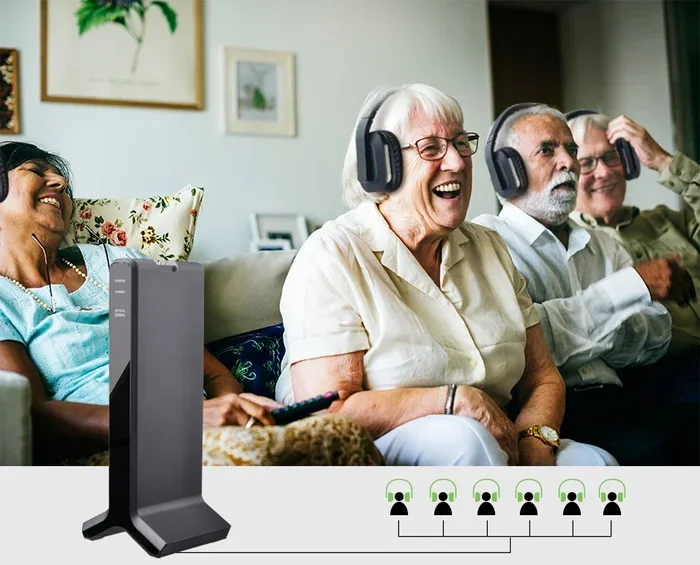
Most wireless TV headphones connect through a base station or transmitter. The transmitter plugs into your TV’s audio output. It then sends the audio signal wirelessly to your headphones. Some models connect directly via Bluetooth without needing a separate transmitter. The method depends on the type of wireless technology the headphones use.
Bluetooth models are the most popular for casual users. They are easy to set up and work with most modern TVs. RF models use a dedicated transmitter and offer a longer range. Infrared models require a clear line of sight between the transmitter and the headphones. Each approach has its place depending on your needs.
Types of Wireless TV Headphones
Not all wireless TV headphones are created equal. Different types use different technologies and serve different purposes. Understanding these differences helps you pick the right pair for your situation.
Bluetooth Wireless TV Headphones
Bluetooth wireless TV headphones are the most common type on the market today. They connect directly to your TV if your TV supports Bluetooth. If your TV does not have built-in Bluetooth, you can use a Bluetooth transmitter that plugs into your TV’s audio output. These headphones are convenient and easy to use.
One thing to watch out for is latency. Bluetooth has a slight delay, which can cause audio to be out of sync with video. For most casual viewing, this delay is barely noticeable. But for fast-action movies or sports, it might be a problem. Look for Bluetooth models that advertise low latency for the best experience.
RF (Radio Frequency) Wireless TV Headphones
RF wireless TV headphones use radio waves to transmit audio. They come with a dedicated transmitter that connects to your TV. These headphones offer a longer range than Bluetooth, often up to 150 feet or more. You can move around your home and still hear your TV clearly.
RF headphones also tend to have less latency than Bluetooth. This makes them a great choice for watching sports or action movies. However, they require a base station, which adds bulk to your setup. They are also more prone to interference from other wireless devices in your home.
Infrared Wireless TV Headphones
Infrared wireless TV headphones use light signals to transmit audio. They require a clear line of sight between the transmitter and the headphones. If something blocks the signal, you will experience audio dropouts. This can be annoying if you like to move around while watching TV.
Infrared headphones are less common today. They were popular in the past but have been mostly replaced by Bluetooth and RF options. They still work well in certain situations, especially for users who stay in one spot while watching TV. The sound quality is usually very good for the price.
Wi-Fi Wireless TV Headphones
Some wireless TV headphones connect to your home Wi-Fi network. These headphones stream audio directly from your TV or a streaming app. Wi-Fi models often support high-quality audio codecs, which means better sound. They also tend to have less latency than standard Bluetooth.
The downside is that Wi-Fi headphones can be more complex to set up. They also rely on your home network, so if your Wi-Fi is slow or unstable, your audio quality may suffer. These headphones are best for tech-savvy users who want premium sound quality.
Key Features to Look For
When shopping for wireless TV headphones, not all features are created equal. Some features matter more than others depending on how you plan to use them. Here are the most important things to consider.
Battery Life
Battery life is one of the most important factors. You do not want your headphones dying in the middle of a great movie. Most wireless TV headphones offer between 10 and 40 hours of battery life on a single charge. Rechargeable batteries are standard in most models today.
Look for headphones with at least 20 hours of battery life if you watch TV for long periods. Some models also let you use them while charging, which is a nice bonus. Always check the battery life rating before you buy.
Sound Quality
Sound quality can make or break your experience with wireless TV headphones. You want clear dialogue and good bass for movies and shows. Over-ear headphones generally sound better than on-ear or in-ear options. They also tend to be more comfortable for long viewing sessions.
Some models offer surround sound or virtual surround sound. This can make your TV watching feel more immersive. If you care about audio quality, look for headphones with good driver size and frequency response specs.
Comfort and Fit
Comfort matters a lot if you watch TV for hours at a time. Look for wireless TV headphones with cushioned ear cups and an adjustable headband. Lightweight designs are also a plus. Some models even have swivel ear cups that make it easy to wear them on one ear.
For elderly users or people who wear glasses, comfort is especially important. Over-ear headphones with soft padding work best in these cases. Try before you buy if possible, or check return policies so you can exchange them if they feel uncomfortable.
Volume Control and Hearing Support
Many wireless TV headphones come with independent volume control. This means you can set your volume without affecting the TV speakers. This is a huge plus for households with different hearing needs. Some models also include hearing aid compatibility or amplification features.
If you or a family member has hearing difficulties, look for headphones with built-in amplification. These TV headphones for hearing impaired users can make a big difference in the viewing experience. They boost dialogue clarity and reduce background noise.
Microphone and Call Features
Some wireless TV headphones include a built-in microphone. This lets you take phone calls or chat with family members without removing the headphones. It is a handy feature if you want an all-in-one solution for both TV watching and communication.
Not all models have this feature, so check the specifications if it matters to you. The microphone quality varies, so do not expect studio-quality calls from most TV headphones. But for casual conversations, they work just fine.
Top Benefits of Wireless TV Headphones
There are many reasons why people choose wireless TV headphones over traditional TV speakers or wired alternatives. Here are the biggest benefits you can expect.
Private Listening Without Disturbing Others
The number one reason people buy wireless TV headphones is private listening. You can turn the volume up as high as you want without bothering anyone else. This is perfect for late-night viewing or when family members are sleeping in other rooms.
Better Sound Quality Than Built-In TV Speakers
Most TV built-in speakers are not great. They sound thin and lack bass. Wireless TV headphones often deliver much better sound than your TV’s default speakers. They provide clearer dialogue, richer bass, and a more immersive experience overall.
Freedom to Move Around
With wireless TV headphones, you are not tied to your couch. You can move around the kitchen, do light chores, or even sit in a different room and still hear your TV clearly. This freedom is especially nice for people who like to stay active while watching shows.
Easy Setup and Use
Most wireless TV headphones are plug-and-play. You connect the transmitter, pair the headphones, and you are good to go. No complicated wiring or technical skills are needed. This makes them accessible for users of all ages and tech levels.
Comfort for Long Viewing Sessions
Watching a three-hour movie marathon? Wireless TV headphones are designed for comfort during long sessions. They are lighter than most gaming headsets and less bulky than older TV listening devices. You can wear them for hours without feeling uncomfortable.
Common Problems and How to Fix Them
Wireless TV headphones are not perfect. Like any technology, they come with a few common issues. Here are the problems users face most often and simple ways to fix them.
Audio Delay or Latency
Audio delay is the most common complaint with wireless TV headphones. You hear the sound a fraction of a second after the video action happens. This is especially noticeable with Bluetooth connections.
To fix this, look for headphones that support aptX Low Latency or similar codecs. You can also try adjusting the audio delay settings in your TV if your model supports it. RF headphones generally have less latency than Bluetooth, so they are a good alternative.
Short Battery Life
If your headphones die quickly, check if they are fully charged. Old batteries may also degrade over time. To extend battery life, reduce the volume slightly and turn off active noise cancellation if your model has it. Storing the headphones in their charging case when not in use also helps preserve battery health.
Signal Interference
Wireless interference can cause audio dropouts or static. This is more common with RF and Wi-Fi headphones. To reduce interference, keep the transmitter away from other wireless devices like routers or microwaves. Repositioning the transmitter can also help strengthen the signal.
Uncomfortable Fit
If your headphones hurt after a while, try adjusting the headband or swapping out the ear cushions. Some models come with different ear pad sizes. If the fit still feels wrong, consider switching to a different style. Over-ear headphones are generally more comfortable than on-ear or in-ear options for TV watching.
Connection Drops
Connection drops happen when the headphones lose their signal. This is common with Bluetooth when you move too far from the TV. To prevent this, stay within the recommended range of your headphones. For RF models, make sure there are no large metal objects blocking the signal path between the transmitter and the headphones.
Are Wireless TV Headphones Worth the Money?
The short answer is yes. Wireless TV headphones are worth it for most people. They offer convenience, better sound, and the freedom to watch TV without disturbing others. Whether you are a casual viewer or a dedicated movie watcher, they add real value to your home entertainment setup.
That said, not every model is worth buying. You should consider your specific needs, budget, and viewing habits before making a purchase. A budget pair of Bluetooth headphones might work perfectly fine for someone who watches TV for an hour a day. But a serious movie lover might need a premium RF or Wi-Fi model with better sound and less latency.
The key is to match the headphones to your lifestyle. Think about how often you will use them, where you will use them, and what features matter most to you. With the right pair, wireless TV headphones can transform your TV watching experience in a big way.
Comparison Table: Types of Wireless TV Headphones
| Type | Range | Latency | Setup | Best For |
|---|---|---|---|---|
| Bluetooth | 30 ft | Low to Medium | Easy | Casual viewers, short-range use |
| RF (Radio Frequency) | 150 ft | Low | Moderate | Active viewers, large homes |
| Infrared | 20 ft | Low | Easy | Stationary viewers |
| Wi-Fi | Full home | Low | Complex | Tech-savvy users, premium sound |
Quick Tips for Getting the Most Out of Wireless TV Headphones
- Charge fully before first use: This helps condition the battery and extends its overall lifespan.
- Keep the firmware updated: Many wireless TV headphones receive software updates that improve performance and fix bugs.
- Store them in the charging case: This prevents battery drain when you are not using them.
- Clean the ear pads regularly: Sweat and oils can degrade the cushioning over time.
- Use a dedicated transmitter: For the best audio quality, use the transmitter that comes with the headphones rather than relying on Bluetooth alone.
- Test the range in your home: Before committing to a model, check how far you can go before the signal drops.
Expert Insights on Wireless TV Headphones
Audio engineers and TV specialists agree that wireless TV headphones have improved dramatically in recent years. The technology has matured, and the common complaints from the past are largely addressed in modern models. Today’s wireless TV headphones offer sound quality that rivals many wired alternatives.
Experts also recommend considering your specific use case. If you need headphones for hearing support, look for models with built-in amplification and clarity enhancements. If you want the best sound for movies, prioritize low-latency connections and over-ear designs. And if budget is a concern, there are excellent options available at every price point.
The bottom line is that wireless TV headphones are no longer a niche product. They have become a mainstream solution for better TV audio. Whether you want privacy, better sound, or simply a more comfortable viewing experience, there is a pair of wireless TV headphones that fits your needs.
Key Takeaways
- Multiple types available: Bluetooth, RF, infrared, and Wi-Fi wireless TV headphones each have unique strengths.
- Clear audio is possible: Modern wireless TV headphones offer low latency and good sound quality for movies and shows.
- They suit different needs: From hearing-impaired users to late-night watchers, there is a pair for everyone.
- Battery life varies: Most rechargeable models last between 10 and 40 hours on a single charge.
- Price ranges widely: You can find solid options from under $30 to over $300 depending on features.
- Setup is usually simple: Most wireless TV headphones connect easily with minimal technical knowledge.
- They are worth it: For comfort, privacy, and better sound, wireless TV headphones deliver real value.
Conclusion
Wireless TV headphones are a fantastic addition to any home entertainment setup. They solve real problems like noise disturbance, poor TV speaker quality, and hearing difficulties. With so many types and price points available, there is truly something for everyone.
Whether you choose Bluetooth for simplicity, RF for range, or Wi-Fi for premium sound, the right pair of wireless TV headphones can change the way you watch TV. They offer freedom, comfort, and better audio in one convenient package.
If you have been on the fence about buying a pair, now is a great time to take the leap. The technology is reliable, the prices are competitive, and the benefits are clear. Wireless TV headphones are absolutely worth it for anyone who wants to elevate their TV watching experience.
Frequently Asked Questions
Can I use wireless TV headphones with any television?
Most wireless TV headphones work with standard TVs that have a 3.5mm audio output, optical port, or Bluetooth capability. If your TV does not have Bluetooth, you can use a Bluetooth transmitter that plugs into the audio output. This makes wireless TV headphones compatible with nearly any TV, even older models.
Do wireless TV headphones work for hearing-impaired users?
Yes, many wireless TV headphones are designed specifically for hearing-impaired users. These models include volume amplification, clarity enhancement, and independent volume control. They allow users to set their preferred listening level without affecting the TV speakers for other people in the room.
How far can I go from my TV while using wireless TV headphones?
The range depends on the type of headphones you have. Bluetooth models typically work up to 30 feet. RF wireless headphones can reach up to 150 feet or more. Wi-Fi models can work throughout your entire home. Always check the manufacturer’s range specifications before buying.
Are wireless TV headphones safe for long-term use?
Yes, wireless TV headphones are safe for long-term use. They emit low-level wireless signals that are well within safety standards. However, it is a good practice to take breaks during extended listening sessions. Over-ear headphones are generally more comfortable for long viewing than in-ear or on-ear models.
Can I charge wireless TV headphones while wearing them?
Some models allow you to use the headphones while they charge, but most require you to remove them from the charging base. It is best to check the product specifications before purchasing. Models with longer battery life reduce the need to charge during viewing sessions.
What is the average lifespan of wireless TV headphones?
Most wireless TV headphones last between 2 and 5 years with regular use. Battery degradation is the most common reason for replacement. To extend the lifespan, charge the headphones properly, store them in a cool dry place, and avoid dropping or exposing them to moisture.