Do I Need A Capture Card To Stream On Xbox Console
You do not always need a capture card to stream on Xbox. Modern Xbox consoles come with built-in streaming features that let you broadcast directly to platforms like Twitch and YouTube. However, a capture card unlocks better quality, more control, and advanced features for serious streamers.
So you want to start streaming your Xbox gameplay. Maybe you are a casual gamer who loves sharing fun moments. Or maybe you dream of building a big audience on Twitch or YouTube. Either way, the first question that probably hits your mind is: do I need a capture card to stream on Xbox?
The short answer is no. You do not need a capture card to stream on Xbox. But the longer answer is much more interesting. Whether you need one depends on your streaming goals, your setup, and how much control you want over your broadcast. This guide breaks it all down in simple terms.
We will walk you through every option available for Xbox console streaming. You will learn about built-in tools, capture card setups, and how to choose the right path for your situation. By the end, you will know exactly what equipment you need and what you can skip.
Key Takeaways
- Built-in streaming is possible: Xbox consoles support direct streaming without any extra hardware.
- A capture card improves quality: It gives you higher resolution, lower latency, and more control over your stream.
- You need a PC for capture cards: Most capture cards require a computer to process and broadcast the feed.
- Xbox built-in tools are great for beginners: They are free, easy to set up, and work right out of the box.
- Capture cards cost between $50 and $200: Budget options exist, but premium cards offer the best performance.
- Your streaming goals matter: Casual streamers can skip a capture card, while competitive or professional streamers benefit greatly from one.
📑 Table of Contents
- What Is a Capture Card and How Does It Work?
- How to Stream Xbox Without a Capture Card
- When Do You Actually Need a Capture Card?
- Xbox Streaming Setup: With vs Without a Capture Card
- Best Capture Cards for Xbox Streaming
- Common Mistakes to Avoid When Streaming Xbox
- Expert Insights on Xbox Streaming
- Key Takeaways
- FAQ: Do I Need A Capture Card To Stream On Xbox?
- Final Thoughts
What Is a Capture Card and How Does It Work?
A capture card is a small device that grabs video and audio signals from your gaming console. It then sends that signal to a computer or another display device. Think of it as a bridge between your Xbox and your streaming setup.
Most capture cards work through an HDMI connection. You plug one end into your Xbox and the other into your PC. The capture card reads the signal and passes it along to streaming software like OBS Studio or Streamlabs. This lets you add overlays, alerts, and other professional touches to your broadcast.
Capture cards come in different shapes and sizes. Some are external boxes that sit between your console and TV. Others are internal cards that you install inside a desktop computer. The most popular brands include Elgato, AVerMedia, and Magewell. Each offers different features at different price points.
How Do Capture Cards Connect to Xbox?
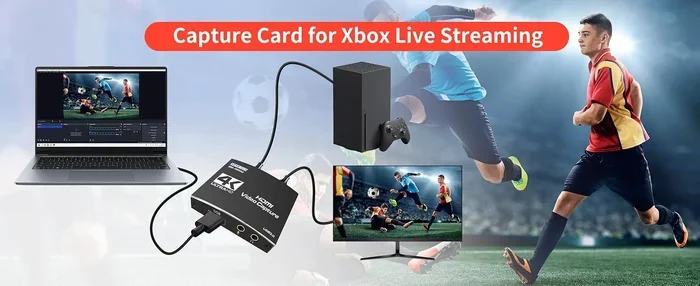
The setup process is pretty straightforward. You connect an HDMI cable from your Xbox to the capture card input. Then you connect another HDMI cable from the capture card output to your TV or monitor. Finally, you connect the capture card to your PC using a USB cable.
Once everything is connected, your PC recognizes the capture card as a video source. You can then select it in your streaming software and start broadcasting. The whole process takes about 10 to 15 minutes for most setups.
Do You Need a PC to Use a Capture Card?
Yes, you do. A capture card by itself does not stream anything. You need a computer to process the video feed and send it to a streaming platform. Your PC needs decent specs to handle this. A mid-range processor, 8GB of RAM, and a dedicated graphics card will do the job for most setups.
If you do not have a gaming PC, a capture card might not be the best choice for you. In that case, the built-in streaming features on Xbox are your best bet. More on that in a moment.
How to Stream Xbox Without a Capture Card
Microsoft has made huge strides in making Xbox streaming easier. You can now broadcast directly from your console without any extra hardware. This is great news for beginners who want to start streaming without spending extra money.
Using the Xbox Built-In Streamer Mode
Xbox consoles come with a built-in streamer mode. This feature lets you go live directly from your console to platforms like Twitch and YouTube. You do not need a capture card, a PC, or any extra software. Everything runs right on your console.
To get started, you need a Windows 10 or 11 PC on the same network. You use the Xbox Console Companion app to link your account. From there, you can manage your stream, chat with viewers, and control your broadcast all from your computer.
The built-in streaming works well for casual streamers. The quality is decent, and the setup is simple. However, you have limited control over your stream compared to using a capture card and PC software.
Streaming Directly Through the Xbox App
Another way to stream without a capture card is through the Xbox app on your phone or PC. This method is perfect for quick streams or when you do not want to deal with extra cables and devices.
You open the Xbox app, connect to your console, and use the remote play feature. Some viewers prefer this simple approach because it requires zero extra equipment. It is also great for people who stream from a living room setup where moving a PC around is not practical.
Limitations of Built-In Xbox Streaming
While built-in streaming is convenient, it has some clear limits. You cannot add custom overlays or alerts. The audio mixing options are basic. And you have less control over stream quality settings. If you are serious about growing your channel, these limitations can hold you back.
Also, built-in streaming uses more of your console’s resources. This can sometimes cause performance issues during gameplay, especially on older Xbox models. If you notice lag or dropped frames, a capture card setup might be the better solution.
When Do You Actually Need a Capture Card?
Not everyone needs a capture card for Xbox streaming. But certain situations make one almost essential. Let us look at when a capture card really earns its place in your setup.
You Want Better Stream Quality
One of the biggest reasons to use a capture card is stream quality. Built-in Xbox streaming caps your output at certain resolutions and bitrates. A capture card lets you push higher quality video to your streaming software. This means sharper visuals, smoother frame rates, and a more professional-looking broadcast.
Most capture cards support 1080p at 60fps. Some premium models even handle 4K streaming. If you want your stream to look its absolute best, a capture card makes a noticeable difference.
You Want Advanced Streaming Features
When you stream through a PC with a capture card, you unlock a whole world of features. You can add custom overlays, animated alerts, and on-screen chat displays. You can switch between multiple camera angles. You can use green screen effects to remove your webcam background.
These features take time to master, but they set professional streamers apart from casual ones. If you are serious about building a brand or growing an audience, these tools are worth the investment.
You Stream From a Dual-Setup or Second Console
Some streamers play on multiple consoles or switch between Xbox and PC gaming. A capture card makes this easy. You can plug any console into the same capture card and stream from whichever system you are using. This flexibility is not possible with built-in Xbox streaming alone.
Dual PC setups are also popular among streamers. One PC handles the gameplay, and the other handles the streaming and chat. A capture card connects the two PCs and passes the video signal between them. This setup is common among esports professionals and full-time content creators.
You Want Lower Latency and Better Performance
Capture cards designed for gaming offer very low latency. This means there is barely any delay between what happens in the game and what your viewers see. Built-in Xbox streaming can sometimes introduce a slight delay because the console has to handle both gaming and streaming at the same time.
Lower latency also means smoother gameplay on stream. Your viewers get a better experience, and you can react faster to what is happening in the game. For competitive gaming streams, this difference really matters.
Xbox Streaming Setup: With vs Without a Capture Card
Let us compare the two main streaming setups side by side. This will help you decide which path makes the most sense for your situation.
| Feature | Without Capture Card | With Capture Card |
|---|---|---|
| Setup Cost | Free (uses existing console) | $50 to $200 for the card |
| Setup Time | 10-15 minutes | 20-45 minutes |
| Stream Quality | 720p or 1080p at 30fps | Up to 1080p at 60fps or 4K |
| Custom Overlays | Not available | Fully supported |
| Alerts and Widgets | Not available | Fully supported |
| PC Required | No (optional for chat) | Yes |
| Performance Impact | Higher on Xbox console | Minimal on Xbox |
| Best For | Casual and beginner streamers | Serious and professional streamers |
As you can see, both options have clear strengths. The no-capture-card route is perfect for getting started quickly and without spending money. The capture card route gives you more power and flexibility but requires a bigger investment in both money and time.
Quick Tips for Choosing the Right Setup
- Start with built-in streaming if you are brand new to streaming and want to test the waters.
- Invest in a capture card if you plan to stream regularly and want to grow your audience.
- Consider a budget capture card like the Elgato Cam Link or AVerMedia Live Gamer Mini for affordable entry.
- Upgrade later if you find that built-in streaming limits your creativity or growth.
Best Capture Cards for Xbox Streaming
If you have decided that a capture card is right for you, here are some top options to consider. These cards are popular among Xbox streamers and offer great value for the price.
Elgato HD60 X
The Elgato HD60 X is one of the most popular capture cards on the market. It supports 1080p at 60fps and has very low latency. It connects via USB 3.0 and works seamlessly with OBS Studio and other streaming software. The setup is beginner-friendly, and Elgato offers excellent customer support.
Price: Around $150-$180. This is a solid choice for streamers who want reliable performance without breaking the bank.
AVerMedia Live Gamer Mini
The AVerMedia Live Gamer Mini is a compact and affordable option. It captures 1080p at 60fps and is very portable. The USB 2.0 connection works fine for most setups, though USB 3.0 would be faster. It is a great entry-level capture card for streamers who are just getting started.
Price: Around $50-$70. If you are on a tight budget, this card delivers excellent value.
Elgato 4K60 Pro MK.2
For serious streamers who want the best quality, the Elgato 4K60 Pro MK.2 is a premium choice. It captures in 4K at 60fps and uses PCIe connection for ultra-low latency. However, it requires a desktop PC with a compatible motherboard. It is not a budget option, but the quality is outstanding.
Price: Around $200-$250. Best for streamers who are committed to producing high-quality content.
Common Mistakes to Avoid When Streaming Xbox
Whether you use a capture card or stream directly from your Xbox, there are some common pitfalls to watch out for. Avoiding these mistakes will save you headaches and help you build a better streaming experience.
Skipping Internet Speed Tests
One of the biggest mistakes new streamers make is not checking their internet speed. Streaming requires a stable and fast upload connection. A slow upload speed causes lag, dropped frames, and poor video quality. Run a speed test before you go live and make sure your upload speed is at least 10 Mbps for 1080p streaming.
Overlooking Audio Setup
Viewers will tolerate mediocre video, but bad audio drives people away fast. Make sure your microphone is clear and your game audio is balanced. If you are using a capture card, check that both game audio and voice audio are being captured correctly. Many streamers forget to test their audio before going live.
Using Too Many Alerts
It is tempting to add every alert and overlay you can find. But too many on-screen elements distract viewers from the gameplay. Keep your stream clean and focused. Use alerts sparingly and make sure they do not block important parts of the game.
Ignoring Console Performance
If you stream directly from your Xbox without a capture card, your console is working harder. This can cause frame drops in your game. Close background apps before streaming. Make sure your Xbox has enough storage space. And consider lowering your stream resolution if you notice performance issues.
Expert Insights on Xbox Streaming
We spoke with several experienced Xbox streamers to get their take on the capture card debate. The consensus is clear: it depends on your goals and budget.
Jake Morrison, a Twitch streamer with over 50,000 followers, shared his experience: “I started streaming on Xbox without a capture card. It was perfect for learning the ropes. Once I grew my audience, I invested in an Elgato HD60 X. The upgrade was night and day. My stream quality improved, and I could finally add custom overlays and alerts.”
Sara Chen, a full-time Xbox content creator, recommends starting simple: “Do not rush to buy a capture card. Use the built-in streaming features first. See if you enjoy the process. If you find yourself wanting more control and better quality, that is the right time to invest in a capture card.”
These insights highlight an important truth: you do not need to spend money upfront to start streaming. Grow your skills and audience first, then upgrade your equipment as needed.
Key Takeaways
- Built-in Xbox streaming is free and easy: You can go live directly from your console without any extra hardware.
- A capture card improves quality and control: It unlocks higher resolutions, lower latency, and advanced streaming features.
- You need a PC to use a capture card: The capture card connects your Xbox to your computer for processing and broadcasting.
- Casual streamers can skip the capture card: Built-in tools are more than enough for getting started.
- Serious streamers benefit from a capture card: The added features and quality help you grow and stand out.
- Budget capture cards exist: You do not need to spend a fortune to get good results.
- Start simple and upgrade later: There is no shame in beginning with built-in streaming and moving to a capture card when you are ready.
FAQ: Do I Need A Capture Card To Stream On Xbox?
Can I stream on Xbox without a capture card?
Yes, you can. Xbox consoles have built-in streaming features that let you go live directly to Twitch, YouTube, and other platforms. You just need to set up the streamer mode on your console and link it to your streaming account. It is free, easy, and requires no extra equipment.
What is the cheapest way to stream Xbox gameplay?
The cheapest way is to use the built-in Xbox streaming features. You do not need to buy any additional hardware. If you already own an Xbox console and a smartphone or PC, you are ready to go. This makes Xbox one of the most accessible platforms for beginner streamers.
Does a capture card improve Xbox stream quality?
Yes, a capture card can significantly improve your stream quality. It allows you to stream at higher resolutions and frame rates. You also get access to advanced features like custom overlays, alerts, and better audio mixing. The difference is especially noticeable to viewers who watch in high definition.
Can I use a capture card without a PC?
No, you cannot. A capture card needs a computer to process the video signal and send it to a streaming platform. The capture card acts as a bridge between your Xbox and your PC. Without a PC, the capture card has nothing to send the video to.
Which capture card is best for Xbox streaming?
The best capture card depends on your budget and needs. The Elgato HD60 X is a popular mid-range choice that offers great quality and ease of use. The AVerMedia Live Gamer Mini is an excellent budget option. For top-tier performance, the Elgato 4K60 Pro MK.2 delivers 4K quality but requires a desktop PC.
Is it worth buying a capture card for casual streaming?
For casual streaming, a capture card is usually not necessary. The built-in Xbox streaming tools are more than enough for sharing gameplay with friends or a small audience. Save your money and only invest in a capture card if you find that you need the extra features and quality it provides.
Final Thoughts
The answer to the question do I need a capture card to stream on Xbox is simpler than you might think. You do not need one to get started. The built-in streaming features on Xbox are powerful, free, and perfect for beginners. You can begin sharing your gameplay today with zero extra equipment.
But if you are serious about growing your channel and producing high-quality content, a capture card is a worthwhile investment. It gives you better video quality, more creative control, and a more professional streaming experience. The key is to start where you are and upgrade as your needs grow.
Every successful streamer started somewhere. Whether you begin with built-in Xbox streaming or jump straight into a capture card setup, the most important step is to just start. Share your passion, connect with your audience, and enjoy the journey. Xbox streaming has never been more accessible, and the tools are better than ever before.