Can You Pair 2 Qfx Speakers Together for Better Sound
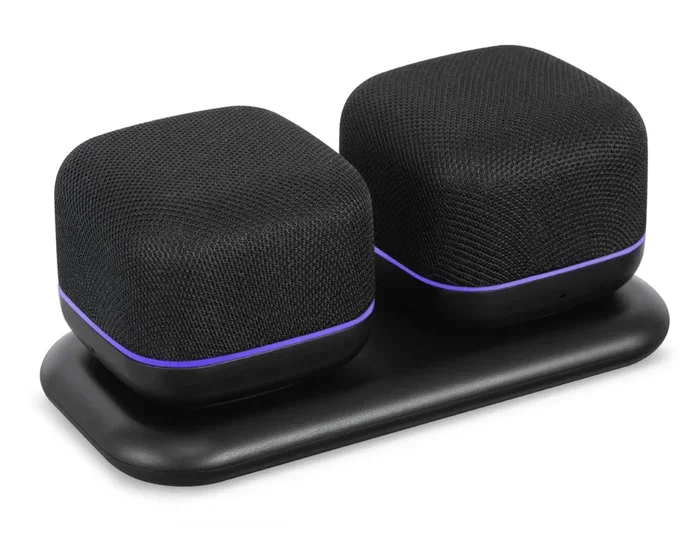
Yes, you can pair 2 QFX speakers together to create a stereo setup or expand your sound coverage. Many QFX Bluetooth speakers support wireless pairing, allowing you to enjoy richer, fuller audio for parties, home listening, or outdoor events. This guide walks you through the exact steps, compatible models, and pro tips to get the best results.
Have you ever wondered if you can connect two QFX speakers together for a bigger, richer sound? The short answer is yes. Many QFX speaker models let you pair two units wirelessly, giving you stereo sound or just louder volume. Whether you are hosting a backyard party or upgrading your home listening setup, pairing two speakers can make a noticeable difference.
In this guide, we will walk you through everything you need to know. We will cover how pairing works, which QFX models support it, step-by-step instructions, and common mistakes to avoid. By the end, you will feel confident setting up your own dual-speaker system.
QFX is a well-known brand in the portable audio world. They make affordable speakers that deliver solid sound quality for the price. Their speakers are popular for casual listening, outdoor trips, and small gatherings. The ability to pair two units together adds real versatility to the experience.
Key Takeaways
- Pairing is possible: Most QFX Bluetooth speakers support dual-speaker pairing for stereo sound.
- Simple process: You can pair two speakers using Bluetooth or a dedicated pairing button in just a few steps.
- Better audio quality: Two speakers deliver wider soundstage, deeper bass, and improved volume.
- Check compatibility: Not all QFX models support pairing, so verify your specific model first.
- Watch for common issues: Distance, interference, and firmware updates can affect pairing success.
- Pro tips help: Placement, positioning, and sync settings make a big difference in sound quality.
📑 Table of Contents
- Understanding QFX Speakers and Their Pairing Capabilities
- How to Pair 2 QFX Speakers Together
- Benefits of Pairing Two QFX Speakers Together
- Compatible QFX Speaker Models for Pairing
- Common Problems When Pairing QFX Speakers (and How to Fix Them)
- Tips for Getting the Best Sound from Paired QFX Speakers
- Quick Tips for QFX Speaker Pairing Success
- Common Mistakes to Avoid When Pairing QFX Speakers
- Expert Insights on Dual QFX Speaker Setups
- Key Takeaways
- Conclusion
Understanding QFX Speakers and Their Pairing Capabilities
QFX has built a strong reputation in the portable Bluetooth speaker market. Their devices range from compact pocket-sized units to larger speakers with deep bass. Many people choose QFX because of the balance between price and performance. The brand offers wireless connectivity options that make speaker pairing straightforward for most users.
Not every QFX speaker supports pairing with another unit. The feature depends on the specific model and its firmware. Older models may lack this capability entirely. Newer models from the QFX BT series and higher-end portable speakers usually include dual-speaker pairing support. Before you attempt to pair two speakers, check your user manual or the QFX product page for confirmation.
How Wireless Speaker Pairing Works
Wireless speaker pairing connects two audio devices to work as a single system. One speaker acts as the primary unit. It receives the audio signal from your phone or source device. The second speaker syncs with the first one to reproduce the same sound. This creates a wider soundstage and fills a room more evenly.
The pairing process uses Bluetooth technology in most cases. Some QFX models may also support a dedicated button or app-based connection. The two speakers communicate with each other to stay in sync. This sync process ensures that the audio plays in perfect time on both units. Without proper sync, you might hear echoes or delays, which ruins the listening experience.
Stereo Mode vs. Dual Volume Mode
When you pair two speakers, you typically get two modes to choose from. Stereo mode splits the audio channels. The left speaker plays the left channel, and the right speaker plays the right channel. This creates a true surround-like effect. It makes music sound wider and more immersive.
Dual volume mode plays the same audio on both speakers. This simply makes the sound louder. It is useful when you need maximum volume for a large outdoor area. Some QFX models let you switch between these modes easily. Check your speaker controls or the QFX app if available.
How to Pair 2 QFX Speakers Together
The pairing process is simple once you know the steps. Most QFX speakers follow a similar procedure. Below, we break it down into clear, easy-to-follow instructions. Make sure both speakers are fully charged before you start.
Step-by-Step Pairing Guide
Follow these steps to connect two QFX speakers wirelessly:
- Turn on both speakers. Press and hold the power button on each unit until the LED light flashes.
- Enter pairing mode. On most QFX models, press and hold the Bluetooth or pairing button for 3 to 5 seconds. The flashing light means the speaker is ready to connect.
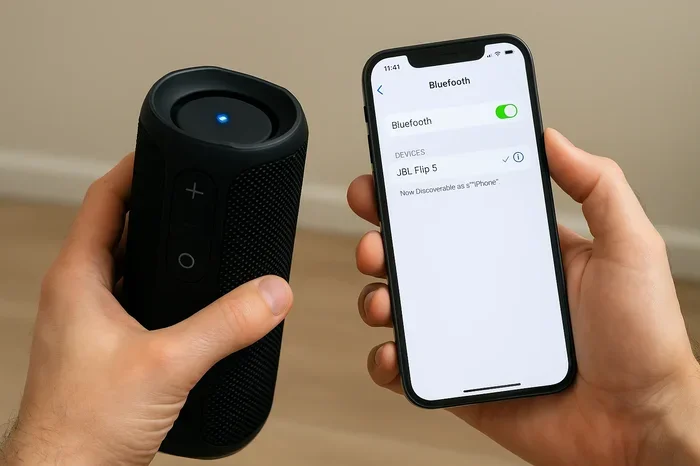
- Connect the first speaker to your device. Go to your phone or tablet Bluetooth settings. Find the first QFX speaker and tap to connect.
- Activate the second speaker. Once the first speaker is connected, press the pairing button on the second speaker. It should automatically detect the first speaker.
- Wait for the sync confirmation. Both speakers will play a tone or change their LED pattern to show they are paired.
- Test the audio. Play music and listen to both speakers. Adjust the volume and positioning as needed.
If your speakers do not auto-pair, try pressing the pairing button on both units at the same time. Some QFX models require this method. Always refer to your specific model’s manual for exact instructions.
Using the QFX App for Pairing
Some newer QFX speakers work with a companion app. The app gives you more control over your speaker settings. You can manage pairing, adjust EQ settings, and update firmware through the app. Download the QFX app from the Google Play Store or Apple App Store. Follow the on-screen prompts to connect both speakers. The app makes the process even smoother than using Bluetooth settings alone.
Benefits of Pairing Two QFX Speakers Together
Pairing two QFX speakers offers real advantages over using a single unit. Here is why many users choose to set up a dual-speaker system.
Louder and Fuller Sound
The most obvious benefit is volume. Two speakers produce significantly more sound than one. This is perfect for outdoor gatherings, pool parties, or large rooms. The audio feels richer and more full-bodied when it comes from two sources instead of one.
Wider Soundstage
Stereo pairing creates a wider listening area. You can hear more detail in the music. Instruments and vocals feel more separated and clear. This is especially noticeable with songs that have complex arrangements. The stereo effect makes listening feel more professional and immersive.
Better Coverage for Large Spaces
A single speaker may not reach every corner of a large room or outdoor area. Two speakers placed in different spots cover more ground evenly. You avoid dead zones where the sound is weak. This makes paired speakers ideal for backyard barbecues, beach trips, or open-plan living spaces.
Enhanced Bass and Depth
When two speakers work together, the bass response can improve. The low frequencies reinforce each other, giving you deeper, more impactful sound. This is a big plus for hip-hop, electronic music, and action movie soundtracks. The overall audio experience feels more balanced and complete.
Compatible QFX Speaker Models for Pairing
Not all QFX speakers support pairing with another unit. Here are some of the most popular models that do offer this feature.
| Model | Pairing Support | Battery Life | Water Resistance |
|---|---|---|---|
| QFX FLOW 2 | Yes | 10 hours | IPX5 |
| QFX BULLET 5 | Yes | 12 hours | IPX6 |
| QFX SONIC BOOM | Yes | 8 hours | IPX4 |
| QFX POP 2 | Yes | 6 hours | IPX5 |
| QFX TOUCH 3 | Yes | 14 hours | IPX7 |
Always double-check your specific model before purchasing. QFX updates their lineup regularly, and newer models may add improved pairing features. Visit the official QFX website or contact their customer support if you are unsure about your model.
Common Problems When Pairing QFX Speakers (and How to Fix Them)
Even with a simple process, things can go wrong sometimes. Here are the most common issues users face when pairing two QFX speakers and how to solve them.
Speakers Will Not Connect to Each Other
This is the most frequent problem. Usually, it happens because one speaker is still connected to a previously paired device. Reset both speakers by turning them off and back on. Then try the pairing process again. Make sure no other Bluetooth devices are interfering during the setup.
Audio Delay or Echo Between Speakers
If you hear an echo or delay, the speakers are out of sync. Move the speakers closer together during the initial pairing process. Once paired, you can move them to your desired positions. Also, check for Bluetooth interference from other devices like Wi-Fi routers or microwaves.
One Speaker Is Quieter Than the Other
Volume imbalance between paired speakers can be frustrating. Check the placement of both speakers. Obstacles like walls or furniture can block sound from one unit. Also, make sure both speakers have the same firmware version. An outdated firmware on one speaker can cause volume differences.
Paired Speakers Keep Disconnecting
Intermittent disconnections usually point to a weak Bluetooth signal. Stay within the recommended range, which is typically 30 feet or less. Remove any physical barriers between the speakers. Also, keep your source device close to the primary speaker for a stable connection.
Tips for Getting the Best Sound from Paired QFX Speakers
Once you have successfully paired your two QFX speakers, a few smart adjustments can take your sound to the next level.
Placement Matters
Where you put your speakers affects the sound quality a lot. Place them at ear level when possible. Angle them slightly inward toward your listening area. Keep them at least 3 to 5 feet apart for the best stereo effect. Avoid placing them in corners or against walls, as this can muddy the bass.
Keep Firmware Updated
QFX releases firmware updates that improve Bluetooth stability and audio performance. Check the QFX app or website regularly for updates. An updated speaker pairs more reliably and may have bug fixes that improve sound quality.
Experiment with Stereo Positioning
Try different speaker placements to find the sweet spot. Move one speaker slightly forward or back. Adjust the angle a few degrees. Small changes can make a big difference in how the sound fills the room. Take your time and listen carefully as you adjust.
Use High-Quality Audio Files
The quality of your audio source matters. Streaming services use compressed audio, which sounds fine for casual listening. But if you want the best possible sound from your paired QFX speakers, use lossless audio files or high-bitrate streams. The difference is especially noticeable with two speakers working together.
Charge Both Speakers Equally
Uneven battery levels can affect performance. A low battery speaker may produce weaker sound or distort at higher volumes. Charge both speakers to full before each use. This ensures consistent output from both units throughout your listening session.
Quick Tips for QFX Speaker Pairing Success
- Always start with fully charged speakers to avoid interruptions during pairing.
- Reset both speakers if the pairing process fails the first time.
- Keep your phone close to the primary speaker during setup.
- Turn off other Bluetooth devices temporarily to reduce interference.
- Check for firmware updates before attempting to pair.
- Place speakers in an open area away from walls and obstacles for the best sound.
- Use the QFX app if your model supports it for easier management.
Common Mistakes to Avoid When Pairing QFX Speakers
Avoid these common errors that can ruin your pairing experience.
- Skipping the reset step: A simple reset solves most pairing issues. Do not skip it.
- Pairing in a crowded Bluetooth environment: Busy areas with many wireless signals cause interference. Find a quiet spot for setup.
- Ignoring firmware updates: Outdated software can prevent successful pairing and cause audio glitches.
- Placing speakers too far apart too soon: Start close and move them apart gradually after pairing.
- Assuming all models support pairing: Always verify compatibility before you buy or attempt to pair.
- Not reading the manual: The user manual contains model-specific instructions that can save you time and frustration.
Expert Insights on Dual QFX Speaker Setups
Audio enthusiasts and sound engineers often recommend dual-speaker setups for portable Bluetooth devices. The reason is simple: two speakers create a more natural listening experience. Our ears expect sound to come from different directions, and a single speaker cannot replicate that. When you pair two QFX speakers, you get closer to that natural feel.
The QFX brand has made significant improvements in their wireless connectivity over the years. Earlier models sometimes struggled with sync issues. Newer versions handle pairing much more reliably. If you are considering a dual setup, look for models released in the last two years for the best experience.
One thing to keep in mind is that paired speakers do not replace a full home audio system. They are a portable, convenient solution that delivers surprisingly good sound. For casual listening, outdoor events, and small gatherings, a pair of QFX speakers hits the sweet spot between quality and portability.
Key Takeaways
- Pairing is possible: Most QFX Bluetooth speakers support dual-speaker pairing for stereo sound.
- Simple process: You can pair two speakers using Bluetooth or a dedicated pairing button in just a few steps.
- Better audio quality: Two speakers deliver wider soundstage, deeper bass, and improved volume.
- Check compatibility: Not all QFX models support pairing, so verify your specific model first.
- Watch for common issues: Distance, interference, and firmware updates can affect pairing success.
- Pro tips help: Placement, positioning, and sync settings make a big difference in sound quality.
Conclusion
Pairing 2 QFX speakers together is a great way to elevate your audio experience. Whether you want louder volume, wider stereo sound, or better coverage for your outdoor events, the process is straightforward and well worth the effort. Most modern QFX models support wireless pairing, and the steps to connect them are simple and quick.
Remember to check your specific model for compatibility, keep your firmware updated, and follow the pairing steps carefully. Avoid common mistakes like skipping resets or pairing in crowded Bluetooth environments. With the right setup and placement, two QFX speakers can deliver sound that rivals much more expensive audio systems.
Now that you know how to pair your QFX speakers, go ahead and give it a try. The improvement in sound quality is immediate and satisfying. Whether you are at home, at the beach, or hosting a get-together, your paired QFX speakers will deliver the audio experience you deserve.
Frequently Asked Questions
Can any QFX speaker be paired with another QFX speaker?
No, not all QFX models support pairing. Check your specific model’s specifications or user manual before attempting to pair two speakers. Newer models from the QFX BT series and portable speakers are more likely to support this feature.
How far apart can I place my paired QFX speakers?
Keep both speakers within 30 feet of each other for a stable connection. You can move them further apart after pairing, but too much distance may cause disconnections or audio delays. For the best experience, place them 3 to 10 feet apart in your listening area.
Can I pair a QFX speaker with a speaker from a different brand?
Generally, QFX speakers only pair with other QFX speakers of the same brand. Bluetooth pairing protocols vary between manufacturers, and cross-brand pairing is not officially supported. Stick to pairing two QFX units for reliable results.
Will pairing two QFX speakers drain the battery faster?
Yes, running two speakers simultaneously will use more battery than a single unit. Plan for shorter playback times or keep charging cables nearby for longer events. Fully charging both speakers before use helps maximize your listening time.
Can I pair more than two QFX speakers together?
Most QFX speakers only support pairing two units at a time. Some models may allow connecting to a third device separately, but a three-speaker setup is not standard. Check your specific model’s documentation for details on multi-speaker capabilities.
Do I need the QFX app to pair two speakers together?
No, the app is not required for basic pairing. Most QFX speakers use Bluetooth to connect two units directly. However, the QFX app can make the process easier and gives you access to additional settings like EQ adjustments and firmware updates.