Can I Make My Speakers Bluetooth And How Easy It Is
Yes, you can make your speakers Bluetooth with a few simple methods, and it is easier than most people think. Whether you have a wired speaker system or a portable setup, adding Bluetooth connectivity opens up a world of wireless music streaming. This guide walks you through every option, from Bluetooth adapters to DIY solutions, so you can enjoy wireless audio without buying a whole new speaker system.
Have you ever looked at your trusty old speakers and wished you could stream music from your phone without any wires? Maybe you have a great sound system sitting in the living room, but it only has a cable input. The good news is that can I make my speakers Bluetooth is a question with a very simple answer: yes, you absolutely can.
Adding Bluetooth connectivity to your existing speakers is one of the easiest and most affordable upgrades you can make. You do not need to be a tech expert. You do not need to buy expensive new equipment. In most cases, all you need is a small adapter that plugs right into your speaker. Within minutes, you will be streaming music from your phone, tablet, or laptop without a single cable holding you back.
This guide covers every method you can use to make your speakers wireless. We will walk through Bluetooth adapters, transmitter kits, and even some DIY tricks. We will also talk about audio quality, range, and common pitfalls to avoid. By the end, you will know exactly which option works best for your setup and budget.
Key Takeaways
- Bluetooth adapters are the easiest and most affordable way to add wireless streaming to any speaker with a 3.5mm or RCA input.
- You do not need to replace your old speakers to enjoy modern wireless audio technology and seamless music streaming.
- Bluetooth range typically reaches 30 feet, giving you freedom to move around your room or backyard while listening.
- Audio quality depends on the Bluetooth codec your adapter supports, with aptX and LDAC offering near-lossless sound.
- Common mistakes like poor pairing or interference can be avoided with a few simple setup tips.
- Built-in Bluetooth speakers offer convenience but retrofitting your existing setup is more cost-effective and eco-friendly.
- Pairing takes under two minutes once you have the right adapter, making the whole process quick and painless.
📑 Table of Contents
- What Does It Mean to Make Speakers Bluetooth?
- Why You Should Make Your Speakers Wireless
- Methods to Make Your Speakers Bluetooth
- Bluetooth Adapter vs. Built-in Bluetooth Speakers
- Tips for Best Wireless Audio Quality
- Common Mistakes to Avoid When Bluetooth-ifying Your Speakers
- Quick Tips for a Smooth Setup
- How to Pair Your Bluetooth Adapter Step by Step
- Expert Insights on Wireless Speaker Upgrades
- Final Thoughts
What Does It Mean to Make Speakers Bluetooth?
When people ask if they can make their speakers Bluetooth, they want to know how to add wireless streaming capability to a speaker that does not have it built in. Traditional speakers use wires to connect to a music source. A Bluetooth speaker receives audio signals through radio waves, so there are no cables between your phone and the speaker.
The process of adding Bluetooth to a non-wireless speaker involves using a small electronic device. This device acts as a bridge between your phone and your speaker. It receives the Bluetooth signal and converts it into an audio output that your speaker can understand. Think of it like a translator that speaks two different languages.
The most common connection types on older speakers include a 3.5mm aux jack, RCA ports, or even a USB input. Most Bluetooth adapters support one or more of these connection types. This means almost any speaker made in the last 30 years can be upgraded to wireless audio streaming.
How Bluetooth Technology Works for Speakers
Bluetooth technology uses short-range radio waves to transmit audio data between devices. When you press play on your phone, the audio signal travels through the air to your Bluetooth adapter. The adapter then sends the signal to your speaker through a cable or aux input. The whole process happens in milliseconds, so there is virtually no delay.
Different versions of Bluetooth offer different speeds and ranges. Bluetooth 5.0 and newer versions provide stronger connections and wider coverage. If you are buying a Bluetooth adapter, look for one that supports at least Bluetooth 4.0 or higher for the best performance.
Why You Should Make Your Speakers Wireless
There are so many reasons to add wireless connectivity to your speaker setup. Let us look at the biggest benefits that make this upgrade worth your time.
Freedom of movement is the number one reason people love Bluetooth speakers. You can walk around your house, sit on the porch, or even go into the kitchen while your music keeps playing. No more sitting frozen next to your speaker because the cord is too short.
Convenience is another huge factor. You can pair your phone in seconds. You can switch between devices without unplugging and replugging cables. Multiple people can take turns playing music from their own phones. It makes gatherings and parties so much more fun.
Cost savings should not be overlooked either. A good Bluetooth adapter costs between $15 and $50. A brand-new wireless speaker system can cost hundreds of dollars. Retrofitting your current speakers lets you keep the sound quality you already love while adding modern features.
Eco-friendliness is a bonus too. Instead of throwing away perfectly good speakers, you extend their life with a simple adapter. This reduces electronic waste and saves you money at the same time.
Methods to Make Your Speakers Bluetooth
Now let us get into the actual steps. There are several ways to add Bluetooth to your speakers, and each method works better for different setups.
Method 1: Bluetooth Adapter (The Easiest Option)
A Bluetooth adapter is a small dongle or box that connects to your speaker and receives wireless signals from your phone. This is by far the most popular method because it is simple, affordable, and works with almost any speaker.
Here is how it works. You plug the adapter into your speaker’s audio input. Then you pair the adapter with your phone through Bluetooth settings. Once paired, any audio from your phone streams wirelessly to the adapter and then to your speaker.
Look for adapters that support aptX or LDAC codecs for better audio quality. These codecs compress audio less, which means the sound stays closer to the original quality. Cheap adapters without good codecs may produce lower sound quality, so read reviews before buying.
Popular brands like TaoTronics, Avantree, and 1Mii make reliable Bluetooth adapters. Most of these cost under $40 and come with cables to fit different speaker inputs.
Method 2: Bluetooth Transmitter and Receiver Combo
A Bluetooth transmitter and receiver kit gives you more flexibility than a simple adapter. These kits usually come with two devices. One acts as a transmitter (sends audio from your phone to the speaker). The other acts as a receiver (receives Bluetooth signals and outputs them through a cable).
This method is great if you want to use your Bluetooth adapter with multiple speaker systems. You can also use the transmitter to add Bluetooth to devices like TVs or computers that do not have built-in wireless capability.
The setup process is similar to the adapter method. You plug the receiver into your speaker. You pair it with your phone. Then you enjoy wireless audio streaming. The main advantage is versatility. You get two devices in one package.
Method 3: Bluetooth Speaker Dock or Cradle
Some companies make Bluetooth speaker docks designed to hold your existing speaker and add wireless capability. These are less common but can work well for certain speaker models. They essentially enclose your speaker and add a Bluetooth receiver inside the housing.
This method works best for portable speakers that have a charging dock or cradle. You place your speaker in the dock, and the dock handles the Bluetooth connection. However, this option limits your speaker choices and may not work with all models.
Method 4: Smart Speaker Replacement (For Full Upgrade)
If your current speakers are very old or low quality, you might consider replacing them with a smart speaker that has Bluetooth built in. Devices like the Amazon Echo or Google Nest Audio offer both Bluetooth streaming and voice assistant features.
This is not technically “making your speakers Bluetooth,” but it achieves the same goal of wireless audio. The tradeoff is cost. Smart speakers range from $30 to $200 or more. However, they offer features that Bluetooth adapters cannot, like voice control and smart home integration.
Bluetooth Adapter vs. Built-in Bluetooth Speakers
When deciding how to get wireless audio, you have two main paths. You can add a Bluetooth adapter to your current speakers, or you can buy new speakers with built-in Bluetooth. Both options have pros and cons.
| Feature | Bluetooth Adapter | Built-in Bluetooth Speaker |
|---|---|---|
| Cost | $15 to $50 | $30 to $300+ |
| Setup Time | Under 5 minutes | Instant (no setup) |
| Keeps Existing Sound Quality | Yes | Varies by model |
| Portability | Depends on speaker | Usually portable |
| Battery Required | No (plugs into speaker) | Yes (needs charging) |
| Compatibility | Works with most speakers | Only works with that speaker |
| Extra Features | Basic wireless streaming | Voice assistants, smart features |
For most people, a Bluetooth adapter is the better choice. It is cheaper, it keeps your existing speakers, and it takes only a few minutes to set up. Built-in Bluetooth speakers are better if you want portability and extra smart features.
Tips for Best Wireless Audio Quality
One concern people have when adding Bluetooth to speakers is sound quality. Will the audio suffer? The short answer is: it depends on your setup. Here are some tips to make sure you get the best possible wireless audio experience.
Choose an adapter with a good codec. Codecs like aptX, aptX HD, and LDAC deliver much better sound than basic SBC codecs. If you care about audio quality, this is the most important factor.
Keep your devices close together. Bluetooth range is typically 30 feet indoors. Walls and obstacles reduce the signal. Place your adapter within a reasonable distance from your phone for the strongest connection.
Avoid wireless interference. Wi-Fi routers, microwaves, and other Bluetooth devices can cause signal drops or static. If you experience audio interruptions, move away from other wireless devices and see if the quality improves.
Use a high-quality cable from the adapter to your speaker. Even the best Bluetooth signal gets degraded by a cheap or damaged cable. Invest in a good aux cable or RCA cable to maintain clean audio output.
Keep your adapter firmware updated. Many Bluetooth adapters receive firmware updates that improve connectivity and audio quality. Check the manufacturer’s app or website for updates.
Charge your phone fully before streaming. If your phone battery drops low, it may reduce Bluetooth performance. A fully charged phone ensures a stable wireless connection.
Common Mistakes to Avoid When Bluetooth-ifying Your Speakers
Even though the process is simple, some common mistakes can cause frustration. Here is what to watch out for.
Buying the wrong adapter type. Not all Bluetooth adapters work with all speakers. Check your speaker’s input type before buying. If your speaker has RCA ports, get an adapter with RCA cables. If it only has a 3.5mm jack, make sure the adapter includes an aux cable.
Skipping the pairing process. Some people plug in the adapter and expect it to work automatically. Most adapters need to be manually paired with your device through Bluetooth settings. Take the extra minute to complete the pairing process properly.
Placing the adapter too far from the speaker. If your adapter connects to your speaker via a cable, keep the adapter close to the speaker. Long cables can cause signal loss or static noise.
Ignoring battery requirements. Most Bluetooth adapters need to be plugged into a power source. They do not run on battery alone. Make sure you have an available power outlet near your speaker setup.
Expecting audiophile quality from cheap adapters. A $10 adapter will not sound as good as a $40 adapter with aptX support. Set realistic expectations based on your budget, and you will be happy with the results.
Quick Tips for a Smooth Setup
Here are some fast tips to make your setup process as smooth as possible.
- Read the adapter manual before plugging anything in. Knowing the steps ahead of time saves frustration.
- Turn off other Bluetooth devices nearby during setup. This reduces interference and helps with pairing.
- Name your adapter something recognizable in Bluetooth settings so you can find it easily.
- Test with a familiar song first. This lets you quickly check if the audio quality sounds good.
- Restart both devices if pairing fails. A simple reboot fixes most connection issues.
- Keep your adapter in a ventilated spot. Some adapters get warm during use, and good airflow prevents overheating.
How to Pair Your Bluetooth Adapter Step by Step
Once you have your adapter, the pairing process is straightforward. Follow these steps for a quick and easy setup.
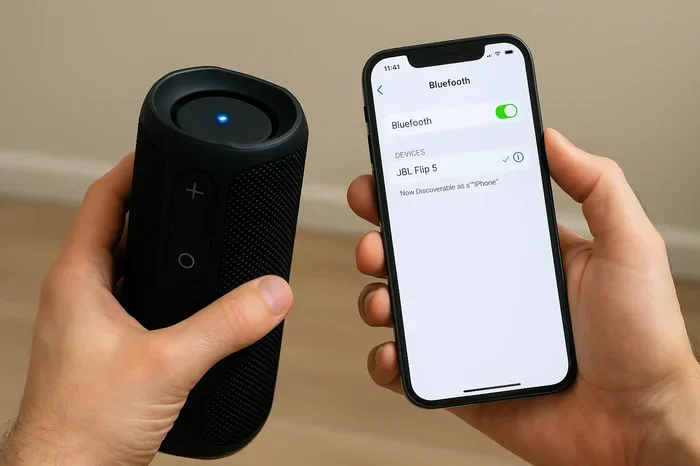
- Plug the adapter into your speaker. Use the appropriate cable for your speaker’s input port.
- Power on the adapter. Most adapters have a small LED light that blinks when ready to pair.
- Open Bluetooth settings on your phone. Go to Settings, then Bluetooth, and make sure it is turned on.
- Search for available devices. Your adapter name should appear in the list of available devices.
- Tap on the adapter name to pair. Wait a few seconds for the connection to establish.
- Play music and test the sound. Adjust volume on both your phone and speaker for the best balance.
That is it. The entire process takes less than two minutes once you have your adapter. You will be listening to wireless music in no time.
Expert Insights on Wireless Speaker Upgrades
Audio engineers and tech reviewers agree that retrofitting existing speakers with a Bluetooth adapter is one of the best value upgrades you can make. The wireless audio market has matured significantly in recent years, and modern adapters deliver sound quality that was impossible just a few years ago.
“Most people underestimate how much their old speakers can benefit from a simple Bluetooth upgrade,” says audio specialist Mark Donovan. “The speaker driver itself is what produces the sound. Adding Bluetooth does not change the speaker’s hardware. It just gives you a better way to feed audio into it.”
The Bluetooth range on most adapters covers a typical living room or backyard. For larger spaces, consider a adapter with Bluetooth 5.0 or higher, which offers extended range and more stable connections.
Another expert tip: if you use your speakers for both music and TV audio, look for adapters with a low-latency mode. This reduces the delay between video and audio, which is especially important for watching movies or shows.
Final Thoughts
So, can you make your speakers Bluetooth? The answer is a resounding yes. Whether you choose a Bluetooth adapter, a transmitter-receiver kit, or a smart speaker replacement, adding wireless streaming to your existing setup is easier and cheaper than you might think.
The process takes minutes, costs very little, and instantly upgrades your listening experience. You get the freedom to play music from any device without wires. You keep the speakers you already love. And you join the millions of people who enjoy wireless music streaming every day.
Start with a simple Bluetooth adapter. It is the lowest-risk, highest-reward option. Try it out, see how it works for your setup, and enjoy the convenience of wireless audio. Once you experience the freedom of Bluetooth speaker connectivity, you will wonder why you ever waited to make the switch.
Your old speakers still have great sound to offer. Give them the wireless upgrade they deserve, and turn any room into your personal music room. The process is simple, affordable, and incredibly satisfying. Go ahead and make your speakers Bluetooth today.
Frequently Asked Questions
Can I make any speaker Bluetooth compatible?
Yes, almost any speaker with a 3.5mm aux input or RCA ports can be made Bluetooth compatible using an adapter. Even older speakers work well with a simple Bluetooth adapter. The only requirement is that your speaker has an audio input option you can connect to.
How much does it cost to add Bluetooth to speakers?
A basic Bluetooth adapter costs between $15 and $50. Higher-end adapters with better codecs like aptX cost $40 to $80. This is much cheaper than buying a brand-new wireless speaker system. The adapter is a one-time purchase that lasts for years.
Will adding a Bluetooth adapter reduce my speaker’s sound quality?
Not necessarily. The sound quality depends on the adapter you choose. Adapters with good codecs like aptX or LDAC maintain excellent audio quality. Cheap adapters with basic codecs may slightly reduce quality, but most people will not notice a big difference.
How far can I move away from my speaker with Bluetooth?
Most Bluetooth adapters have a range of about 30 feet indoors. Walls and obstacles can reduce this distance. Bluetooth 5.0 adapters offer longer range and more stable connections. For best results, stay within the same room as your speaker.
Can I connect multiple devices to a Bluetooth adapter?
Most Bluetooth adapters support one active connection at a time. Some newer models allow multipoint pairing, which lets you connect two devices simultaneously. Check the product specifications if you need this feature. Switching between devices is usually quick and easy.
Is it hard to pair a Bluetooth adapter with my phone?
No, pairing a Bluetooth adapter is very easy and takes less than two minutes. You simply turn on Bluetooth on your phone, search for devices, and tap on the adapter name. Most adapters have a blinking LED light that indicates they are ready to pair.
=== CONCLUSION ===
Making your speakers Bluetooth is one of the simplest and most rewarding upgrades you can do. With a Bluetooth adapter, you turn any wired speaker into a wireless streaming powerhouse. The process is fast, affordable, and requires no technical skills. Whether you want to listen to music in the kitchen, host a backyard party, or just enjoy wireless freedom in your living room, the solution is within reach.
Remember to choose a good-quality adapter with the right input cables for your speaker. Pay attention to codec support if audio quality matters to you. And follow the setup tips we shared to avoid common mistakes. Once your speakers are connected wirelessly, you will wonder how you ever lived with cables.
Take action today. Pick up a Bluetooth adapter, follow the simple steps in this guide, and start enjoying wireless audio from your favorite speakers. The freedom of Bluetooth speaker connectivity is just a few minutes away. You have everything you need to make it happen.