Do Iphones Have Smoke Detectors Built Into Your Phone
Do iphones have smoke detectors? The short answer is no. iPhones do not come with built-in smoke detection hardware. However, your phone can still play a big role in fire safety through smart apps, connected devices, and emergency alerts. This guide covers everything you need to know about iPhone fire detection and how to keep your home safe.
Do iphones have smoke detectors? It is a question many people ask, especially as our phones become more connected to our homes. The answer might surprise you. Your iPhone does not have a smoke detector built into it. But that does not mean your phone cannot help keep you safe from fires. In fact, iPhones play a big role in modern fire safety through apps, smart home integration, and emergency alert systems.
In this article, we will explore everything about iPhone fire detection. We will look at what your phone can and cannot do. We will also talk about smart smoke detectors that work with iOS devices. You will learn how to set up a safer home using your iPhone. Whether you are curious about smart home safety or just want to know if your phone can detect smoke, this guide has you covered.
Let us start with the basics. Understanding what your iPhone can do is the first step toward better home security. From there, we will dive into apps, accessories, and real-world tips that make a difference.
Key Takeaways
- No Built-In Sensor: iPhones do not have a physical smoke detector inside the device.
- Smart Apps Help: You can use fire alert apps on your iPhone to connect with smart smoke detectors.
- HomeKit Integration: Apple HomeKit works with compatible smart smoke alarms for iPhone users.
- Emergency Alerts: iPhones can receive government-issued emergency and fire alerts through Wireless Emergency Alerts (WEA).
- Air Quality Monitoring: Third-party accessories can pair with your iPhone to monitor air quality and detect smoke.
- Smart Home Safety: Connecting a smart smoke detector to your iPhone gives you real-time notifications and peace of mind.
- Fire Prevention Matters: No phone replaces a proper smoke alarm. Always install certified detectors in your home.
📑 Table of Contents
- Do Iphones Have Smoke Detectors? The Truth About Built-In Hardware
- How Your iPhone Can Help With Fire Safety
- Smart Smoke Detectors That Work With iPhones
- Can Your iPhone Monitor Air Quality?
- Carbon Monoxide Detection and iPhone Safety
- Common Mistakes People Make With Phone-Based Safety
- Expert Insights on iPhone Safety and Fire Prevention
- Quick Tips for iPhone Fire Safety Setup
- Comparison: Traditional vs. Smart Smoke Detectors
- Key Takeaways
- Conclusion
Do Iphones Have Smoke Detectors? The Truth About Built-In Hardware
Let us get one thing straight. Your iPhone does not have a smoke detector inside it. There is no photoelectric sensor or ionization sensor built into the device. iPhones are packed with amazing technology. They have gyroscopes, accelerometers, barometers, and even LiDAR scanners on newer models. But a smoke detection sensor is not one of them.
So why do people ask this question? Well, iPhones are so powerful these days that it feels like they can do anything. You can track your sleep, monitor your heart rate, and even measure the air quality around you. But detecting smoke particles in the air requires specialized hardware. That hardware is not something Apple puts inside a phone.
What Sensors Does an iPhone Actually Have?
Your iPhone has several sensors that are useful in different ways. Here is a quick look at what is inside your device:
- Accelerometer: Detects motion and orientation changes.
- Gyroscope: Helps with rotation and spatial awareness.
- Barometer: Measures atmospheric pressure changes.
- Proximity Sensor: Turns off the screen when you hold the phone to your ear.
- Ambient Light Sensor: Adjusts screen brightness automatically.
- LiDAR Scanner: Available on Pro models for depth sensing and AR experiences.
None of these sensors detect smoke or fire. The barometer can sense pressure changes, which might hint at weather shifts. But it cannot pick up the tiny particles that a smoke alarm detects. So if you are hoping your phone can replace a traditional detector, that is not going to happen.
How Your iPhone Can Help With Fire Safety
Even though your iPhone lacks a built-in smoke detector, it is still a powerful tool for fire safety. Apple has built strong features into iOS that can alert you to dangers. And with the right accessories, your phone becomes a central hub for home safety.
Wireless Emergency Alerts (WEA)
One of the most important safety features on your iPhone is Wireless Emergency Alerts. These are government-issued notifications that can warn you about fires, severe weather, and other emergencies. When a fire alert is issued for your area, your iPhone will make a loud sound and show a notification on the screen.
These alerts are automatic. You do not need to download any app or sign up for anything. They work through a special cellular network that bypasses normal traffic. This means even if cell towers are overloaded, you can still receive the alert. It is one of the best examples of how your iPhone contributes to emergency preparedness.
To make sure WEA is turned on, go to Settings, then Notifications, and scroll down to Government Alerts. Make sure Emergency Alerts and Public Safety Alerts are switched on.
Fire Alert Apps for iPhone
The App Store has many apps focused on fire alert apps and safety. These apps do not detect smoke on their own. But they connect to smart home devices and send you notifications when something is wrong. Here are some popular options:
- Nest App: Works with Nest Protect smoke and carbon monoxide detectors.
- Ring App: Connects to Ring Alarm and smoke sensors.
- HomeKit App: Built into iOS for Apple HomeKit-compatible devices.
- First Alert App: Pairs with First Alert smart detectors.
- Smoke Detector Connect: Links various smart detectors to your iPhone.
These apps turn your iPhone into a command center for home security. You can check sensor status, receive alerts, and even silence false alarms from your phone. It is a huge step up from traditional smoke alarms that only beep locally.
Smart Smoke Detectors That Work With iPhones
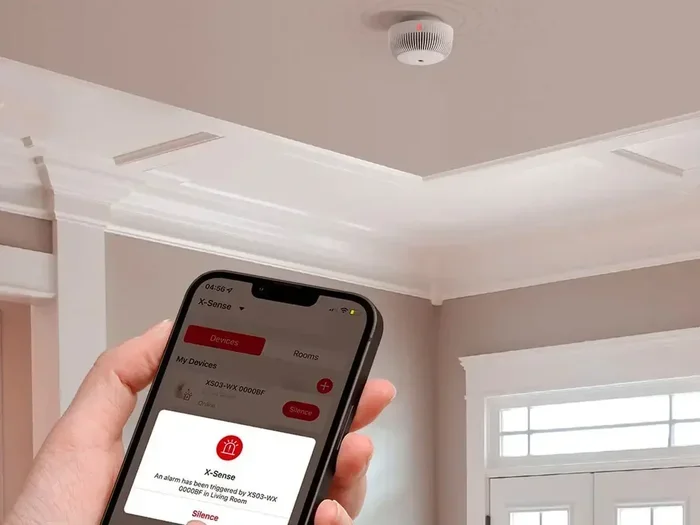
If you want real iPhone smoke detection, you need a smart smoke detector that connects to your phone. These devices use Wi-Fi or Bluetooth to send alerts directly to your iPhone. They are the closest thing to having a smoke detector built into your phone, except the actual sensing happens in the detector itself.
How Smart Smoke Detectors Connect to iPhones
Smart smoke detectors use your home Wi-Fi network to communicate with your iPhone. When the detector senses smoke, it sends a signal through the internet to the app on your phone. You then receive a push notification, no matter where you are. This is a game-changer for fire prevention because you can respond quickly even when you are not at home.
Most smart detectors also send alerts to other family members. So if you are at work and your partner is at home, both of you get notified instantly. Some models even call emergency services automatically if they cannot reach anyone in the house.
Top Smart Smoke Detectors for iPhone Users
Here are some of the best smart smoke detectors that pair with iPhones:
- Nest Protect (3rd Gen): Works with Apple HomeKit and sends alerts to your iPhone via the Nest app. It has a split-spectrum sensor that detects both fast-burning and smoldering fires.
- First Alert Onelink Safe & Sound: Connects to HomeKit and also has a built-in speaker for emergency broadcasts.
- Kidde Wi-Fi Smoke Detector: A more affordable option that sends notifications to your iPhone through the Kidde app.
- Roost Smart Battery: This is not a full detector but a smart battery you put inside your existing alarm. It connects to your iPhone and sends low-battery alerts and emergency notifications.
Each of these devices adds a layer of smart home safety to your iPhone setup. They are easy to install and work seamlessly with iOS.
Can Your iPhone Monitor Air Quality?
While your iPhone cannot detect smoke directly, it can monitor air quality through connected accessories. The air quality monitoring market has grown a lot in recent years. Many devices now pair with iPhones to give you real-time data about the air in your home.
Air Quality Monitors That Work With iPhone
Devices like the Awair Element, Airthings Wave, and Foobot connect to your iPhone via Bluetooth or Wi-Fi. They measure things like:
- Volatile organic compounds (VOCs)
- Carbon dioxide levels
- Humidity
- Temperature
- Dust particles
Some of these monitors can detect changes that might indicate a fire starting. For example, a sudden spike in VOCs or particulate matter could signal something burning. While they are not replacements for a proper smoke detector, they add another layer of protection to your home security setup.
You can view all this data right on your iPhone. The apps show trends, send alerts, and give you actionable tips to improve your indoor air. It is a great example of how your phone extends its usefulness beyond just communication.
Carbon Monoxide Detection and iPhone Safety
Smoke detectors are not the only safety device to consider. Carbon monoxide detectors are equally important. Carbon monoxide is a colorless, odorless gas that can be deadly. And just like smoke detectors, iPhones do not have built-in carbon monoxide sensors.
However, smart carbon monoxide detectors work the same way as smart smoke detectors. They connect to your iPhone and send instant alerts. Some models, like the Nest Protect, detect both smoke and carbon monoxide in one unit. This gives you two types of protection from a single device that talks to your phone.
If you have gas appliances, a fireplace, or an attached garage, a carbon monoxide detector is essential. Pairing it with your iPhone means you will know about a leak before it becomes dangerous. That is a huge advantage for fire safety tips and overall home protection.
Common Mistakes People Make With Phone-Based Safety
There are several mistakes people make when relying on their iPhone for safety. Avoiding these errors can save lives.
Relying Only on Your Phone
The biggest mistake is thinking your iPhone can replace a real smoke detector. It cannot. A certified smoke alarm has specialized hardware designed to detect smoke particles quickly and reliably. Your phone is a supplement, not a replacement.
Ignoring App Updates
Smart detector apps need regular updates to work properly. If you ignore updates, you might miss important bug fixes or new features. Make sure your apps are always up to date for the best iPhone connected devices experience.
Not Testing Your Detectors
Even the best smart smoke detector needs regular testing. Press the test button once a month. Replace batteries at least once a year. And replace the entire unit every ten years, or as the manufacturer recommends.
Disabling Alerts
It is tempting to silence alerts that go off too often. But disabling notifications for your smoke detector app is dangerous. If you get a false alarm, troubleshoot the issue instead of turning off alerts permanently.
Expert Insights on iPhone Safety and Fire Prevention
Fire safety experts agree that smart technology has changed how we protect our homes. According to the National Fire Protection Association (NFPA), working smoke detectors cut the risk of dying in a home fire by 50 percent. Adding smart connectivity through your iPhone makes that protection even stronger.
Experts recommend a layered approach to home security. Start with hardwired or battery-powered smoke detectors in every bedroom and hallway. Then add smart detectors that connect to your iPhone for remote alerts. Finally, use air quality monitors for an extra level of awareness. This combination gives you the best possible protection.
Fire safety is not just about technology. It is also about having a plan. Make sure your family knows two ways out of every room. Practice fire drills regularly. And keep a fire extinguisher in the kitchen and garage. Technology helps, but preparation saves lives.
Quick Tips for iPhone Fire Safety Setup
Here are some fast, practical steps you can take right now to improve your iPhone fire detection setup:
- Enable Wireless Emergency Alerts: Go to Settings, tap Notifications, and turn on Government Alerts.
- Download a Safety App: Install the Nest, Ring, or HomeKit app and connect your smart devices.
- Buy a Smart Smoke Detector: Choose a model that works with Apple HomeKit for seamless integration.
- Set Up Notifications: Make sure your phone allows notifications from safety apps. Go to Settings, then Notifications, and enable alerts for each app.
- Test Your Devices Monthly: Use the test button on your smoke detector and check the app for proper connectivity.
- Keep Your iPhone Charged: In an emergency, you need your phone to work. Maintain at least a 50 percent charge at all times.
- Share Access With Family: Most smart detector apps let you add multiple users. Invite family members so everyone gets alerts.
These simple steps take less than an hour to set up. But they can make a massive difference when seconds count.
Comparison: Traditional vs. Smart Smoke Detectors
| Feature | Traditional Detector | Smart Detector (iPhone Connected) |
|---|---|---|
| Smoke Detection | Yes | Yes |
| iPhone Alerts | No | Yes |
| Remote Monitoring | No | Yes |
| Carbon Monoxide Detection | Varies | Often Included |
| Self-Testing | Manual | Automatic |
| Smart Home Integration | No | Yes (HomeKit, Alexa, Google) |
| Price Range | $10 – $30 | $80 – $130 |
| Installation | Easy | Easy |
| Battery Replacement | Every 6-12 months | Sealed 10-Year Battery |
As you can see, smart detectors offer far more value for iPhone users. The remote alerts alone are worth the investment. You will know about a fire in your home even when you are miles away.
Key Takeaways
- No Built-In Sensor: iPhones do not have a physical smoke detector inside the device.
- Smart Apps Help: You can use fire alert apps on your iPhone to connect with smart smoke detectors.
- HomeKit Integration: Apple HomeKit works with compatible smart smoke alarms for iPhone users.
- Emergency Alerts: iPhones can receive government-issued emergency and fire alerts through Wireless Emergency Alerts (WEA).
- Air Quality Monitoring: Third-party accessories can pair with your iPhone to monitor air quality and detect smoke.
- Smart Home Safety: Connecting a smart smoke detector to your iPhone gives you real-time notifications and peace of mind.
- Fire Prevention Matters: No phone replaces a proper smoke alarm. Always install certified detectors in your home.
Conclusion
So, do iphones have smoke detectors? No, they do not. Your iPhone is an incredible device, but it is not a fire detection tool by design. However, that does not mean your phone is useless when it comes to fire safety. In fact, your iPhone can be one of the most powerful tools in your home security toolkit.
By enabling Wireless Emergency Alerts, downloading the right apps, and connecting smart smoke detectors, you turn your iPhone into a safety hub. You get real-time notifications, remote monitoring, and peace of mind that traditional alarms alone cannot provide. Combine this with proper fire prevention habits, and you give yourself and your family the best chance of staying safe.
Remember, technology is a helper, not a replacement. Always have certified smoke detectors installed in your home. Test them regularly. And use your iPhone to enhance that protection, not replace it. A smart home is a safe home, and your iPhone is the key to unlocking that potential.
Take action today. Check your current detectors, download a safety app, and explore the world of iPhone connected devices. Your future self will thank you when those alerts give you the extra seconds you need to act.
Frequently Asked Questions
Can my iPhone detect smoke without any extra devices?
No, your iPhone cannot detect smoke on its own. It does not have the necessary hardware, such as a photoelectric or ionization sensor. You need a smart smoke detector that connects to your iPhone for real-time alerts and notifications.
What is the best smoke detector app for iPhone?
The Nest App is one of the most popular choices for iPhone users. It works seamlessly with Apple HomeKit and sends instant notifications when smoke or carbon monoxide is detected. Other great options include the Ring App and the First Alert App, both of which support iOS devices.
Do smart smoke detectors work with all iPhone models?
Most smart smoke detectors work with any iPhone running a recent version of iOS. As long as your phone can connect to Wi-Fi and supports Bluetooth, it should pair with compatible smart detectors. Check the product listing to confirm iOS compatibility before purchasing.
Can Wireless Emergency Alerts warn me about fires near my home?
Yes, Wireless Emergency Alerts (WEA) can notify you about fires and other emergencies in your area. These alerts are sent by government authorities and reach your iPhone automatically through the cellular network. You do not need to sign up or download any app to receive them.
Is air quality monitoring the same as smoke detection?
No, they are not the same. Air quality monitors measure things like VOCs, carbon dioxide, and dust particles. They can sometimes detect changes that suggest a fire, but they are not designed to replace a dedicated smoke detector. Use both for the best protection.
How often should I test my smart smoke detector?
You should test your smart smoke detector at least once a month. Most smart detectors have a test button and a self-test feature that runs automatically. You can also check the detector status in the app on your iPhone to make sure it is working properly.