Do Smartphones Use Cell Towers to Connect to the Internet
Do Smartphones Use Cell Towers? Yes, they do. Every time you make a call, send a text, or browse the web, your phone connects to a nearby cell tower. These towers form the backbone of mobile network infrastructure and send wireless signals that keep you connected. In this guide, we break down exactly how this process works, why signal strength changes, and what you can do to improve your cellular connection.
Do Smartphones Use Cell Towers? The short answer is yes. Every time you make a call, send a text, or browse the web, your phone connects to a nearby cell tower. These towers form the backbone of mobile network infrastructure. They send and receive wireless signals that keep you connected to people and information. In this article, we will break down exactly how this process works. You will learn what cellular connection means for your device, why signal strength can change from place to place, and what you can do to get better results.
Understanding how your phone connects to the internet is more useful than you might think. It helps you troubleshoot slow mobile data. It helps you understand why calls drop. And it helps you make smart choices about your carrier network and coverage. Let us dive into the world of cell tower signal and see how it all works.
Key Takeaways
- Smartphones rely on cell towers for all wireless communication: Every call, text, and data request travels through nearby towers.
- Cell tower signal strength depends on proximity and obstacles: The closer you are to a tower, the stronger your wireless signal.
- 4G LTE and 5G networks both use towers: Newer 5G network tech still depends on cellular infrastructure built on tower sites.
- Your smartphone antenna is the key link: It sends and receives signals from base stations every second.
- Signal boosters and good habits help: You can improve your mobile data speed and reduce dropped calls.
- You can bypass towers with Wi-Fi calling: But for true internet connectivity on the go, towers are essential.
📑 Table of Contents
How Do Smartphones Use Cell Towers?
Your phone is always talking to towers. Even when you are not on a call, it sends small signals to find and stay connected to the nearest base station. This is how your smartphone antenna works behind the scenes. Let us look at the steps involved.
The Role of the Base Station
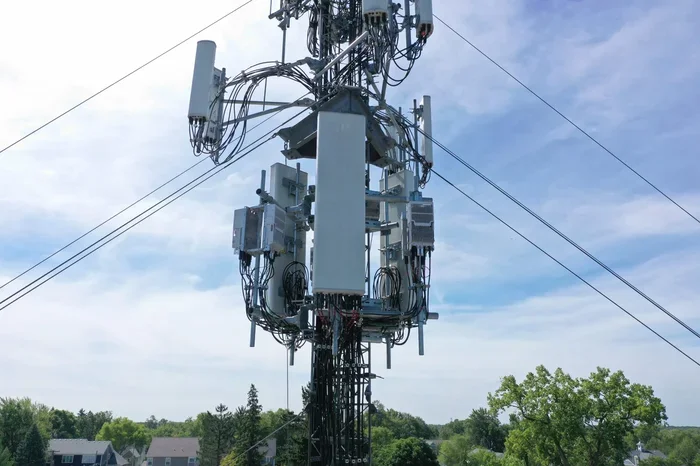
A base station is the equipment at the top of a cell tower. It sends and receives wireless signals in all directions. When you make a call, your phone sends a signal up to the base station. The base station then routes your call through cables and switches to reach the other person. This whole process happens in milliseconds. You do not even notice it happening.
Cellular infrastructure includes many base stations spread across a city or rural area. Each base station covers a specific area called a cell. When you move from one cell to another, your phone smoothly switches to the next tower. This is called a handoff, and it keeps your call or data session going without interruption.
How Your Phone Finds a Tower
When you turn on your phone, it scans for available cell tower signal. Your smartphone antenna checks for the strongest signal from nearby towers. It then connects to the best one available. This happens automatically. You do not need to do anything.
The phone also stores a list of nearby towers. This helps it switch towers quickly when you are driving or walking. The better your network coverage, the more towers your phone can choose from. In areas with few towers, your phone may struggle to find a strong connection.
The Handoff Process
The handoff process is one of the most impressive parts of wireless communication. When you move while on a call, your phone hands off your connection from one tower to the next. This keeps your call clear and prevents drops.
Here is how it works in simple steps:
- Your phone measures the signal strength from nearby towers.
- When the signal from your current tower gets weak, your phone looks for a stronger one.
- The network transfers your connection to the new tower.
- Your call or data session continues without interruption.
This handoff happens so fast that you barely notice it. But it depends on good cellular infrastructure and proper tower proximity. If towers are too far apart, the handoff may fail. This can lead to dropped calls or slow mobile data.
Quick Tip: If you notice frequent dropped calls in a certain area, it may mean the cell tower signal is weak there. Check your signal strength bars. They can give you a clue about your network coverage in that spot.
What Happens When You Make a Call or Use Data?
Every action you take on your phone involves wireless communication with a tower. But the way your phone uses the tower differs between calls and data. Let us break it down.
Voice Calls and Cell Towers
When you make a voice call, your phone turns your voice into a digital signal. This signal travels through the air to the nearest cell tower. The tower sends it to the base station, which routes it through the carrier network to the other phone. The whole trip takes less than a second.
Voice calls need a steady cell tower signal. If the signal drops, your call may cut out. This is why signal strength matters so much for calls. In areas with weak coverage, you may hear static or experience silence during a conversation.
Mobile Data and Internet Connectivity
When you use mobile data, your phone sends and receives data packets through towers. Every time you open a webpage, send a message, or stream a video, data travels from your phone to a tower and back. This is how your phone achieves internet connectivity on the go.
Mobile data uses more bandwidth than voice calls. That is why data speeds can slow down in busy areas. If many people are connected to the same tower, the tower has to share its capacity. This can make your internet connectivity slower during peak hours.
How 4G LTE and 5G Fit In
4G LTE and 5G network are two different ways towers send data. Both use the same basic system of towers and base stations. But they differ in speed and technology.
4G LTE has been around for many years. It provides fast mobile data for most tasks. 5G network is newer and much faster. It uses higher spectrum frequencies to send more data at once. But 5G network towers have shorter range. They need to be closer together than 4G LTE towers.
Both 4G LTE and 5G network depend on cellular infrastructure. Even the newest 5G network towers are still part of the same tower system. Your phone connects to them the same way it always has.
| Feature | 4G LTE | 5G Network |
|---|---|---|
| Speed | Fast | Very Fast |
| Range | Longer | Shorter |
| Spectrum Frequencies | Lower bands | Higher bands |
| Tower Density | Fewer towers needed | More towers needed |
| Best For | Calls, browsing, streaming | Ultra-fast downloads, gaming |
Why Does Signal Strength Change?
Have you ever noticed your signal strength bars jump up and down? This is normal. Many factors affect how well your phone connects to a cell tower. Understanding these factors can help you troubleshoot problems.
Tower Proximity and Coverage
The distance between your phone and the nearest tower matters a lot. The closer you are, the stronger your cell tower signal. If you live far from a tower or in a rural area, your network coverage may be weak. This can lead to slow mobile data and dropped calls.
Tower proximity also matters indoors. Buildings, walls, and roofs can block wireless signals. Even if a tower is nearby, your phone may struggle to get a strong signal inside a thick building. This is why signal strength can be different on each floor of a house.
Obstacles That Weaken Your Signal
Many things can block or weaken wireless signals between your phone and a tower:
- Hills and mountains: They can block the line of sight to towers.
- Heavy rain or storms: Water in the air absorbs wireless signals.
- Thick walls and concrete: They block signals from reaching your smartphone antenna.
- Trees and foliage: Dense tree cover can weaken your cell tower signal.
- Other electronic devices: Some devices can cause interference.
Spectrum Frequencies Explained
Spectrum frequencies are the radio waves used by towers to send data. Different frequencies travel different distances and pass through different materials. Lower frequencies travel farther and go through walls better. Higher frequencies carry more data but do not travel as far.
This is why 5G network towers need to be closer together. The higher spectrum frequencies they use do not travel as well as the lower ones used by 4G LTE. Understanding spectrum frequencies helps explain why your signal strength varies in different locations.
Common Mistake: Many people think more signal bars always mean faster speed. This is not true. You can have full bars but slow data if the tower is crowded. Signal strength and data speed are related but not the same thing.
Can You Use a Smartphone Without Cell Towers?
Cell towers are the main way phones connect to the internet. But there are some ways to use your phone without relying on towers. Let us look at them.
Wi-Fi Calling and VoIP
Wi-Fi calling lets you make calls over a Wi-Fi network instead of a tower. If you have a strong Wi-Fi connection at home, you can use it for calls and texts. This bypasses cellular connection entirely. It is a great option in areas with weak cell tower signal.
VoIP (Voice over Internet Protocol) apps like WhatsApp and Skype also work over Wi-Fi. They send your voice as data packets through the internet. No tower is needed. But you do need a working Wi-Fi connection.
Offline Features and Airplane Mode
Your phone has many features that work without towers or internet. You can take photos, play offline games, use a calculator, and listen to downloaded music. These features do not need cellular infrastructure.
Airplane mode turns off all wireless connections. This includes your smartphone antenna and its connection to towers. In airplane mode, you can still use offline features. But you cannot make calls, send texts, or use mobile data.
Expert Insight: Even when you are not actively using your phone, it still checks for tower signals in the background. This is why battery drain can be faster in areas with weak network coverage. Your phone works harder to find and hold a cell tower signal.
How to Improve Your Cell Tower Connection
You can take simple steps to get better cell tower signal and faster mobile data. These tips can make a big difference in your daily use.
Tips for Better Signal Strength
Here are easy ways to improve your wireless signal and internet connectivity:
- Move near a window: Walls block signals. Being near a window helps your smartphone antenna receive a stronger cell tower signal.
- Go to higher ground: Being on a higher floor or outside can improve your connection to the nearest tower.
- Turn off unnecessary apps: Some apps use mobile data in the background. This can slow down your connection.
- Restart your phone: This forces your phone to reconnect to the best available tower.
- Check for updates: Software updates can improve how your phone connects to cellular infrastructure.
When to Use a Signal Booster
A signal boost device can amplify your cell tower signal. It picks up the existing tower signal and makes it stronger. This is helpful in areas with poor network coverage or thick walls that block signals.
Signal boosters work well in homes and offices. They are especially useful in rural areas where tower proximity is limited. You can also find small boosters for cars. These help maintain a steady cellular connection while you drive through weak coverage zones.
Understanding Your Carrier Network
Your carrier network plays a big role in your connection quality. Different carriers have different tower locations and coverage maps. If you always have weak signal strength in your home, it may be because your carrier has fewer towers nearby.
You can check coverage maps online before choosing a carrier. You can also ask neighbors what carrier they use. Their experience can tell you a lot about network coverage in your area. Switching to a carrier with better tower proximity can dramatically improve your internet connectivity.
Common Myths About Cell Towers and Smartphones
There are many myths about how cell towers work. Let us clear up some of the most common ones.
Myth: Towers Always Work Perfectly
This is not true. Towers can get overloaded, especially in crowded areas like concerts or sports events. When too many people connect to the same tower, mobile data slows down. Dropped calls become more common. Cell tower signal is not always perfect, no matter how many bars you see.
Myth: More Bars Means Faster Speed
As mentioned earlier, signal bars show strength, not speed. You can have full bars and still have slow data. Speed depends on how many people share the tower, the spectrum frequencies used, and the network type (4G LTE or 5G network). Do not judge your speed by bars alone.
Myth: Cell Towers Are Dangerous
Many people worry about living near towers. But studies show that cellular infrastructure operates within safe radiation limits. The wireless signals from towers are low power. They are much weaker than other common sources of radiation. Regulatory bodies around the world monitor tower safety closely.
Quick Tip: If you are concerned about cell tower signal near your home, you can check the tower’s radiation levels with local environmental agencies. They provide data on tower safety and compliance.
Conclusion
Do Smartphones Use Cell Towers? Yes, absolutely. Your phone depends on towers for calls, texts, and mobile data. The cell tower signal travels from your smartphone antenna to a nearby base station. From there, it moves through the carrier network to reach its destination. This wireless communication system is what keeps you connected every day.
Understanding how this works helps you troubleshoot problems. It helps you choose the right carrier. And it helps you get the most from your cellular connection. Whether you use 4G LTE or 5G network, towers are the foundation of your internet connectivity.
Take the tips from this guide and apply them. Check your signal strength. Improve your network coverage where you can. And remember that tower proximity and spectrum frequencies play a big role in your daily experience. With the right knowledge, you can stay connected with confidence.
Frequently Asked Questions
Do Smartphones Use Cell Towers for Wi-Fi?
No, Wi-Fi does not use cell towers. Wi-Fi connects to a local router. But your phone can switch between Wi-Fi and mobile data from towers. When Wi-Fi is off, your phone uses cellular connection through towers for internet access.
How Far Can a Cell Tower Reach?
A typical tower can reach several miles. The exact range depends on spectrum frequencies, terrain, and obstacles. Lower frequencies travel farther. Higher frequencies, like those used in 5G network, have shorter range and need more towers close together.
Why Do Dropped Calls Happen Near Cell Towers?
Dropped calls can happen even near towers if the cell tower signal is weak or interrupted. Obstacles like buildings, hills, or heavy rain can block wireless signals. Overloaded towers in crowded areas can also cause dropped calls and slow mobile data.
Can You Choose Which Cell Tower Your Phone Connects To?
No, your phone automatically connects to the strongest available tower. The smartphone antenna scans for towers and picks the best one. You cannot manually select a tower, but you can move to a different location to improve your signal strength.
Are 5G Towers Different from 4G Towers?
Yes and no. Both types of towers serve the same basic purpose. But 5G network towers use different spectrum frequencies and need to be closer together. The cellular infrastructure for 5G is an upgrade of the existing mobile network system. Your phone connects to them the same way.
Does Airplane Mode Stop Your Phone from Using Cell Towers?
Yes, airplane mode turns off all wireless connections. This includes your cellular connection to towers. In airplane mode, your phone cannot make calls, send texts, or use mobile data. You can still use offline features that do not need internet connectivity.