Can You Add A Wifi Extender To A Mesh Network Explained
Can You Add A Wifi Extender To A Mesh Network? Yes, you can, but it comes with trade-offs. This guide explains when it makes sense, how to set it up correctly, and how to avoid common pitfalls that kill your Wi‑Fi speed.
Every home has a spot where the Wi‑Fi signal dies. You might call it a dead zone. A weak signal means dropped calls and buffering videos. Many people turn to mesh Wi‑Fi systems to solve this problem. A mesh network uses multiple nodes to blanket your home in strong signal.
But what if your mesh system still leaves a corner uncovered? You might wonder, Can You Add A Wifi Extender To A Mesh Network. The short answer is yes. You can connect a range extender to a mesh network. However, the way you do it matters a lot. It can either improve your coverage or create new headaches.
In this article, I’ll walk you through everything you need to know. I’ll explain the pros and cons. I’ll share a step‑by‑step setup guide. I’ll also highlight common mistakes to avoid. By the end, you’ll know exactly whether adding an extender makes sense for your home.
Key Takeaways
- Yes, You Can Add an Extender: A range extender works with a mesh network, but setup matters.
- Check Compatibility First: Not every extender plays nice with every mesh router.
- Use Access Point Mode: This prevents double NAT and keeps all devices on one network.
- Wired Backhaul Is Best: Connect the extender via Ethernet for full speed.
- Watch for Speed Drops: Wireless extenders can cut your bandwidth in half.
- Consider a Mesh Satellite Instead: Matching nodes give seamless roaming.
- Placement Matters: Put the extender halfway between the router and the dead zone.
📑 Table of Contents
- What Is a Mesh Network and Why Do People Love It
- Can You Add A Wifi Extender To A Mesh Network? The Short Answer
- The Pros and Cons of Adding an Extender to a Mesh System
- How to Add a Wifi Extender to Your Mesh Network (Step by Step)
- Mesh Satellite vs. Third‑Party Extender: A Comparison
- Common Mistakes to Avoid When Extending a Mesh Network
- Expert Insights: When to Stick with Mesh and When to Extend
- Quick Tips for the Best Results
- Conclusion
What Is a Mesh Network and Why Do People Love It
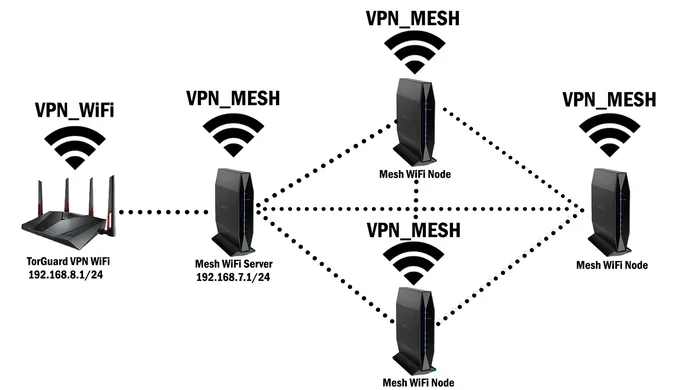
A mesh Wi‑Fi system replaces your old single router. It uses a main router and satellite nodes. These nodes talk to each other wirelessly. They create a single, unified network. Your phone switches between nodes without you noticing. This is called seamless roaming.
Mesh networks use a smart topology. Each node acts as a relay. The signal bounces from node to node. This extends your coverage far beyond one router. Many mesh systems also use band steering. They push devices to the fastest available band. This keeps your network fast and stable.
How Mesh Nodes Talk to Each Other
Mesh nodes communicate through a dedicated backhaul channel. Think of backhaul as a private highway for node‑to‑node traffic. It keeps your internet speed high. Tri‑band mesh systems have an extra radio for this backhaul. Dual‑band systems share their radio with client devices. This can slow things down when many devices connect.
The Magic of Seamless Roaming
Seamless roaming means your devices stay connected as you move. Your phone switches from one mesh node to another. The SSID stays the same. You don’t have to re‑enter a password. This is a big advantage over old‑school routers. A single router forces you to reconnect when you walk too far.
Can You Add A Wifi Extender To A Mesh Network? The Short Answer
Can You Add A Wifi Extender To A Mesh Network? Yes, you can. But it’s not always a perfect fit. A mesh system is designed to work as one unit. Adding a third‑party range extender breaks that unity. You need to know what you’re signing up for.
Yes, But It’s Not Always Simple
Some mesh routers allow extenders in bridge mode or access point mode. Others block third‑party devices completely. You must check your mesh brand’s support page. Look for compatibility lists. TP‑Link, Netgear, and ASUS each handle extenders differently. Always read the manual first.
Why Would You Even Want to Do This
You might have a large home with thick walls. Your mesh nodes cover most rooms but miss a garage. Or maybe you saved money by buying a cheaper mesh kit. An extender can fill that final coverage gap. It costs less than buying an extra mesh satellite. That’s the main reason people try this route.
The Pros and Cons of Adding an Extender to a Mesh System
Adding a wireless extender to a mesh network has clear benefits. It also has clear risks. You need to weigh both sides carefully.
Pros: Extra Coverage Where You Need It
- Fills dead zones: An extender reaches places your mesh nodes can’t.
- Low cost: Range extenders are cheaper than extra mesh nodes.
- Easy to find: Any standard extender works in theory.
- Quick fix: You can set it up in minutes.
- More device support: Extenders handle many client devices at once.
Cons: Potential Speed and Stability Issues
- Speed loss: Wireless extenders cut your bandwidth. They use the same radio to receive and send data.
- Double NAT risk: If you don’t use access point mode, you get two routers. This causes IP conflicts.
- No seamless roaming: Your devices might see the extender as a separate network. You’ll have to manually switch.
- Latency increase: Each hop adds delay. This hurts video calls and gaming.
- Interference: The extender can create signal overlap with your mesh nodes.
How to Add a Wifi Extender to Your Mesh Network (Step by Step)
Follow these steps to add a range extender without breaking your mesh system. Take your time and read each step carefully.
Step 1: Check Compatibility
Look up your mesh router model online. Search for “extender compatibility.” Many mesh brands list tested extenders. Buy one from that list if possible. If you already own an extender, check its specs. It must support access point mode or bridge mode.
Step 2: Put the Extender in Access Point Mode
This is the most important step. Access point mode turns the extender into a simple wireless bridge. It stops the extender from creating a second router. Your mesh network stays in charge of all devices. You avoid double NAT and IP conflicts.
Step 3: Connect via Ethernet or Wireless
For the best results, use a wired connection. Run an Ethernet cable from your mesh node to the extender. This is called wired backhaul. It gives the extender full speed. If you must use wireless, place the extender where it gets a strong signal from the mesh node.
Step 4: Configure and Test
Log into the extender’s admin page. Give it the same SSID and password as your mesh network. This helps devices stay on one network. Then run a speed test. Walk around your home with a phone. Check for dead zones and signal drops. Adjust the extender’s position if needed.
Mesh Satellite vs. Third‑Party Extender: A Comparison
| Feature | Mesh Satellite Node | Third‑Party Range Extender | Wireless Access Point |
|---|---|---|---|
| Seamless Roaming | Yes, built‑in | Usually no | No (separate SSID) |
| Setup Complexity | Very easy | Easy to moderate | Moderate |
| Cost | High (brand‑priced) | Low to medium | Medium |
| Speed Impact | Minimal | Can halve wireless speed | Minimal if wired |
| Best For | Expanding an existing mesh | Filling a small coverage gap | Permanent wired expansion |
Common Mistakes to Avoid When Extending a Mesh Network
Many people make simple errors that ruin their Wi‑Fi experience. Watch out for these pitfalls.
Placing the Extender in a Bad Spot
Don’t put the extender in the dead zone itself. It needs a strong signal from the mesh router first. Place it halfway between the mesh node and the weak area. If it sits too far away, it repeats a weak signal. That makes everything slower.
Forgetting to Update Firmware
Both your mesh router and the extender need fresh firmware. Updates fix bugs and security holes. They also improve performance. Check the manufacturer’s app or web page. Update before you start the setup.
Using a Dual‑Band Extender on a Tri‑Band Mesh
Your mesh system might use a dedicated backhaul band. A cheap dual‑band extender can’t use that band. It shares the 2.4 GHz and 5 GHz bands with your devices. This creates congestion. You lose the speed advantage of your tri‑band mesh.
Expert Insights: When to Stick with Mesh and When to Extend
The Verdict from Networking Professionals
Most networking experts say: use matching mesh satellites whenever possible. They are designed to work together. They share the same backhaul protocol. They support client steering and band steering. A third‑party extender can’t do that. It breaks the smart features of your mesh system.
However, if you just need to cover one extra room, an extender works fine. Just set it in access point mode. Use an Ethernet cable if you can. Keep your expectations realistic. You’ll get coverage, but not the full mesh experience.
Quick Tips for the Best Results
Use Wired Backhaul Whenever Possible
A powerline adapter or Ethernet cable gives the extender a strong input signal. This preserves your internet speed. Wireless backhaul always loses some speed. If you can run a cable, do it.
Name Your SSID Wisely
Give the extender the exact same network name and password as your mesh. This helps devices roam naturally. Some extenders let you create a separate network. Avoid that unless you have a specific reason. One network is simpler and better for most homes.
Monitor Your Network Speed
After setup, run a speed test in every room. Use a tool like Speedtest.net. Compare results to your mesh‑only baseline. If you see big drops, move the extender. Check for interference from microwaves or baby monitors. Adjust the channel if needed.
Conclusion
Can You Add A Wifi Extender To A Mesh Network? The answer is a clear yes. You can extend your coverage with a range extender. But you must do it the right way. Put the extender in access point mode. Use wired backhaul when possible. Avoid common placement mistakes. This keeps your network fast and stable.
Remember, a mesh satellite node is always the better choice. It works seamlessly with your existing system. But a third‑party extender can save the day in a pinch. Just know the trade‑offs. You’ll get extra coverage, but you might lose some speed and smart features.
Now you have the knowledge to make the best decision for your home. Test your setup, monitor your speeds, and enjoy a stronger Wi‑Fi signal everywhere. Happy networking!
Frequently Asked Questions
Will adding a wifi extender to my mesh network slow down my internet?
It can. Wireless extenders use the same radio to receive and send data. This halves your available bandwidth. If you connect the extender via Ethernet, the speed loss is minimal. Always test your speeds after setup.
Do I need to buy a special extender for a mesh network
No special extender is required. Any standard range extender that supports access point mode or bridge mode will work. Check your mesh router’s compatibility list for the best results. Avoid extenders that only work in repeater mode.
Can I use a powerline adapter instead of a wifi extender with mesh
Yes. A powerline adapter sends internet through your home’s electrical wiring. It connects to a mesh node or access point. This gives you a wired backhaul without running cables. It’s a great alternative to wireless extenders.
Will my devices automatically switch between the mesh and the extender
Only if you give the extender the same SSID and password. Even then, seamless roaming isn’t guaranteed. Many devices stick to the stronger signal. They may not switch to a better node if the extender shows a stronger bar. Use a mesh satellite for true seamless roaming.
What is the difference between bridge mode and access point mode
Bridge mode connects two networks together. Access point mode turns the extender into a simple wireless hub. For mesh networks, access point mode is what you want. It stops the extender from creating a second router and keeps all devices on one network.
Is it worth adding an extender if I already have a tri‑band mesh system
Usually not. A tri‑band mesh system already has a dedicated backhaul band. Adding an extender can’t use that band. It will likely create interference. Buy an extra mesh satellite instead. It will match your system’s speed and features perfectly.