Can Vhs Play Through Hdmi Everything You Need To Know
Yes, you can play VHS through HDMI, but not directly. You need a VCR with HDMI output or a VCR to HDMI converter to bridge the analog and digital gap. This guide covers every option, tip, and mistake to avoid so you can watch your old tapes on modern TVs with clear, boosted quality.
This is a comprehensive guide about Can Vhs Play Through Hdmi.
Key Takeaways
- VHS and HDMI are different signal types: VHS is analog, HDMI is digital, so a direct connection is not possible without a converter.
- VCRs with built-in HDMI output exist: Several brands offer all-in-one VCRs that let you plug straight into your TV via HDMI.
- External converters work well too: Devices like the Retrotink 5X or generic composite-to-HDMI boxes can upscale your old VHS tapes nicely.
- Upscaling improves but does not perfect VHS quality: You will get a clearer picture, but the original tape limitations still apply.
- RCA cables matter: Using good-quality composite or component cables makes a real difference in playback clarity.
- Digitizing is the best long-term solution: Converting VHS to digital files lets you preserve memories permanently and watch them on any device.
[FEATURED_IMAGE_PLACEHOLDER]
Can VHS Play Through HDMI Everything You Need To Know
Have a box of old VHS tapes sitting in your closet? Maybe you found your childhood home videos or a stack of classic movies. You want to watch them on your big flat-screen TV, but you are not sure how. The big question is simple: can VHS play through HDMI?
The short answer is yes, but not on its own. VHS tapes use an analog signal, and HDMI uses a digital signal. These two technologies do not speak the same language. You need a middleman to make the connection work. This guide will walk you through every option, every product, and every tip you need to know.
Whether you want to watch old tapes on your modern TV or preserve your family memories, this article has you covered. We will look at VCRs with HDMI built in, external converter boxes, and even how to digitize your tapes for the best quality possible. Let us get into it.
Why VHS and HDMI Are Not Compatible Directly
To understand how to connect VHS to HDMI, you first need to know why a direct cable will not work. VHS tapes store video as an analog signal. That means the picture information is recorded as continuous electrical waves on the magnetic tape. When you play a tape, the VCR reads those waves and sends them out through RCA cables — the yellow, red, and white plugs.
HDMI, on the other hand, is a digital signal. It carries data in ones and zeros. Your modern TV only speaks digital. So if you try to plug a VCR’s RCA output straight into an HDMI port, nothing will happen. The TV simply does not understand the signal.
This is where analog to digital conversion comes in. A converter takes the old analog signal and translates it into a digital format that your TV can display through HDMI. Think of it like a translator between two people who speak different languages. Without the translator, they cannot understand each other.
Understanding VHS Resolution and Quality
VHS tapes have a very limited resolution compared to today’s standards. A typical VHS tape delivers about 240 lines of resolution. Compare that to a 1080p or 4K TV, and you can see why the picture might look fuzzy or blurry. The tape itself has physical limits. The magnetic particles on the tape can only hold so much detail.
When you play VHS through HDMI with an upscaler, the converter tries to boost that low resolution to match your TV’s display. This process is called upscaling. It does not add detail that was never there, but it can make the picture look much cleaner and sharper on a big screen.
How VCRs with Built-in HDMI Output Work
The easiest way to play VHS through HDMI is to use a VCR with a built-in HDMI output. These devices combine the old VCR technology with modern digital outputs in one box. You just plug in the VCR to your TV using an HDMI cable, and you are ready to go.
Several brands make these combo units. Some are designed for casual users who just want to watch old tapes. Others are aimed at collectors and enthusiasts who want better video playback quality. Here is what you should know about them.
Top Brands Offering VCRs with HDMI
- Panasonic: Known for reliable VCRs with decent HDMI upscaling. Their combo units are popular for everyday use.
- Magnavox: Offers affordable VCR/DVD combo players that include HDMI output for modern TVs.
- Emerson: Budget-friendly options that let you watch VHS tapes on HDMI screens without extra equipment.
- Hitachi: Some models include HDMI and focus on cleaner playback with basic noise reduction.
Pros and Cons of All-in-One VCRs
Built-in HDMI VCRs are convenient. You do not need extra boxes or cables. Just connect and play. However, they do have downsides. The upscaling quality in budget models is often basic. The VHS tape quality you get may still look soft or noisy. Also, these combo units can sometimes have shorter lifespans because they combine older mechanics with newer electronics.
If you only have a few tapes to watch, an all-in-one VCR is a fine choice. If you are serious about home video preservation, you may want to look at a dedicated converter instead.
External VCR to HDMI Converters Explained
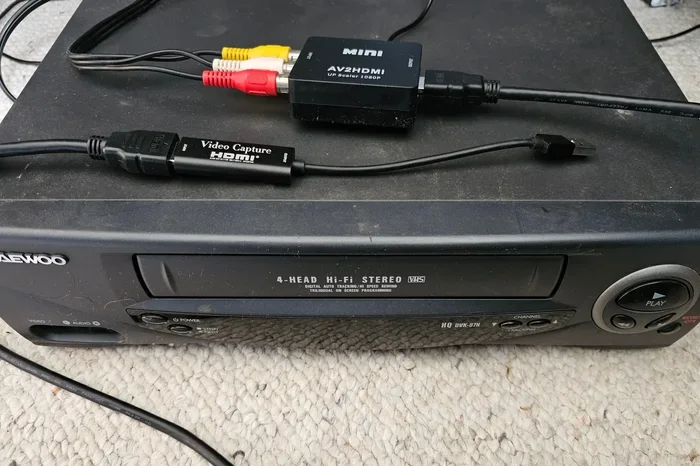
An external VCR to HDMI converter gives you more control over the conversion process. You connect your VCR to the converter using RCA cables, and then the converter sends a digital signal to your TV through HDMI. These devices often do a better job of upscaling than built-in VCR systems.
Converters range from simple and affordable to advanced and expensive. The right one depends on your needs and budget. Let us look at the main types available.
Basic Composite to HDMI Converters
These are the most affordable options. A basic composite to HDMI converter takes the yellow, red, and white RCA plugs from your VCR and converts them to an HDMI signal. Prices for these start as low as $15 to $30. They work well for casual viewing.
However, basic converters do not do much upscaling. The picture will look better than using an older CRT TV, but it will not be stunning. Think of it as a simple bridge between two signal types.
Advanced Upscaling Converters
For better quality, consider an advanced upscaling converter. Devices like the RetroTink 5X or the OSSC (Open Source Scan Converter) offer much cleaner output. They can reduce noise, sharpen edges, and produce a picture that looks surprisingly good on a modern display.
These devices cost more — often $100 to $300 — but the improvement in standard definition video quality is significant. If you watch a lot of VHS tapes or care about preserving memories, this is the route to take.
Quick Tips for Choosing a Converter
- Check if the converter supports line doubling for smoother motion.
- Look for models with noise reduction features to clean up grainy VHS footage.
- Make sure the converter has HDMI output that matches your TV’s resolution (720p or 1080p).
- Read reviews carefully — cheap converters can introduce lag or color issues.
Step-by-Step Guide to Playing VHS Through HDMI
Getting your VHS tapes playing through HDMI is easier than you might think. Here is a simple walkthrough that works for most setups.
Step 1: Gather Your Equipment
You will need a VCR (either one with HDMI or one with RCA outputs), the appropriate cables, and either a converter box or a VCR with HDMI built in. If you are using a separate converter, make sure you have composite RCA cables and an HDMI cable ready.
Step 2: Connect the VCR to the Converter
Plug the yellow RCA cable into the VCR’s video output. Connect the red and white cables to the audio outputs. Run the other ends to the input ports on your converter box.
Step 3: Connect the Converter to Your TV
Take an HDMI cable and plug one end into the converter’s HDMI output. Plug the other end into an available HDMI port on your TV. Make sure both the VCR and the converter are powered on.
Step 4: Set the TV Input and Play
Switch your TV to the correct HDMI input. Press play on the VCR. You should see the VHS tape playing on your screen. Adjust the converter settings if needed to get the best picture.
Common Mistakes to Avoid When Setting Up VHS Through HDMI
- Using low-quality RCA cables: Old or damaged cables can cause a weak signal and poor picture quality. Replace them if they look worn.
- Skipping the upscaling step: Without a converter or upscaling VCR, your TV will not display the VHS signal at all.
- Using the wrong TV input: Make sure you select the HDMI port you actually plugged into.
- Ignoring audio settings: Some converters need you to set the audio output to stereo or surround. Check the manual.
Best VCR to HDMI Converter Options on the Market
Not all converters are created equal. Some are great for casual viewers, while others are built for enthusiasts who want the best possible VHS playback quality. Here is a closer look at some popular options.
| Product | Type | Price Range | Best For |
|---|---|---|---|
| RetroTink 5X | Advanced Upscaler | $200 – $280 | Enthusiasts, collectors |
| OSSC | Advanced Upscaler | $150 – $200 | Retro gaming, VHS purists |
| Magnavox VCR/DVD Combo | All-in-One VCR | $80 – $130 | Casual viewing |
| Generic Composite-to-HDMI Box | Basic Converter | $15 – $30 | Budget-friendly setup |
| Digitnow VCR to Digital Converter | Converter + Capture | $40 – $60 | Digitizing tapes |
Each option has its strengths. The RetroTink 5X and OSSC offer the best picture quality but require more setup. All-in-one VCRs are simple but may not deliver the sharpest image. Basic converters are cheap and get the job done for casual watching.
Expert Insights on VHS to HDMI Conversion
Experts in the retro media space agree that upscaling makes a noticeable difference when watching VHS on modern TVs. The grain and noise that are part of the VHS charm can be reduced without losing the authentic look of the tape. The key is finding a converter that balances noise reduction with detail preservation.
If your goal is to preserve old family videos, many experts recommend VHS digitization. This means converting the tape to a digital file format like MP4 or MKV. You can then store the file on a hard drive or cloud service and watch it on any device — phone, tablet, laptop, or smart TV. This is the most future-proof approach.
How to Digitize VHS Tapes for HDMI-Ready Playback
Digitizing means capturing the video from the VHS tape and saving it as a digital file. You can do this with a USB capture card or a dedicated digitizer. Once the file is saved, you can play it on any device that supports digital video, including through HDMI connections.
To digitize, connect your VCR to a USB capture device using RCA cables. Use software on your computer to record the playback. Save the file in a high-quality format. You now have a permanent digital copy of your VHS tape that you can watch anytime through HDMI.
Tips for Getting the Best VHS Playback Quality Through HDMI
Even with the right equipment, there are things you can do to improve the picture and sound quality of your VHS playback. Here are some practical tips.
Clean your VCR heads. Over time, the playback heads inside a VCR can get dirty. Use a VCR head cleaning cassette regularly. Clean heads mean a clearer signal and fewer tracking issues.
Use good-quality RCA cables. Cheap cables can introduce interference and signal loss. Look for well-shielded cables with gold-plated connectors. They make a real difference in the final picture.
Store your VHS tapes properly. tapes stored in humid or hot conditions can suffer from mold or magnetic degradation. Keep them in a cool, dry place and rewinds them fully before storing.
Adjust the converter settings. Many converters let you tweak sharpness, noise reduction, and output resolution. Spend a few minutes experimenting to find the settings that look best for your specific tapes.
Consider your TV settings. Some modern TVs have processing features that can actually make VHS content look worse. Try turning off motion smoothing or picture enhancement features when watching VHS through HDMI.
Can VHS Play Through HDMI Final Thoughts
So, can VHS play through HDMI? Absolutely. You just need the right equipment to bridge the gap between analog and digital. Whether you choose a VCR with built-in HDMI, an external converter, or a full digitization setup, you can enjoy your old VHS tapes on modern screens with much better quality than ever before.
The key takeaway is that VHS playback through HDMI is not only possible but also quite accessible. Basic converters are affordable, and advanced upscalers can deliver impressive results. The most important step is just getting started. Dust off those old tapes, get the right connection, and enjoy your memories on a big screen again.
Take some time to explore your options. Try a basic setup first and see how it looks. If you love the results, you can always upgrade to a better converter or start digitizing your collection. The world of analog video is still alive and well, and with the right tools, your VHS tapes can live on for years to come.
Frequently Asked Questions
Do I need a special VCR to play tapes through HDMI?
Not necessarily. You can use a standard VCR with RCA outputs and connect it to an external VCR to HDMI converter. However, if you want a simpler setup, look for a VCR that has HDMI built in. These all-in-one units handle the conversion for you without extra equipment.
Will my VHS tapes look HD through HDMI?
No, VHS tapes have a low resolution of about 240 lines, and no converter can create detail that was never recorded. However, upscaling through HDMI can make the picture look much cleaner and sharper on a modern TV compared to watching on an old CRT screen. The improvement is noticeable, even if it is not true HD.
Can I connect multiple VCRs to one HDMI converter?
Yes, you can switch between multiple VCRs using an RCA audio/video selector switch. Connect each VCR to the selector, then run the selector output to your converter. This is a great option if you have a collection of VCRs and want to switch between them easily.
How long does it take to digitize a VHS tape?
A standard two-hour VHS tape takes about two hours to digitize. The process is real-time, meaning you play the tape and record it simultaneously. Some people prefer to digitize overnight or while they are at work. The wait is worth it for a permanent digital copy.
Is it better to digitize VHS or just watch it through HDMI?
Digitizing is the better long-term option. VHS tapes degrade over time, and magnetic tapes can lose quality after years of storage. A digital file does not degrade. You can watch it on any device, share it with family, and back it up in multiple places. Watching through HDMI is great for now, but digitizing protects your memories forever.
What is the cost of converting VHS to HDMI?
A basic composite-to-HDMI converter costs $15 to $30. A VCR with built-in HDMI ranges from $80 to $150. Advanced upscalers like the RetroTink 5X or OSSC run $150 to $300. If you also want to digitize tapes, a USB capture card adds $20 to $50. You can start small and upgrade as needed.
Frequently Asked Questions
What is Can Vhs Play Through Hdmi?
Can Vhs Play Through Hdmi is an important topic with many practical applications.