Can I Watch Regular TV On My Projector At Home Tonight
Yes, you absolutely can watch regular TV on your projector at home. With the right setup and a few simple steps, your projector can replace your living room TV and deliver a bigger, more immersive viewing experience. Whether you use a cable box, streaming device, or antenna, connecting regular TV to a projector is easier than most people think.
Have you ever sat on your couch and thought, “I wish my movie nights could feel like a trip to the cinema?” Maybe you already own a projector but wonder if it can handle regular TV watching. The short answer is yes. You can watch regular TV on your projector at home tonight, and the process is simpler than you might expect.
Projectors are no longer just for movie buffs or business presentations. Today, many people use them as their primary TV replacement. A big screen changes everything. Suddenly, watching the evening news, your favorite sitcom, or a live sports game feels completely different. The image fills your wall, and you feel more connected to what you are watching.
In this guide, I will walk you through every step. You will learn about the different ways to connect your TV source to a projector, what equipment you need, and how to avoid common mistakes. By the end, you will feel confident setting up your own projector TV system tonight.
Key Takeaways
- Watching regular TV on a projector is simple: You just need the right cables and connections.
- HDMI is the best way to connect: Most modern projectors and TV devices use HDMI for easy setup.
- You have multiple options: Cable boxes, streaming sticks, antennas, and even smart projectors can all deliver regular TV channels.
- Brightness matters: A brighter projector gives you a better picture for TV watching, especially during the day.
- Sound can be a challenge: Projectors usually have weak built-in speakers, so consider external audio.
- Setup time is minimal: Most people can get their projector watching TV in under 30 minutes.
📑 Table of Contents
- Why Watch Regular TV on a Projector?
- How to Connect Regular TV to Your Projector
- What Equipment Do You Need?
- Projector vs. TV: Which Is Better for Regular TV?
- Enhancing Your Projector TV Viewing Experience
- Can You Watch Live TV on a Projector?
- Is Watching Regular TV on a Projector Hard on Your Eyes?
- How to Set Up Your Projector for TV Tonight
- Final Thoughts
Why Watch Regular TV on a Projector?
You might be wondering why anyone would want to watch regular TV on a projector instead of a normal TV. There are actually several great reasons. Let me break them down for you.
A Bigger, More Immersive Screen
Even a 60-inch TV feels small compared to a projector screen. When you project an image onto a wall or a dedicated screen, you can easily go 100 inches or more. That is massive. Movies, sports, and even the news feel more engaging when everything is larger than life. You sit closer to the action, and the whole room transforms into your personal theater.
Cost Savings Over Time
A high-quality projector can sometimes cost less than a large premium TV. A good 1080p projector might run you a few hundred dollars, while a 75-inch or 85-inch TV costs much more. Plus, projector bulbs and maintenance are relatively affordable. Over time, a projector setup can save you money while giving you a superior viewing experience.
Flexibility and Portability
Projectors are not stuck to your wall. You can move them from room to room. You can set one up in your bedroom for late-night shows. You can take it to the backyard for an outdoor movie night with friends. This flexibility is something a regular TV simply cannot offer.
Better for Group Viewing
If you enjoy watching games or shows with family and friends, a projector screen is hard to beat. Everyone can see clearly, and the shared experience feels much more like being in a real theater. No more squinting at a small screen from the couch.
How to Connect Regular TV to Your Projector
Now let us get into the practical stuff. How do you actually connect your TV source to a projector? There are several methods, and I will cover each one so you can pick what works best for your setup.
Method 1: Using an HDMI Cable (The Easiest Way)
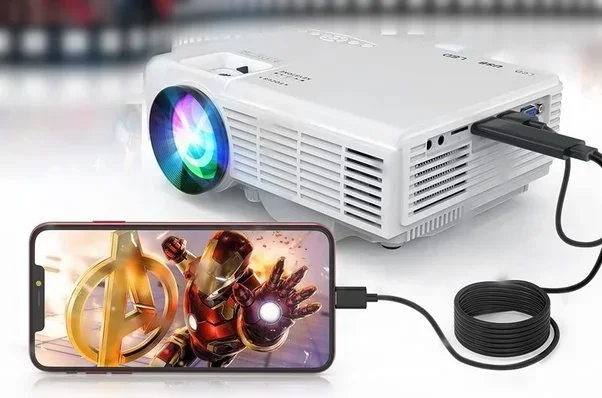
Most modern projectors come with at least one HDMI port. This is the simplest and most reliable way to watch regular TV on your projector. Here is how it works:
- Plug one end of an HDMI cable into your cable box, streaming device, or TV tuner.
- Plug the other end into the HDMI port on your projector.
- Switch your projector to the correct input source.
- Turn on your device, and you should see the TV signal on the big screen.
This method works with cable boxes, satellite receivers, and even streaming sticks like Roku or Amazon Fire TV Stick. If your projector does not have HDMI, do not worry. I will cover alternatives below.
Method 2: Using a Streaming Device
Not everyone has a cable subscription anymore. That is totally fine. You can still watch regular TV channels through streaming devices. A device like Roku, Apple TV, or Chromecast connects to your projector via HDMI. From there, you can access live TV apps, sports channels, news networks, and more.
Some projectors even come with built-in smart features. These smart projectors have apps like Netflix, YouTube, and live TV built right in. You do not need any extra devices. Just connect to Wi-Fi, open the app, and start watching.
Method 3: Using a TV Antenna for Over-the-Air Channels
Want to watch local channels for free? You can use a TV antenna with your projector. Connect the antenna to a digital TV tuner box, then use an HDMI cable to send the signal to your projector. This gives you access to ABC, NBC, CBS, Fox, and your local PBS station without paying for cable.
This is a great option if you live in an area with strong broadcast signals. A simple indoor antenna can pick up dozens of channels. It is one of the cheapest ways to watch regular TV on a projector.
Method 4: Using an AV Receiver or Converter
Older projectors might not have HDMI ports. In that case, you can use an AV receiver or an HDMI-to-composite converter. These devices translate the HDMI signal into older connection types like RCA or component cables. It adds a small step, but it works well for older equipment.
An AV receiver also improves your sound quality. Many projectors have weak built-in speakers. An AV receiver lets you connect better speakers or a soundbar for a much richer audio experience.
What Equipment Do You Need?
Setting up regular TV on a projector does not require a lot of gear. Here is a simple list of what you might need:
- A projector: Any projector with at least 1080p resolution works well for TV watching.
- An HDMI cable: This is the standard connection for most setups. Get a good quality cable for the best picture.
- A TV source device: This could be a cable box, streaming stick, antenna with tuner, or even a laptop.
- A screen or wall: A white wall works, but a dedicated projector screen gives better results.
- External speakers (optional but recommended): Built-in projector speakers are usually not great. A simple soundbar or bookshelf speakers make a huge difference.
- A stable power source: Make sure your projector has a reliable outlet nearby.
Quick Tips for Choosing the Right Projector
If you are shopping for a projector specifically for TV watching, keep these tips in mind:
- Look for at least 2,000 lumens of brightness. This ensures a clear picture even with some ambient light.
- Choose 1080p resolution or higher for sharp, detailed images.
- Check the contrast ratio. Higher contrast gives deeper blacks and better picture quality.
- Consider a short-throw projector if you have limited space. These can project a large image from just a few feet away.
- Read reviews from trusted sources before buying.
Projector vs. TV: Which Is Better for Regular TV?
People often ask me whether a projector or a TV is better for watching regular TV. Both have pros and cons. Let me give you a clear comparison.
| Feature | Projector | Regular TV |
|---|---|---|
| Screen Size | 80 to 150+ inches | 40 to 85 inches |
| Brightness | Varies, often needs dim room | Bright, works in daylight |
| Portability | Easy to move around | Heavy, stays in one place |
| Cost for Large Screen | More affordable | Expensive at large sizes |
| Sound Quality | Usually weak built-in speakers | Built-in speakers are decent |
| Setup Time | 5 to 15 minutes | Plug and play |
| Eye Comfort | Reflects light, easier on eyes | Emits light directly |
| Lifespan | Bulb needs replacement | LED panels last 50,000+ hours |
As you can see, a projector wins on screen size and portability. A regular TV wins on brightness and convenience. Your choice depends on what matters most to you. If you want the biggest screen possible and do not mind dimming the lights, a projector is fantastic. If you want something bright and easy, a TV might be the better pick.
Common Mistakes to Avoid
Here are some mistakes I see people make when setting up a projector for regular TV watching:
- Using a dim projector in a bright room. This washes out the picture. Choose a brighter model or watch TV in a darker room.
- Ignoring audio quality. Projector speakers are often tinny and quiet. Invest in a soundbar or external speakers.
- Not matching the projector distance to screen size. Measure your throw distance before mounting the projector.
- Forgetting to keystone or focus the image. A blurry or distorted picture ruins the experience. Take a minute to adjust the settings.
- Using a low-quality HDMI cable. A cheap cable can cause signal drops or poor picture quality. Buy a certified high-speed HDMI cable.
Enhancing Your Projector TV Viewing Experience
Once you have your projector set up for regular TV, you can take your experience to the next level. Small improvements make a big difference.
Upgrade Your Sound
Most projectors have small, weak speakers. They are fine for a quick check of the weather, but they will not impress you during a football game or a drama series. A simple Bluetooth soundbar or a pair of wireless speakers transforms the experience. Your voice will be clearer, the bass will be deeper, and you will feel like you are in the studio.
Improve Your Screen Quality
A white wall works, but a proper projector screen makes colors pop and blacks look deeper. You can get a retractable screen for under $50. For a more permanent setup, consider a fixed-frame screen. It looks professional and gives you the best possible picture every time.
Control Your Lighting
Ambient light is the enemy of projector picture quality. Use blackout curtains or dim the lights in your room. Some people even install LED light strips behind the screen for an ambient glow that reduces eye strain and adds to the theater feel.
Use a Surge Protector
Projectors are sensitive electronics. A power surge can damage them. Plug everything into a surge protector to keep your equipment safe. This is a small step that saves you from expensive repairs.
Schedule Your Viewing
Projector lamps have a limited lifespan. Running them for hours every day wears them out faster. Consider using your projector mainly for evening TV sessions. This extends the lamp life and keeps your picture bright for years.
Expert Insight: Get the Best Picture Settings
Most projectors come with picture modes like “Dynamic,” “Cinema,” and “Standard.” For watching regular TV, the “Standard” or “Movie” mode usually works best. These modes balance brightness and color accuracy. If you watch a lot of daytime TV, switch to “Dynamic” mode for extra brightness. Experiment with the settings until the picture looks natural to your eyes.
Can You Watch Live TV on a Projector?
Yes, you can absolutely watch live TV on a projector. Whether it is a morning news show, a midday talk program, or a live sports event, your projector handles it all. The key is having the right source device connected.
If you have cable or satellite service, connect your set-top box via HDMI. If you use an antenna, connect it through a tuner box. If you prefer streaming services with live TV like YouTube TV, Hulu + Live TV, or Sling TV, a streaming stick or Roku device will do the job. All of these options send the live TV signal to your projector screen in real time.
One thing to keep in mind is input lag. Most projectors have minimal lag for live TV, so you will not notice any delay. Sports fans will be happy to know that watching a live game on a projector feels incredibly immersive. The crowd noise, the player movements, the big plays, it all comes alive on a large screen.
Is Watching Regular TV on a Projector Hard on Your Eyes?
This is a common concern, and it is a fair one. Projectors use reflected light, which is gentler on your eyes than the direct light emitted by a TV screen. This means you can watch TV on a projector for longer periods without getting as tired.
However, there are a few things to keep in mind. Never look directly into the projector lens when it is on. The light from the bulb is very bright and can hurt your eyes. Also, make sure the projector is positioned so the light does not shine into your eyes while you are watching.
Take breaks every hour or so, just like you would with any screen. The 20-20-20 rule works well here. Every 20 minutes, look at something 20 feet away for 20 seconds. This helps your eyes relax and reduces strain.
How to Set Up Your Projector for TV Tonight
Ready to get started? Here is a simple step-by-step guide you can follow tonight:
- Choose your spot. Set up your projector on a stable surface or mount it on the ceiling. Make sure it faces the screen or wall squarely.
- Connect your source device. Plug your cable box, streaming stick, or antenna tuner into the projector using an HDMI cable.
- Turn on the projector. Switch it on and select the correct HDMI input. You should see a menu or TV channel on the screen.
- Adjust the focus and keystone. Use the projector controls to sharpen the image and make it rectangular if needed.
- Set up your sound. Connect external speakers if you want better audio. Otherwise, adjust the projector volume to a comfortable level.
- Dim the lights. Close the curtains or turn off the lamps. This dramatically improves the picture quality.
- Grab some snacks and enjoy. You are all set. Sit back and watch your favorite regular TV channels on the big screen.
That is it. The entire process takes less than 30 minutes for most people. Once you do it once, you will never go back to a small TV screen.
Final Thoughts
So, can I watch regular TV on my projector? Absolutely yes. Whether you want to catch up on the news, binge your favorite series, or watch the big game with friends, a projector turns your regular TV experience into something extraordinary. The setup is simple, the equipment is affordable, and the results are incredible.
You do not need to be a tech expert. You just need a projector, an HDMI cable, and a TV source. From there, the rest is easy. Follow the steps in this guide, avoid the common mistakes, and you will be enjoying your favorite shows on a big screen in no time.
Tonight, try it out. Set up your projector, connect your cable box or streaming device, dim the lights, and enjoy. Once you see your regular TV channels displayed on a wall-sized screen, you will wonder why you ever settled for a smaller TV. The big screen experience is waiting for you. All you have to do is press play.
Frequently Asked Questions
Do I need a special projector to watch regular TV?
No, you do not need a special projector. Any projector with an HDMI input will work fine for watching regular TV channels. Even older projectors can work with the right adapters or converters. The key is having a way to connect your TV source device to the projector.
Can I watch cable TV on a projector without a cable box?
Not directly. You need a cable box or a streaming device that supports your cable provider to receive and display cable channels. However, if you use an antenna, you can watch local over-the-air channels without a cable subscription at all.
What is the best projector for watching regular TV at home?
Look for a projector with at least 1080p resolution, 2,000 lumens or more of brightness, and HDMI inputs. Popular choices include the Epson Home Cinema series, BenQ HT series, and ViewSonic projectors. These brands offer great picture quality for TV watching at reasonable prices.
Can I use a projector to watch TV during the day?
Yes, but it is more challenging. Projectors work best in dim or dark rooms. If you want to watch TV during the day, choose a projector with high brightness (3,000 lumens or more) and consider using a projector screen with a high gain rating. Closing curtains and blocking sunlight also helps significantly.
Do projectors have built-in TV tuners?
Most projectors do not have built-in TV tuners. They are designed to receive video signals from external sources. You will need a cable box, streaming device, or antenna tuner to provide the TV signal. Some smart projectors include apps for streaming live TV, but they still need a Wi-Fi connection.
Is watching TV on a projector bad for the projector lamp?
Not necessarily. Projector lamps are designed for extended use. Watching a few hours of TV each day will not significantly shorten the lamp life. Most projector lamps last between 3,000 and 5,000 hours. Using eco mode can extend this even further and reduce energy consumption.
=== CONCLUSION ===
Watching regular TV on your projector at home is not only possible, it is a fantastic upgrade to your entertainment setup. You get a bigger screen, a more immersive experience, and a versatile viewing option that works for the whole family. With a simple HDMI connection, the right source device, and a few tweaks to your room setup, you can transform any room into a home theater.
The primary keyword Can I Watch Regular TV On My Projector has a clear answer: yes, you can. And the process is easier than you think. Tonight is the perfect night to try it. Set up your projector, connect your TV source, and enjoy your favorite channels on the big screen. You will not regret it.