Can I Use A Wifi Extender As A Repeater At My Home
Yes, you can use a WiFi extender as a repeater to expand your home network coverage. Both devices work by receiving and rebroadcasting your existing wireless signal. However, they differ in features, speed, and setup options. Understanding these differences helps you make the best choice for your home. This guide covers everything you need to know about using a WiFi extender as a repeater effectively.
Have you ever walked into a room in your home and found that your WiFi signal drops to nothing? Maybe your bedroom upstairs gets terrible reception, or your backyard patio has zero connectivity. These dead zones are frustrating, and they affect almost every household with a wireless network. Many people turn to WiFi extenders and repeaters to fix this problem. But here is the big question: can you actually use a WiFi extender as a repeater?
The short answer is yes. A WiFi extender can work as a repeater, and many people use them this way every day. But the full answer is a bit more nuanced. There are differences in how these devices operate, what features they offer, and how well they perform in real-world conditions. This article breaks down everything you need to know. You will learn how each device works, when to use one over the other, and how to set things up for the best possible wireless experience.
Let us start by understanding what each device actually does. Once you see how they work, the rest falls into place.
Key Takeaways
- A WiFi extender can function as a repeater: Both devices rebroadcast your existing signal to extend coverage.
- Extenders offer more features: They often include access point mode and better bandwidth management than basic repeaters.
- Speed loss is a factor: Every device in the signal chain reduces your wireless speed to some degree.
- Placement matters greatly: Position your device halfway between your router and the dead zone for the best results.
- Setup is straightforward: Most extenders and repeaters use simple WPS or web-based configuration methods.
- Mesh systems may be a better option: For large homes, a mesh WiFi system can outperform both extenders and repeaters.
- Dual-band devices perform better: Choose a dual-band WiFi extender to minimize speed loss and interference.
📑 Table of Contents
What Is a WiFi Extender and How Does It Work
A WiFi extender is a device that boosts your existing wireless signal. It sits between your main router and the area of your home where the signal is weak. The extender receives the signal from your router, amplifies it, and sends it out again. This process helps cover areas that your router alone cannot reach.
Think of it like a relay race. Your router passes the signal baton to the extender, and the extender carries it further down the hallway or up the stairs. The goal is simple: eliminate dead zones and improve your overall network coverage.
How a WiFi Extender Captures Your Signal
A WiFi extender connects to your existing network wirelessly. It scans for your router’s signal and locks onto it. Once connected, it creates a new broadcast of that same signal in a wider area. Most modern extenders use dual-band technology, meaning they can work on both the 2.4 GHz and 5 GHz frequency bands. This helps reduce interference and keeps your connection stable.
Some extenders also support access point mode. In this mode, the device connects to your router through an Ethernet cable and broadcasts a fresh wireless signal. This setup gives you the best possible speed because it avoids the wireless signal loss that happens with wireless repeating.
Types of WiFi Extenders Available
Not all WiFi extenders are the same. Here are the most common types you will find on the market:
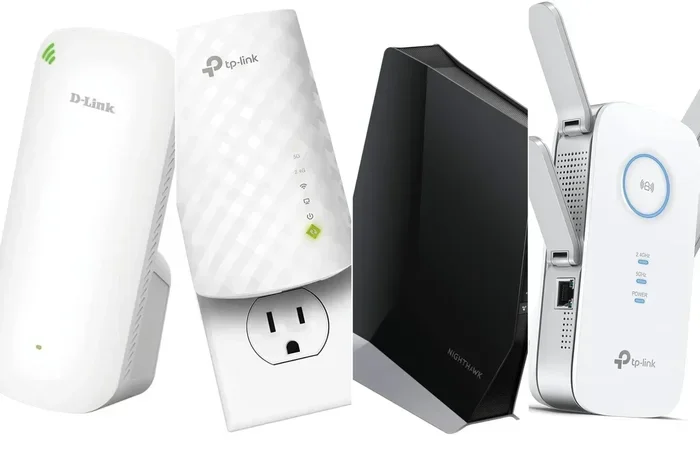
- Standard WiFi extenders: These are the basic models. They plug into a wall outlet and rebroadcast your signal wirelessly. They are affordable and easy to set up.
- Mesh WiFi extenders: These work with mesh systems to create a seamless network. They hand off your connection smoothly as you move around your home.
- Powerline adapters with WiFi: These use your home’s electrical wiring to carry the internet signal. The extender part then broadcasts WiFi from the outlet where it is placed.
- Outdoor WiFi extenders: These are weatherproof devices designed for patios, garages, and yards. They handle extreme temperatures and wider coverage areas.
Each type has its strengths. Your choice depends on your home size, your budget, and the specific coverage problem you are trying to solve.
What Is a WiFi Repeater and How Does It Work
A WiFi repeater is a simpler device. Its only job is to receive your router’s wireless signal and rebroadcast it. A repeater does not amplify the signal in the same way an extender does. Instead, it creates a second network that mirrors your original one.
Repeaters are often smaller and cheaper than extenders. They plug directly into a wall outlet and require very little setup. For many people, a repeater is a quick fix for a weak signal in one specific room.
How a Repeater Differs from an Extender
The key difference lies in how each device handles the signal. A WiFi extender can do more than just repeat. It can boost signal strength, manage bandwidth better, and offer more configuration options. A repeater simply copies and forwards the signal without much processing.
Here is a simple way to think about it:
- A repeater is like a mirror. It reflects your router’s signal in a new direction. It does not change or improve the signal.
- An extender is like a spotlight. It takes the signal, processes it, and projects it further with more power and clarity.
This difference matters when you are trying to improve your wireless connectivity across a larger area.
When a Repeater Makes Sense
A WiFi repeater works well in simple situations. If you have one room with a weak signal and your router is nearby, a repeater can help. It is also a good choice if you want a low-cost solution that requires no technical knowledge. Just plug it in, press the WPS button, and you are done.
However, repeaters have limitations. They can cut your bandwidth in half because they use the same radio to both receive and transmit data. This means your internet speed may drop noticeably when connected through a repeater.
Can You Use a WiFi Extender as a Repeater
Yes, you can use a WiFi extender as a repeater. Most WiFi extenders on the market today include a repeater mode or wireless bridging feature. When you switch your extender into this mode, it behaves exactly like a repeater. It receives your router’s wireless signal and forwards it to areas with poor coverage.
This is great news for homeowners who want flexibility. You do not need to buy two separate devices. One good WiFi extender can handle both jobs. It can extend your signal range and repeat the signal when needed.
The Short Answer
The short answer is yes. A WiFi extender can absolutely replace a repeater. In fact, many people prefer using an extender because it offers more control and better performance. The wireless repeater function is just one of many features available on modern extenders.
How the Two Devices Overlap in Function
Both devices solve the same core problem: extending your wireless network coverage. They both connect to your router’s signal and broadcast it further. The overlap is significant, which is why many people use the terms “extender” and “repeater” interchangeably.
Here is what they share in common:
- Same purpose: Both boost your wireless signal to cover dead zones.
- Same basic setup: Most devices use WPS or a simple app-based setup process.
- Same placement rules: Both work best when placed halfway between your router and the weak signal area.
- Same frequency support: Many models support both 2.4 GHz and 5 GHz bands.
The differences come down to features, performance, and flexibility. An extender gives you more options, but a repeater does the job with less complexity.
WiFi Extender vs Repeater: Key Differences
Understanding the differences helps you make the right choice for your home network. Let us look at the main areas where these devices differ.
Comparison Table: WiFi Extender vs Repeater
| Feature | WiFi Extender | WiFi Repeater |
|---|---|---|
| Signal processing | Amplifies and rebroadcasts | Copies and forwards |
| Speed loss | Moderate | Can be significant |
| Setup complexity | Moderate | Very simple |
| Configuration options | Many | Limited |
| Dual-band support | Common | Varies |
| Price range | Mid to high | Low to mid |
| Access point mode | Usually available | Rare |
| Best for | Larger homes, multiple devices | Small areas, quick fixes |
Speed and Performance
Speed is where the biggest difference shows up. A WiFi extender typically loses less speed than a repeater. This is because extenders often have dedicated radios for receiving and transmitting. A repeater uses the same radio for both tasks, which creates a bottleneck.
If you care about maintaining good internet speeds, an extender is the better choice. It handles network traffic more efficiently and keeps your connection more stable.
Ease of Setup
A WiFi repeater is easier to set up. You plug it in, press a button, and it connects. A WiFi extender may require a few more steps. You might need to access a web interface or use a companion app. But the extra effort is usually worth it. Extenders give you access to more settings and customization options.
Coverage Area
Extenders generally cover a larger area than repeaters. They have stronger antennas and more processing power. If you need to cover a large home or office, an extender will do a better job. A repeater works fine for a single room or a small area.
How to Set Up Your WiFi Extender as a Repeater
Setting up your WiFi extender in repeater mode is not difficult. Most modern devices make the process simple and user-friendly. Here is how to do it step by step.
Step-by-Step Setup Guide
- Plug in your WiFi extender in the room where your signal starts to weaken. Do not place it too far from your router.
- Wait for the power light to turn solid. This means the device has power and is ready.
- Press the WPS button on your router. Then press the WPS button on your extender within two minutes.
- Wait for the connection light to confirm the link between your router and extender.
- Open the extender’s web interface by typing its IP address into your browser. Or use the companion app if your device has one.
- Select repeater mode from the settings menu. This tells the extender to rebroadcast the signal instead of extending it through a wired connection.
- Choose your network name from the list of available networks and enter your WiFi password.
- Save your settings and wait for the extender to reconnect. Your repeater is now active.
Tips for Best Results
Getting the best performance from your WiFi extender used as a repeater takes a little planning. Here are some quick tips that make a big difference:
- Place the device halfway between your router and the dead zone. This ensures it gets a strong signal from the router and can rebroadcast it effectively.
- Keep it away from thick walls and metal objects. These block wireless signals and reduce performance.
- Use the 5 GHz band when possible. It offers faster speeds and less interference than the 2.4 GHz band.
- Update your extender’s firmware regularly. Manufacturers release updates that improve performance and fix bugs.
- Restart your extender once a month. This clears the cache and keeps things running smoothly.
Common Mistakes to Avoid
Even with the best device, poor setup can ruin your results. Here are the most common mistakes people make when using a WiFi extender as a repeater.
Placing the Device in the Wrong Spot
This is the number one mistake. People often place their extender too far from the router or too close to the dead zone. The sweet spot is always in the middle. If your extender is too far from the router, it will not get a strong enough signal to rebroadcast. If it is too close, it will not reach the weak area.
A good rule of thumb is to place your WiFi extender where your signal is still strong but starting to fade. You can check this with a WiFi signal strength app on your phone. Walk around your home and find the spot where the signal drops to about two bars. That is where your extender should go.
Ignoring Network Settings
Many people set up their extender and never touch the settings again. But checking your network settings can improve performance significantly. Make sure your extender is using the same channel as your router or a non-overlapping channel. Also, check that your extender is using the correct frequency band for your devices.
Expecting Magic
A WiFi extender or repeater cannot create a perfect connection out of thin air. If your router is in a basement and your extender is on the third floor, the signal will still be weak. The extender can only rebroadcast what it receives. Start with a strong signal at the extender’s location, and you will get a strong signal in the coverage area.
When to Consider Other Solutions
Sometimes a WiFi extender or repeater is not the best answer. Here are other options worth considering.
Mesh WiFi Systems
A mesh WiFi system replaces your entire router setup with multiple nodes placed around your home. Each node communicates with the others to create one seamless network. Mesh systems are the best option for large homes with multiple dead zones. They offer better speed, easier management, and smoother handoffs between nodes.
The downside is cost. A mesh system can be two to three times more expensive than a single extender or repeater. But if you need whole-home coverage, it is worth the investment.
Powerline Adapters
Powerline adapters use your home’s electrical wiring to carry internet data. You plug one adapter near your router and connect it with an Ethernet cable. Then you plug the second adapter in the room where you need better coverage. The second adapter broadcasts a fresh WiFi signal.
Powerline adapters are great for homes with thick walls that block wireless signals. They are also more stable than wireless extenders because they do not rely on radio waves for the main connection.
Upgrading Your Router
Sometimes the problem is not coverage. It is an old or weak router. If your router is more than five years old, upgrading to a newer model can solve many of your WiFi problems. Modern routers have better antennas, stronger processors, and support for the latest WiFi standards like WiFi 6 and WiFi 7.
Final Thoughts
So, can you use a WiFi extender as a repeater? Absolutely. The two devices overlap in function, and most modern WiFi extenders include a repeater mode that works perfectly fine for extending your home network coverage. The key is understanding what each device offers and placing it correctly in your home.
A WiFi extender gives you more flexibility and better performance than a basic repeater. It is the smarter choice for most households. But if you just need a quick fix for one weak room, a repeater can still do the job.
The most important thing is to take action. Do not live with dead zones and frustrating WiFi drops. Pick the right device, set it up properly, and enjoy a stronger, more reliable wireless connection throughout your home. Your internet experience will thank you for it.
Frequently Asked Questions
Can any WiFi extender work as a repeater?
Most modern WiFi extenders can function as a repeater. Look for a model that supports wireless repeating or bridging mode. Check the product specifications or the manufacturer’s website to confirm this feature before purchasing.
Will using a WiFi extender as a repeater slow down my internet?
Yes, there will be some speed loss. Every device in the signal chain reduces your bandwidth to a degree. However, a good dual-band WiFi extender minimizes this loss and keeps your connection fast enough for streaming, browsing, and video calls.
What is the best placement for a WiFi extender used as a repeater?
Place your extender halfway between your router and the area with a weak signal. This ensures it receives a strong signal from the router and can effectively rebroadcast it to the dead zone. Avoid placing it too far from either end.
Do I need a special WiFi extender to use it as a repeater?
No, you do not need a special device. A standard WiFi extender with wireless repeating capability works perfectly. Just make sure the model you choose supports repeater mode and has dual-band WiFi for the best performance.
Can I use multiple WiFi extenders as repeaters in my home?
Yes, you can use multiple WiFi extenders as repeaters throughout your home. However, each additional device in the chain will reduce your speed further. It is usually better to use a mesh WiFi system or powerline adapters for multi-room coverage.
Is a WiFi extender better than a mesh system for large homes?
A mesh WiFi system is generally better for large homes. It creates a seamless network with multiple nodes and handles handoffs smoothly. WiFi extenders work well for smaller homes or single dead zones, but mesh systems offer superior coverage and performance for larger spaces.