Can I Use A USB Bluetooth Adapter On My Stereo System
Yes, you can use a USB Bluetooth adapter on your stereo system to stream music wirelessly from your phone, tablet, or laptop. A USB Bluetooth adapter turns any stereo with a USB port into a wireless music machine, giving you more freedom and convenience. This guide covers everything from setup to troubleshooting, so you can enjoy wireless audio streaming right away.
Have you ever wanted to stream music wirelessly through your stereo but felt stuck because it does not have Bluetooth built in? You are not alone. Many people love their stereo systems but wish they could connect their phones without dealing with cables. The good news is that a USB Bluetooth adapter can solve this problem in most cases.
This article will walk you through everything you need to know about using a USB Bluetooth adapter on your stereo. We will cover how these adapters work, which stereos they fit, and how to set them up step by step. By the end, you will know exactly whether this solution is right for your setup and how to get the best sound quality possible.
Wireless audio streaming has become a huge part of how we listen to music today. Whether you are at home relaxing or driving in your car, the ability to play music from your phone without wires feels essential. A Bluetooth adapter for stereo makes that possible even on older systems that were not designed for wireless connections.
Key Takeaways
- USB Bluetooth adapters work on most stereo systems: If your stereo has a USB port, you can likely add Bluetooth capability with a simple dongle.
- Setup is simple and fast: Most adapters plug and play, requiring minimal configuration to start streaming music wirelessly.
- Compatibility matters: Check if your stereo supports USB audio devices and which Bluetooth codecs your adapter uses for the best sound quality.
- Bluetooth range and codecs affect performance: Understanding aptX, SBC, and other codecs helps you choose the right adapter for your needs.
- Troubleshooting is straightforward: Most common issues like pairing failures or audio lag have easy fixes that anyone can handle.
- Both home and car stereos benefit: USB Bluetooth adapters work in multiple settings, from living room systems to vehicle audio setups.
- Choosing the right adapter depends on your needs: Consider range, codec support, battery life, and price when selecting a Bluetooth stereo adapter.
📑 Table of Contents
- What Is a USB Bluetooth Adapter?
- Can You Really Use a USB Bluetooth Adapter on Any Stereo?
- How to Set Up a USB Bluetooth Adapter on Your Stereo
- Sound Quality: What to Expect
- Best USB Bluetooth Adapters for Stereo Systems
- Common Mistakes to Avoid
- USB Bluetooth Adapter vs. Other Wireless Options
- Expert Insights
- Key Takeaways
- Conclusion
What Is a USB Bluetooth Adapter?
A USB Bluetooth adapter is a small device that plugs into a USB port and adds Bluetooth wireless capability to your stereo system. Think of it as a tiny bridge between your phone and your speakers. It receives the audio signal from your device and sends it to your stereo without any cables.
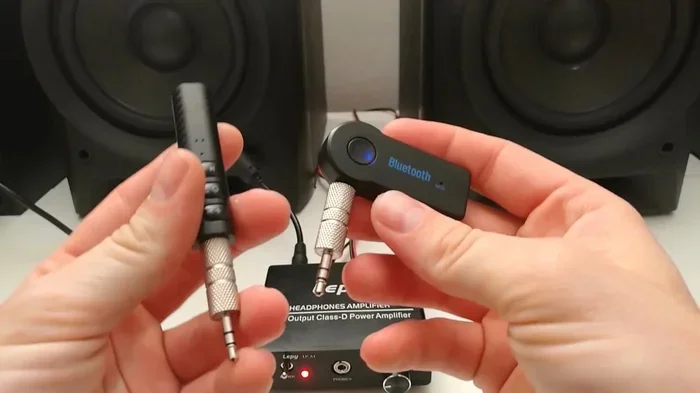
These adapters come in different shapes and sizes. Some look like simple USB sticks, while others have a 3.5mm audio jack built in. The ones with a 3.5mm jack are especially popular because they can connect to almost any stereo that has an aux input. The ones with a USB connection work directly with stereos that have a USB port designed for audio.
How Does It Work?
When you plug a USB Bluetooth dongle into your stereo, it acts as a USB audio device. Your stereo recognizes it just like it would recognize a USB flash drive. The adapter then searches for nearby Bluetooth devices, like your phone or tablet. Once paired, it receives the audio signal and sends it to your stereo’s amplifier and speakers.
The process uses a Bluetooth codec to compress and transmit the audio data. The most common codec is SBC, which works on almost all devices. Higher-end adapters support aptX or aptX HD, which deliver better sound quality with less compression. This means your music sounds closer to the original recording.
Types of USB Bluetooth Adapters
Not all adapters are the same. Here are the main types you will find on the market:
- Basic USB Bluetooth dongles: These are small and affordable. They work well for casual listening and offer a range of about 30 feet.
- Adapters with built-in 3.5mm cables: These have a headphone-style plug on one end and a USB plug on the other. They are great for stereos with aux inputs.
- High-resolution Bluetooth adapters: These support advanced codecs like aptX HD or LDAC. They deliver studio-quality sound for audiophiles who want the best possible audio.
- Car-specific USB Bluetooth adapters: Designed for vehicle stereos, these often include features like hands-free calling and noise reduction.
- Bluetooth transmitters with USB power: These send the Bluetooth signal to your stereo while drawing power from the USB port. They are ideal for home audio setups.
Can You Really Use a USB Bluetooth Adapter on Any Stereo?
The short answer is yes, in most cases. But the details matter. Whether your stereo system Bluetooth setup will work depends on a few factors. Let us break them down so you know exactly what to expect.
Home Stereo Systems
Most modern home stereos have USB ports that support audio devices. If your stereo has a USB port labeled for audio input, a USB Bluetooth adapter should work right out of the box. Simply plug it in, pair your phone, and start streaming.
Older stereos might not recognize a USB audio device. In that case, you can use an adapter with a 3.5mm output jack. Plug it into the aux input on your stereo, and you will have wireless audio in seconds. This is one of the easiest and most affordable ways to add wireless music streaming to any home system.
Car Stereos
Car stereos are a different story. Many modern vehicles have USB ports that only charge devices or play music from USB drives. They do not always support Bluetooth adapters for audio input. However, some car stereos do accept USB audio devices and will work with a Bluetooth stereo adapter.
If your car stereo has an aux input, you can use a Bluetooth adapter with a 3.5mm cable. This is the most reliable way to add wireless capability to a car stereo. You plug the USB end into a car charger for power and the 3.5mm end into the aux port on your stereo.
Factory vs. Aftermarket Stereos
Factory-installed stereos in newer cars are more likely to support Bluetooth adapters. Aftermarket stereos from brands like Pioneer, Kenwood, and Sony often have better USB audio support. They are designed with more features and tend to work well with USB audio devices.
Older factory stereos may not have USB ports at all. In those cases, an FM transmitter with Bluetooth is a better option than a USB adapter. It broadcasts the audio to an empty FM frequency on your radio. This is not as clean as a direct connection, but it works in a pinch.
How to Set Up a USB Bluetooth Adapter on Your Stereo
Setting up a USB Bluetooth adapter on your stereo is easier than most people think. You do not need to be tech-savvy. Follow these steps and you will be listening to wireless music in no time.
Step-by-Step Setup Guide
- Check your stereo’s USB port: Make sure the port is functional and supports audio input. Try plugging in a USB drive with music files to test it.
- Purchase a compatible adapter: Choose a Bluetooth receiver for stereo that matches your stereo’s input options. If you have a USB port, get a USB adapter. If you have an aux input, get one with a 3.5mm cable.
- Plug the adapter in: Insert the USB end into your stereo’s USB port. If your stereo does not provide enough power, use a USB hub or a powered USB port.
- Turn on your stereo: Switch the input source to USB or Aux, depending on your adapter type. Your stereo should recognize the new device.
- Pair your phone: Go to your phone’s Bluetooth settings, turn on Bluetooth, and search for available devices. Select your adapter from the list.
- Enter the PIN if needed: Some adapters use a default PIN like 0000 or 1234. Check the adapter’s manual for the correct code.
- Start playing music: Once paired, play a song on your phone. The audio should come through your stereo speakers immediately.
Quick Tips for a Smooth Setup
- Keep your adapter close: During pairing, keep your phone within 3 feet of the adapter for the best results.
- Restart both devices: If pairing fails, turn off Bluetooth on both devices and try again.
- Update your adapter’s firmware: Some adapters come with a companion app that lets you update the firmware for better performance.
- Use a short USB cable: Long cables can cause signal loss. Keep the connection between the adapter and the USB port as short as possible.
Troubleshooting Common Issues
Sometimes things do not work perfectly the first time. Here are the most common problems and how to fix them:
- Adapter not recognized: Try a different USB port. Some stereo USB ports only work with certain types of devices.
- No sound after pairing: Check the stereo input source. Make sure it is set to USB or Aux. Also check your phone’s volume and the stereo volume.
- Audio stuttering or cutting out: This is usually caused by interference. Move away from Wi-Fi routers and other electronic devices that might cause signal disruption.
- Pairing keeps failing: Delete the adapter from your phone’s Bluetooth list and pair it again from scratch.
- Audio delay or latency: This happens with some Bluetooth codecs. Switching to an adapter that supports aptX low latency can reduce or eliminate this issue.
Sound Quality: What to Expect
One of the biggest questions people have about USB Bluetooth adapters is sound quality. After all, wireless audio has a reputation for being inferior to wired connections. The truth is more nuanced.
Understanding Bluetooth Codecs
A Bluetooth codec is the technology that compresses and sends audio data wirelessly. The codec you use has a big impact on sound quality. Here is a quick comparison:
- SBC: The standard codec for all Bluetooth devices. It works everywhere but has average sound quality.
- aptX: Offers better sound quality than SBC with lower latency. Great for music and videos.
- aptX HD: Delivers high-resolution audio over Bluetooth. Audiophiles will notice the difference.
- aptX Adaptive: The latest codec that balances sound quality, latency, and connection stability.
- LDAC: Sony’s codec that supports very high bitrates. It offers near-wireless Hi-Res audio quality.
Factors That Affect Sound Quality
Several things determine how your music sounds through a Bluetooth adapter for stereo:
- Your phone’s audio output settings: Make sure your phone is not compressing the audio further.
- The quality of your stereo system: A good stereo with quality speakers will always sound better than a cheap system.
- Distance from the adapter: Bluetooth range is typically 30 feet. Going beyond that causes signal loss and lower quality.
- Interference from other devices: Wi-Fi, microwaves, and other Bluetooth devices can all degrade audio quality.
- The adapter’s internal antenna and chip quality: More expensive adapters generally have better components and deliver cleaner sound.
Does a USB Bluetooth Adapter Sound as Good as Bluetooth Built Into a Stereo?
In most cases, yes. A quality USB Bluetooth adapter with aptX support sounds nearly identical to built-in Bluetooth. The difference is usually so small that most listeners cannot tell. The real-world performance depends more on the adapter’s quality than on whether Bluetooth is built into the stereo or added externally.
Best USB Bluetooth Adapters for Stereo Systems
Not all adapters are created equal. Some deliver excellent sound and reliable connections, while others fall short. Here are some top options to consider:
Budget-Friendly Options
If you want a simple USB Bluetooth adapter that gets the job done without breaking the bank, look for options in the $10 to $20 range. Brands like TaoTronics and Mpow offer reliable adapters that support basic Bluetooth streaming. These work great for casual listening and are perfect for people who want a quick and easy solution.
Mid-Range Adapters
Adapters in the $25 to $50 range usually support aptX and offer better build quality. The Avantree Oasis and the 1Mii B06 are popular choices. They provide solid Bluetooth range of up to 50 meters and deliver noticeably better sound than budget options.
Premium Adapters for Audiophiles
If you care deeply about sound quality, invest in an adapter that supports aptX HD or LDAC. The FiiO BTR5 and the AudioQuest DragonFly are excellent choices. These adapters deliver studio-quality audio and work beautifully with high-end stereo systems. They also often include features like DAC (digital-to-analog converter) capabilities.
Common Mistakes to Avoid
Even with a great adapter, mistakes can ruin your experience. Here are the most common ones and how to avoid them:
- Buying the wrong type of adapter: Make sure you get an adapter that matches your stereo’s inputs. A USB-only adapter will not work with a stereo that only has an aux input, and vice versa.
- Ignoring codec compatibility: If both your phone and adapter support aptX but your stereo does not, you will fall back to SBC. Check compatibility before buying.
- Placing the adapter too far away: Bluetooth has a limited range. Keep your phone within range, especially in walls or through obstacles.
- Forgetting to update firmware: Adapter manufacturers release updates that improve performance. Check for updates after purchase.
- Using a low-power USB port: Some stereo USB ports do not provide enough power. If your adapter keeps disconnecting, try a different power source.
- Pairing too many devices: Most adapters can only stay paired with a few devices at a time. Too many paired devices can cause confusion and slow down connections.
USB Bluetooth Adapter vs. Other Wireless Options
A USB Bluetooth adapter is not the only way to go wireless with your stereo. Let us compare it to a few alternatives:
| Feature | USB Bluetooth Adapter | Aux Bluetooth Receiver | FM Transmitter | Wi-Fi Streaming |
|---|---|---|---|---|
| Ease of Setup | Very Easy | Very Easy | Easy | Moderate |
| Sound Quality | Excellent | Good | Fair | Excellent |
| Range | 30+ feet | 30+ feet | 10-15 feet | Whole home |
| Price | $10-$100+ | $10-$40 | $15-$30 | $50-$300+ |
| Works With Old Stereos | Yes | Yes | Yes | No |
| Hands-Free Calling | Yes | Yes | Yes | Usually No |
| Latency | Low (with aptX) | Low | None | Low |
As you can see, a USB Bluetooth adapter offers a great balance of ease, sound quality, and versatility. For most people, it is the best wireless solution for their stereo system.
Expert Insights
Audio engineers agree that adding a Bluetooth stereo adapter to a stereo system is one of the best ways to modernize your listening experience. According to industry experts, the key is choosing an adapter that supports high-quality codecs and has a reliable connection. A Bluetooth receiver for stereo with aptX support will give you 90% of the sound quality of a wired connection for a fraction of the cost.
Experts also recommend keeping your adapter’s firmware up to date. Manufacturers regularly improve performance through software updates. And do not underestimate the importance of placement. Keeping the adapter in a central location, away from walls and electronic interference, will give you the strongest and clearest signal.
Key Takeaways
- A USB Bluetooth adapter works on most stereo systems: Whether you have a home stereo or a car stereo, a Bluetooth adapter for stereo can add wireless capability quickly.
- Setup takes just a few minutes: Plug in the adapter, pair your device, and start streaming wireless music right away.
- Choose an adapter with aptX support for the best sound: Codec support makes a big difference in audio quality.
- Compatibility is the biggest factor: Check your stereo’s inputs and make sure the adapter matches them.
- Troubleshooting is usually simple: Most issues can be fixed by restarting devices, checking input sources, or updating firmware.
- Both home and car stereos benefit: A USB Bluetooth adapter works in almost any setting, making it a versatile accessory.
- Invest in quality for the best experience: A well-made adapter from a reputable brand will last longer and sound better than a cheap generic option.
Conclusion
So, can you use a USB Bluetooth adapter on your stereo? The answer is a clear yes. Whether you want to add wireless streaming to your home stereo, car stereo, or any other audio system, a Bluetooth stereo adapter is one of the easiest and most affordable solutions available today.
The process is simple. Plug in the adapter, pair your phone, and enjoy your favorite music without any cables. With the right adapter and a little bit of setup, you can transform any stereo system into a wireless music machine. The technology has improved so much in recent years that the sound quality is now excellent, even for demanding listeners.
Take some time to choose the right adapter for your needs. Consider your stereo’s inputs, your budget, and the sound quality you want. With the right USB Bluetooth adapter, you will wonder how you ever listened to music any other way.
Frequently Asked Questions
Will any USB Bluetooth adapter work with my stereo?
Most USB Bluetooth adapters will work with stereos that have a USB port supporting audio devices. However, some older or simpler stereos may only support USB for storage or charging. Check your stereo’s manual or look for a USB port labeled “audio” or “iPod” to confirm compatibility.
Does a USB Bluetooth adapter reduce sound quality?
Not necessarily. A quality adapter that supports advanced codecs like aptX or aptX HD delivers excellent sound with minimal loss. The difference between Bluetooth and wired audio is very small with modern adapters, especially ones that use aptX low latency technology.
Can I use a USB Bluetooth adapter in my car stereo?
Yes, you can use a USB Bluetooth adapter in a car stereo if your car stereo supports USB audio input. If it does not, you can use an adapter with a 3.5mm cable plugged into your car’s aux input instead. Some car-specific adapters also draw power from the car’s USB port for convenience.
What is the range of a USB Bluetooth adapter?
Most Bluetooth adapters for stereo have a range of about 30 feet (10 meters). Some high-end models with better antennas can reach up to 50 meters in open spaces. Walls and other obstacles reduce the range, so keep your phone close to the adapter for the best connection.
Can I connect multiple devices to one USB Bluetooth adapter?
Yes, most adapters can remember and switch between multiple paired devices. However, only one device can stream audio at a time. Some adapters support multipoint Bluetooth, which allows two devices to stay connected simultaneously and switch between them easily.
Do I need special software to use a USB Bluetooth adapter with my stereo?
Most USB Bluetooth dongles work without any special software. They use standard Bluetooth protocols and pair directly with your phone or tablet. Some premium adapters come with companion apps that let you update firmware or adjust settings, but these are optional and not required for basic use.