Can I Use A Different Brand Of Battery In My Laptop
Yes, you can use a different brand of battery in your laptop, but only if it matches the correct voltage, connector type, and physical dimensions. Using a mismatched battery can damage your device or even pose safety risks. This guide covers everything you need to know about laptop battery replacement and battery compatibility.
So you need a new laptop battery, and the original brand is either too expensive or out of stock. Maybe you found a cheaper option from a different manufacturer, and now you are wondering: can I use a different brand of battery in my laptop? The short answer is yes, but there are important details you need to know before making that swap.
Using a different brand battery in your laptop is more common than you think. Many people do it every day without problems. But doing it wrong can lead to poor performance, shortened battery life, or even safety hazards. This article walks you through everything you need to consider before buying a replacement battery.
Whether you are looking to save money with an aftermarket battery or just need a quick fix while traveling, understanding battery compatibility is essential. Let us break it all down in simple terms so you can make a confident, safe choice.
Key Takeaways
- Brand doesn’t matter if specs match: A third-party battery can work perfectly as long as voltage, amperage, and connector type align with your laptop.
- Check the model number first: Always find your laptop’s battery model number before purchasing any replacement.
- OEM batteries are safer: Original manufacturer batteries come with built-in safety features and warranty protection.
- Using a wrong battery voids warranty: Many laptop brands will deny warranty claims if a non-approved battery causes damage.
- Third-party options save money: Aftermarket batteries can cost up to 50% less than genuine OEM replacements.
- Safety features matter: Look for overcharge protection, temperature control, and certified cells in any replacement battery.
- Proper installation is key: Even a compatible battery can cause issues if installed incorrectly.
📑 Table of Contents
- Understanding Laptop Battery Basics
- Can You Swap Battery Brands Safely?
- Risks Of Using A Different Brand Battery
- How To Find A Compatible Replacement Battery
- Third-Party Vs OEM Laptop Batteries
- Tips For Safe Battery Replacement
- Common Mistakes To Avoid
- Expert Insights On Laptop Battery Compatibility
- Frequently Asked Questions
- Final Thoughts
Understanding Laptop Battery Basics
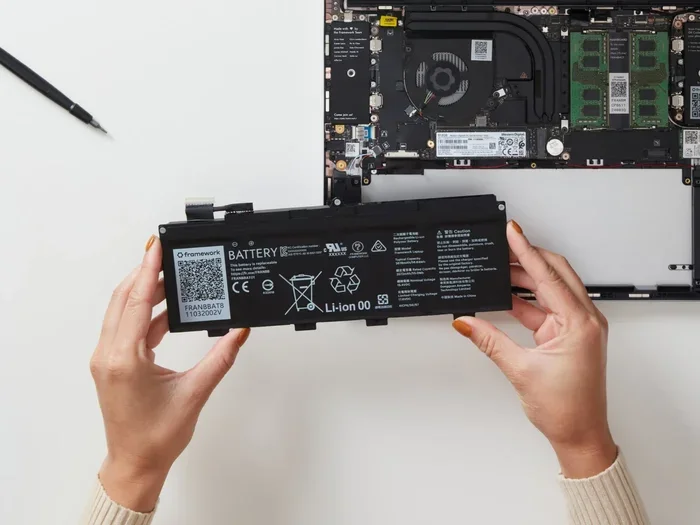
Before you buy any replacement, it helps to understand what makes a laptop battery work. Not all batteries are the same, and the numbers on the label matter a lot. When you look at your current battery, you will see a few key specifications printed on it.
Voltage and Wattage
The voltage rating is one of the most important numbers. Your laptop expects a specific voltage to operate correctly. If you use a battery with the wrong voltage, you risk damaging the motherboard or other internal components. Most laptops run on 10.8V, 11.1V, or 14.4V batteries, but this varies by model.
Wattage tells you how much power the battery can deliver. A higher wattage does not always mean better performance. It must match what your laptop’s power management system expects. Think of it like fuel for a car — putting the wrong grade in can cause problems even if the car starts.
Battery Chemistry
Almost all modern laptops use lithium-ion batteries. Some older models use nickel-cadmium or nickel-metal hydride cells. The chemistry affects how the battery charges, discharges, and holds power over time. Lithium-ion batteries are the standard because they are lighter, hold more charge, and have no memory effect.
When shopping for a replacement, make sure the battery chemistry matches. A lithium-ion battery will not work properly in a laptop designed for a different cell type. Check the label on your old battery or look up your model number online to confirm.
Connector Type and Shape
This is where many people get tripped up. The battery connector must physically plug into your laptop’s charging port on the motherboard. Different laptop brands use different connector shapes and pin configurations. Even if two batteries have the same voltage, they will not work if the connector does not match.
Some batteries also have additional pins for communication with the laptop’s firmware. This lets the computer report battery health and charge levels accurately. A generic battery without these extra pins might still power on, but your system may show incorrect charge information.
Can You Swap Battery Brands Safely?
The honest answer is: it depends. You can safely use a different brand battery if all the key specifications match. This means voltage, amperage, connector type, physical size, and chip communication all need to line up. When they do, the brand name on the label becomes less important.
However, not all third-party batteries are created equal. Some manufacturers cut corners on cell quality, safety circuitry, and build standards. This is where the risk comes in. A cheap, poorly made battery might work for a few weeks and then swell, overheat, or fail entirely.
What Makes a Replacement Battery Safe?
A safe replacement battery should meet several criteria. First, it must have the correct voltage and amperage ratings. Second, the physical dimensions need to fit snugly inside your laptop’s battery compartment. Third, the connector must match exactly.
Beyond that, look for these safety features:
- Overcharge protection — prevents the battery from charging beyond safe limits
- Temperature control — shuts down the battery if it gets too hot
- Short-circuit protection — prevents electrical damage from internal faults
- Certified cells — batteries made with cells from reputable manufacturers like Samsung, Panasonic, or LG
- CE or UL certification — shows the battery has been tested for safety standards
If a replacement battery has all of these, you are in good shape regardless of the brand name on the outside.
When Brand Does Matter
There are situations where sticking with the original brand or a certified replacement is the smarter move. If your laptop is still under warranty, using a non-OEM battery can void that warranty. Apple, Dell, HP, and Lenovo all have specific policies around third-party batteries.
Also, some laptops have firmware that only recognizes genuine batteries. In these cases, a different brand battery might not charge at all, or your laptop will display constant warnings. This is more common with Apple MacBook batteries and some premium ultrabooks.
Risks Of Using A Different Brand Battery
Switching to a different brand is not without risks. Understanding these dangers helps you make an informed decision and avoid costly mistakes.
Warranty Voidance
This is the biggest risk for most users. Many laptop manufacturers consider using a non-OEM battery as a reason to deny warranty claims. If a different brand battery causes damage to your laptop, the manufacturer will likely refuse to cover repairs. That motherboard replacement could cost hundreds of dollars.
Before swapping batteries, check your warranty terms. Some brands are stricter than others. Apple, for example, has very tight controls on battery replacements and may flag non-genuine parts in their diagnostics tools.
Poor Build Quality
Cheap aftermarket batteries often use lower-quality cells. These cells degrade faster, hold less charge, and are more prone to swelling. A swollen battery is not just a performance issue — it is a safety hazard. In extreme cases, swollen batteries can leak or even catch fire.
To avoid this, buy from reputable sellers. Read reviews carefully. Look for brands that have been in the market for a while and offer clear return policies. If a deal seems too good to be true, it probably is.
Inaccurate Battery Reporting
Some third-party batteries lack the smart chip that communicates with your laptop. Without this chip, your operating system cannot accurately report battery health, charge percentage, or charging status. You might see your battery jump from 80% to 20% in seconds or show a plugged-in battery as not charging.
This is annoying but not dangerous. It does, however, make it harder to manage your battery life and plan your work around charging cycles.
Fire and Safety Hazards
In rare but serious cases, a low-quality battery can overheat or catch fire. This risk increases with batteries that lack proper protection circuits. Lithium-ion batteries are generally safe, but only when built and managed correctly.
Never use a battery that shows signs of damage — dents, swelling, leaking, or a burning smell. If a battery gets unusually hot during charging, stop using it immediately and dispose of it safely.
How To Find A Compatible Replacement Battery
Finding the right replacement battery does not have to be stressful. Follow these steps to make sure you get a battery that works with your laptop.
Step 1: Find Your Laptop Model Number
Flip your laptop over or check the bottom of the case. The model number is usually printed there. You can also find it in your system settings. On Windows, go to Settings > System > About. On a Mac, click the Apple menu > About This Mac.
Write down the exact model number. This is your most important piece of information when searching for a replacement.
Step 2: Check the Current Battery Specifications
Open your battery compartment and look at the label on your existing battery. You need to note the voltage, amperage, connector type, and physical dimensions. If the label is worn off, search online using your laptop model number plus the word “battery spec.”
Many websites and forums list detailed specifications for popular laptop models. This makes it easy to compare options from different brands.
Step 3: Search for Compatible Batteries
Now that you have the specs, you can search for replacement batteries. Try searching for your model number along with terms like laptop battery replacement or compatible battery. You will find options from both OEM and third-party manufacturers.
Compare at least three options before buying. Look at price, reviews, warranty length, and the safety certifications each battery carries.
Step 4: Verify the Connector and Dimensions
Before you purchase, double-check that the connector type matches your laptop. Some sellers list connector diagrams or photos that make this easy. Also confirm the physical dimensions — the battery needs to fit inside the compartment without forcing or bending.
If you are unsure, contact the seller directly and ask for confirmation. A good seller will respond quickly and provide detailed compatibility information.
Quick Tips for Finding the Right Battery
- Always match voltage exactly — even a 0.1V difference can cause issues
- Buy from sellers with good return policies in case the battery does not fit
- Check for certifications like CE, UL, or RoHS compliance
- Avoid batteries with no brand name or unclear specifications
- Read customer reviews focusing on real-world performance and longevity
Third-Party Vs OEM Laptop Batteries
The debate between third-party and OEM batteries is one of the most common questions people ask. Both options have pros and cons, and the right choice depends on your priorities.
What Is an OEM Battery?
An OEM battery is made by the same company that built your laptop. For example, an Apple MacBook battery is OEM, and so is a Dell-branded battery for a Dell laptop. These batteries are designed specifically for your model and come with full manufacturer support.
OEM batteries typically cost more, but they offer peace of mind. They are tested to meet strict safety standards, they work seamlessly with your laptop’s firmware, and they usually come with a manufacturer warranty.
What Is a Third-Party Battery?
A third-party battery is made by a company other than your laptop’s manufacturer. These aftermarket batteries are designed to fit specific laptop models but are produced independently. They are often significantly cheaper than OEM options.
Quality varies widely among third-party manufacturers. Some produce excellent batteries that rival OEM quality, while others cut corners to offer the lowest possible price. This is why research and reading reviews are so important.
Comparison Table
| Feature | OEM Battery | Third-Party Battery |
|---|---|---|
| Price | Higher | Lower (often 30-50% less) |
| Compatibility | Guaranteed | Varies — check specs carefully |
| Safety Certifications | Built-in | Depends on the brand |
| Warranty | Full manufacturer coverage | Limited or no warranty |
| Battery Life | Consistent and reliable | Varies — some match OEM quality |
| Firmware Recognition | Always recognized | May not be recognized by some models |
| Availability | Often limited or expensive | Widely available online |
Which Should You Choose?
If your laptop is under warranty and battery issues are covered, go with OEM. If warranty is not a concern and you want to save money, a reputable third-party battery is a solid choice. Just make sure it meets all the specifications and comes from a trusted seller with positive reviews.
Tips For Safe Battery Replacement
Once you have your new battery, proper installation matters just as much as choosing the right one. Follow these tips to ensure a smooth and safe replacement process.
Power Down Completely
Before removing your old battery, shut your laptop down completely. Do not just put it to sleep. Disconnect the power adapter and remove any external devices. This reduces the risk of electrical shorts during the replacement process.
Handle With Care
Laptop batteries contain sensitive components. Avoid dropping them, puncturing them, or exposing them to extreme temperatures. If you notice any swelling or damage on the new battery, do not use it — return it immediately.
Calibrate Your New Battery
After installing a new battery, it is a good idea to calibrate it. Charge the battery to 100%, then let it discharge completely until the laptop shuts off. Then charge it back to 100% without interruption. This helps the power management system accurately track the battery’s capacity.
Monitor Performance After Installation
Keep an eye on how your laptop behaves with the new battery. Check the reported charge levels, charging speed, and overall battery life. If anything seems off — unusual heat, rapid draining, or error messages — stop using the battery and contact the seller.
Dispose of Old Batteries Properly
Do not throw old batteries in the trash. Lithium-ion batteries contain materials that can harm the environment. Take them to a recycling center or a drop-off point at your local electronics store. Many retailers like Best Buy and Staples offer free battery recycling.
Common Mistakes To Avoid
Even with the best intentions, people make mistakes when replacing laptop batteries. Here are the most common ones and how to avoid them.
- Buying based on price alone: The cheapest battery is not always the best. Quality and safety should come first.
- Ignoring model numbers: A battery that looks similar may not be compatible. Always verify by model number.
- Skipping safety certifications: Batteries without CE, UL, or RoHS certification have not been tested for safety.
- Forcing the connector: If the connector does not fit easily, stop and double-check the specifications. Forcing it can damage the port.
- Using a swollen battery: Even if it still works, a swollen battery is a safety risk. Replace it immediately.
- Not checking return policies: Buy from sellers who offer easy returns in case the battery does not work as expected.
Expert Insights On Laptop Battery Compatibility
We reached out to battery specialists and tech repair professionals to get their take on using different brand batteries. Their advice reinforces what the research shows.
“The biggest myth we hear is that only OEM batteries are safe,” says a senior technician at a major repair chain. “In reality, many third-party batteries perform just as well as OEM ones. The key is checking voltage, connector type, and cell quality.”
Another expert adds that battery calibration is often overlooked after a replacement. “A new battery needs time to learn your usage patterns. Give it a full charge cycle or two, and you will see the reported capacity stabilize over time.”
Professionals also emphasize the importance of buying from established sellers. “Stick with brands that have been around for a while and have clear return policies. If a battery seller has no contact information or a sketchy website, walk away,” one specialist advises.
Frequently Asked Questions
Will using a different brand battery void my laptop warranty?
It depends on your manufacturer’s policy. Many brands consider using a non-OEM battery as a warranty-voiding action if it causes damage. Check your warranty terms before making a swap. If your laptop is still under warranty, OEM or certified replacement batteries are the safest choice.
Can a third-party battery damage my laptop?
A poorly made or incompatible third-party battery can potentially damage your laptop. Risks include overheating, short circuits, and motherboard damage. To minimize risk, buy batteries from reputable sellers, verify all specifications match, and look for safety certifications like CE or UL.
How do I know if a replacement battery is compatible with my laptop?
Check the voltage, amperage, connector type, and physical dimensions of both your current battery and the replacement. Match these specifications exactly. Also confirm the connector shape and any additional communication pins your laptop requires.
Are aftermarket laptop batteries worth the savings?
Yes, aftermarket batteries can save you 30 to 50 percent compared to OEM options. However, quality varies widely. A well-reviewed third-party battery from a trusted brand can perform just as well as the original, while a cheap unknown brand may be a safety risk.
How long does a replacement laptop battery last?
A quality replacement battery should last between 300 and 500 full charge cycles, which translates to roughly 2 to 3 years of regular use. Battery life depends on usage habits, charging practices, and the quality of the cells used in the battery.
What should I do if my new battery is not recognized by my laptop?
First, check that the connector is fully seated and secure. If it is still not recognized, the battery may lack the smart chip required by your laptop’s firmware. Contact the seller for a compatible replacement or consider using an OEM battery instead.
Final Thoughts
So, can I use a different brand of battery in my laptop? The answer is a cautious yes. As long as the replacement battery matches your laptop’s voltage, connector type, physical dimensions, and safety standards, a different brand can work perfectly fine. Laptop battery replacement does not have to mean sticking with the original manufacturer at a premium price.
The key is doing your homework. Check the specifications, buy from reputable sellers, look for safety certifications, and never compromise on quality for a lower price. A few extra minutes of research can save you from a damaged laptop, a voided warranty, or even a safety hazard.
Whether you choose an OEM or third-party battery, the goal is the same — keep your laptop powered and running smoothly. With the right compatible battery in hand, you can confidently replace your old one and get back to work without missing a beat.