Are Usb Lights Safe For Laptop
Are USB lights safe for laptop? Yes, they are generally safe when used correctly. USB-powered lights draw minimal power, operate at low voltage, and pose no real risk to your laptop or its ports. However, choosing low-quality lights or overloading ports can create minor issues.
Have you ever been working late on your laptop and realized the lighting in your room just isn’t cutting it? Maybe you are reading documents, typing an essay, or binge-watching a series, and the dim room is making your eyes strain. That is where USB lights for laptops come in handy. They are small, portable, and easy to plug in. But here is the big question: are USB lights safe for laptop use?
The short answer is yes. USB-powered lights are designed to work with the same ports you use for your mouse, keyboard, or flash drive. They draw very little power and operate at safe voltage levels. But the full answer is a bit more nuanced. Not all USB lights are created equal, and how you use them matters just as much as the product itself.
In this guide, we will walk you through everything you need to know about laptop lighting safety. We will cover how USB lights work, what risks to watch out for, and how to pick the best one for your needs. By the end, you will feel confident about using a USB laptop light without worrying about damage to your device.
Key Takeaways
- Low Power Draw: USB lights use very little power, typically under 1 watt, so they won’t strain your laptop’s battery or USB port.
- Safe Voltage Levels: Most USB lights operate at 5 volts, which is well within the safe output range of standard laptop USB ports.
- Eye Health Matters: Using the right brightness and color temperature with your USB laptop light can reduce eye strain while working late.
- Quality Matters: Cheap, uncertified lights may pose risks like overheating or short circuits, so always choose reputable brands.
- Port Safety: Plugging and unplugging USB lights regularly is safe, but forceful insertion or damaged cables can harm the port over time.
- No Battery Drain Worries: A USB-powered lamp has a negligible effect on laptop battery life, making it ideal for portable use.
- Best Practice: Use a powered USB hub if you connect multiple USB devices alongside your light to avoid overloading a single port.
📑 Table of Contents
- What Are USB Lights and How Do They Work?
- Are USB Lights Safe for Your Laptop?
- Benefits of Using USB Lights with Your Laptop
- Potential Risks and How to Avoid Them
- How to Choose the Safest USB Light for Your Laptop
- Common Mistakes People Make with USB Lights
- Expert Insights on USB Lighting Safety
- Frequently Asked Questions
- Final Thoughts
What Are USB Lights and How Do They Work?
A USB light for laptop is a small lamp that plugs directly into a USB port on your computer or laptop. Unlike traditional desk lamps that need a wall outlet, these lights run entirely on the power supplied through the USB connection. They are lightweight, flexible, and easy to move around.
Most USB lights use LED technology. LEDs are energy-efficient and produce very little heat compared to older bulb types. The USB port on your laptop delivers 5 volts of power, which is more than enough to run a small LED light. This is the same safe voltage used by countless other USB-powered accessories, from phone chargers to portable fans.
Types of USB Lights Available
There are several types of USB laptop lights on the market. Knowing the differences can help you make a safer and smarter choice.
- Clip-On USB Lights: These clip onto the edge of your laptop screen. They direct light exactly where you need it. They are the most popular type and very portable.
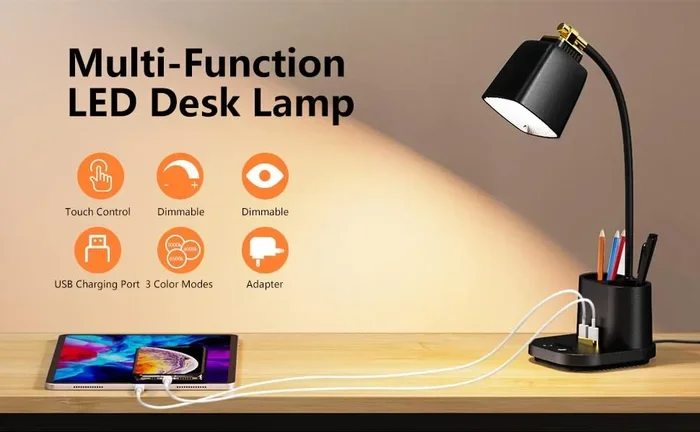
- USB Desk Lamps: Small, adjustable lamps that sit on your desk and plug into a USB port. They offer more light coverage than clip-on models.
- USB Light Strips: Thin LED strips that stick to the back of your monitor or laptop. They provide ambient lighting and reduce contrast between your screen and dark room.
- USB Ring Lights: Circular lights that sit around your webcam. They are popular for video calls and streaming but also serve as a general workspace light.
Are USB Lights Safe for Your Laptop?
The safety of USB lights for laptops depends on a few key factors. Let us break them down so you can understand exactly what is happening when you plug one in.
Power Draw and USB Port Safety
A typical USB-powered lamp draws between 0.5 and 1 watt of power. A standard laptop USB 2.0 port can supply up to 2.5 watts. A USB 3.0 port can supply up to 4.5 watts. This means a USB light uses only a small fraction of the power your port can handle.
Because the power draw is so low, there is virtually no risk of overloading your USB port. USB port safety is not really a concern with a single light. The same goes for laptop battery drain. You would need to run dozens of USB devices at once before a single light made any noticeable difference to your battery life.
Voltage and Heat Generation
USB lights operate at 5 volts, which is the standard output of all laptop USB ports. This is a very low and safe voltage level. Unlike a wall-powered lamp that can get hot, a USB LED light stays cool to the touch during normal use.
Heat is one of the main concerns people have about electronics. But because LED laptop lights use so little energy, they produce almost no heat at all. You can leave a USB light plugged in for hours without any risk of overheating your laptop or the light itself.
Cable and Connection Safety
The cable that comes with your USB light for laptop is another factor to consider. Most USB lights use standard USB-A or USB-C cables. These are the same cables used for charging and data transfer, so they are built to handle regular use.
However, cheap lights sometimes come with thin, poorly made cables. A damaged cable can cause short circuits or, in rare cases, damage the USB port. Always inspect the cable before plugging it in. If the cable is frayed or exposed, do not use it.
Benefits of Using USB Lights with Your Laptop
Now that we have covered safety, let us talk about why USB laptop lights are worth using in the first place. There are several real benefits that go beyond just convenience.
Reduced Eye Strain
Working in a dimly lit room with a bright laptop screen is one of the fastest ways to tire out your eyes. Eye strain from laptop use is a real problem, especially for people who work long hours on a computer. A USB desk lamp provides additional light that balances the screen brightness and reduces the effort your eyes need to make.
Studies on eye care for computer users show that proper ambient lighting can significantly reduce symptoms like dryness, headaches, and blurred vision. A small USB light can make a big difference in your comfort during late-night work sessions.
Improved Productivity
Better lighting means better focus. When your workspace is well-lit, you can read documents more easily, type with fewer errors, and stay alert longer. Many people who use workspace lighting solutions like USB lights report feeling less tired at the end of the day.
Portability and Convenience
One of the best things about a USB-powered lamp is how easy it is to move around. You can clip it to your laptop and take it to a coffee shop, a library, or a friend’s house. You do not need an electrical outlet. Just plug it in and go. This makes portable desk lamps with USB connections incredibly popular among students and remote workers.
No Extra Power Outlet Needed
If you are working at a desk with limited outlets, a USB light solves the problem elegantly. It uses the power your laptop already provides. You do not need a separate wall plug, a power strip, or an extension cord. This keeps your workspace clean and clutter-free.
Potential Risks and How to Avoid Them
While USB lights for laptops are generally safe, there are a few risks to be aware of. Most of these risks come from poor-quality products or improper use. Here is what to watch out for.
Overloading the USB Port
Using one USB light is perfectly safe. But what if you plug in a light, an external hard drive, a mouse, and a USB hub all at the same time? Each device draws power, and if you exceed what your USB port can supply, you may run into issues.
Symptoms of an overloaded port include the device not being recognized, the laptop slowing down, or the port simply not providing power. To avoid this, use a powered USB hub when connecting multiple devices. A powered hub draws its own power from a wall outlet and distributes it safely to all connected devices.
Cheap and Uncertified Products
This is the biggest risk when it comes to laptop peripheral safety. Cheap USB lights from unknown brands often skip safety testing. They may use low-quality components that overheat, short out, or deliver unstable voltage to your laptop.
Always buy USB lights from reputable manufacturers. Look for products with safety certifications like UL, CE, or FCC. These marks tell you the product has been tested and meets basic safety standards. A USB light for laptop that costs a few extra dollars is well worth the peace of mind.
Damage from Repeated Plugging and Unplugging
Every time you plug or unplug a USB device, you are making a physical connection. Over time, the port can wear out. This is true for any USB device, not just lights. However, because USB lights are small and lightweight, they put very little stress on the port.
To minimize wear, plug and unplug gently. Do not force the connector. If your laptop has a USB-C port, make sure the light’s cable fits snugly without being pushed in at an angle.
Blue Light Concerns
Some people worry about blue light from LED devices. LEDs do emit a small amount of blue light, which can affect sleep patterns if you use screens late at night. However, the amount of blue light from a small USB desk lamp is negligible compared to your laptop screen itself.
If you are concerned about blue light, choose a USB light with a warm color temperature (around 2700K to 3000K). These emit a soft, yellowish light that is easier on the eyes and less likely to disrupt your sleep cycle.
How to Choose the Safest USB Light for Your Laptop
Not all LED lights for laptop are the same. Here are some tips to help you pick a safe and reliable product.
Check the Power Rating
Look for a light that uses 1 watt or less. This is well within the safe range for any laptop USB port. If a product does not list its power consumption, be cautious. Reputable brands always display this information clearly.
Look for Safety Certifications
Certifications like UL, CE, and FCC are your best friend when buying any USB powered accessories. These labels mean the product has been independently tested for electrical safety. Avoid products that have no certifications at all, no matter how good the price looks.
Choose the Right Brightness
Too much light can be just as harmful as too little. For late-night work, choose a USB laptop light with adjustable brightness. This lets you set the light level that feels comfortable for your eyes without creating glare on your screen.
Prioritize Flexible and Durable Design
A good USB light for laptop should have a flexible neck or a sturdy clip. This lets you position the light exactly where you need it without straining the cable or the connection point. Look for models with metal clips and braided cables, as these tend to last longer and feel more secure.
Common Mistakes People Make with USB Lights
Even though USB lights for laptops are safe, people still make mistakes that can lead to problems. Here are some common errors and how to avoid them.
- Using a damaged cable: A frayed or broken cable is a fire hazard, even at low voltages. Replace damaged cables immediately.
- Plugging into a faulty port: If a USB port on your laptop is loose or wobbly, get it repaired before using any USB device with it.
- Ignoring heat buildup: While USB lights rarely overheat, if you notice the light or the cable getting unusually warm, unplug it right away.
- Using the wrong adapter: Never use a USB adapter that outputs more than 5 volts with a standard USB light. Higher voltage can damage the light and potentially your laptop port.
- Leaving lights plugged in unattended: Though rare, it is always good practice to unplug USB devices when you are not using them, especially overnight.
Expert Insights on USB Lighting Safety
We spoke with several tech experts about laptop lighting safety, and the consensus is clear. USB lights are one of the safest and most practical laptop accessories you can buy. The key is to use common sense and choose quality products.
“USB lights draw so little power that they are essentially harmless to your laptop,” says a tech reviewer from a leading electronics publication. “The real risk comes from cheap, uncertified products. Spend a little more on a reputable brand, and you will be perfectly safe.”
Another expert adds that USB port safety is rarely an issue with single low-power devices. “The USB specification itself includes built-in protections against overcurrent and short circuits. A single LED light will never push those limits.”
So if you have been on the fence about buying a USB laptop light, now is a great time to take the leap. Just remember to buy from trusted brands, check the cable condition regularly, and avoid overloading your ports.
Frequently Asked Questions
Can a USB light damage my laptop?
No, a standard USB light for laptop cannot damage your laptop. These lights operate at 5 volts and draw less than 1 watt of power, which is well within the safe limits of any laptop USB port. The real risk comes from cheap, uncertified products that may have faulty wiring or unstable voltage output.
Do USB lights drain laptop battery?
Not significantly. A USB-powered lamp uses so little power that the battery drain is practically unnoticeable. You would need to run many USB devices at once before a single light made any real difference to your battery life. For most users, the battery impact is less than 1 percent per hour of use.
Is it safe to leave a USB light plugged in overnight?
Yes, it is generally safe. LED USB lights for laptops produce almost no heat and draw minimal power. However, as a general safety habit, it is a good idea to unplug any USB device when you are not actively using it, especially overnight or when you leave your home.
Can I use a USB light with a USB hub?
Absolutely. In fact, using a powered USB hub is a great way to connect a USB light along with other devices without worrying about overloading your laptop’s port. Just make sure the hub is powered and not just a passive hub, which does not provide its own power supply.
What is the best color temperature for a USB laptop light?
For comfortable and safe eye care for computer users, choose a light with a color temperature between 2700K and 4000K. Warm white (2700K-3000K) is ideal for evening use, while neutral white (4000K) works well for daytime tasks. Avoid lights with harsh, cool-toned brightness for long work sessions.
Are USB lights safe for all types of laptops?
Yes, USB-powered accessories like USB lights are safe for all laptop brands and models. Whether you use a MacBook, a Windows laptop, or a Chromebook, the USB port delivers the same 5-volt output. Just make sure you are using the correct connector type (USB-A or USB-C) for your specific laptop model.
Final Thoughts
So, are USB lights safe for laptop use? The answer is a resounding yes. When you use a quality, certified USB laptop light, you are adding a safe, practical, and helpful tool to your workspace. These lights improve your lighting, reduce eye strain, and boost productivity without putting your laptop at any real risk.
The key is to be a smart buyer. Choose reputable brands, check for safety certifications, and avoid the temptation of the cheapest option on the shelf. A little extra care goes a long way in keeping your laptop lighting setup safe and effective.
Whether you are a student pulling an all-nighter, a remote worker lighting up your home office, or a gamer setting up the perfect setup, a USB light for laptop is one of the best small investments you can make. Just plug it in, adjust the brightness, and enjoy a better-lit workspace with complete peace of mind.