Are Hard Cases Bad For Laptops Everything You Need To Know
So, are hard cases bad for laptops? The short answer is no — but there are important caveats you need to know. A hard case can offer excellent drop protection and scratch resistance, yet it may trap heat and add unwanted weight. This guide breaks down everything you need to know about hard case laptop use, from thermal concerns to choosing the right fit.
You just bought a shiny new laptop. You want to keep it safe. So you look up hard cases. Maybe a friend told you they are great. Maybe another person said they cause damage. Now you are stuck wondering, are hard cases bad for laptops?
This is a question many laptop users ask. The internet is full of conflicting advice. Some people swear by hard shell protection. Others say it traps heat and causes problems. The truth lies somewhere in the middle. And this guide will walk you through it all.
We will cover what hard cases do, how they affect your device, and how to pick the right one. By the end, you will know exactly what to do. No guesswork. No confusion. Just clear, practical advice about laptop protection and hard case use.
Key Takeaways
- Hard cases are not inherently bad: They provide solid drop protection and scratch resistance for your portable computer.
- Heat buildup is the real concern: Poor ventilation inside a hard shell case can affect laptop cooling and performance.
- Not all hard cases are equal: Some designs include ventilation and ergonomic features that reduce risks.
- Soft cases have their own perks: They offer lighter weight and better airflow but less impact protection.
- Proper usage matters most: How you use and remove your case affects your laptop’s longevity more than the case type.
- Choose based on your needs: Travel frequency, environment, and laptop model all influence the best choice.
📑 Table of Contents
- What Is a Hard Case and Why Do People Use Them
- Are Hard Cases Bad For Laptops: The Real Truth
- Hard Case vs. Soft Case: Which Protects Better
- Common Problems Caused by Hard Cases
- How to Choose the Right Laptop Case
- Expert Tips for Using Hard Cases Safely
- Do Hard Cases Affect Laptop Performance
- The Bottom Line: Should You Use a Hard Case
What Is a Hard Case and Why Do People Use Them
A hard case is a rigid outer shell made for your laptop. It usually snaps or slides around your device. People use them to prevent damage. They are especially popular among travelers, students, and professionals.
The main job of a hard case is impact resistance. It spreads force across the surface. This helps if you drop your laptop or bump it against something hard. A good hard shell case can save your device from cracks and dents.
Many hard cases also prevent scratches. They keep your laptop looking new longer. For people who carry their devices daily, this matters a lot. A laptop sleeve or soft pouch does not offer the same level of defense.
But protection comes with trade-offs. And that is where the debate begins. Let us look at both sides.
Types of Hard Cases Available
Not all hard cases are the same. Here are the most common types you will find:
- Full hard shell cases: These cover the entire laptop. They wrap around the top and bottom. They offer maximum drop protection.
- Partial hard cases: These cover only the bottom or corners. They leave the top exposed but still add some impact resistance.
- Hard case with keyboard cover: These include a fitted keyboard protector. They guard against spills and dust.
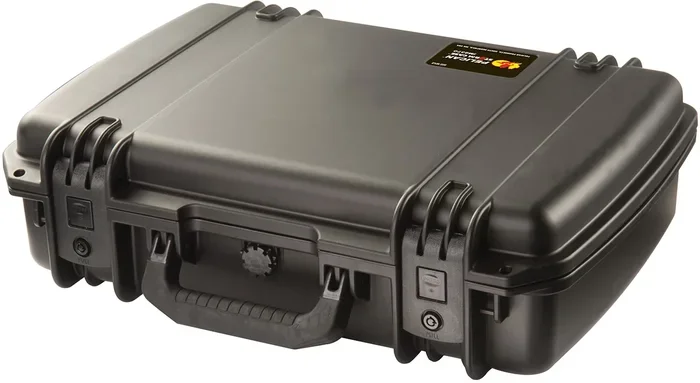
- Rigid travel cases: These are bigger and heavier. They hold your laptop inside a padded compartment. Great for frequent travelers.
Each type has pros and cons. Your choice depends on how you use your laptop and where you take it.
Are Hard Cases Bad For Laptops: The Real Truth
Let us get straight to the point. Are hard cases bad for laptops? The honest answer is no. They are not bad on their own. But they can cause problems if used the wrong way.
The biggest concern people have is heat buildup. Laptops need airflow to stay cool. A hard case wraps around your device tightly. This can block air vents. When air cannot flow, heat gets trapped inside.
Over time, excess heat can hurt your laptop. It may slow down performance. The battery might wear out faster. In extreme cases, it could damage internal parts. This is why many people ask, do hard cases cause overheating?
The answer depends on the case design. Some hard cases include ventilation holes. These let air pass through. Others are fully sealed and block airflow completely. The difference matters a lot.
How Heat Affects Your Laptop
Heat is the silent enemy of electronics. Here is what happens when your laptop gets too hot:
- Thermal throttling: Your laptop slows down to protect itself. This hurts performance.
- Battery degradation: Heat breaks down battery cells faster. Your battery life gets shorter over time.
- Component stress: The CPU and GPU work harder when hot. This shortens their lifespan.
- Fan noise: Fans spin faster to cool things down. This can be annoying.
None of these problems happen overnight. But they add up over months and years. This is why thermal management matters so much when you use a hard case.
Do Hard Cases Cause Scratches Inside?
Another concern is scratching. Some hard cases have rough inner surfaces. When you slide your laptop in and out, it can rub against the walls. Over time, this leaves fine scratches on the finish.
However, most modern hard cases use soft lining on the inside. They have microfiber or felt padding. This prevents scratches. If you buy a cheap case with no lining, you might run into this issue.
So the quality of the case matters a lot. A well-made hard case laptop protector will not scratch your device. A cheap one might.
Hard Case vs. Soft Case: Which Protects Better
This is one of the most common debates among laptop users. Let us compare them side by side.
Protection Level
Hard cases win for impact protection. They resist drops and bumps much better than soft cases. A hard shell case absorbs shock and spreads it out. A soft sleeve just cushions the blow.
Soft cases do protect against scratches. They are usually made of neoprene or padded fabric. They work well for light use. But they will not save your laptop from a serious fall.
Heat and Airflow
Soft cases are better for airflow. They are thin and flexible. Air moves around your laptop more freely. This means better cooling and less heat buildup.
Hard cases trap more heat. But again, it depends on the design. Ventilated hard cases reduce this problem significantly.
Weight and Portability
Soft cases are lighter. They add almost no extra weight to your laptop. This makes them great for people who carry their devices everywhere.
Hard cases add some weight. A full hard shell can add a few hundred grams. For most people, this is not a big deal. But if you are very weight-conscious, a soft sleeve might feel better.
Comparison Table
| Feature | Hard Case | Soft Case |
|---|---|---|
| Drop Protection | Excellent | Moderate |
| Scratch Protection | Excellent | Good |
| Heat Trapping | Higher Risk | Lower Risk |
| Weight Added | Moderate to High | Low |
| Airflow | Poor (unless ventilated) | Good |
| Price Range | Moderate to High | Low to Moderate |
| Durability | Very High | Moderate |
As you can see, neither option is perfect. Each has strengths and weaknesses. Your choice should match your lifestyle and needs.
Common Problems Caused by Hard Cases
Hard cases are not without issues. Here are the most common problems people run into:
1. Heat Buildup During Heavy Use
If you play games or run heavy software, your laptop already gets warm. Adding a hard case on top makes it worse. The case blocks vents and traps hot air. This can cause thermal throttling and slow performance.
The fix is simple. Remove the case during heavy tasks. Or buy a ventilated hard case with airflow channels.
2. Difficulty Removing the Laptop
Some hard cases fit very tightly. This is good for stability. But it can be annoying when you need to pull your laptop out quickly. You might end up bending the case or stressing the hinges.
Look for cases with easy-release mechanisms. These let you slide your laptop in and out without force.
3. Added Bulk
A hard case makes your laptop thicker and heavier. This can be a problem if you travel light. Some people prefer slim setups. A hard case fights against that goal.
If portability is your priority, consider a partial hard case or a thin protective cover.
4. Button and Port Accessibility
Cheap hard cases sometimes block ports. You might struggle to plug in a charger or connect a USB device. The case might also press against your keyboard or touchpad awkwardly.
Always check port cutouts before buying. Make sure all buttons and openings remain fully accessible.
5. Wear on the Case Itself
Hard cases can crack or chip over time. They take a beating so your laptop does not have to. But the case itself wears out. Once it cracks, it no longer protects well.
Higher quality materials last longer. Polycarbonate and ABS plastic are the most durable options.
How to Choose the Right Laptop Case
Choosing the right case does not have to be hard. Follow these steps to find the best fit.
Step 1: Know Your Laptop Model
Measure your laptop or check the manufacturer specs. Every model has slightly different dimensions. A case that is too big will not protect well. One that is too tight will be hard to use.
Search for hard case for [your laptop model] to find the right fit. Brands like Dell, HP, Lenovo, and Apple all have specific cases designed for their devices.
Step 2: Consider Your Usage Environment
Where do you use your laptop most?
- Office or home: A soft case might be enough. You are not moving around much.
- Daily commuting: A hard case offers better protection against bumps in bags.
- Travel: A rigid travel case provides the highest level of drop protection.
- Classroom or library: A lightweight hard case or sleeve works well here.
Step 3: Check for Ventilation
If you are worried about heat, look for ventilated designs. These cases have cutouts or mesh panels near the vents. They let hot air escape while still protecting your laptop.
This is one of the best ways to get the protection of a hard case without the heat problems.
Step 4: Read Reviews
Before you buy, read what other users say. Look for reviews that mention heat, fit, and durability. Real user feedback is one of the best ways to judge a product.
Step 5: Set a Budget
Good hard cases range from $20 to $80. You do not need to spend a fortune. But avoid the cheapest options. They usually lack proper lining and ventilation. A mid-range case gives you the best balance of quality and price.
Expert Tips for Using Hard Cases Safely
Want to enjoy the benefits of a hard case without the downsides? Follow these tips from laptop protection experts.
Remove the Case During Intensive Tasks
This is the single best piece of advice. When you are gaming, editing video, or running heavy software, take the case off. Let your laptop breathe. This keeps temperatures down and maintains laptop performance.
Clean Your Case Regularly
Dust and debris build up inside hard cases over time. This dust can block vents and trap heat. Wipe down the inside of your case every few weeks. A soft cloth works great for this.
Do Not Over tighten Screws or Clips
Some hard cases use screws or clips to hold together. If you tighten them too much, you can warp the case or put pressure on your laptop. Hand-tighten until snug, and no further.
Use a Case with a Handle or Strap
Carrying a hard case by the laptop itself puts stress on the hinges. Always use the built-in handle or strap. This protects both the case and your device.
Replace Worn Cases Promptly
A cracked or damaged case does not protect anymore. Inspect your case regularly. If you see cracks, warping, or loose fit, replace it right away.
Combine a Hard Case with a Sleeve
For maximum protection, use both. Put a soft sleeve inside the hard case. The sleeve adds a layer of scratch protection and cushioning. The hard case handles the impact. Together, they offer excellent defense.
Do Hard Cases Affect Laptop Performance
This is a question that comes up often. The short answer is: not directly. A hard case does not change your laptop’s hardware. It does not slow down the processor or reduce memory.
But indirectly, yes. Heat buildup from a sealed hard case can cause thermal throttling. When your laptop gets too hot, it slows itself down. This affects performance in games, video editing, and other demanding tasks.
The key is balance. Use a ventilated case for everyday protection. Remove it when you need full performance. This simple habit keeps your laptop running smoothly and safely.
Many modern laptops have smart sensors that adjust fan speed based on temperature. A hard case can confuse these sensors by trapping heat near the chassis. The fans spin up earlier than they should. This creates noise and uses more battery.
So while a hard case does not directly hurt performance, it can create conditions that lead to slower operation. Being aware of this helps you use your case wisely.
The Bottom Line: Should You Use a Hard Case
So, are hard cases bad for laptops? Not really. They are a great tool for protection. But they are not one-size-fits-all. The right hard case, used the right way, keeps your laptop safe and looking great.
Choose a case with ventilation if you are worried about heat. Pick one that fits your laptop model perfectly. And remember to remove it during heavy tasks. These simple steps give you the best of both worlds.
Laptop protection is about more than just buying a case. It is about using it wisely. A hard case is a strong shield. But like any shield, it works best when you know how to use it.
Take care of your device. It will take care of you. And that is what this whole thing is about — keeping your laptop safe, cool, and running strong for years to come.
Frequently Asked Questions
Are hard cases bad for laptop cooling?
They can be if the case blocks air vents. However, many modern hard cases include ventilation holes that allow airflow. Choosing a ventilated design helps prevent heat buildup and keeps your laptop cool during use.
Can a hard case damage my laptop over time?
A low-quality hard case with a rough inner lining can cause fine scratches. But most well-made hard cases use soft microfiber padding that protects your device. The key is choosing a quality case and inspecting it regularly for wear.
Should I remove my hard case when gaming?
Yes. Gaming generates a lot of heat. Removing the hard case allows your laptop to cool properly and prevents thermal throttling. This simple habit keeps your laptop performing at its best during intensive tasks.
What is the best hard case for a laptop?
The best hard case depends on your laptop model and how you use it. Look for ventilated designs with proper fit, soft interior lining, and easy port access. Popular brands include Tomtoc, MoKo, and UAG. Reading user reviews helps you find the right match.
Do hard cases make laptops heavier?
Yes, hard cases add some weight. A full hard shell can add 200 to 400 grams depending on the material. If weight is a concern, consider a partial hard case or a lightweight hardshell sleeve as a compromise.
How often should I replace my laptop hard case?
Replace your hard case when you notice cracks, warping, or a loose fit. Most quality hard cases last two to four years with regular use. Inspecting your case every few months helps you catch wear early and keep your laptop protected.
=== CONCLUSION ===
Are hard cases bad for laptops? The answer is clear now. Hard cases are not bad. They are useful tools that protect your laptop from drops, scratches, and daily wear. But they do come with trade-offs, especially around heat and weight.
The key is choosing the right case and using it correctly. Pick a ventilated, well-fitting hard case. Remove it during heavy tasks. Keep it clean. And your laptop will stay safe and perform well for a long time.
Remember, no single case works for everyone. Your needs are unique. Think about how you use your laptop, where you take it, and what matters most to you. Then choose accordingly. A little thought goes a long way in protecting your investment.
Take what you learned here and make the best choice for your setup. Your laptop will thank you for it.