Activate Tracfone Sim Card With These Simple Steps
Activating your Tracfone Sim Card is easier than you think. With just a few simple steps, you can get your prepaid wireless plan up and running in minutes. This guide walks you through every stage of the Activate Tracfone Sim Card process, from gathering your materials to troubleshooting common issues.
So you just got a new Tracfone or a fresh SIM card, and you want to get connected. Good news — activating your Tracfone Sim Card is one of the simplest things you can do. You do not need to be a tech expert. In fact, most people finish the whole process in under ten minutes.
Whether you are activating for the first time or switching to a new SIM card, this guide has you covered. We will walk you through every single step. You will learn what you need before you start, how to activate online or by phone, and what to do if something goes wrong. By the end, your phone will be up and running on Tracfone’s prepaid wireless network.
The process is straightforward, but there are a few things that can trip you up. That is why we put this guide together. We want to save you time and frustration. Let us get started.
Key Takeaways
- Easy Process: You can activate your Tracfone Sim Card online, by phone, or through the Tracfone app in just a few minutes.
- Preparation Matters: Having your SIM card number, phone number, and zip code ready speeds up activation significantly.
- Troubleshooting Is Simple: Most activation problems have quick fixes, like checking your SIM card placement or restarting your device.
- Plan Selection Is Key: Choosing the right Tracfone plan after activation ensures you get the best value for your needs.
- Ongoing Maintenance: Regularly checking your airtime balance and SIM card health keeps your service running smoothly.
- Customer Support Is Available: Tracfone offers multiple support channels if you get stuck during the activation process.
📑 Table of Contents
- What Is a Tracfone Sim Card and Why Does Activation Matter?
- What You Need Before You Activate Your Tracfone Sim Card
- Step-by-Step: How to Activate Tracfone Sim Card
- Common Activation Problems and How to Fix Them
- How to Choose the Right Tracfone Plan After Activation
- Keeping Your Tracfone Sim Card in Top Shape
- Conclusion
What Is a Tracfone Sim Card and Why Does Activation Matter?
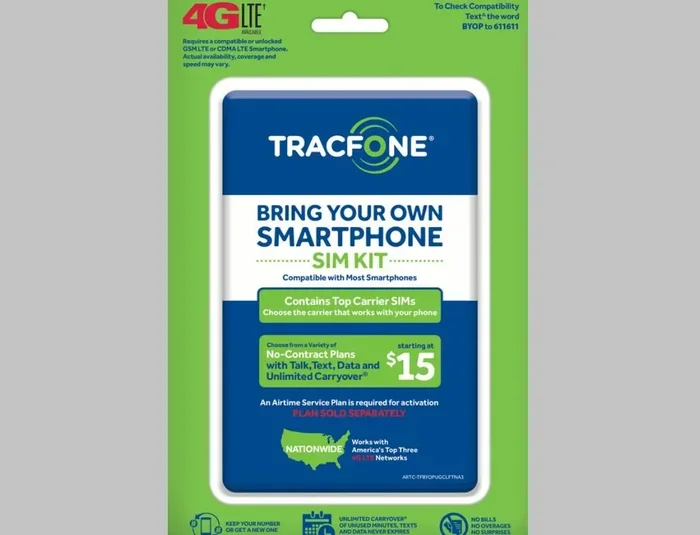
A Tracfone Sim Card is a small chip that connects your phone to Tracfone’s wireless network. Think of it as your phone’s ID card. Without it, your device cannot access calls, texts, or mobile data on Tracfone’s service. The SIM card stores your unique phone number, your account details, and your network preferences.
Activation is the process that links your SIM card to your account and your chosen prepaid plan. Until you activate, the SIM card is just a piece of plastic. It does nothing. Once activated, it unlocks access to Tracfone’s mobile network, and you can start making calls, sending messages, and using data.
Tracfone operates as a prepaid wireless carrier. This means you pay for service upfront rather than signing a long-term contract. That is a big reason why so many people choose Tracfone. The Activate Tracfone Sim Card process is designed to match that simplicity. It is fast, user-friendly, and does not require a credit check or a store visit.
How Tracfone SIM Cards Work
Tracfone uses SIM cards from major networks like AT&T, T-Mobile, and Verizon. The SIM card you receive depends on the network coverage in your area. When you insert the SIM card into your compatible device, it communicates with the nearest cell tower. This connection is what gives you access to voice, text, and data services.
Each SIM card has a unique identifier called the ICCID. This number is essential during activation. You will also need your phone number or the ESN/MEID of your device. These details help Tracfone’s system recognize your device and link it to your account.
What You Need Before You Activate Your Tracfone Sim Card
Before you begin the Activate Tracfone Sim Card process, gather a few things. Having everything ready makes the process smooth and fast. Here is your checklist:
- Your Tracfone SIM Card: This is the small chip card you received in the mail or from a store.
- Your Phone Number or SIM Card Number: You can find this on the SIM card packaging or on the card itself.
- Your Device: Make sure your phone is compatible with Tracfone’s network. Check Tracfone’s website for a list of supported devices.
- Your Zip Code: You will need this to verify your address and check network coverage in your area.
- A Stable Internet Connection: Whether you activate online or through the app, you need a reliable Wi-Fi or data connection.
- Your Tracfone Account Details: If you already have a Tracfone account, have your login information ready.
Quick Tips Before Starting
Here are a few quick tips to set yourself up for success. First, make sure your phone is fully charged or plugged in. Activation can take a few minutes, and you do not want your phone dying mid-process. Second, remove any screen lock or password temporarily if it causes issues. Third, if you are using a new phone, make sure it is not carrier-locked to another network.
Also, keep your SIM card packaging nearby. It has important numbers you will need. If you bought your SIM card online, check your email for confirmation details. These often include your phone number and activation instructions.
Step-by-Step: How to Activate Tracfone Sim Card
Now for the main event. Here is exactly how to activate your Tracfone Sim Card. We cover three methods: online, through the Tracfone app, and by phone. Pick the one that works best for you.
Method 1: Activate Online Through the Tracfone Website
Activating online is the most popular method. It is simple and takes just a few minutes. Follow these steps:
- Go to the Tracfone website. Navigate to tracfone.com and look for the “Activate” or “My Account” section.
- Log in to your account. If you already have a Tracfone account, sign in. If not, you can create one quickly using your email address.
- Enter your SIM card number. You will find this on the SIM card itself or on the packaging. Type it in carefully — even one wrong digit can cause an error.
- Enter your phone number or ESN/MEID. This helps Tracfone link the SIM card to your specific device.
- Select your plan. If you have not already chosen a plan, Tracfone will prompt you to pick one. You can choose from various prepaid options based on minutes, texts, and data.
- Review and confirm. Double-check all the information. Then click the activation button.
- Wait for confirmation. You should receive a confirmation message within a few minutes. Your SIM card is now active.
Once activated, restart your phone. This ensures your device picks up the new network settings. After the reboot, you should see Tracfone’s signal bars at the top of your screen.
Method 2: Activate Through the Tracfone App
The Tracfone mobile app is another great option. It is free to download on both iOS and Android. The app walks you through activation step by step. It also lets you manage your account, check your airtime balance, and refill your plan. The app is especially helpful if you prefer managing everything from your phone.
To activate through the app, download the Tracfone app, create or log into your account, and follow the on-screen prompts. The app will guide you through entering your SIM card details and selecting a plan. The process mirrors the online method but is more convenient if you are already on your phone.
Method 3: Activate by Calling Tracfone Customer Service
If you prefer a human touch or run into issues with the online method, you can call Tracfone customer service. Dial the number on the back of your SIM card packaging. A representative will walk you through the Activate Tracfone Sim Card process over the phone. This method is great for people who are not comfortable with online activation or who need extra help.
Have your SIM card number and phone number ready before you call. The representative may also ask for your zip code and some account details. The call usually takes about five to ten minutes.
Comparison: Which Activation Method Is Best for You?
| Method | Time Required | Best For | Requires Internet |
|---|---|---|---|
| Online (Website) | 5-10 minutes | Most users; those with a computer or phone | Yes |
| Tracfone App | 5-10 minutes | Phone-first users; on-the-go activation | Yes |
| Phone (Customer Service) | 5-15 minutes | Users who need hands-on help | No |
All three methods are reliable. The online and app methods are the fastest. The phone method is best if you want personal guidance. Choose whichever feels most comfortable to you.
Common Activation Problems and How to Fix Them
Sometimes the Activate Tracfone Sim Card process does not go smoothly. That is normal. Most issues are easy to fix. Here are the most common problems and their solutions.
SIM Card Not Recognized by Your Phone
If your phone does not detect the SIM card, try these steps. First, power off your phone completely. Remove the SIM card, check it for dirt or damage, and reinsert it firmly. Make sure it is seated correctly in the tray. Then power your phone back on. This fixes the issue most of the time.
Also, check that you are using the correct SIM card size. Tracfone SIM cards come in standard, micro, and nano sizes. If the SIM card is too large or too small for your phone’s tray, it will not be recognized.
Activation Error Messages
Error messages during activation can be frustrating. A common one is “Invalid SIM Card” or “Activation Failed.” This usually means you entered the wrong SIM card number or your SIM card is not compatible with your device. Double-check the number and try again. If the error persists, contact Tracfone support.
Another common error is “Network Not Found.” This often happens when your phone cannot connect to Tracfone’s network in your area. Try moving to a different location or restarting your phone. If the problem continues, your device may not be compatible with Tracfone’s network.
Activation Takes Too Long
Most activations complete within minutes. If yours is taking longer than 30 minutes, there may be a delay on Tracfone’s end. Try refreshing the page or closing and reopening the app. If that does not work, wait an hour and try again. Persistent delays may require a call to customer service.
Common Mistakes to Avoid During Activation
- Entering the wrong SIM card number: Always copy the number carefully. One digit off will cause a failure.
- Using an incompatible device: Not all phones work with Tracfone. Check compatibility before you start.
- Skipping the restart: Always restart your phone after activation. This helps your device register on the new network.
- Ignoring error messages: Do not just click through errors. Read them carefully — they often tell you exactly what went wrong.
- Activating without a plan: You need an active prepaid plan for your SIM card to work. Make sure you select or already have a plan.
Expert Insight: Why Activation Sometimes Fails
According to Tracfone support experts, the most common reason for activation failure is entering incorrect account or SIM information. The second most common cause is using a device that is locked to another carrier. Always double-check your details and confirm your device is unlocked before starting the process.
How to Choose the Right Tracfone Plan After Activation
Once your SIM card is active, you need a plan. Tracfone offers several prepaid wireless options. Choosing the right one depends on how you use your phone.
Tracfone Plan Options
- Monthly Plans: These give you a set amount of minutes, texts, and data for 30 days. They are great for regular users who want predictable costs.
- Pay-As-You-Go: You buy airtime as you need it. This works well for light users who only make occasional calls.
- Annual Plans: These offer a discounted rate if you pay for a full year upfront. They save you money if you use your phone frequently.
- Data-Only Plans: If you mostly use your phone for internet, a data-only plan can be a smart choice.
Think about your usage habits. Do you stream a lot of video? You will want a plan with generous data. Do you mostly text and call? A plan with more minutes and texts and less data will save you money. Tracfone’s website has a plan comparison tool that makes this easy.
Quick Tips for Managing Your Tracfone Service
- Check your airtime balance regularly. This helps you avoid running out of service unexpectedly.
- Set up auto-refill. Tracfone offers automatic plan renewal so you never lose service.
- Use Wi-Fi whenever possible. This saves your mobile data and keeps your costs low.
- Monitor your usage. Tracfone’s app lets you track how many minutes, texts, and data you have used.
Keeping Your Tracfone Sim Card in Top Shape
Once you have successfully activated your Tracfone Sim Card, you want to keep it working well. A well-maintained SIM card lasts longer and gives you better service. Here are some simple tips.
Keep your SIM card clean. Dust and debris can build up on the metal contacts. If you notice signal issues, remove the SIM card and wipe it gently with a dry cloth. Do not use water or cleaning liquids.
Store your SIM card safely when it is not in use. If you switch phones, keep the SIM card in a small case to prevent damage. Avoid exposing it to extreme heat or moisture.
Also, periodically check for network updates. Tracfone occasionally releases firmware updates that improve network performance. You can check for these in your phone’s settings under “About Phone” or “System Updates.”
If you move to a new area, your network coverage may change. Tracfone uses different towers depending on your location. If you notice weak signal in a new home or workplace, contact Tracfone support. They can help you check which network your SIM card is connected to and whether a network switch might improve your coverage.
When to Contact Tracfone Support
Most activation and service issues can be resolved on your own. But sometimes you need professional help. Contact Tracfone customer service if:
- Your SIM card still does not activate after multiple attempts.
- You experience persistent signal loss or dropped calls.
- Your phone number or account information is compromised.
- You need help choosing or changing your plan.
- You want to transfer your number from another carrier.
Tracfone support is available online, by phone, and through the mobile app. They are generally responsive and helpful. Do not hesitate to reach out if you are stuck.
Conclusion
Activating your Tracfone Sim Card is a simple process that anyone can handle. Whether you choose to activate online, through the app, or by phone, the steps are clear and straightforward. The key is to have your information ready, follow each step carefully, and do not panic if something goes wrong — most issues have easy fixes.
Once your SIM card is active, you are ready to enjoy Tracfone’s affordable prepaid wireless service. Pick the right plan for your needs, keep your SIM card clean and maintained, and reach out to customer support whenever you need help. With this guide, you have everything you need to get started. Now go ahead and activate your Tracfone Sim Card today.
Frequently Asked Questions
How long does it take to activate a Tracfone Sim Card?
Most activations complete within 5 to 10 minutes. If you are activating online or through the app, the process is usually faster. Phone activation may take a little longer, around 5 to 15 minutes, depending on wait times for customer service.
Can I activate my Tracfone Sim Card without an internet connection?
Yes, you can activate by calling Tracfone customer service. You will need your SIM card number and phone number ready. The representative will guide you through the process over the phone. However, online and app activation methods do require an internet connection.
What should I do if my Tracfone Sim Card is not working after activation?
First, restart your phone. This often resolves the issue. If the problem persists, check that the SIM card is properly inserted. You can also try removing and reinserting the SIM card. If none of these steps work, contact Tracfone customer support for further assistance.
Is it free to activate a Tracfone Sim Card?
Yes, activation is free. Tracfone does not charge a fee to activate your SIM card. You only need to purchase a prepaid plan or airtime to start using your service. Some promotional SIM card kits may include a free trial plan as well.
Can I activate a Tracfone Sim Card on any phone?
Not all phones are compatible with Tracfone’s network. Tracfone operates on major networks like AT&T, T-Mobile, and Verizon, and your phone must be unlocked and compatible with one of these networks. Check Tracfone’s website for a list of supported devices before you start the activation process.
How do I find my Tracfone Sim Card number?
You can find your SIM card number printed on the SIM card itself. It is also listed on the SIM card packaging. If you no longer have the packaging, you can find the number in your Tracfone account online or through the Tracfone mobile app under account details.