Can I Use An Old Dell Charger On A New Dell Laptop
Can I use an old Dell charger on a new Dell laptop? The answer depends on connector type, voltage, and wattage. Not all old Dell chargers work with newer models, and using the wrong one can damage your device. This guide walks you through Dell charger compatibility, Dell power adapter specs, and how to pick the right charger safely.
You just got a shiny new Dell laptop, and then it hits you — your old Dell charger might not fit. Maybe the connector looks different, or the brick feels lighter. You start wondering, can I use an old Dell charger on a new Dell laptop? It is a really common question, and the answer is not as simple as yes or no.
The truth is, Dell charger compatibility depends on several factors. Things like connector type, voltage, wattage, and even the charging port design all play a role. Using the wrong Dell power adapter can lead to slow charging, battery damage, or worse. That is why it is so important to get this right before you plug anything in.
In this guide, we will walk through everything you need to know about using an old Dell charger with a new laptop. We will cover Dell charger types, Dell voltage compatibility, and the risks involved. By the end, you will know exactly what to look for and how to keep your new laptop safe.
Key Takeaways
- Connector type matters: Dell uses different charger connectors, and an old barrel plug may not fit a new Dell laptop.
- Voltage and wattage must match: Using a charger with the wrong specs can harm your Dell laptop battery and internal components.
- Some old Dell chargers work fine: If the connector fits and the voltage matches, you can safely use an older Dell power adapter.
- USB-C charging is changing the game: Many new Dell laptops use USB-C, which means old barrel chargers won’t work at all.
- Check your Dell laptop model: Always verify the Dell charger specs before plugging in any adapter.
- OEM and certified third-party chargers are safest: Stick with Dell OEM charger options or reputable brands to avoid risks.
📑 Table of Contents
- Understanding Dell Charger Types and Connectors
- Voltage and Wattage Compatibility
- When an Old Dell Charger Will Work on a New Laptop
- When an Old Dell Charger Will Not Work
- Risks of Using an Incompatible or Old Dell Charger
- How to Find the Right Charger for Your New Dell Laptop
- Expert Insights on Dell Charger Compatibility
- Key Takeaways
- Conclusion
Understanding Dell Charger Types and Connectors
Why Dell Uses Different Charger Connectors
Dell has used several different charger designs over the years. This is why can I use an old Dell charger on a new Dell laptop is such a tricky question. The connector is the first thing you need to check. If it does not fit, nothing else matters.
Older Dell laptops often use a barrel-style connector. This is a round plug that goes into a circular port on the laptop. Newer Dell models, especially the XPS and Inspiron lines from the last few years, use USB-C charging. That means the old barrel charger simply will not work, no matter what.
Common Dell Charger Connector Types
Here are the main Dell charger connector types you will encounter:
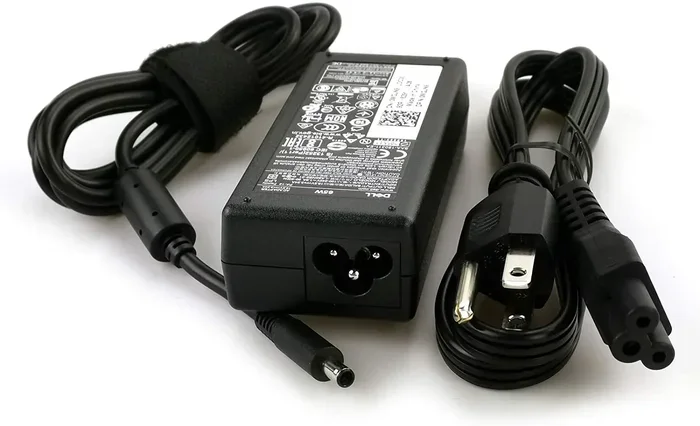
- Barrel connector (3-pin): Used on older Dell Inspiron, Latitude, and OptiPlex models. These come in different sizes, so even among old chargers, there is no one-size-fits-all.
- Barrel connector (5-pin): Slightly larger and used on some mid-range Dell laptops from the mid-2010s.
- USB-C charging: The modern standard for most new Dell laptops. These use a reversible USB-C cable and a USB-C power adapter.
- SmartPin connector: Found on some Dell Precision workstations. These have a special pin configuration that communicates with the laptop.
If your new Dell laptop has a USB-C port for charging, an old barrel charger will not work. Period. You need a Dell USB-C charger or a compatible USB-C power delivery adapter.
Voltage and Wattage Compatibility
What Do Voltage and Wattage Mean for Your Dell Laptop?
Once the connector fits, the next thing to check is Dell voltage compatibility. Every Dell laptop has a specific voltage and wattage requirement. These numbers are printed on the bottom of your laptop or listed in the user manual.
Voltage is measured in volts (V), and it is the electrical pressure that pushes power into your laptop. Wattage is measured in watts (W), and it is the total amount of power the charger can deliver. If the Dell charger wattage is too low, your laptop may not charge properly or may charge very slowly.
Can You Use a Charger with Higher Wattage?
Here is some good news. If the voltage matches and the connector fits, you can usually use a charger with a higher wattage. For example, if your new Dell laptop needs 65W, a 90W Dell charger will work just fine. The laptop only draws the power it needs.
However, using a charger with lower wattage can be a problem. Your laptop might not charge while you use it, or the battery might drain even when plugged in. Always match the voltage exactly, and make sure the wattage is equal to or higher than what your laptop requires.
Quick Guide to Dell Voltage and Wattage
- 45W chargers: Common for ultraportable Dell laptops like the XPS 13.
- 65W chargers: Standard for most Dell Inspiron and Vostro models.
- 90W chargers: Used for larger laptops and some business models like the Latitude.
- 130W and above: Found on high-performance Dell Precision workstations.
When an Old Dell Charger Will Work on a New Laptop
Same Connector, Same Voltage, Same or Higher Wattage
The simplest answer to can I use an old Dell charger on a new Dell laptop is yes, when three things line up. The connector must be the same type. The voltage must match exactly. And the wattage must be the same or higher.
For example, if you have a Dell Inspiron 15 from 2018 and you upgrade to a Dell Inspiron 15 from 2020, there is a good chance the charger is the same. Both might use a 65W barrel charger with the same pin size and voltage. In this case, your old charger will work perfectly.
Dell Models That Share Charger Compatibility
Dell often uses the same Dell power adapter across multiple models within the same product line. Here are some examples:
- Dell Inspiron 15 series: Many models from 2016 to 2022 share the same 65W charger.
- Dell Latitude 5000 series: Business laptops in this line often use the same 90W adapter across several generations.
- Dell Vostro 15 and 17: These consumer business laptops frequently share charger specs within the same series.
If you are not sure whether your old charger will work, check the label on the charger brick. It will list the output voltage and wattage. Compare that to what your new laptop needs.
How to Check Your Dell Laptop’s Charging Requirements
Finding the right specs is easy. Flip your new Dell laptop over and look at the label on the bottom. You will see the model number, serial number, and power requirements. Look for something like “Input: 19.5V 3.33A 65W.” That tells you the voltage and wattage your charger needs to deliver.
You can also check the Dell support website. Enter your laptop model number, and the site will list the correct Dell charger specs and compatible adapters. This is the most reliable way to confirm compatibility.
When an Old Dell Charger Will Not Work
Different Connector Types
The most obvious reason an old charger will not work is the connector does not fit. If your new Dell laptop uses USB-C and your old charger has a barrel plug, you are out of luck. No adapter will make that work safely for charging.
Even among barrel connectors, there are different sizes. A 3-pin barrel plug will not fit into a 5-pin barrel port. And the pin configuration matters too. Some Dell chargers have a center pin that communicates with the laptop to confirm the charger is genuine. If the pin does not match, the laptop may not recognize the charger at all.
Mismatched Voltage
Dell voltage compatibility is critical. If the voltage does not match, do not even think about using the charger. Too much voltage can fry your laptop’s motherboard. Too little voltage means the laptop will not charge or will behave erratically.
Always match the voltage exactly. If your old charger outputs 19.5V and your new laptop needs 20V, that is a problem. Even a small difference can cause issues over time.
Insufficient Wattage
Using a charger with too low wattage is another common mistake. Your laptop might turn on and even run, but the battery will not charge. Or it will charge very slowly. This is especially true if you are running demanding applications or multiple programs at once.
Over time, constantly underpowering your laptop can strain the Dell laptop battery and reduce its lifespan. It is better to use the correct charger than to risk battery health.
Risks of Using an Incompatible or Old Dell Charger
Battery Damage and Reduced Lifespan
Your Dell laptop battery is one of the most expensive components to replace. Using the wrong charger can shorten its life significantly. If the voltage is too high, it can overcharge the battery and cause swelling. If the wattage is too low, the battery may never fully charge, which degrades its capacity over time.
Overheating and Safety Hazards
An incompatible charger can overheat. This is not just annoying — it is dangerous. A charger that pushes too much power can melt its own casing, damage the laptop’s charging port, or even cause a fire. This is why it is so important to never use a charger that does not match your laptop’s requirements.
Voiding Your Warranty
Dell warranties often cover hardware defects, but they do not cover damage caused by using unauthorized or incompatible chargers. If you use a third-party or mismatched charger and your laptop gets damaged, Dell may refuse to cover the repair. That is a costly mistake that is easy to avoid.
Data Loss and Component Failure
In rare but serious cases, a wrong charger can cause power surges that damage internal components. This can lead to data loss, a dead motherboard, or a non-functional charging port. These repairs can cost hundreds of dollars, all because of a cheap or incompatible charger.
How to Find the Right Charger for Your New Dell Laptop
Buy a Dell OEM Charger
The safest option is always a Dell OEM charger. OEM stands for Original Equipment Manufacturer, which means it is made by Dell specifically for your laptop model. These chargers come with the right connector, correct voltage, and the proper wattage. They also carry a Dell warranty, so you are covered if anything goes wrong.
You can buy Dell OEM chargers directly from Dell’s website, through authorized retailers, or from Dell support. They are more expensive than third-party options, but they offer peace of mind and long-term reliability.
Consider Certified Third-Party Chargers
If you want to save money, certified third-party chargers are a good alternative. Look for chargers that are MFi certified or have Dell compatibility listed. Reputable brands like Anker, Belkin, and Targus make high-quality Dell USB-C chargers that meet safety standards.
Always check the charger specs carefully before buying. Make sure the voltage, wattage, and connector type match your Dell laptop. A cheap, uncertified charger is a gamble you should not take.
Quick Tips for Choosing the Right Charger
- Always match the voltage exactly.
- Choose a wattage that is equal to or higher than your laptop’s requirement.
- Make sure the connector type matches your laptop’s charging port.
- Buy from reputable sellers or directly from Dell.
- Avoid ultra-cheap chargers from unknown brands.
- Check for certifications like UL, CE, or FCC on the charger.
- When in doubt, contact Dell support for guidance.
What If You Need a Charger Right Away?
If your old charger stops working and you need a replacement fast, check local electronics stores like Best Buy or Walmart. They often carry popular Dell power adapter models. You can also order from Amazon, but make sure to verify the model number matches your Dell laptop.
Another option is to use a universal laptop charger. These come with interchangeable tips that fit various laptop brands. However, universal chargers are not always as reliable as OEM options. Use them as a temporary solution only, and replace them with a proper Dell charger as soon as possible.
Expert Insights on Dell Charger Compatibility
What Dell Support Says
Dell’s official stance is clear: always use a charger that meets the specifications listed for your laptop model. Dell support representatives frequently advise customers against using old or third-party chargers unless they are certain of compatibility. According to Dell, using an incompatible charger is one of the most common causes of charging issues and battery problems.
What Tech Experts Recommend
Tech experts generally agree that matching voltage and wattage is the most important factor. They also stress the importance of the connector type. Even if the voltage and wattage are correct, a loose or ill-fitting connector can cause intermittent charging, sparking, or port damage over time.
Experts also recommend keeping your old charger as a backup, but only if it meets all the compatibility requirements. Having a spare charger that is known to work can save you a lot of trouble when you need it most.
Key Takeaways
- Connector type is the first thing to check: If the old charger does not physically fit your new Dell laptop, stop there. It will not work.
- Voltage must match exactly: Even a small voltage mismatch can damage your laptop or battery.
- Wattage should be equal to or higher than required: Higher wattage is safe; lower wattage can cause slow charging and battery strain.
- USB-C charging is standard on new Dell laptops: If your new laptop uses USB-C, an old barrel charger will not work.
- Dell OEM chargers are the safest choice: They are designed specifically for your model and come with a warranty.
- Certified third-party chargers are a budget-friendly alternative: Just make sure they meet all the required specs.
- Check your laptop label or Dell support site for exact specs: This is the best way to confirm what charger you need.
Conclusion
So, can I use an old Dell charger on a new Dell laptop? The short answer is: it depends. If the connector fits, the voltage matches, and the wattage is the same or higher, then yes. But if any of those three things do not line up, the answer is no.
Taking the time to check your Dell charger compatibility before plugging in an old adapter can save you from costly repairs, battery damage, and safety hazards. Your new Dell laptop is an investment, and using the right Dell power adapter is one of the easiest ways to protect it.
When you are in doubt, go with a Dell OEM charger or a certified third-party option. Match the voltage, meet or exceed the wattage, and make sure the connector is the right type. Follow these simple steps, and your new Dell laptop will charge safely and efficiently for years to come.
Do not guess when it comes to charging your laptop. Take five minutes to check the specs, and you will have peace of mind every time you plug in. Your Dell laptop — and your wallet — will thank you for it.
Frequently Asked Questions
What happens if I use the wrong Dell charger on my new laptop?
Using the wrong Dell charger can cause slow charging, battery damage, overheating, or even permanent hardware failure. If the voltage does not match, the risk is even higher. Always check the charger specs before plugging it in.
Can I use a Dell charger with a higher wattage on my new laptop?
Yes, you can safely use a Dell charger with a higher wattage as long as the voltage matches and the connector fits. Your laptop will only draw the power it needs. A 90W charger works fine on a laptop that needs 65W.
How do I know if my Dell laptop uses USB-C charging?
Check the charging port on your Dell laptop. If it is a small, oval-shaped USB-C port, your laptop likely supports USB-C charging. You can also check the Dell support website or your laptop manual for charging details.
Are third-party Dell chargers safe to use?
Certified third-party chargers from reputable brands are generally safe. Look for UL, CE, or FCC certifications and verify the voltage and wattage match your Dell laptop’s requirements. Avoid cheap, uncertified chargers from unknown sellers.
Where can I find the correct charger specs for my Dell laptop?
You can find the charger specs on the label at the bottom of your Dell laptop or on the charger brick itself. You can also visit Dell’s support website, enter your laptop model number, and find the recommended charger specifications there.
Can I use an old Dell charger if the connector is the same but the wattage is lower?
It is not recommended. A lower-wattage charger may cause slow charging or prevent the battery from charging while you use the laptop. Over time, this can strain the battery and reduce its overall lifespan. Always use a charger that meets or exceeds the required wattage.